The Best Keychron Keyboard
Keychron offers a wide range of mechanical keyboards for every need. Our expert picks include the best wired, wireless, low-profile, and gaming models, all scored with BP Score. Find the perfect Keychron keyboard for your desk in 2026.
 By Adrian Perez
Updated September 12, 2026
By Adrian Perez
Updated September 12, 2026
Keychron has established itself as a leading brand for mechanical keyboards that work seamlessly across macOS, Windows, and Linux.
Whether you’re a programmer who types all day, a gamer looking for rapid triggers, or a creative professional needing a compact travel companion, Keychron offers a board tailored to your workflow.
Our team at BestProducts evaluated top models using expert review consensus, verified buyer feedback, and published specifications to score each keyboard on our 0, 10 BP Score scale.
Below you’ll find our curated list of the best Keychron keyboards you can buy in 2026 to help you make an informed decision.
Our buying guide covers the key factors you need to consider, from switch types and layouts to wireless performance and extra features like Hall Effect technology. We also provide detailed answers to frequently asked questions.
Dive into the list to see which Keychron model deserves a spot on your desk.
| Award | Product | BP Score About BP ScoreThe BP Score is our own rating from 0 to 10, based on performance, design and build, ease of use, and value. It reflects independent research and is never influenced by manufacturers, retailers, or affiliate commissions. Learn more › | Price | |
|---|---|---|---|---|
| Best Overall |
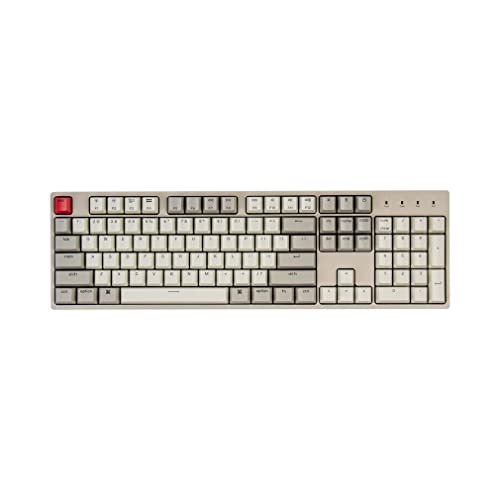 Keychron C2 Wired Mechanical Keyboard (Red Switch)
|
9.9/10 | $43.18 | Buy |
| Best Premium |
 Keychron K2 HE 75% Magnetic Keyboard
|
9.9/10 | $139.99 | Buy |
 Keychron K4 HE 96% Hall Effect Keyboard
|
9.9/10 | $144.99 | Buy | |
| Best Budget |
 Keychron C2 Wired Mechanical Keyboard
|
9.8/10 | $43.30 | Buy |
| Best Value |
 Keychron K3 V2 QMK 75% Wireless Low-Profile
|
9.8/10 | $59.63 | Buy |
 Keychron K10 HE Hall Effect Keyboard
|
9.6/10 | $144.99 | Buy | |
 Keychron K10 Max Full-Size Wireless Keyboard
|
9.6/10 | $119.99 | Buy | |
 Keychron B6 Pro Ultra-Slim Wireless Keyboard
|
9.5/10 | $44.99 | Buy | |
|
Keychron K3 V2 75% Wireless Keyboard
|
9.4/10 | $56.28 | Buy |
Keychron C2 Wired Mechanical Keyboard (Red Switch)
The Keychron C2 is a full-size wired mechanical keyboard with a retro color scheme and red switches. It includes a number pad and extra keycaps for both Mac and Windows, making it a versatile choice for productivity and light gaming.
Pros
- Full-size layout with dedicated number pad
- Retro-inspired color scheme
- Optimized for Mac with extra keycaps
- USB-C braided cable connection
- Two-level adjustable feet for comfort
Cons
- Wired only, no wireless option
- Non-backlight version only
- Best suited for light gaming, not heavy use
Keychron K2 HE 75% Magnetic Keyboard
The Keychron K2 HE combines a compact 75% layout with magnetic Hall effect switches for fully customizable actuation and rapid triggering. Its web-based configurator and multi-mode connectivity make it a versatile choice for gamers and typists who want precise control over key responses.
Pros
- Highly customizable actuation per key
- Rapid trigger improves gaming responsiveness
- Seamless multi-device connectivity
- Hot-swappable switches for easy tweaking
- Works with both Mac and Windows out of box
Cons
- Keycap legends not shine-through hard to see in dark
- Only compatible with Gateron double-rail magnetic switches
Keychron K4 HE 96% Hall Effect Keyboard
For gamers and productivity users who need a full numpad without sacrificing desk space, the Keychron K4 HE delivers a 96% layout with Gateron double-rail magnetic switches. Its adjustable actuation and rapid trigger provide a competitive edge, while tri-mode connectivity and a web-based configurator add flexibility. The aluminum frame with real wood accents gives it a premium, distinctive look.
Pros
- Space-saving 96% layout with full numpad
- Highly adjustable magnetic switches
- Rapid trigger and Snap Tap for gaming
- Tri-mode with 1000Hz polling
- Premium build with wood accents
Cons
- Non-shine-through keycaps limit backlight visibility
- Hot-swap limited to Gateron double-rail switches
- Heavy at 2.3 pounds
Keychron C2 Wired Mechanical Keyboard
A reliable choice for productivity and light gaming, this full-size wired keyboard from Keychron pairs a tactile brown switch with a retro color scheme. Its optimized Mac layout and included extra keycaps make it versatile across operating systems.
Pros
- Full-size layout with dedicated numpad
- Tactile brown switches offer responsive feedback
- Durable construction rated for 50 million keystrokes
- Compatible with both Mac and Windows out of the box
- Adjustable two-level feet for ergonomic typing
Cons
- Non-backlight version limits use in low light
- Wired connection only (no Bluetooth option)
- Num Lock function works solely on Windows
Keychron K3 V2 QMK 75% Wireless Low-Profile
This ultra-slim mechanical keyboard packs a 75% layout with low-profile switches for speed and portability. Bluetooth 5.1 lets you pair up to three devices, while the QMK firmware and AI assistant make customization simple.
Pros
- Ultra-slim and lightweight aluminum body
- Connects with up to 3 devices via Bluetooth 5.1
- Open-source QMK firmware for full key remapping
- Built-in AI assistant for easy customization
- Includes Mac layout and extra Windows keycaps
Cons
- Signal interference may occur at longer distances
- Plastic bottom frame feels less premium
- White backlight only, no per-key RGB
Keychron K10 HE Hall Effect Keyboard
This full-size wireless keyboard blends a classic mechanical feel with advanced Hall Effect magnetic switches for precise, customizable actuation. It offers tri-mode connectivity (Bluetooth, 2.4 GHz, USB-C), hot-swappable switches, and a refined design with rosewood accents, making it a versatile choice for both typing and gaming.
Pros
- Hall Effect switches for durability and adjustable actuation
- Tri-mode connectivity (Bluetooth, 2.4 GHz, USB-C)
- Hot-swappable switches without soldering
- Full-size layout with wood accents
- PBT keycaps resist shine and wear
Cons
- Non-shine-through keycaps limit backlight visibility
- Heavy and large footprint
- Configurator requires clearing browser cache
Keychron K10 Max Full-Size Wireless Keyboard
The Keychron K10 Max is a full-size wireless mechanical keyboard with hot-swappable switches and QMK programmability. Its 1000Hz polling rate and triple connectivity make it versatile for both work and gaming, while the acoustic foam and steel plate enhance the typing experience.
Pros
- Hot-swappable switch support
- Fully programmable via QMK/web app
- Triple wireless and wired modes
- 1000Hz polling for low latency
- Quality PBT keycaps and acoustic foam
Cons
- Programming requires wired connection
- Steel plate adds extra weight
Keychron B6 Pro Ultra-Slim Wireless Keyboard
This full-size wireless keyboard combines an ultra-slim profile with a remarkable 1200-hour battery life. It supports 2.4 GHz, Bluetooth, and wired connections, plus ZMK customization for remapping keys via a web browser.
Pros
- Exceptional battery life
- Ultra-slim and portable
- Multiple connection modes
- Customizable key mapping
- Broad OS support
Cons
- No backlighting mentioned
Keychron K3 V2 75% Wireless Keyboard
The Keychron K3 V2 is a slim, low-profile mechanical keyboard with a compact 75% layout and wireless Bluetooth 5.1 connectivity for up to three devices. Its QMK firmware and AI assistant (in beta) allow easy key mapping, while the included Mac and Windows keycaps make it versatile across platforms.
Pros
- Ultra-slim and lightweight design
- Bluetooth 5.1 connects up to 3 devices
- Mac layout with Windows keycaps included
- Open-source QMK firmware for customization
- AI assistant simplifies key remapping
Cons
- Plastic bottom frame feels less premium
- Single-color white backlight only
- AI assistant still in beta
Keychron Keyboards Buying Guide
Switch Type and Feel
The switch type defines the typing experience. Most Keychron boards come with Gateron mechanical switches (Red, Brown, Blue) or Keychron’s own optical and magnetic switches.
Linear switches like Gateron Red are smooth and quiet, ideal for gaming; tactile Brown offers feedback without a loud click, suitable for both typing and gaming; clicky Blue provides a classic mechanical sound.
For a quieter workspace, consider a keyboard with silent or quiet switches. Keychron offers a hot-swappable PCB on many models so you can swap switches later.
Hall Effect magnetic switches, found in models like the K2 HE, use magnets for analog input and rapid trigger capabilities, particularly beneficial for competitive gamers who need lightning-fast actuation.
Our research shows that users appreciate the ability to customize actuation points via software, giving a tailored feel for different tasks.
Layout and Size
Keychron offers layouts from full-size (104 keys) and 96% down to 75% and 60%. Full-size keyboards, like the C2, include a number pad for data entry professionals.
The 75% layout (e.g., K2, K2 HE) is a popular middle ground, keeping the function row and arrow keys while saving desk space.
For those who prefer a tenkeyless design without a numpad, see our guide to the best tenkeyless keyboards; however, Keychron’s 75% is often a better compromise for most users.
Another consideration is the K4 HE’s 96% layout, which keeps the number pad but shrinks gaps, giving a full-size experience in a smaller footprint.
Travelers might prefer the B6 Pro’s ultra-slim profile, which is more like a slim keyboard yet still mechanical. For ultimate portability, compact boards like the 60% exist, but Keychron currently focuses on larger sizes.
Connectivity and Wireless Performance
Keychron excels in multi-device connectivity. Most wireless models support Bluetooth 5.1/5.2, allowing you to pair up to three devices and switch instantly. The K2 HE, K10 HE, and K4 HE add a 2.4 GHz dongle for ultra-low latency gaming, plus wired USB-C.
For a purely wireless experience without dongles, the B6 Pro uses Bluetooth only. Users report stable connections even through walls, but if you need zero lag, a wired keyboard (like the C2) remains reliable and costs less.
Battery life varies: Keychron’s low-profile K3 lasts about 34 hours with backlighting, while the B6 Pro claims up to 1200 hours without LEDs. The Hall Effect models consume more power due to magnetic sensors, so expect to charge every few days with heavy use.
Build Quality and Materials
Keychron keyboards feature aluminum frames (on higher-end models) or sturdy ABS plastic. The K2 HE and K10 HE have aluminum top plates, giving a premium feel and weight that prevents sliding.
Double-shot PBT keycaps are standard on most models, resisting shine and wear over time. Some boards, like the K4 HE, include a wood accent frame for a touch of warmth.
If ergonomic design is critical, note that Keychron offers adjustable feet for two typing angles, but none have split or tented designs, consider an ergonomic board if you have wrist issues.
For those who appreciate a retro look, the C2 series comes in a classic beige color scheme reminiscent of vintage terminals.
Special Features (Hot‑swap, QMK, Hall Effect)
Many Keychron keyboards are hot‑swappable, meaning you can replace switches without soldering. This is a huge plus for customizing feel or replacing damaged switches.
The K2, K3, K4, and K10 families offer both hot‑swap and non‑swap versions; check the product page carefully. QMK firmware (and VIA support) allows deep macro programming and key remapping.
Models like the K10 Max and the HE series are fully QMK‑compatible.
For gamers, Hall Effect technology in the K2 HE, K10 HE, and K4 HE provides rapid trigger and adjustable actuation points, giving a competitive edge.
If you love tinkering, a custom keyboard may be your next hobby, but Keychron offers an excellent out‑of‑box experience with room to grow.
Compatibility and Software
All Keychron keyboards work with macOS and Windows out of the box, a rare feature. A switch on the side toggles between layouts, and the keycaps include both Mac and Win legends. Linux users also report good compatibility.
Software support varies: the HE models use the QMK Launcher web app for configuration, while others rely on VIA. No need to install bloated drivers.
For beginners, starter keyboards like the C2 offer a plug‑and‑play experience with no software required. For those wanting a more modern aesthetic, Keychron also offers white and other color variants; see our guide to white keyboards for inspiration.
Why You Should Trust Us
BestProducts is an independent review site that does not accept free products or payment for positive reviews. We assess each product against a consistent set of criteria and assign a BP Score on a 0, 10 scale.
Our evaluations are based on thorough research: we analyze published specifications, aggregate expert review consensus from trusted sources, and incorporate feedback from verified buyers to ensure real-world perspective.
We do not conduct our own product trials; our evaluations are grounded in research, published data, expert review consensus, and verified buyer feedback.
Every product listed is available for purchase, and we update our picks regularly as new models are released. This article contains affiliate links, which allow us to fund our research at no extra cost to you.
Final Thoughts
- Best Overall: Keychron C2 Full Size Wired (Red Switch), With a perfect BP Score of 9.9/10, this wired full‑size board delivers consistent performance, reliable Gateron Red switches, and a retro aesthetic at an unbeatable value. Ideal for those who want a no‑nonsense keyboard that works out of the box.
- Best Wireless Mechanical: Keychron K2 HE Wireless Magnetic (Hall Effect), Equipped with Hall Effect magnetic switches, rapid trigger, and both Bluetooth and 2.4 GHz connectivity, this 75% board scores 9.9/10 and is a top pick for gamers who demand the fastest response.
- Best Low‑Profile: Keychron K3 Version 2 QMK 75% Wireless Low‑Profile, Scoring 9.8/10, the K3 offers a slim design perfect for travelers and those who prefer shallower travel. Its hot‑swap capability and QMK firmware add flexibility.
- Best Ultralight Travel: Keychron B6 Pro Ultra‑Slim Full‑Size Wireless (Space Gray), An incredibly thin mechanical keyboard with a BP Score of 9.5/10, the B6 Pro prioritizes portability without sacrificing typing feel. Its long battery life and full layout make it a great companion for mobile work.
Each of these Keychron keyboards stands out in its category. Choose the one that best matches your priorities, whether it’s gaming speed, travel convenience, or classic reliability.
Frequently Asked Questions
What is the best Keychron keyboard for gaming?
For competitive gaming, the Keychron K2 HE or K10 HE with Hall Effect switches and rapid trigger are excellent choices. They offer near‑instant actuation and adjustable actuation points.
If you prefer a wired, no‑latency option, the C2 wired models are also very capable. Check our FPS keyboard guide for more gaming‑focused options.
Are Keychron keyboards hot‑swappable?
Many Keychron models (K2, K3, K4, K10, etc.) have a hot‑swappable version, often marked as “K2 Pro,” “K3 Hot‑Swappable”, etc. The standard versions are not hot‑swappable. Always verify the product description before purchasing.
Hot‑swap versatility means you can later install split‑type switches (most standard MX‑style) to customize your feel.
Can I use a Keychron keyboard with a Mac?
Yes, every Keychron keyboard works with macOS. A physical switch on the side lets you toggle between Mac and Windows layouts. The keycaps include both Mac and Windows modifier keys.
If you need a polished macOS experience, Keychron is one of the best digital keyboard choices for Mac users.
What is the difference between Gateron and Keychron switches?
Gateron is a third‑party switch manufacturer used by Keychron in many boards (Red, Brown, Blue). Keychron also produces its own optical switches for some low‑profile models (like the K3) and magnetic Hall Effect switches for the HE series.
Gateron switches are widely aftermarket and more familiar, while Keychron’s own switches are designed to optimize the low‑profile or magnetic technology.
How do I connect a Keychron keyboard via Bluetooth?
Turn on the keyboard using the side switch. Press and hold the Bluetooth button (usually Fn + B) for 3 seconds until the LED blinks. Then go to your device’s Bluetooth settings and select the keyboard.
Up to three devices can be paired; you can switch between them by pressing the Bluetooth button again. For stable connections, keep the keyboard close to the device.
If you frequently move between desks, a travel keyboard like the B6 Pro is very convenient.
Which Keychron keyboard is best for programming?
Programmers often prefer tactile switches (Brown) or hot‑swappable boards to customize. The Keychron C2 Pro (wired) or K2 Pro (wireless) with Brown switches offer a good balance of feedback and quietness.
The 75% layout saves space while retaining Function row and arrows, and QMK support allows you to program macros for productivity. Consider checking our editing keyboard guide for more ergonomic suggestions.
About the author
Adrian covers digital pianos, keyboards, and drum kits for BestProducts, comparing key and pad feel, sound engines, and quiet practice options. He helps musicians find instruments that satisfy at home and on stage.