The Best Split Keyboard
BestProducts evaluated seven split keyboards based on ergonomic design, adjustability, and user feedback to find the best options for reducing strain and improving typing comfort.
 By Adrian Perez
Updated September 11, 2026
By Adrian Perez
Updated September 11, 2026
Typing for hours on a standard keyboard can lead to wrist strain, shoulder tension, and long-term injury.
A split keyboard addresses these issues by dividing the key layout into two independent halves, allowing your hands and arms to assume a more natural, shoulder-width position.
Whether you’re a programmer, writer, or data entry professional, investing in a well-designed split keyboard can transform your typing experience and protect your health in the long run.
In this guide, we’ve researched and compared the top split keyboards on the market, evaluating their design, adjustability, build quality, and user satisfaction.
Our selections are based on meticulous research, expert consensus, and verified buyer feedback, ensuring that you get reliable recommendations for your next keyboard upgrade. Below, you’ll find our top picks for the best split keyboard in 2026.
| Award | Product | BP Score About BP ScoreThe BP Score is our own rating from 0 to 10, based on performance, design and build, ease of use, and value. It reflects independent research and is never influenced by manufacturers, retailers, or affiliate commissions. Learn more › | |
|---|---|---|---|
| Best Overall |
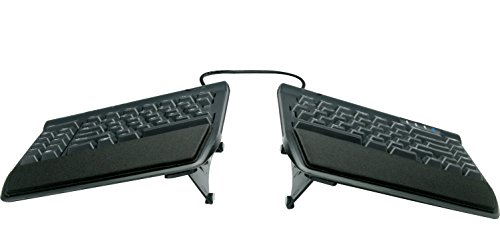 Kinesis Freestyle2 KB820PB Ergonomic Keyboard
|
9.2/10 | Buy |
| Best Premium |
 Kinesis Advantage360 Pro Split Keyboard
|
9.2/10 | Buy |
| Best Budget |
 Perixx PERIBOARD-512B Split Ergonomic Keyboard
|
9.1/10 | Buy |
 Arteck Split Ergonomic Keyboard 2.4G Wireless
|
8.9/10 | Buy | |
 Arteck Split Ergonomic Keyboard Backlit
|
8.8/10 | Buy | |
| Best Value |
 Incase Sculpt Ergonomic Keyboard Split Layout
|
8.8/10 | Buy |
 Logitech ERGO K860 Wireless Ergonomic Keyboard
|
8.0/10 | Buy |
Kinesis Freestyle2 KB820PB Ergonomic Keyboard
Typing for hours often leads to wrist strain, and this split keyboard addresses that with modules that separate up to 9 inches and rotate freely. Preinstalled VIP3 lifters provide three tenting angles plus padded palm rests, while low-force membrane keys are designed for lighter, more comfortable keystrokes. The standard Windows layout includes hotkeys and an embedded number pad, with no software needed.
Pros
- Adjustable split design up to 9 inches
- Three tenting angles plus cushioned palm supports
- Low-force tactile keys reduce finger strain
- Standard Windows layout with embedded numeric keypad
- Plug-and-play, no software or drivers required
Cons
- Wired USB-A connection, no wireless option
- Membrane switches lack mechanical feel
Kinesis Advantage360 Pro Split Keyboard
The Kinesis Advantage360 Pro is a fully split ergonomic keyboard with contoured key wells, quiet Kailh Box Pink switches, and wireless Bluetooth connectivity. Its adjustable tenting and open-source programmability cater to power users seeking maximum comfort and customization.
Pros
- Contoured ergonomic shape proven to increase comfort
- Quiet mechanical switches with linear feel
- Fully programmable via open source firmware
- Adjustable tenting with three heights
- Wireless Bluetooth with backlighting
Cons
- Premium palm pads sold separately
- Relatively heavy at 3.2 pounds
- Orthogonal layout may require adjustment
Perixx PERIBOARD-512B Split Ergonomic Keyboard
This wired split keyboard pairs a one-piece angled layout with curved key rows and tactile feedback to support a natural typing posture. Its long 4.2mm key travel and included wrist rest aim to reduce fatigue during extended use, though the unique shape may require one to two weeks to feel natural.
Pros
- Split design reduces wrist strain
- Tactile feedback similar to brown switches
- Long 4.2mm key travel
- Curved keycaps improve fingertip comfort
- Durable up to 20 million keystrokes
Cons
- Requires adjustment period of 1-2 weeks
- Large footprint takes significant desk space
- Membrane switches, not mechanical
Arteck Split Ergonomic Keyboard 2.4G Wireless
This keyboard uses a split design to promote a natural wrist position, and includes a soft cushioned palm rest for comfort during long typing sessions. It connects via a tiny USB receiver and offers a rechargeable battery that lasts up to six months per charge.
Pros
- Split design for natural wrist position
- Soft cushioned palm rest included
- Simple plug-and-play setup with nano receiver
- Rechargeable battery lasts up to 6 months
- Includes USB-C charging cable
Cons
- Compatible only with Windows systems
- No backlit keys
- Large footprint (16.5 x 9.6 inches) takes desk space
Arteck Split Ergonomic Keyboard Backlit
This wired split keyboard from Arteck is designed to reduce strain by positioning wrists and forearms naturally. It includes a cushioned wrist rest and seven backlight colors with three brightness levels, making it a comfortable option for ergonomic-minded typists on a budget.
Pros
- Promotes natural typing posture
- Cushioned wrist rest enhances comfort
- Multiple backlight colors and brightness options
- Long cable for flexible desk placement
- 24-month warranty included
Cons
- Wired only, no wireless option
- Compatibility listed only for Windows
Incase Sculpt Ergonomic Keyboard Split Layout
This ergonomic keyboard uses a domed geometry and cushioned palm rest to reduce wrist strain during long typing sessions. It also includes a removable elevator for tilt adjustment and a standalone numeric keypad for flexible desktop setups.
Pros
- Reduces wrist strain with ergonomic design
- Integrated palm rest supports all-day use
- Adjustable tilt for personalized comfort
- 128-bit encryption for secure typing
- Modular keypad allows custom layout
Cons
- No backlighting for low-light use
- Split layout may take time to adapt
- Limited color options only black
Logitech ERGO K860 Wireless Ergonomic Keyboard
This split wireless keyboard prioritizes comfort with a curved layout and a pillowed memory foam wrist rest that reduces wrist bending. Ideal for those who spend long hours typing and want to improve posture without sacrificing full-size key features.
Pros
- Curved split design reduces muscle strain
- Memory foam wrist rest provides 54% more support
- Adjustable tilt legs for seated or standing use
- Scooped keys match fingertips for precision
- Ergonomist certified for posture improvement
Cons
- No backlighting for low-light typing
- Bulky design may take up extra desk space
Best Split Keyboard Buying Guide
Keyboard Layout and Separation
The primary benefit of a split keyboard is the ability to position each half independently. Some models offer a fixed split, while others let you adjust the angle and distance between the halves.
A wider separation can be beneficial for those with broader shoulders, but it also takes up more desk space. Consider how much flexibility you need.
For example, the KINESIS Freestyle2 includes VIP3 Lifters that allow up to 9 inches of separation and tilt options.
If you frequently switch between desks or travel, a compact split design with a fixed separation may be more practical. The Arteck wireless model, for instance, offers a modest spread that suits most users without consuming excessive space.
Tenting and Adjustability
Tenting refers to the ability to angle the keyboard halves upward, similar to an open book, which reduces forearm pronation. Look for models that offer multiple tenting levels or an adjustable tenting kit.
The KINESIS Advantage360, for example, provides a fully adjustable tenting mechanism that can be tailored to your preferred wrist angle. This feature is especially valuable for users with existing wrist pain or those who type for extended periods.
Some budget-friendly options, like the Perixx PERIBOARD-512B, include built-in tenting legs that offer a few preset angles. While less customizable than premium models, they still provide meaningful ergonomic benefits.
Key Switch Type and Typing Feel
Split keyboards come with either membrane or mechanical switches. Membrane switches are quieter and often more affordable, making them a good choice for shared offices.
Mechanical switches, found on models like the KINESIS Advantage360, offer tactile feedback and durability, though they can be louder.
If noise is a concern, consider a keyboard with quieter mechanical switches or read our guide to the best quiet keyboard for more serene options.
Your typing style also matters: linear switches are smooth, tactile switches provide a bump, and clicky switches offer audible feedback. Many programmable keyboards allow you to remap keys, so you can customize the layout to suit your preferences.
Connectivity and Compatibility
Split keyboards connect via wired USB or wireless Bluetooth/RF. Wired models provide a stable, lag-free connection and never need charging, while wireless options eliminate cable clutter and offer more freedom to position the halves.
The Logitech Ergo K860 uses a wireless receiver with the option to connect to multiple devices, making it ideal for a multi-device workspace. For those who prefer a single-cable setup, the Arteck wired backlit keyboard is a solid choice.
Compatibility with your operating system is also important. Most keyboards work with Windows and macOS, but some require software for remapping. For a comprehensive look at different keyboard types, check out our guide to the best keyboard for every typist and gamer.
Wrist Support and Ergonomics
Many split keyboards come with attached or detachable palm rests that help maintain a neutral wrist posture. The Logitech Ergo K860 features a curved, multi-layer palm rest that pairs well with its split design.
Even if a keyboard doesn’t include a palm rest, you can often add a separate one. Proper wrist support is crucial for preventing strain, especially during long typing sessions.
For a deeper dive into ergonomic workspaces, our guide to the best motor standing desk can help you create a more adjustable and healthier setup overall.
Programmability and Extra Features
Advanced users may want a keyboard that supports programmable keys and layers. The KINESIS Advantage360 uses open-source firmware (ZMK), allowing full customization of every key, including macros and different layers for different tasks.
Backlighting, media controls, and dedicated function rows are other features to consider. If you need a keyboard that can switch between multiple devices, the Logitech Ergo K860 supports up to three paired devices with easy switching.
For those who prefer a more compact layout without a number pad, take a look at our roundup of the best 10-keyless keyboard, which offers many of these features in a smaller footprint.
Why You Should Trust Us
At BestProducts, we are committed to providing independent, data-driven recommendations. Each product in this article has been evaluated and scored using our proprietary BP Score (on a scale of 0 to 10), based on consistent criteria across all categories.
We do not conduct our own product trials; our evaluations are grounded in research, published data, expert review consensus, and verified buyer feedback. This methodology ensures that our picks reflect real-world performance and reliability.
Our team of editors and researchers scours authoritative sources, analyzes specifications, and cross-references user experiences to deliver trustworthy advice. When we recommend a product, you can be confident that it has been thoroughly vetted.
We are transparent about our process and any affiliate relationships: if you click on a link and make a purchase, we may earn a small commission at no extra cost to you.
This helps us maintain our independence and continue producing high-quality reviews.
Final Thoughts
- Best Overall: KINESIS Freestyle2 USB-A Ergonomic Keyboard with VIP3 Lifters, With a high BP Score and versatile adjustability, this keyboard offers an excellent balance of ergonomic features and build quality for most users.
- Best Budget Pick: Perixx PERIBOARD-512B Wired Ergonomic Keyboard, Delivering solid ergonomics at an affordable price point, this model is ideal for those new to split keyboards or on a tight budget.
- Best Premium Pick: KINESIS Advantage360 Professional Split Ergonomic Keyboard, For users who demand the highest level of customization and comfort, this programmable mechanical keyboard justifies its premium cost with superior features.
- Best Wireless: Logitech Ergo K860 Wireless Ergonomic Split Keyboard, Combining wireless convenience with a curved layout and excellent palm support, this is a top choice for a clean desk setup.
Frequently Asked Questions
What are the benefits of using a split keyboard?
Split keyboards reduce strain on your wrists, arms, and shoulders by allowing you to keep your hands shoulder-width apart. This neutral posture helps prevent repetitive strain injuries like carpal tunnel syndrome. Many users also report improved typing comfort and reduced fatigue during long work sessions.
How long does it take to adjust to a split keyboard?
Most users adapt within a few days to a week. The learning curve is generally short, especially if you already touch-type. Some models include a traditional staggered layout, which helps ease the transition. Practicing on the keyboard can speed up the adjustment period.
Can I use a split keyboard with a laptop or Mac?
Yes, the vast majority of split keyboards are compatible with Windows, macOS, and Linux. Some come with software for customizing keys on each system. Wireless models often have easy pairing with multiple devices, so you can switch between your desktop, laptop, and tablet seamlessly.
What is tenting and why is it important?
Tenting refers to angling the halves of the keyboard upward, like an open book. This reduces forearm pronation (twisting) and helps align your wrists in a more natural, neutral position. Adjustable tenting is a key ergonomic feature found on many premium split keyboards.
Are mechanical or membrane switches better for a split keyboard?
It depends on your preferences. Mechanical switches offer more tactile feedback and durability, ideal for heavy typists or gamers. Membrane switches are quieter and more affordable, making them suitable for shared spaces.
Many top split keyboards come in both variants, so you can choose based on your needs.
Do split keyboards help with wrist pain?
Many users experience significant relief from wrist pain after switching to a split keyboard because it encourages a more natural hand and wrist position. However, for chronic pain, it’s advisable to consult a healthcare professional.
A split keyboard is a tool to support ergonomic improvement, not a cure.
About the author
Adrian covers digital pianos, keyboards, and drum kits for BestProducts, comparing key and pad feel, sound engines, and quiet practice options. He helps musicians find instruments that satisfy at home and on stage.