The Best Tkl Keyboard
Compact but functional, a TKL keyboard frees desk space without losing the keys you need. Wired, wireless, budget, and premium picks compared.
 By Adrian Perez
Updated September 12, 2026
By Adrian Perez
Updated September 12, 2026
Compact keyboards are no longer a compromise. A tenkeyless design removes the number pad but keeps the arrow keys and the navigation cluster above them, so you get a smaller footprint without losing the shortcuts you use every day.
For gamers, writers, and desk-minimalists alike, the best TKL keyboard balances space savings, typing comfort, and performance better than almost any other layout.
To build this guide, we researched the current market using manufacturer specifications, expert review consensus, verified buyer feedback, and published performance data. We assessed each model against the same criteria: layout, switch feel, connectivity, build quality, software, and value.
Whether you want a budget board for a first build or a premium wireless option for competitive play, our picks are below, followed by a buying guide to help you narrow down the field.
| Award | Product | BP Score About BP ScoreThe BP Score is our own rating from 0 to 10, based on performance, design and build, ease of use, and value. It reflects independent research and is never influenced by manufacturers, retailers, or affiliate commissions. Learn more › | |
|---|---|---|---|
| Best Overall |
 Kisnt KN85 75% Wireless Mechanical Keyboard
|
9.2/10 | Buy |
| Best Premium |
 Logitech G515 Lightspeed TKL Wireless Keyboard
|
9.2/10 | Buy |
 SteelSeries Apex Pro TKL Gen 3
|
9.2/10 | Buy | |
| Best Budget |
 SteelSeries Apex 3 TKL Compact Keyboard
|
8.9/10 | Buy |
| Best Value |
 Logitech G413 TKL SE Mechanical Keyboard
|
8.8/10 | Buy |
 Corsair K70 CORE TKL Tenkeyless
|
8.8/10 | Buy | |
 MageGee 87-Key TKL Mechanical Keyboard
|
8.0/10 | Buy | |
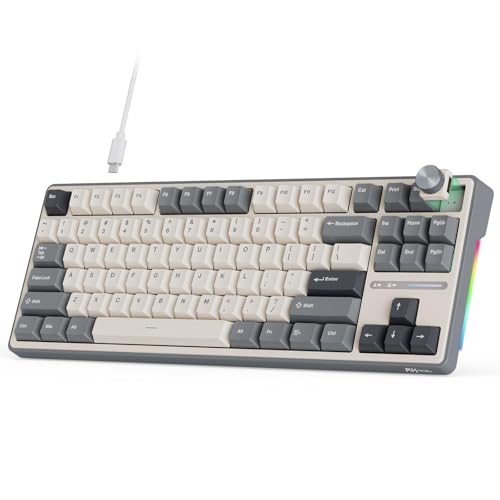 RK Royal Kludge R87 Pro TKL Wired Keyboard
|
8.0/10 | Buy |
Kisnt KN85 75% Wireless Mechanical Keyboard
This compact 85-key board blends a creamy, marbly typing feel with tri-mode wireless and hot-swappable switches. It is a solid pick for gamers or typists who want a space-saving layout and customizable RGB, though the lack of a numpad and Windows-only software for macros are notable trade-offs.
Pros
- Compact design frees desk space
- Buttery-smooth linear switches
- Rich, satisfying sound from gasket mount and foam
- Wireless with low-latency options
- Easy switch swapping without soldering
Cons
- No dedicated numpad
- Software only available for Windows
- RGB animation consumes battery quickly
Logitech G515 Lightspeed TKL Wireless Keyboard
This tenkeyless mechanical keyboard from Logitech G combines a slim profile with low-profile GL Brown tactile switches for discernible feedback. It offers tri-mode connectivity (LIGHTSPEED wireless, Bluetooth, USB) and up to 36 hours of battery life, plus deep customization via KEYCONTROL software.
Pros
- Slim low-profile TKL design
- Tri-mode wireless connectivity
- GL Brown tactile switches with factory lube
- 36-hour battery life
- PBT keycaps and LIGHTSYNC RGB
Cons
- Tenkeyless design lacks numpad
SteelSeries Apex Pro TKL Gen 3
The SteelSeries Apex Pro TKL Gen 3 is a tenkeyless keyboard featuring OmniPoint 3.0 analog magnetic switches with adjustable actuation from 0.1mm to 4.0mm. Its Quickset auto-presets enable instant activation of Rapid Trigger, Rapid Tap, and Protection Mode per game, making it ideal for competitive gamers seeking customizable response and reduced errors.
Pros
- Adjustable actuation range (0.1mm to 4.0mm)
- Rapid Trigger for faster key resets
- Rapid Tap for better movement control
- Protection Mode minimizes accidental keypresses
- Onboard OLED for quick settings adjustments
Cons
- Tenkeyless design lacks dedicated number pad
- Wired-only connectivity (USB-C)
SteelSeries Apex 3 TKL Compact Keyboard
A tenkeyless RGB keyboard with IP32 water and dust resistance. Whisper quiet switches and anti-ghosting make it a practical choice for gamers who value durability and a compact layout.
Pros
- Compact tenkeyless design popular among pros
- Whisper quiet low-friction switches
- IP32 water and dust resistant
- PrismSync RGB with millions of colors
- Dedicated multimedia controls with volume roller
Cons
- Only 8-zone RGB, not per-key
- No included wrist rest
- ABS keycaps may wear sooner than PBT
Logitech G413 TKL SE Mechanical Keyboard
This tenkeyless gaming keyboard combines PBT keycaps, tactile mechanical switches, and a brushed aluminum-magnesium alloy top case for durability and responsive performance. Ideal for gamers who want a compact wired keyboard with essential media controls and anti-ghosting.
Pros
- Sturdy aluminum-magnesium alloy build
- PBT keycaps for long-term durability
- TKL layout frees up desk space
- Tactile switches provide satisfying feedback
- White backlighting with useful FN controls
Cons
- No numeric keypad for data entry
- White LED only, no RGB customization
- Wired design limits placement flexibility
Corsair K70 CORE TKL Tenkeyless
The Corsair K70 CORE TKL is a compact tenkeyless gaming keyboard with pre-lubed MLX Red v2 linear switches for smooth, responsive keystrokes. Its sound dampening layers and pre-lubed stabilizers deliver a subdued typing experience, while the multifunction rotary dial and programmable media button offer convenient control. Ideal for gamers who prioritize desk space and smooth linear action.
Pros
- Space-saving tenkeyless layout
- Pre-lubed smooth linear switches
- Effective sound dampening layers
- Sturdy double-shot ABS keycaps
- Convenient rotary dial and media button
Cons
- ABS keycaps may develop shine over time
- Requires iCUE software for advanced customization
MageGee 87-Key TKL Mechanical Keyboard
Compact tenkeyless keyboard with linear red switches and blue LED backlight. Its slim layout frees up desk space while 16 lighting modes and full anti-ghosting suit gamers on a budget.
Pros
- Compact TKL design saves desk space
- Linear red switches for smooth, fast keypresses
- Customizable blue backlight with 16 modes
- Full anti-ghosting on all 87 keys
- Plug-and-play, no drivers needed
Cons
- Only blue backlight, not RGB
- No software for macro or remapping
- Cable is non-detachable
RK Royal Kludge R87 Pro TKL Wired Keyboard
This compact 75% mechanical keyboard combines a programmable metal knob with hot-swappable switch sockets, letting you adjust volume or mute with a twist and swap switches without soldering. Its five-layer gasket construction dampens noise for a quieter typing experience, while the per-key RGB offers over 15 effects to match your setup.
Pros
- Programmable metal knob for volume/mute
- Hot-swappable 3/5-pin switch support
- Gasket structure reduces noise and vibration
- Vibrant RGB with 15+ lighting effects
- QMK/VIA compatible for custom layouts
Cons
- Wired-only connection
- Compact layout may require adapting to smaller key spacing
Best TKL Keyboard Buying Guide
Layout and Form Factor
TKL stands for tenkeyless, which means the keyboard retains the main typing area, function row, arrows, and navigation cluster but drops the number pad. That simple change creates a more centered typing position and frees up mouse room.
If you are new to this form factor, our tenkeyless keyboard guide breaks down the main layout differences.
The main decision is how much you are willing to give up. A full TKL keeps the navigation cluster, while a small keyboard goes even further by removing keys like Insert, Home, and Page Up.
That trade-off makes small boards ideal for sparse desks, but some typists miss the dedicated keys.
Portability is another part of the layout story. A TKL fits comfortably into a backpack, and if you regularly work from multiple locations, a travel keyboard can trim weight and size even further.
Switch Type and Feel
The switch type determines how a keyboard feels, sounds, and responds. Linear switches are smooth, tactile switches offer a distinct bump, and clicky switches add audible feedback.
Many people enjoy mechanical action for both typing and gaming, though membrane keyboards remain a quiet and affordable alternative if you prefer a softer press.
Noise matters more than many buyers expect. In a shared office or a studio apartment, a silent keyboard makes long typing sessions easier on everyone. Lubed switches, dampening foam, and stable keycaps all reduce clatter without destroying the typing feel.
Wired, Wireless, and Latency
Connection method is the next big choice. A wired keyboard is still the most dependable option for low latency and zero battery anxiety, and most tenkeyless boards use a detachable USB-C cable.
If you are building a desktop setup, a wired keyboard never goes out of style.
Wireless models use Bluetooth, a 2.4 GHz dongle, or both. Bluetooth is convenient for switching between multiple devices, while a 2.4 GHz dongle usually gives a faster and more stable link.
If you need broad compatibility, a USB keyboard that works with PCs, Macs, and tablets is easy to find.
Gamers should pay attention to polling rate, anti-ghosting, and features like rapid trigger. A dedicated FPS keyboard can make a measurable difference in games where every millisecond counts, especially if it offers adjustable actuation or rapid-tap controls.
Build Quality, Comfort, and Ergonomics
Build quality shows up in the frame, keycaps, and rubber feet. Metal top plates, stable keycaps, and a solid base reduce flex and keep the board in place during intense sessions.
For wrist strain, ergonomic keyboards offer alternative angles and split designs that can ease pressure on your shoulders and forearms.
Height affects typing posture, too. A slim keyboard keeps your wrists closer to the desk, which works well for low-profile setups, while a thicker board often comes with a wrist rest for support.
Software, Customization, and Extra Features
Software can turn a good keyboard into a perfect one. Remappable keys, per-layer programming, and macro recording let you tune the board to your own workflow. Enthusiasts who want deeper control can explore custom keyboard builds with QMK or VIA support for nearly unlimited layouts.
Creative professionals may want application-specific shortcuts or a dial. An editing keyboard can speed up video timelines and photo edits, while media controls are useful for anyone who listens to music while they work.
Why You Should Trust Us
BestProducts is an independent review publisher, and we take that role seriously. We do not conduct our own product trials; our evaluations are grounded in research, published data, expert review consensus, and verified buyer feedback.
Every model in this guide was reviewed against a consistent set of criteria and given a BP Score on a 0 to 10 scale.
That score weighs specifications, expert consensus, verified owner reviews, and published benchmark data, so it reflects a broad picture rather than a single opinion.
Our recommendations are supported by affiliate links in some cases. If you buy through those links, we may earn a commission at no additional cost to you. That support keeps our research independent and never determines which products we recommend.
Final Thoughts
After checking the full field, a few models stand out for different reasons. The picks below earned strong BP Scores through our research process, so you can match the right board to your desk and budget.
- Best Overall: Logitech G515 Lightspeed TKL earned one of the highest BP Scores in this lineup thanks to its low-latency wireless, quiet tactile switches, and clean low-profile frame.
- Best Premium Analog Pick: SteelSeries Apex Pro TKL Gen 3 stands out with OmniPoint 3.0 analog switches, adjustable actuation, and rapid-tap controls for players who want cutting-edge esports features.
- Best Budget Pick: MageGee 75% proves you do not need to spend much to get a workable mechanical TKL, with a compact layout and backlighting for everyday gaming and typing.
- Best Wired Value Pick: Logitech G413 TKL SE combines a durable aluminum top plate and responsive switches without stretching your budget.
- Best for Customization: RK Royal Kludge R87 Pro offers QMK/VIA support and a handy knob, so you can remap layouts and adjust volume without opening a separate app.
Frequently Asked Questions
Is a TKL keyboard good for gaming?
Yes. A TKL keyboard keeps the arrow keys and function row while cutting extra weight, and the extra mouse room is a real benefit for shooters.
Many esports pros prefer compact layouts for that reason. SteelSeries keyboards are a familiar sight at pro events, and models like the Apex Pro TKL Gen 3 push the form factor even further.
What is the difference between a TKL and a 75% keyboard?
A TKL layout has 87 or 88 keys with full-size spacing and retains the navigation cluster above the arrows. A 75% layout condenses the same keys into a tighter grid, often placing the arrows and navigation keys in a compressed arrangement.
Both save desk space, but 75% boards are shorter and may take a short adjustment period.
Should I choose linear or tactile switches?
Linear switches are smooth and uninterrupted, which makes them popular for gaming. Tactile switches provide a distinct bump that helps typists feel each keystroke.
The best choice depends on your habits: if you mostly play, linear often feels smoother, while tactile gives more confidence for all-day typing.
Is a wireless TKL keyboard reliable for gaming?
Modern 2.4 GHz wireless is stable enough for competitive play, and many brands use the same low-latency protocols in their wireless and wired modes. Bluetooth is less ideal for fast response, but it is fine for office work.
If you want maximum certainty, a wired TKL remains a solid choice.
Can I use a TKL keyboard with a Mac?
Most TKL keyboards work with Windows and macOS, though some software features and keycap legends are Windows-oriented. Check whether the keyboard has a Mac toggle or easily reassignable Command and Option keys. Many wireless models also support multi-device pairing.
What makes a tenkeyless keyboard better than a full-size keyboard?
A tenkeyless keyboard is more compact, leaves more room for your mouse, and is easier to pack. You only give up the number pad, which many people rarely use outside of data entry. That trade-off is why TKL remains a favorite for gamers and minimalists.
About the author
Adrian covers digital pianos, keyboards, and drum kits for BestProducts, comparing key and pad feel, sound engines, and quiet practice options. He helps musicians find instruments that satisfy at home and on stage.