The Best Ergo Keyboard
We evaluated the top ergonomic keyboards based on design, connectivity, wrist support, and value to help you type comfortably for hours.
 By Adrian Perez
Updated September 11, 2026
By Adrian Perez
Updated September 11, 2026
Typing for hours on a flat, standard keyboard can lead to wrist strain, discomfort, and even long-term injuries. An ergonomic keyboard is designed to support a more natural hand, wrist, and arm position, reducing stress on your joints.
Whether you're a writer, programmer, or remote worker, investing in the right ergonomic keyboard can make a significant difference in your daily comfort and productivity.
At BestProducts, we've researched and compared the top ergonomic keyboards on the market. Our evaluations are based on specifications, expert review consensus, and verified buyer feedback, with each product scored on our 0-to-10 BP Score.
In this guide, we break down the key features to consider and present our top recommendations to help you find the perfect fit for your workspace.

TECKNET Split Ergonomic Wireless Keyboard
This wireless keyboard features a split curved layout and a built-in memory foam wrist rest to reduce strain during extended typing. It connects via Bluetooth 5.0 or 2.4GHz to up to four devices, and its rechargeable battery provides up to 200 hours of use per charge. The adjustable tilt legs and ergonomic design make it a practical choice for anyone seeking comfortable, efficient typing.
Pros
- Split and curved key layout promotes natural wrist posture
- Built-in memory foam wrist rest is comfortable and supportive
- Supports Bluetooth 5.0 and 2.4GHz for easy multi-device switching
- Long battery life: up to 200 hours on a full charge
- Adjustable tilt legs offer multiple ergonomic angles
Cons
- No backlight for typing in low light
- Wrist rest is integrated and not removable
- Only available in black color

Kensington Pro Fit Ergonomic Wireless Keyboard
This split and sloped keyboard positions your wrists and forearms for neutral alignment, reducing strain during long typing sessions. It offers dual wireless connectivity with government-grade encryption and quiet keys, making it a secure and comfortable choice for office use.
Pros
- Split ergonomic design with adjustable reverse tilt
- Dual wireless (2.4 GHz and Bluetooth) with AES 128-bit encryption
- Quiet keys and spill-proof construction (MIL-STD-810H)
Cons
- Heavy at 2.2 pounds

ProtoArc EK01 Plus Full-Size Ergonomic Keyboard
This full-size ergonomic keyboard features a curved split-frame design and cushioned wrist rest to reduce strain during long typing sessions. It offers adjustable backlighting, a 2000mAh rechargeable battery, and seamless switching between three devices via Bluetooth or 2.4G. Best for users seeking comfort and multi-device connectivity, though it has a learning curve and limited programmability.
Pros
- Excellent ergonomic design for comfort
- Long battery life with backlight off
- Easy switching between three devices
- Adjustable backlight and tilt settings
- Cushioned wrist rest reduces fatigue
Cons
- Learning curve of 1-2 weeks
- No wired connection option
- 2.4G mode not fully compatible with Mac

Perixx PERIBOARD-512B Split Ergonomic Keyboard
This wired split keyboard pairs a one-piece angled layout with curved key rows and tactile feedback to support a natural typing posture. Its long 4.2mm key travel and included wrist rest aim to reduce fatigue during extended use, though the unique shape may require one to two weeks to feel natural.
Pros
- Split design reduces wrist strain
- Tactile feedback similar to brown switches
- Long 4.2mm key travel
- Curved keycaps improve fingertip comfort
- Durable up to 20 million keystrokes
Cons
- Requires adjustment period of 1-2 weeks
- Large footprint takes significant desk space
- Membrane switches, not mechanical

ULSOU Ergonomic Wave Keyboard and Mouse Combo
This wireless combo from ULSOU focuses on ergonomic comfort with a wave-shaped keyboard and a contoured mouse. Its plug-and-play 2.4G connection and automatic power-saving features make it a reliable, fuss-free choice for long work sessions.
Pros
- Ergonomic wave keyboard with wrist rest
- Contoured right-handed mouse
- Plug-and-play 2.4G connection
- Automatic power-saving sleep mode
- Wide compatibility with dual system layout
Cons
- Mouse is for right-hand use only
- Batteries not included
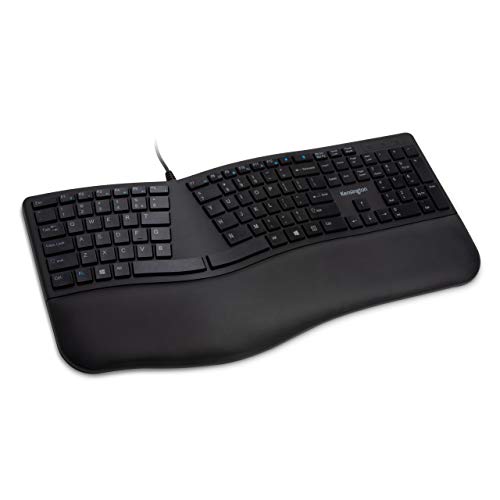
Kensington Pro Fit Ergonomic Wired Keyboard
The Kensington Pro Fit Ergonomic Wired Keyboard features a built-in wrist rest and neutral hand alignment for comfortable typing. Its quiet, spill-proof keys and MIL-STD durability make it a reliable choice for office environments.
Pros
- Built-in wrist rest for comfort
- Quiet keys for non-disruptive typing
- Spill-proof with MIL-STD durability
- Dedicated lock and function keys
- Neutral hand alignment reduces strain
Cons
- Large footprint may not suit small desks
- Wired connection limits placement flexibility

Arteck Split Ergonomic Keyboard 2.4G Wireless
This keyboard uses a split design to promote a natural wrist position, and includes a soft cushioned palm rest for comfort during long typing sessions. It connects via a tiny USB receiver and offers a rechargeable battery that lasts up to six months per charge.
Pros
- Split design for natural wrist position
- Soft cushioned palm rest included
- Simple plug-and-play setup with nano receiver
- Rechargeable battery lasts up to 6 months
- Includes USB-C charging cable
Cons
- Compatible only with Windows systems
- No backlit keys
- Large footprint (16.5 x 9.6 inches) takes desk space

Logitech Wave Keys Ergonomic Wireless Keyboard
Designed for all-day comfort, the Logitech Wave Keys combines a wavy ergonomic layout with a plush memory foam palm rest to reduce wrist strain. It supports multi-device switching via Bluetooth or Logi Bolt, and offers up to three years of battery life. This keyboard is best for anyone seeking an affordable ergonomic upgrade with thoughtful customization options.
Pros
- Scientifically designed wavy shape reduces typing strain
- Plush, supportive memory foam palm rest included
- Long battery life (up to 3 years)
- Connects to multiple devices easily
- Compact, space-saving footprint
Cons
- No backlighting for low-light environments
- Wavy layout may take time to adjust to
- Palm rest is non-detachable

ProtoArc EK01 Plus Ergonomic Keyboard
The ProtoArc EK01 Plus is a full-size ergonomic keyboard with a curved split-frame design to reduce wrist strain. It offers adjustable white backlighting, a cushioned wrist rest, and can switch between three devices via Bluetooth or 2.4G. Battery life ranges from 12 hours with high backlight to over 90 days with backlight off.
Pros
- Curved split-frame design reduces wrist strain
- Adjustable white backlight with 3 levels
- Long battery life up to 90 days with backlight off
- Cushioned wrist rest for extra support
- Seamless switching between 3 devices
Cons
- Occupies more desk space than standard keyboards
- Backlight resets after sleep mode
- No wired connectivity option

Logitech Ergo K860 Wireless Ergonomic Keyboard
The Logitech Ergo K860 features a split design and cushioned wrist rest to reduce strain during long typing sessions. Its adjustable palm lift lets you customize the tilt for better posture, and the keys are shaped to match fingertips for comfort and precision.
Pros
- Split keyframe promotes natural typing posture
- Pillowed wrist rest offers 54% more support
- Reduces wrist bending by 25%
- Adjustable palm lift with three angles
- Ergonomist approved design
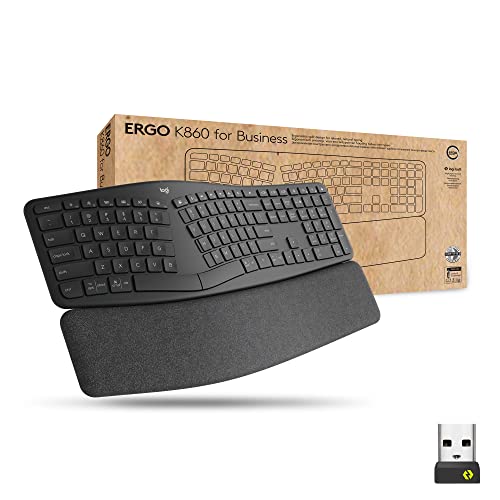
Logitech Ergo K860 Split for Business
An ergonomic wireless keyboard designed for IT pros and comfort seekers. Its split, curved keyframe improves typing posture and reduces muscle strain, while Logi Bolt wireless ensures secure enterprise-grade connectivity.
Pros
- Split curved design improves typing posture
- Enterprise-level secure wireless with Logi Bolt
- Adjustable palm lift with three tilt positions
- Connects to up to three devices
- Two-year battery life
Cons
- No backlit keys
- No included wrist rest replacement options
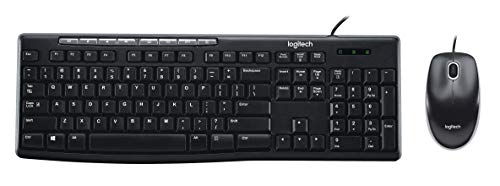
Logitech MK200 Wired Keyboard & Mouse Combo
The Logitech MK200 is a no-frills wired combo that delivers essential features like dedicated media keys and a comfortable typing experience. Its spill-resistant design and plug-and-play setup make it a practical choice for office or home use. The included optical mouse offers smooth tracking for everyday tasks, but the wired setup may not suit those seeking a clutter-free desk.
Pros
- Dedicated media keys
- Quiet low-profile keys
- Responsive optical mouse
- Spill-resistant construction
- Easy plug-and-play setup
Cons
- Wired connection only
- Basic mouse without extra buttons
- No backlighting
Ergo Keyboard Buying Guide
Keyboard Layout: Split vs. Contoured vs. Fixed
The most important factor in an ergonomic keyboard is its layout. Split keyboards separate the key groups into two halves, allowing you to position each hand at shoulder width and angle the halves independently. This promotes a neutral wrist posture.
Contoured keyboards feature sculpted key wells that match the natural curve of your fingers, reducing finger extension. Fixed-angle keyboards have a single curved or tented design that elevates the center.
Which layout is best depends on your typing style and comfort. For a deeper dive, see our ergonomic split keyboard guide.
Connectivity: Wired vs. Wireless
Ergonomic keyboards come in wired and wireless variants. Wired models offer lag-free performance and never need battery changes, making them ideal for stationary desktops.
Wireless options, using Bluetooth or a 2.4 GHz USB receiver, provide a cleaner desk and flexibility to move around. Some keyboards support both, allowing you to switch between multiple devices. If you value portability, check out our portable keyboard recommendations.
Wrist Support and Tenting
Many ergonomic keyboards include a padded palm rest to keep your wrists in a neutral position. Look for detachable or adjustable rests that suit your typing angle.
Tenting, where the keyboard is raised in the middle like an inverted V, can further reduce forearm pronation. Some models offer built-in tenting legs or adjustable feet. Proper wrist support is crucial for avoiding carpal tunnel symptoms.
For a quieter typing experience, consider our silent keyboard guide.
Build Quality and Key Switches
The feel of the keys is largely determined by the switch type. Membrane switches are common and quieter, while mechanical switches provide tactile feedback and durability. Some ergonomic keyboards use scissor-switch mechanisms for a laptop-like feel.
Build quality matters for longevity; look for a solid frame and spill-resistant designs. If you prefer a compact layout, our 10-keyless keyboard guide may be helpful.
Compatibility and Extra Features
Most ergonomic keyboards work with Windows and macOS, but check for dedicated keys or software for your operating system. Some models offer programmable keys, backlighting, and media controls. If you frequently switch between devices, multi-device pairing is a plus.
For those who work in shared spaces, a quiet keyboard is essential; browse our quiet keyboard picks for silent options.
Why You Should Trust Us
BestProducts is an independent review site dedicated to helping you make informed purchasing decisions. We do not sell products or accept payment for reviews.
Each product in this guide has been evaluated using our consistent BP Score methodology, which ranges from 0 to 10.
Our scoring is based on a thorough analysis of specifications, expert review consensus from trusted industry sources, verified buyer feedback, and published performance data.
We do not conduct our own product trials; our evaluations are grounded in research, published data, expert review consensus, and verified buyer feedback. Our goal is to provide transparent, objective recommendations that you can rely on.
Final Thoughts
After extensive research, here are our top picks across different categories:
- Best Overall: TECKNET Wireless Ergonomic Keyboard, With a near-perfect BP Score, this keyboard combines a contoured design, wireless connectivity, and an integrated wrist rest at an accessible price point.
- Best Split Design: Perixx PERIBOARD-512B, A wired split keyboard with a generous wrist rest, ideal for users who want adjustable hand positioning.
- Best Wireless Value: Kensington Pro Fit Ergonomic Wireless Keyboard, Bluetooth connectivity and a compact layout make this a great choice for clean desks and multi-device setups.
- Best for Mac Users: ProtoArc EK01 Plus Backlit Bluetooth Keyboard, Full-size, backlit, and compatible with both Windows and Mac, with a high BP Score.
Frequently Asked Questions
What is the best ergonomic keyboard for wrist pain?
For wrist pain relief, look for a keyboard with a split or contoured design that promotes a neutral wrist angle. The Perixx PERIBOARD-512B and the Kensington Pro Fit Wireless are excellent options.
Also ensure you have proper wrist support and take regular breaks. For more information, check our comprehensive keyboard buying guide.
Are ergonomic keyboards worth the investment?
Yes, if you spend long hours typing, an ergonomic keyboard can reduce strain and improve comfort, potentially preventing repetitive stress injuries. The models we recommend range from budget-friendly to premium, so there is an option for every budget.
Should I choose a split or contoured keyboard?
It depends on personal preference. Split keyboards allow you to adjust the angle and distance between halves, which is beneficial if you have broad shoulders or prefer a customized layout.
Contoured keyboards provide fixed sculpted key wells that guide your fingers into a natural curve. Both have strong advocates; trying one in person can help, but our research shows top performers in each category.
Can I use an ergonomic keyboard with a Mac?
Most ergonomic keyboards support macOS, but you may need to remap modifier keys. Many models include dedicated Mac keys or software for customization. The ProtoArc EK01 Plus and Logitech K860 are particularly Mac-friendly.
How do I clean my ergonomic keyboard?
Regularly dust with compressed air and wipe surfaces with a slightly damp microfiber cloth. Avoid liquid directly on keys. For deep cleaning, remove keycaps if possible. Always refer to the manufacturer's instructions.
About the author
Adrian covers digital pianos, keyboards, and drum kits for BestProducts, comparing key and pad feel, sound engines, and quiet practice options. He helps musicians find instruments that satisfy at home and on stage.