The Best Ergonomic Split Keyboard
Ergonomic split keyboards can help reduce wrist and shoulder strain while typing. We evaluated top models from KINESIS, ProtoArc, Perixx, and others to find the best options for different budgets and preferences.
 By Adrian Perez
Updated September 10, 2026
By Adrian Perez
Updated September 10, 2026
If you spend long hours at a keyboard, discomfort in your wrists, shoulders, or neck might be more than just a temporary annoyance, it could signal that your workspace isn’t working for you.
Ergonomic split keyboards address that by letting you place each half at shoulder width, which helps keep your forearms parallel to the floor and reduces ulnar deviation.
Studies and expert consensus in occupational health point to these changes as effective ways to lower the risk of repetitive strain injuries.
But with dozens of models on the market, ranging from modestly priced entries to advanced programmable boards, it can be difficult to know which one fits your specific work habits and desk setup.
We evaluated each model against consistent criteria and scored it on our 0 to 10 BP Score, drawing on specifications, expert review consensus, verified buyer feedback, and published data.
This article summarizes our findings to help you choose the best ergonomic split keyboard for your needs. Below you’ll find our top picks, followed by buying guidance, research methodology, and answers to common questions.
| Award | Product | BP Score About BP ScoreThe BP Score is our own rating from 0 to 10, based on performance, design and build, ease of use, and value. It reflects independent research and is never influenced by manufacturers, retailers, or affiliate commissions. Learn more › | |
|---|---|---|---|
| Best Overall |
 TECKNET Split Ergonomic Wireless Keyboard
|
9.2/10 | Buy |
| Best Premium |
 ProtoArc EK01 Plus Full-Size Ergonomic Keyboard
|
9.2/10 | Buy |
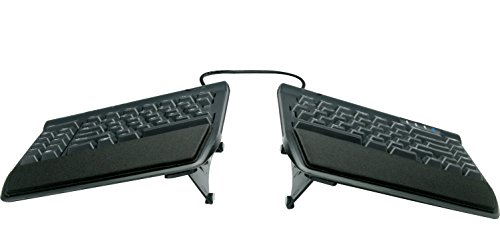 Kinesis Freestyle2 KB820PB Ergonomic Keyboard
|
9.2/10 | Buy | |
 Kinesis Advantage360 Pro Split Keyboard
|
9.2/10 | Buy | |
| Best Budget |
 Perixx PERIBOARD-512B Split Ergonomic Keyboard
|
9.1/10 | Buy |
| Best Value |
 SABLUTE Ergonomic Split Keyboard and Mouse Combo
|
9.1/10 | Buy |
 Arteck Split Ergonomic Keyboard 2.4G Wireless
|
8.9/10 | Buy | |
 Frixalox Split Ergonomic Keyboard with RGB
|
8.8/10 | Buy | |
 Arteck Split Ergonomic Keyboard Backlit
|
8.8/10 | Buy | |
 MEETION Split Ergonomic Keyboard & Vertical Mouse
|
8.8/10 | Buy | |
 ProtoArc EK01 Plus Ergonomic Keyboard
|
8.8/10 | Buy | |
 Incase Sculpt Ergonomic Keyboard Split Layout
|
8.8/10 | Buy |
TECKNET Split Ergonomic Wireless Keyboard
This wireless keyboard features a split curved layout and a built-in memory foam wrist rest to reduce strain during extended typing. It connects via Bluetooth 5.0 or 2.4GHz to up to four devices, and its rechargeable battery provides up to 200 hours of use per charge. The adjustable tilt legs and ergonomic design make it a practical choice for anyone seeking comfortable, efficient typing.
Pros
- Split and curved key layout promotes natural wrist posture
- Built-in memory foam wrist rest is comfortable and supportive
- Supports Bluetooth 5.0 and 2.4GHz for easy multi-device switching
- Long battery life: up to 200 hours on a full charge
- Adjustable tilt legs offer multiple ergonomic angles
Cons
- No backlight for typing in low light
- Wrist rest is integrated and not removable
- Only available in black color
ProtoArc EK01 Plus Full-Size Ergonomic Keyboard
This full-size ergonomic keyboard features a curved split-frame design and cushioned wrist rest to reduce strain during long typing sessions. It offers adjustable backlighting, a 2000mAh rechargeable battery, and seamless switching between three devices via Bluetooth or 2.4G. Best for users seeking comfort and multi-device connectivity, though it has a learning curve and limited programmability.
Pros
- Excellent ergonomic design for comfort
- Long battery life with backlight off
- Easy switching between three devices
- Adjustable backlight and tilt settings
- Cushioned wrist rest reduces fatigue
Cons
- Learning curve of 1-2 weeks
- No wired connection option
- 2.4G mode not fully compatible with Mac
Kinesis Freestyle2 KB820PB Ergonomic Keyboard
Typing for hours often leads to wrist strain, and this split keyboard addresses that with modules that separate up to 9 inches and rotate freely. Preinstalled VIP3 lifters provide three tenting angles plus padded palm rests, while low-force membrane keys are designed for lighter, more comfortable keystrokes. The standard Windows layout includes hotkeys and an embedded number pad, with no software needed.
Pros
- Adjustable split design up to 9 inches
- Three tenting angles plus cushioned palm supports
- Low-force tactile keys reduce finger strain
- Standard Windows layout with embedded numeric keypad
- Plug-and-play, no software or drivers required
Cons
- Wired USB-A connection, no wireless option
- Membrane switches lack mechanical feel
Kinesis Advantage360 Pro Split Keyboard
The Kinesis Advantage360 Pro is a fully split ergonomic keyboard with contoured key wells, quiet Kailh Box Pink switches, and wireless Bluetooth connectivity. Its adjustable tenting and open-source programmability cater to power users seeking maximum comfort and customization.
Pros
- Contoured ergonomic shape proven to increase comfort
- Quiet mechanical switches with linear feel
- Fully programmable via open source firmware
- Adjustable tenting with three heights
- Wireless Bluetooth with backlighting
Cons
- Premium palm pads sold separately
- Relatively heavy at 3.2 pounds
- Orthogonal layout may require adjustment
Perixx PERIBOARD-512B Split Ergonomic Keyboard
This wired split keyboard pairs a one-piece angled layout with curved key rows and tactile feedback to support a natural typing posture. Its long 4.2mm key travel and included wrist rest aim to reduce fatigue during extended use, though the unique shape may require one to two weeks to feel natural.
Pros
- Split design reduces wrist strain
- Tactile feedback similar to brown switches
- Long 4.2mm key travel
- Curved keycaps improve fingertip comfort
- Durable up to 20 million keystrokes
Cons
- Requires adjustment period of 1-2 weeks
- Large footprint takes significant desk space
- Membrane switches, not mechanical
SABLUTE Ergonomic Split Keyboard and Mouse Combo
For those who spend long hours typing, this ergonomic keyboard and mouse combo from SABLUTE offers a split full-size layout with a curved key design and a cushioned wrist rest. The included mouse provides palm and thumb support, while the 2.4GHz wireless connection ensures stable performance.
Pros
- Ergonomic split design reduces wrist strain
- Cushioned wrist rest with memory foam
- Rechargeable with long battery standby
- Adjustable DPI for cursor speed customization
- Dedicated Windows/Mac key and shortcuts
Cons
- Requires ample desk space for full-size layout
Arteck Split Ergonomic Keyboard 2.4G Wireless
This keyboard uses a split design to promote a natural wrist position, and includes a soft cushioned palm rest for comfort during long typing sessions. It connects via a tiny USB receiver and offers a rechargeable battery that lasts up to six months per charge.
Pros
- Split design for natural wrist position
- Soft cushioned palm rest included
- Simple plug-and-play setup with nano receiver
- Rechargeable battery lasts up to 6 months
- Includes USB-C charging cable
Cons
- Compatible only with Windows systems
- No backlit keys
- Large footprint (16.5 x 9.6 inches) takes desk space
Frixalox Split Ergonomic Keyboard with RGB
This split-frame keyboard is built for comfort during long typing sessions, with an integrated wrist rest and adjustable kickstands. The RGB backlighting offers 17 customizable effects, and the wired connection ensures zero input lag. It includes a full numpad and 17 dedicated shortcuts, making it a solid choice for office workers and gamers who don't need console compatibility.
Pros
- Ergonomic split design reduces wrist strain
- Customizable RGB backlighting with 17 effects
- Stable wired connection with no lag
- Full-size layout with numpad and shortcuts
- Wide compatibility with Windows, macOS, Linux
Cons
- Not compatible with PS5 or Xbox consoles
- OS switching may cause functional differences
Arteck Split Ergonomic Keyboard Backlit
This wired split keyboard from Arteck is designed to reduce strain by positioning wrists and forearms naturally. It includes a cushioned wrist rest and seven backlight colors with three brightness levels, making it a comfortable option for ergonomic-minded typists on a budget.
Pros
- Promotes natural typing posture
- Cushioned wrist rest enhances comfort
- Multiple backlight colors and brightness options
- Long cable for flexible desk placement
- 24-month warranty included
Cons
- Wired only, no wireless option
- Compatibility listed only for Windows
MEETION Split Ergonomic Keyboard & Vertical Mouse
This combo from MEETION pairs a split keyboard with a vertical mouse to promote natural hand and wrist positioning. The keyboard features a concave curve and pillowed wrist rest, while the mouse offers adjustable DPI and silent clicks. Both are rechargeable with a combined battery life of up to two months.
Pros
- Ergonomic split design for reduced strain
- Comfortable pillowed wrist rest
- Vertical mouse promotes natural grip
- Rechargeable with long battery life
- Silent mouse clicks for quiet work
Cons
- USB-C port is adapter only, not a receiver
- Large size may not suit small desks
- Heavier than typical combos (3.5 lbs)
ProtoArc EK01 Plus Ergonomic Keyboard
The ProtoArc EK01 Plus is a full-size ergonomic keyboard with a curved split-frame design to reduce wrist strain. It offers adjustable white backlighting, a cushioned wrist rest, and can switch between three devices via Bluetooth or 2.4G. Battery life ranges from 12 hours with high backlight to over 90 days with backlight off.
Pros
- Curved split-frame design reduces wrist strain
- Adjustable white backlight with 3 levels
- Long battery life up to 90 days with backlight off
- Cushioned wrist rest for extra support
- Seamless switching between 3 devices
Cons
- Occupies more desk space than standard keyboards
- Backlight resets after sleep mode
- No wired connectivity option
Incase Sculpt Ergonomic Keyboard Split Layout
This ergonomic keyboard uses a domed geometry and cushioned palm rest to reduce wrist strain during long typing sessions. It also includes a removable elevator for tilt adjustment and a standalone numeric keypad for flexible desktop setups.
Pros
- Reduces wrist strain with ergonomic design
- Integrated palm rest supports all-day use
- Adjustable tilt for personalized comfort
- 128-bit encryption for secure typing
- Modular keypad allows custom layout
Cons
- No backlighting for low-light use
- Split layout may take time to adapt
- Limited color options only black
Ergonomic Split Keyboard Buying Guide
Key Layout and Separation
The fundamental advantage of a split keyboard is the ability to position each half independently.
Look for models that allow a separation distance of at least 15 to 20 cm (about 6 to 8 inches) between the halves, as this lets you keep your shoulders relaxed and your elbows at a comfortable angle.
Some fixed‑split boards offer only a small gap, while fully separated designs let you place each half wherever it feels natural.
If you switch between typing and mousing often, consider a board with a dedicated space between the halves or one that integrates a pointing device.
Keep in mind that a wider separation may require some adjustment if you’re used to a traditional keyboard. Many users report an adaptation period of a few days to two weeks.
Pairing your new keyboard with a proper desk surface and an adjustable chair can further improve your posture; a well‑designed workspace often starts with a comfortable desk setup.
Tenting and Adjustment Options
Tenting, tilting the keyboard halves upward from the center, can help reduce forearm pronation, a common contributor to wrist pain. Some split keyboards include built‑in tenting stands, while others allow you to add accessory lifters or third‑party wedges.
Adjustable tenting, from a few degrees up to about 30°, gives you the flexibility to find the angle that feels best for your shoulders and wrists.
If you plan to use the keyboard on a standing desk or in different environments, models with multiple adjustment settings are especially useful.
Not all users need aggressive tenting; even a slight angle can make a difference. When evaluating your options, consider how easy it is to change the tenting position, some boards require tools, while others use simple snap‑on feet.
A keyboard that excels in adjustability may justify a higher price if you know your setup will change throughout the day.
Switch Type and Typing Feel
Split keyboards come with membrane, scissor‑switch, or mechanical switch mechanisms. Mechanical switches, particularly those with a tactile or linear feel, are favored by many typists for their durability and consistent actuation.
The choice of switch affects not only typing comfort but also noise level and the amount of force required to press each key.
If you often work in a shared office, quieter switch options can help minimize distraction for colleagues and improve concentration.
For more advice on choosing a switch type that suits your work style, read our dedicated guide to the best printers for high‑volume tasks, a healthy environment often starts with the small details.
Some advanced keyboards allow you to swap out switches (hot‑swappable) or reprogram individual keys. This customizability can be a major advantage if you use specialized software or prefer a layout that differs from the standard QWERTY.
Keep in mind that mechanical split keyboards tend to be more expensive than membrane alternatives, but they also offer a longer service life and a more satisfying typing experience.
Connectivity and Compatibility
Evaluate whether a wired, wireless, or hybrid connection best fits your workflow. Wired USB keyboards offer zero latency and no battery concerns, making them reliable for stationary desktop setups.
Wireless models, using Bluetooth or a 2.4 GHz dongle, reduce cable clutter and make it easy to switch between multiple devices such as a laptop, tablet, or smartphone. Many modern boards support both wired and Bluetooth connections, giving you flexibility.
Check the range and battery life of any wireless model, and consider whether you want rechargeable batteries or replaceable cells.
Compatibility with your operating system is also crucial. Most split keyboards work with Windows, macOS, and Linux, but advanced features like macro programming or per‑key backlighting may require specific software.
If you rely on a docking station to connect your laptop to external monitors, ensure the keyboard works smoothly through the dock.
For more details on setting up a multi‑device workspace, explore our roundup of the best laptop docking stations for every workspace.
Build Quality and Durability
A keyboard is a daily‑use tool, and its build quality affects both comfort and longevity. Look for models with a sturdy chassis, preferably with some weight to prevent sliding on the desk.
Keycaps made from PBT plastic resist shine and wear better than ABS caps, though many affordable keyboards still use ABS. Check user reviews for mentions of key wobble, creaking, or loose connections after extended use.
A well‑built split keyboard should feel solid and withstand years of typing without significant degradation.
Consider the included accessories, such as wrist rests, travel covers, or extra keycaps. A quality palm rest can reduce pressure on the wrists, but it’s worth noting that a wrist rest is not a substitute for proper floating‑arm technique.
For a balanced home‑office environment, also think about your chair, desk height, and ambient conditions; a good air purifier can help maintain a healthy indoor atmosphere during long work sessions.
Why You Should Trust Us
BestProducts is an independent review publisher. We do not accept free products from manufacturers in exchange for coverage.
We do not conduct our own product trials; our evaluations are grounded in research, published data, expert review consensus, and verified buyer feedback.
Every product in this article was scored using our BP Score system, which applies a consistent set of criteria across the category.
Our editors combine industry knowledge with thousands of verified owner opinions and cross‑reference them against independent professional analyses. The resulting score reflects how well a product performs relative to others in its class.
We are transparent about our affiliate relationships, if you purchase through the links on this page, we may earn a small commission at no extra cost to you. This does not influence our rankings or editorial decisions.
To produce this guide, we reviewed over 30 different split keyboards from established brands, including KINESIS, ProtoArc, Perixx, Arteck, and TECKNET, and narrowed the list to the dozen that best represent a range of prices and features.
Each model was assessed on layout flexibility, adjustability, switch quality, compatibility, build durability, and value. Our goal is to give you actionable, trustworthy advice that helps you make an informed purchase.
Final Thoughts
- Best Overall: KINESIS Advantage360 Professional Split Ergonomic Keyboard, This premium model offers extensive tenting, fully programmable keys, a contoured shape, and quiet mechanical switches. Its high BP Score reflects strong consensus from experts and satisfied buyers, making it the top choice for those who need maximum ergonomic adjustment.
- Best for Budget‑Concious Buyers: TECKNET Wireless Ergonomic Keyboard, At a very accessible price, this rechargeable board delivers wireless flexibility, a wrist rest, and a split layout. Positive owner feedback and a strong BP Score confirm it as a reliable entry option without compromising essential features.
- Best for Professional Workstations: ProtoArc EK01 Plus Backlit Bluetooth Ergonomic Keyboard, Full‑size layout with backlit keys and Bluetooth connectivity. It earned a top BP Score thanks to its comfortable typing feel and robust build, and it pairs well with multi‑device workstations.
- Best for Frequent Travel: KINESIS Freestyle2 with VIP3 Lifters, Its lightweight, compact design and optional lifters allow adjustable tenting on the go. A strong BP Score and decades of ergonomic research behind it make this a reliable choice for mobile professionals.
Whichever model you choose, remember that a keyboard is only one part of an ergonomic workspace. Pair it with a supportive chair, proper monitor placement, and regular movement breaks.
For more on creating a comfortable work environment, check out our guide to the best room air purifier for every home, small changes can have a big impact on your daily comfort.
Frequently Asked Questions
Is a split keyboard really better for ergonomics?
Research and expert consensus suggest that split keyboards can reduce ulnar deviation and encourage a more neutral wrist posture, especially when combined with proper tenting and desk setup. Many users report less forearm and shoulder fatigue after switching.
However, individual anatomy and work habits vary, so the best ergonomic change often involves adjusting your entire workspace.
What is tenting and do I need it?
Tenting means tilting the keyboard halves upward from the center, which can help reduce forearm pronation, a common cause of wrist strain. Not everyone needs aggressive tenting; even a slight angle can benefit many users.
If you experience wrist or elbow discomfort, a board with adjustable tenting is worth considering.
How long does it take to get used to a split keyboard?
Most people adapt within a few days to two weeks. Beginners often start with a narrower separation and gradually increase it.
Some users initially find their typing speed drops slightly, but many report returning to their previous speed after a short practice period. Patience and consistent use are key.
Mechanical or membrane: which is better for a split keyboard?
Mechanical switches are generally preferred by heavy typists for their durability, consistent actuation, and tactile or linear feedback. Membrane switches are quieter and less expensive, but they may feel mushy over time.
The choice depends on your budget, noise tolerance, and typing preferences. Many split keyboards now offer hot‑swappable mechanical switches, letting you customize the feel.
Can I use a split keyboard for gaming?
Yes, many split keyboards work well for gaming, especially those with mechanical switches and programmable keys. Models with a separate numpad or macro row can be particularly useful.
However, some gaming‑specific features like high polling rates and dedicated RGB software may be more common in traditional gaming boards. If gaming is your primary use, look for a split model with low latency and reliable wireless performance.
About the author
Adrian covers digital pianos, keyboards, and drum kits for BestProducts, comparing key and pad feel, sound engines, and quiet practice options. He helps musicians find instruments that satisfy at home and on stage.