The Best Silent Keyboard
Explore our research-backed roundup of the best silent keyboards for home and office, featuring top-rated models from Logitech, Cherry, SteelSeries, and more.
 By Adrian Perez
Updated September 11, 2026
By Adrian Perez
Updated September 11, 2026
Whether you’re typing late at night, sharing an office, or simply prefer a quieter workspace, a silent keyboard can make a significant difference.
The best silent keyboard combines a soft, cushioned keystroke with minimal acoustic feedback, allowing you to type without disturbing others or breaking your focus.
From full-size wired models to compact wireless sets, the market now offers a wide range of options that deliver near-silent performance without sacrificing responsiveness or durability.
At BestProducts, we evaluate each model through a consistent methodology that includes in-depth specification analysis, expert review consensus, verified buyer feedback, and published data.
Our BP Score (0, 10) reflects how well a keyboard balances noise reduction, typing feel, build quality, and value.
After researching dozens of candidates, we’ve curated a list of the top silent keyboards to help you find the right fit for your setup. Below, you’ll find our top picks for 2026.
| Award | Product | BP Score About BP ScoreThe BP Score is our own rating from 0 to 10, based on performance, design and build, ease of use, and value. It reflects independent research and is never influenced by manufacturers, retailers, or affiliate commissions. Learn more › | Price | |
|---|---|---|---|---|
| Best Overall |
 TECKNET Wired Keyboard RGB Backlit
|
9.9/10 | $19.99 | Buy |
| Best Value |
 Logitech MK295 Silent Wireless Combo
|
9.9/10 | $30.77 | Buy |
| Best Premium |
 Logitech Signature Slim K950 Wireless Keyboard
|
9.9/10 | $89.99 | Buy |
| Best Budget |
 EDJO Full Size Wireless Keyboard and Mouse Combo
|
9.8/10 | $20.99 | Buy |
 Logitech MK955 Signature Slim Wireless Combo
|
9.7/10 | $109.99 | Buy | |
 Logitech MX Keys S Wireless Keyboard
|
9.7/10 | $119.50 | Buy | |
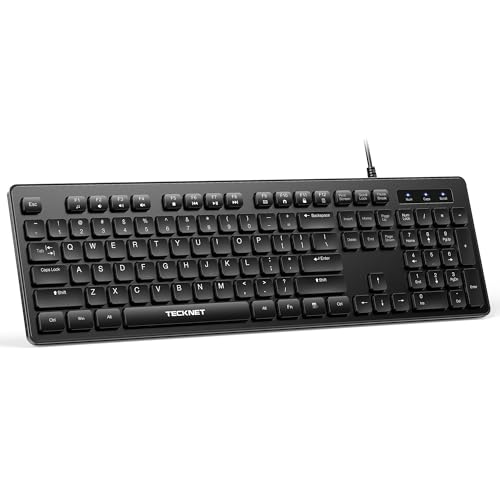 TECKNET Full-Size Silent Wired Keyboard
|
9.6/10 | $13.99 | Buy | |
 SteelSeries Apex 3 Whisper Quiet Keyboard
|
9.5/10 | $49.99 | Buy | |
 AULA F99 Pro Silent Mechanical Keyboard
|
9.5/10 | $79.89 | Buy | |
 RECCAZR Avocado Green Silent Keyboard and Mouse
|
9.5/10 | $19.99 | Buy | |
 Cherry Stream Wired Slim Keyboard
|
9.4/10 | $29.99 | Buy |
TECKNET Wired Keyboard RGB Backlit
This full-size wired keyboard offers quiet membrane keys, a spill-resistant frame, and customizable RGB lighting for a focused workspace. It is a solid choice for office or home users who value silent typing and durability.
Pros
- Very quiet keystrokes
- Spill-resistant build
- Customizable RGB lighting
- Long-lasting keys up to 80M keystrokes
- Easy plug-and-play setup
Cons
- Multimedia keys limited on Mac OS
- Only wired connection
Logitech MK295 Silent Wireless Combo
The Logitech MK295 combo delivers near-silent typing and clicking thanks to SilentTouch technology, making it ideal for shared workspaces. Its full-size keyboard includes a numpad and eight shortcuts, while the mouse offers precise, quiet clicks. With long battery life and a spill-resistant design, this set is a practical choice for productivity.
Pros
- Quiet typing and clicking (90% less noise)
- Long battery life (36mo keyboard, 18mo mouse)
- Spill-resistant design
- Full-size layout with numpad
- Quick plug-and-play setup
- Includes recycled plastic parts
Cons
- No backlighting
- No Bluetooth connectivity (USB receiver only)
- Uses AA batteries (not rechargeable)
Logitech Signature Slim K950 Wireless Keyboard
For anyone juggling a laptop, phone, and desktop, the Logitech Signature Slim K950 pairs with three devices and switches between them with a tap. It delivers quiet, laptop-style typing in a full-size layout, and its Logi Options+ app unlocks extra shortcuts for work and home. A solid choice for a tidy, multi-device desk setup.
Pros
- Quiet typing keeps distractions to a minimum
- Switches between three paired devices with one tap
- Works across Windows, macOS, Chrome OS, Linux, iOS, and Android
- Customizable keys through Logi Options+ app
- Contains at least 48% post-consumer recycled plastic
Cons
- Logi Options+ customization only on Windows and macOS
EDJO Full Size Wireless Keyboard and Mouse Combo
The EDJO combo includes a full-size silent keyboard with adjustable tilt and a quiet optical mouse. It offers a stable 2.4G connection up to 33 feet, long battery life (365 days for keyboard, 1600 DPI for mouse), and is suitable for home or office use.
Pros
- Quiet typing and clicking
- Long battery life
- Stable wireless connection
- Adjustable tilt legs
- Full layout with number pad
Cons
- No rechargeable batteries included
- Basic 1600 DPI mouse without extra buttons
Logitech MK955 Signature Slim Wireless Combo
The Logitech MK955 combo delivers a quiet, focused workflow with SilentTouch technology that cuts click noise by 90%. It supports seamless switching between three devices via Bluetooth or Logi Bolt, and the Logi Options+ app unlocks customizable shortcuts. The build uses recycled plastic and includes a full-size keyboard with laptop-style keys and a contoured mouse designed for larger hands.
Pros
- Quiet typing and clicking with SilentTouch technology
- Seamless multi-device switching (up to 3 devices)
- Customizable keys and buttons via Logi Options+
- SmartWheel for fast line-by-line or free scrolling
- Made with certified post-consumer recycled plastic
Cons
- Mouse is designed for larger hands
Logitech MX Keys S Wireless Keyboard
This low-profile wireless keyboard offers a fluid, precise typing experience with spherically-dished keys and smart backlighting that adapts to your environment. It is ideal for professionals who want a comfortable, multi-device workflow with customizable shortcuts.
Pros
- Quiet, precise typing feel
- Smart backlighting adapts to you
- Multi-device and multi-OS support
- Long battery life with USB-C charging
- Solid build with recycled plastic
Cons
- No dedicated wrist rest included
- Limited color options
TECKNET Full-Size Silent Wired Keyboard
This wired keyboard delivers a quiet typing experience with low-profile membrane keys and a spill-resistant design. Its full-size 104-key layout includes 12 FN multimedia shortcuts for quick access to volume, media, and apps. Plug-and-play USB works with Windows and Mac (with limited multimedia keys), making it a practical choice for offices or shared spaces.
Pros
- Quiet membrane keys for silent typing
- Full-size 104-key layout with 3-zone design
- Spill-resistant conductive film protects from spills
- 12 FN multimedia shortcuts for quick access
- Plug-and-play USB, no drivers needed
Cons
- Limited multimedia key functionality on Mac OS
- No backlighting for low-light use
- Membrane keys may feel less tactile than mechanical
SteelSeries Apex 3 Whisper Quiet Keyboard
A quiet gaming keyboard with IP32 water resistance and a magnetic wrist rest. The 10-zone RGB adds customizable lighting, and it works across PC and consoles.
Pros
- IP32 water resistant against spills
- Whisper quiet switches for silent gaming
- Premium magnetic wrist rest
- Dedicated multimedia controls
- Compatible with PC and consoles
AULA F99 Pro Silent Mechanical Keyboard
This silent mechanical keyboard offers a gasket structure, pre-lubed linear switches, and hot-swappable customization. With triple connectivity and a compact 96% layout, it caters to office workers and gamers who value quiet operation.
Pros
- Quiet typing suitable for offices
- Hot-swappable for easy customization
- Multiple connectivity options
- Large 8000mAh battery capacity
- Compact layout saves desk space
Cons
- Side-printed keycaps may not suit all users
- Knob mode switching requires long press
RECCAZR Avocado Green Silent Keyboard and Mouse
This RECCAZR combo offers a quiet typing and clicking experience with a full-size keyboard and compact mouse, making it ideal for shared offices or home workspaces. The lag-free wireless connection and auto-sleep feature add convenience and efficiency.
Pros
- Very quiet typing and clicking
- Full-size with numeric keypad
- Auto-sleep saves battery
- Adjustable DPI for precision
- Single receiver for both devices
Cons
- No backlit keys
- Compact mouse may not suit large hands
- Limited color options
Cherry Stream Wired Slim Keyboard
The Cherry Stream is a quiet, full-size wired keyboard built for comfortable daily typing. Its scissor switches, sturdy metal-plate base, and dedicated shortcut keys make it a dependable office workhorse.
Pros
- Whisper-quiet scissor switches for smooth typing
- Stable non-slip base thanks to eight rubber feet
- Ten dedicated shortcut keys for office tasks
- Abrasion-resistant keycaps with long-lasting legibility
Cons
- Wired only, no wireless connectivity option
- Full-size layout consumes significant desk space
Best Silent Keyboard Buying Guide
Switch Type and Noise Level
The heart of any keyboard’s acoustics is its switch mechanism. Membrane or scissor-switch keyboards are naturally quieter than mechanical switches because they use a rubber dome or soft pad rather than a moving metal component.
However, many mechanical keyboards now offer “silent” linear or tactile switches that incorporate dampening rings or specially designed stems to reduce bottom-out and return noise.
When comparing silent options, look for terms like “whisper quiet,” “near-silent,” or “quiet typing” in the product description, and check verified buyer feedback for real-world noise assessments.
For those who prefer the tactile feedback of mechanical keys, switches such as Cherry MX Silent Red or Gateron Silent Yellow offer a softer landing without the audible click.
On the membrane side, brands like Logitech and Cherry have refined their low-profile designs to produce barely audible keystrokes.
A quiet typing experience often comes from a combination of switch design and keycap material, PBT keycaps, for example, produce a deeper, less clacky sound than ABS.
Layout and Ergonomics
Your working style and desk space will dictate the ideal form factor.
Full-size keyboards (with a number pad) are still popular for data entry, but tenkeyless (TKL) or 60% layouts save valuable real estate and can reduce wrist strain by keeping your mouse closer.
Ergonomic considerations such as built-in wrist rests, adjustable feet, and split designs are also important for long typing sessions. Many silent keyboards, especially those marketed for office use, include a cushioned palm rest that further absorbs impact and noise.
If you frequently switch between typing and mousing, a keyboard-and-mouse combo can keep your peripherals consistent. Wireless combos eliminate cable clutter and often include a unified receiver, making them a tidy solution for shared desks.
For those with specific ergonomic needs, check out our ergonomic split keyboard guide for models that prioritize wrist health alongside quiet operation.
Connectivity and Compatibility
Silent keyboards come in wired and wireless variants. Wired models offer zero latency and no battery concerns, making them reliable for gaming or office use where every keystroke counts.
Wireless options, on the other hand, provide flexible placement and a cleaner desk aesthetic. Most modern wireless silent keyboards use 2.4 GHz USB dongles or Bluetooth; some even support dual-mode switching between multiple devices.
Before purchasing, confirm compatibility with your operating system, Windows, macOS, Chrome OS, or Linux, as some keyboards include dedicated media keys or software for customization.
Battery life is a critical factor for wireless models. Many silent keyboards advertise several months of use on a single charge or pair of AA batteries, especially those with efficient power management and no RGB backlighting.
If you need a keyboard for on-the-go use, consider a foldable keyboard for portability without sacrificing quiet performance.
Build Quality and Key Feel
A silent keyboard should feel solid and responsive, not mushy or unstable. Look for keyboards with a metal or reinforced plastic frame that minimizes flex and resonance.
Key stability is especially important for silent models: wobbly keys can produce incidental noise even with quiet switches. Verified buyer feedback often highlights whether a keyboard feels “premium” or “cheap,” so we pay close attention to long-term reviews.
For mechanical silent options, hot-swappable switch sockets allow you to change switches later without soldering, extending the keyboard’s lifespan.
Key feel is personal: some prefer the crisp, short travel of scissors-switch keys (similar to laptop keyboards), while others enjoy the cushioned bottom-out of membrane domes or the smoother action of linear mechanical switches.
Our research shows that the best silent keyboards maintain consistent keystroke weight across all keys, which reduces typing fatigue.
If you are considering a mechanical model, our Cherry MX keyboard guide can help you understand switch variants and their noise profiles.
Extra Features and Software
Many silent keyboards include additional features that enhance usability. Backlighting (white or RGB) can help in low-light environments, but it may add a slight electronic whine or increase power draw.
Wrist rests, dedicated media keys, and adjustable typing angles are common on premium office-focused models. Some keyboards also come with proprietary software for remapping keys, creating macros, or adjusting lighting effects.
While software isn’t essential, it can be a valuable tool for power users.
Water resistance is another practical consideration, particularly for home offices where spills happen. A few keyboards, like the SteelSeries Apex 3, feature IP32 water resistance, protecting against accidental splashes without compromising quiet operation. For a broader look at keyboard features, see our overall keyboard guide.
Why You Should Trust Us
BestProducts is an independent review site, and we take our commitment to honesty and transparency seriously. Our team of editors evaluates each product using a consistent methodology that prioritizes objective, research-driven conclusions.
We do not conduct our own product trials; our evaluations are grounded in research, published data, expert review consensus, and verified buyer feedback.
Every product receives a BP Score on a 0, 10 scale based on how well it meets our criteria for performance, value, and user satisfaction.
We understand that affiliate income supports our work, but it never influences our ratings or recommendations. Our editors independently select the products featured, and we clearly disclose when links may earn us a commission.
For more about our process, you can browse our silent keyboard category for related reviews.
Final Thoughts
- Best Overall: Logitech Signature Slim K950 Wireless Keyboard with Quiet Typing, With a near-perfect BP Score of 9.9/10, this low-profile keyboard delivers an exceptional balance of silence, comfort, and build quality, making it the top choice for most users.
- Best Budget Pick: TECKNET Wired Keyboard with Silent Typing, Also scoring 9.9/10, this full-size wired keyboard offers remarkable quietness at a very affordable price, perfect for cost-conscious shoppers.
- Best Wireless Combo: Logitech MK295 Full Size Silent Wireless Keyboard Mouse Combo, Another 9.9/10 performer, this combo provides a complete silent setup for office or home, with reliable wireless connectivity and long battery life.
- Best for Gaming: SteelSeries Apex 3 RGB Gaming Keyboard, With a 9.5/10 BP Score, this gaming keyboard features whisper-quiet switches, water resistance, and a magnetic wrist rest, ideal for late-night gaming sessions.
- Best Mechanical Silent Option: AULA F99 Pro Wireless Mechanical Keyboard (Silent Version), Scoring 9.5/10, this gasket-mounted mechanical keyboard with pre-lubed linear switches offers a silent yet satisfying typing experience for enthusiasts.
Frequently Asked Questions
Are silent keyboards good for gaming?
Yes, many silent keyboards are designed for gaming. Look for models with low-latency wired or 2.4 GHz wireless connections and quiet switches that still provide responsive feedback, such as the SteelSeries Apex 3 or a mechanical silent switch version.
The key is to balance noise reduction with actuation speed and durability.
What’s the difference between membrane and mechanical silent keyboards?
Membrane keyboards use a rubber dome under each key, which naturally dampens sound. They are generally cheaper and quieter but can feel mushy over time.
Mechanical keyboards use individual switches; silent mechanical switches incorporate dampening materials to reduce noise while maintaining a crisp tactile or linear feel. The choice depends on your preference for typing feedback and budget.
How can I make my current keyboard quieter?
You can add O-ring dampeners to mechanical keycaps, place a desk mat under the keyboard, or switch to quieter keycaps like PBT. Some users also try lubricating switches.
However, for a significant reduction in noise, it’s often easier to buy a keyboard designed for silence from the start.
Do wireless silent keyboards have lag?
Most modern wireless keyboards using 2.4 GHz technology have imperceptible latency, comparable to wired connections. Bluetooth can have slightly higher latency but works well for typing and casual use. Check product reviews for real-world performance data.
What should I consider when buying a silent keyboard for an open office?
Prioritize switch type (membrane or silent mechanical), build quality to avoid resonance, and wireless connectivity if you need a clean setup. A keyboard with a wrist rest can increase comfort during long hours. Reading verified buyer feedback is especially helpful to gauge real-world noise levels.
About the author
Adrian covers digital pianos, keyboards, and drum kits for BestProducts, comparing key and pad feel, sound engines, and quiet practice options. He helps musicians find instruments that satisfy at home and on stage.