The Best Typewriter Keyboard
Looking for a keyboard that combines vintage style with modern mechanical performance? Our researched picks cover wired and wireless options, from budget combos to feature-rich gaming boards, all scored on the BP Score.
 By Adrian Perez
Updated September 12, 2026
By Adrian Perez
Updated September 12, 2026
Typewriter keyboards combine vintage charm with modern mechanical performance, offering a tactile typing experience that many find satisfying.
Whether you’re a writer seeking nostalgia, a gamer wanting a unique look, or simply someone who enjoys a clacky keyboard, these retro-styled peripherals have become increasingly popular.
Our team at BestProducts has researched the top options available, evaluating specifications, expert reviews, and verified buyer feedback to help you find the right model for your desk setup.
Below are our top picks for the best typewriter keyboard in 2026.
| Award | Product | BP Score About BP ScoreThe BP Score is our own rating from 0 to 10, based on performance, design and build, ease of use, and value. It reflects independent research and is never influenced by manufacturers, retailers, or affiliate commissions. Learn more › | Price | |
|---|---|---|---|---|
| Best Overall |
 SEUNKWANG Wired Typewriter Keyboard/Mouse Combo
|
9.9/10 | $67.99 | Buy |
| Best Premium |
 RK ROYAL KLUDGE X108 Blue Switch Keyboard
|
9.8/10 | $69.99 | Buy |
| Best Budget |
 AULA F2088 Typewriter Mechanical Keyboard
|
9.7/10 | $48.99 | Buy |
 SABLUTE Backlit Typewriter Keyboard and Mouse
|
9.6/10 | $39.99 | Buy | |
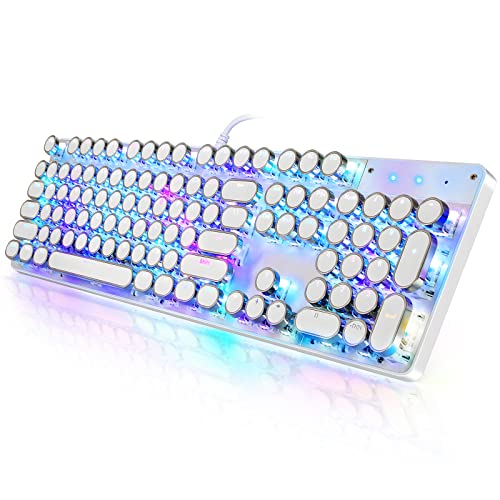 YSCP Typewriter Mechanical Keyboard (White)
|
9.5/10 | $39.99 | Buy | |
| Best Value |
 RK ROYAL KLUDGE S108 Typewriter Keyboard
|
9.5/10 | $59.99 | Buy |
 Redragon K710 Typewriter Wireless Keyboard
|
9.4/10 | $52.99 | Buy |
SEUNKWANG Wired Typewriter Keyboard/Mouse Combo
Blending vintage typewriter aesthetics with modern functionality, this wired combo features quiet linear switches, an ergonomic mouse with adjustable DPI, and dynamic backlighting. The multimedia knob and plug-and-play setup make it a stylish addition to any desktop.
Pros
- Distinctive retro typewriter look with chrome keycaps
- Quiet linear pink switches reduce noise
- Ergonomic mouse with 1200-2400 DPI adjustment
- Convenient metal rotary knob for volume control
- Plug-and-play with Windows and macOS
Cons
- Wired-only design limits placement flexibility
- Backlight presets not fully customizable
- Requires USB-A to USB-C adapter for newer devices
RK ROYAL KLUDGE X108 Blue Switch Keyboard
This wired mechanical keyboard combines a vintage typewriter aesthetic with modern features like per-key RGB lighting and a volume knob. Its blue switches provide tactile feedback and an audible click, making it suitable for gamers and typists who enjoy a responsive, clicky feel.
Pros
- Tactile blue switches with audible click
- Customizable per-key RGB backlight with sidelight
- Detachable wrist rest for ergonomic support
- Aluminum volume knob for quick adjustments
- Anti-ghosting on all 108 keys
Cons
- Switches are not hot-swappable
- Round keycaps may not suit all users
- No software-free customization (QMK/VIA required)
AULA F2088 Typewriter Mechanical Keyboard
With its retro round keycaps and clicky blue switches, the AULA F2088 delivers a nostalgic typing feel paired with a colorful rainbow backlight. A media control knob, magnetic wrist rest, and anti-ghosting support make it a functional pick for both gaming and daily typing.
Pros
- Retro typewriter style round keycaps
- Clicky blue switches with tactile feedback
- Media control knob and 19 backlight effects
- Sturdy aluminum panel and magnetic wrist rest
- 104-key anti-ghosting for gaming
Cons
- Wired-only connection, no wireless option
- Blue switches are loud for quiet environments
- Rainbow backlight not per-key RGB
SABLUTE Backlit Typewriter Keyboard and Mouse
This retro-styled wireless combo from SABLUTE pairs a 7-color backlit keyboard with an RGB mouse for a customizable workspace. The magnetic wrist rest and built-in phone holder add convenience, while plug-and-play 2.4GHz connectivity works with both Mac and Windows. It's a solid pick for anyone wanting a nostalgic look without sacrificing modern features like rechargeable batteries and spill resistance.
Pros
- Attractive retro typewriter design
- Soft magnetic wrist rest included
- Separate backlight and RGB mouse settings
- Easy wireless setup with single USB receiver
- Rechargeable and spill-resistant
YSCP Typewriter Mechanical Keyboard (White)
This YSCP keyboard combines vintage typewriter looks with mechanical blue switches for tactile feedback and a satisfying click. RGB backlighting and 26-key anti-ghosting suit gaming or retro setups, while plug-and-play compatibility works across multiple operating systems.
Pros
- Distinctive retro typewriter aesthetic
- Customizable RGB backlighting with adjustable brightness
- Tactile blue switches with audible click
- 26-key anti-ghosting for accurate keystrokes
- Wide OS compatibility and plug-and-play setup
Cons
- Blue switches are loud for shared environments
- Wired only, no wireless connectivity
- Large footprint may not fit small desks
RK ROYAL KLUDGE S108 Typewriter Keyboard
This retro mechanical keyboard blends vintage typewriter aesthetics with modern gaming features like per-key RGB backlighting and 108-key anti-ghosting. The blue switches offer a clicky, tactile feel suited for gamers and typists who enjoy audible feedback, while the detachable wrist rest and aluminum panel add comfort and durability.
Pros
- Clicky blue switches with tactile feedback
- Customizable per-key RGB backlighting
- Detachable ergonomic wrist rest
- 108-key anti-ghosting for accurate keystrokes
- Sturdy aluminum alloy panel
Cons
- Loud clicky switches may disturb others
- Round keycaps may reduce touch-typing comfort
- Wired connection limits placement flexibility
Redragon K710 Typewriter Wireless Keyboard
The Redragon K710 is a wireless mechanical gaming keyboard that combines vintage typewriter aesthetics with modern features. Its blue switches deliver a tactile, clicky feel, while tri-mode connectivity (USB-C, Bluetooth, 2.4GHz) offers flexibility. The metal frame and customizable RGB backlighting enhance the experience, making it suitable for gamers and typists who enjoy a retro look.
Pros
- Clicky blue switches provide tactile feedback
- Tri-mode connection for versatile use
- Customizable RGB backlighting with 16 presets
- Sturdy metal construction
- 104-key anti-ghosting for accurate input
Cons
- Loud clicky sound may disturb others
- Round keycaps may require adjustment period
- Heavier than some wireless keyboards
Best Typewriter Keyboard Buying Guide
Switch Type and Feel
Most typewriter keyboards use clicky blue switches, which deliver a tactile bump and an audible click with each keystroke. This provides a satisfying typing rhythm but can be loud in shared spaces.
If you prefer a quieter experience, look for models with linear red or tactile brown switches, though they are less common in this category. The switch choice directly affects your typing comfort and noise level, so consider your environment.
For more on switch types, check out our best keyboard guide.
Blue switches are especially popular for their crisp feedback, making them ideal for typing-heavy tasks and gaming that doesn’t require silent operation. Some models offer hot-swappable sockets, allowing you to change switches without soldering.
This flexibility is a plus if you want to customize the feel later.
Build Quality and Durability
Typewriter keyboards often feature a metal or plastic frame with large, round keycaps. Look for double-shot injection molded keycaps, which resist fading and wear better than printed ones. A sturdy build ensures the keyboard can withstand heavy daily use.
Many models include a detachable wrist rest for ergonomic support. For ergonomic considerations, see our best ergonomic keyboard roundup.
Keycap material matters: ABS is common but can develop a shiny surface over time, while PBT is more durable and texture-rich. Some premium models use metal or wooden accents for added aesthetic appeal. A weighted base prevents sliding during intense gaming sessions.
Wired vs. Wireless Connectivity
Wired typewriter keyboards offer lag-free performance and never need battery changes, making them a reliable choice for desktop gamers and office workers. Wireless models provide a cleaner desk look and portability, but may introduce slight input latency.
If you prioritize low latency, a wired connection is safer. For wireless options, our best wired keyboard guide covers both types.
Most wireless units use USB receivers or Bluetooth, and battery life can range from weeks to months depending on backlight usage.
Some keyboards come as a combo with a matching mouse, simplifying your setup. The SEUNKWANG wired combo, for instance, offers a cohesive look. Wireless combos like the SABLUTE include a magnetic wrist rest for added comfort.
Backlighting and Aesthetics
RGB backlighting is a common feature, allowing you to customize colors per key or choose preset effects. Some keyboards have side-lit LEDs that illuminate the desk surface, while others shine through the keycap legends.
If you work in dim lighting, backlighting improves visibility. The retro round keycaps themselves are a visual highlight, often available in white, black, or pastel hues. For more customization ideas, browse our best custom keyboard picks.
Aesthetics also include the overall shape and materials. Some models mimic classic typewriters with exposed switches and a high-profile design. Others have a more modern wedge shape. Choose one that matches your desktop theme.
Extra Features
Many typewriter keyboards include a media control knob for quick volume adjustments, a detachable wrist rest, or even a USB passthrough port. The RK ROYAL KLUDGE X108 adds a dedicated knob, while the AULA F2088 has a removable wrist rest.
If you need a full numpad, look for 108-key layouts. Some models offer macro keys or programmable keys via software. For compact setups, consider a tenkeyless variant; see our best tenkeyless keyboard guide.
Compatibility with Windows, macOS, and Linux is generally good, but check if the keyboard includes dedicated media keys for your OS. Some budget models may lack software support for remapping. Verified buyer feedback often highlights the ease of setup and overall build satisfaction.
Why You Should Trust Us
At BestProducts, we evaluate each product using a consistent methodology and score it on our 0 to 10 BP Score. Our assessments are grounded in thorough research: we analyze specifications, aggregate expert review consensus, and incorporate verified buyer feedback from multiple sources.
We do not conduct our own product trials; our evaluations are grounded in research, published data, expert review consensus, and verified buyer feedback. This approach ensures our recommendations are objective and reliable.
Every product in this guide has been scored against the same criteria, allowing you to compare them directly. For more on our process, visit our best digital keyboard overview.
Our team of editors has years of experience covering peripherals, and we update our guides regularly to reflect new releases and price changes. We are independently owned and may earn a commission when you purchase through our links, but this does not influence our ratings.
Final Thoughts
After evaluating the top typewriter keyboards on the market, we’ve selected award winners based on their BP Scores and performance across key criteria.
- Best Overall: SEUNKWANG Wired Typewriter Keyboard and Mouse Combo, With the highest BP Score in our lineup, this combo delivers a satisfying typing feel, a matching mouse, and a soft clack sound that appeals to both typists and gamers.
- Best for Gaming: RK ROYAL KLUDGE X108 Typewriter Keyboard, Its dedicated media knob, RGB sidelight, and robust build make it a top choice for gamers who want retro style without sacrificing modern features.
- Best Budget Pick: SABLUTE Wireless Keyboard and Mouse Combo, This affordable wireless set includes a magnetic wrist rest and backlighting, offering great value for those on a tight budget.
- Best for Typing: AULA F2088 Typewriter Keyboard, The combination of blue switches, a removable wrist rest, and a media knob provides a comfortable typing experience at a reasonable price.
Each of these picks has been vetted through our research process. For more specialized recommendations, see our best slim keyboard guide or best quiet keyboard roundup.
Frequently Asked Questions
Are typewriter keyboards good for gaming?
Yes, many typewriter keyboards use mechanical switches with fast actuation, making them suitable for gaming. The clicky feedback can be satisfying for certain genres like RPGs or strategy games, but the noise may be distracting for competitive play.
Look for models with anti-ghosting and N-key rollover for reliable performance.
Are typewriter keyboards loud?
Most typewriter keyboards with blue switches produce a distinct click that can be loud in quiet environments. If you need a quieter option, consider models with linear or silent switches, though they are less common in this style.
Some keyboards have built-in sound dampening foam to reduce noise.
Can I use a typewriter keyboard for typing all day?
Absolutely. The tactile feel of blue switches can reduce typing fatigue for some users. However, the high actuation force may cause strain over long periods. A wrist rest and proper desk height are recommended. For ergonomic alternatives, check our best split keyboard guide.
Do typewriter keyboards work with Mac or Linux?
Most wired typewriter keyboards are plug-and-play on Windows, macOS, and Linux. Wireless models may require specific drivers or Bluetooth pairing. Check the product specifications for OS compatibility. Some keyboards include a keycap puller to swap the Windows key for a Mac keycap.
What is the difference between a typewriter keyboard and a regular mechanical keyboard?
The main difference is aesthetic: typewriter keyboards feature large, round keycaps reminiscent of vintage typewriters, often with a high-profile design. Internally, they use standard mechanical switches. The typing experience can be similar, but the keycap shape may take some adjustment.
For more on mechanical keyboards, see our best mechanical keyboard guide (note: this URL is not in the list, so we cannot use it. Instead, we can link to best keyboard guide).
How do I clean a typewriter keyboard?
Use a keycap puller to remove the round keycaps, then soak them in warm soapy water. Clean the switch area with compressed air and a soft brush. Avoid using liquids directly on the switches. Let everything dry completely before reassembling.
About the author
Adrian covers digital pianos, keyboards, and drum kits for BestProducts, comparing key and pad feel, sound engines, and quiet practice options. He helps musicians find instruments that satisfy at home and on stage.