The Best Mechanical Keyboard
Our editors evaluated dozens of mechanical keyboards using expert consensus and buyer feedback to find the top options for typing, gaming, and value. Find your ideal key feel, size, and budget.
 By Josephine Mason
Updated September 10, 2026
By Josephine Mason
Updated September 10, 2026
Mechanical keyboards have evolved from a niche enthusiast hobby into a mainstream choice for everyone from gamers to remote workers. The crisp tactile feedback, durability, and customization options, from switch types to keycaps, make them a rewarding daily driver.
In 2026, the market offers an overwhelming variety of layouts, connectivity options, and price points. Our goal is to cut through the noise.
We have evaluated dozens of models against consistent criteria, analyzing specifications, expert review consensus, verified buyer feedback, and published data. Below, you will find the best mechanical keyboard picks for 2026, each scored on our 0 to 10 BP Score.
| Award | Product | BP Score About BP ScoreThe BP Score is our own rating from 0 to 10, based on performance, design and build, ease of use, and value. It reflects independent research and is never influenced by manufacturers, retailers, or affiliate commissions. Learn more › | |
|---|---|---|---|
| Best Overall |
 Kisnt KN85 75% Wireless Mechanical Keyboard
|
9.2/10 | Buy |
| Best Value |
 YUNZII B75 PRO 75% Wireless Mechanical Keyboard
|
9.2/10 | Buy |
 AULA F75 75% Wireless Mechanical Keyboard
|
9.2/10 | Buy | |
| Best Premium |
 EPOMAKER x Aula F75 75% Wireless Keyboard
|
9.2/10 | Buy |
 AULA F75 75% Wireless Mechanical Keyboard
|
9.2/10 | Buy | |
 AULA S98 Pro Wireless Mechanical Keyboard
|
9.2/10 | Buy | |
 SteelSeries Apex Pro TKL Gen 3
|
9.2/10 | Buy | |
| Best Budget |
 AULA WIN60 HE 60% Gaming Keyboard
|
9.1/10 | Buy |
 Redragon K556 Wired RGB Mechanical Keyboard
|
9.1/10 | Buy | |
 Logitech G213 Prodigy Wired RGB Keyboard
|
9.1/10 | Buy | |
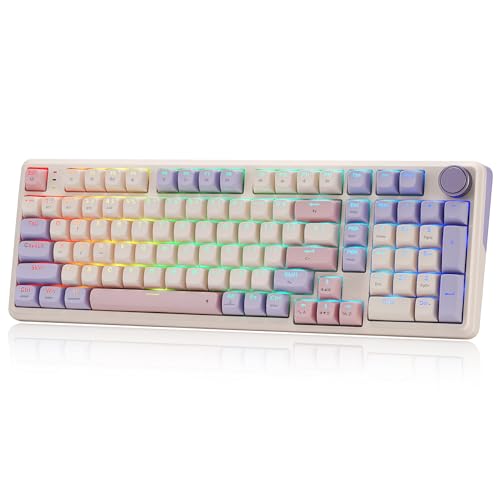 Redragon K768 PRO Wireless 8000mAh
|
9.1/10 | Buy |
Kisnt KN85 75% Wireless Mechanical Keyboard
This compact 85-key board blends a creamy, marbly typing feel with tri-mode wireless and hot-swappable switches. It is a solid pick for gamers or typists who want a space-saving layout and customizable RGB, though the lack of a numpad and Windows-only software for macros are notable trade-offs.
Pros
- Compact design frees desk space
- Buttery-smooth linear switches
- Rich, satisfying sound from gasket mount and foam
- Wireless with low-latency options
- Easy switch swapping without soldering
Cons
- No dedicated numpad
- Software only available for Windows
- RGB animation consumes battery quickly
YUNZII B75 PRO 75% Wireless Mechanical Keyboard
This compact 75% keyboard offers a creamy typing feel thanks to its gasket mount and five-layer padding. With tri-mode connectivity and hot-swappable switches, it adapts well to both office and gaming use.
Pros
- Smooth, creamy typing experience
- Large 4000mAh battery
- Versatile connectivity options
- Hot-swappable for custom switches
- Compact layout with arrow keys
Cons
- No included wrist rest
- Software customization somewhat limited
AULA F75 75% Wireless Mechanical Keyboard
The AULA F75 is a 75% wireless mechanical keyboard offering tri-mode connectivity and hot-swappable switches, ideal for gamers and office users. Its pre-lubed Reaper switches deliver a creamy typing feel, while the 4000mAh battery supports extended wireless use.
Pros
- Tri-mode connectivity (BT, 2.4GHz, wired)
- Hot-swappable switch sockets
- Pre-lubed switches for smooth typing
- 4000mAh battery for long battery life
- 16.8 million RGB with multiple effects
Cons
- Compact layout lacks a dedicated numpad
- Driver software needed for full customization
EPOMAKER x Aula F75 75% Wireless Keyboard
This 75% keyboard packs a gasket mount with five-layer padding for a quiet, cushioned typing feel. It offers Bluetooth, 2.4GHz, and wired connections plus a 4000mAh battery, hot-swappable switches, and vibrant RGB. Best suited for gamers and typists who want a compact but fully featured wireless board.
Pros
- Gasket mount with five-layer padding for quiet typing
- Tri-mode wireless with large 4000mAh battery
- Full-key hot-swappable with pre-lubed switches
- Cherry profile double-shot PBT keycaps resist wear
- Low-latency wireless and 16.8M RGB backlight
Cons
- Compact layout lacks dedicated numpad
- Knob controls only media functions
AULA F75 75% Wireless Mechanical Keyboard
This 81-key mechanical keyboard features pre-lubed linear switches and a five-layer silicone dampening structure for a creamy, thocky feel. Tri-mode connectivity (Bluetooth 5.0, 2.4GHz, USB-C) and a 4000mAh battery make it suitable for gaming and everyday work.
Pros
- Hot-swappable PCB supports 3- or 5-pin switches
- Tri-mode connection with up to 5 devices
- Large 4000mAh battery for extended use
- 16.8 million RGB backlit with 16 lighting effects
- Multi-function knob for volume and lighting control
Cons
- Only available in White&Brown color option
AULA S98 Pro Wireless Mechanical Keyboard
The AULA S98 Pro packs a smart LCD screen and multifunction knob into a compact 96-key layout. It offers tri-mode connectivity, hot-swappable switches, and five-layer sound dampening for a creamy typing feel, plus a large 5000mAh battery for extended use. This keyboard appeals to gamers and typists seeking customization and a clean design.
Pros
- Tri-mode connectivity (BT, 2.4GHz, USB-C)
- Hot-swappable switch support
- Five-layer sound dampening for quiet typing
- Large 5000mAh battery for long sessions
- Full RGB lighting with programmable software
Cons
- Screen customization requires wired mode and Windows
- Driver software only works in wired Windows mode
SteelSeries Apex Pro TKL Gen 3
The SteelSeries Apex Pro TKL Gen 3 is a tenkeyless keyboard featuring OmniPoint 3.0 analog magnetic switches with adjustable actuation from 0.1mm to 4.0mm. Its Quickset auto-presets enable instant activation of Rapid Trigger, Rapid Tap, and Protection Mode per game, making it ideal for competitive gamers seeking customizable response and reduced errors.
Pros
- Adjustable actuation range (0.1mm to 4.0mm)
- Rapid Trigger for faster key resets
- Rapid Tap for better movement control
- Protection Mode minimizes accidental keypresses
- Onboard OLED for quick settings adjustments
Cons
- Tenkeyless design lacks dedicated number pad
- Wired-only connectivity (USB-C)
AULA WIN60 HE 60% Gaming Keyboard
This 60% keyboard uses hall effect magnetic switches for precise actuation and a 0.02mm rapid trigger step, making it ideal for fast-paced FPS games like Valorant. Its web-based driver allows easy customization without bulky software.
Pros
- Very fast 0.02mm rapid trigger
- 8000 Hz polling rate
- Compact and space-saving design
- Customizable RGB lighting
- Easy web-based driver
Cons
- No dedicated arrow keys
- Limited to magnetic switch compatibility
Redragon K556 Wired RGB Mechanical Keyboard
This full-size mechanical keyboard features a sturdy aluminum frame that resists flex during fast-paced gaming. Its hot-swappable switch sockets let you change switches without soldering, and the included Brown switches offer a comfortable tactile bump for typing and gaming. With 20 RGB presets and anti-ghosting for all 104 keys, it's a solid wired option for gamers who want durability and customization without breaking the bank.
Pros
- Sturdy aluminum construction
- Hot-swappable switch sockets
- Vibrant RGB with 20 presets
- Full anti-ghosting for 104 keys
- Plug-and-play with Windows and Mac
Cons
- Weighs over 2.2 pounds, not very portable
- Full customization requires companion software
Logitech G213 Prodigy Wired RGB Keyboard
The Logitech G213 Prodigy is a full-sized wired gaming keyboard with customizable RGB lighting and a spill-resistant design. It offers a responsive typing experience and dedicated media controls, though it does not feature mechanical switches.
Pros
- Customizable RGB lighting per zone
- Spill-resistant and easy to clean
- Dedicated media controls and volume wheel
- Comfortable built-in palm rest
Cons
- Membrane keys not mechanical
- No USB pass-through port
- Only five lighting zones
Redragon K768 PRO Wireless 8000mAh
This wireless gaming keyboard combines a massive 8000mAh battery with tri-mode connectivity (USB-C, Bluetooth, 2.4GHz) for extended use between charges. Its gasket-mounted linear switches and PBT keycaps deliver a soft, durable typing feel, while the single knob controls brightness and media playback. Ideal for gamers who need long battery life and a customizable layout with hot-swappable switches.
Pros
- 8000mAh battery for weeks of use
- Tri-mode wireless plus USB-C wired
- Gasket mount with creamy linear switches
- Fade-resistant PBT keycaps with RGB
- Hot-swappable 3-pin or 5-pin switches
Cons
- Single color option (Lilac Land)
- Knob only control for media and lighting
- Software needed for advanced macros and lighting
Best Mechanical Keyboard Buying Guide
Switch Type and Feel
The heart of any mechanical keyboard is its switches. Linear switches offer a smooth keystroke without tactile bump or click, ideal for fast double-tapping in gaming.
Tactile switches provide a noticeable bump at the actuation point, giving physical confirmation, preferred by typists. Clicky switches add an audible click, satisfying for some but potentially noisy in shared spaces.
Many keyboards in our roundup feature hot-swappable sockets, allowing you to swap switches without soldering. This flexibility lets you experiment with different feels and even magnetic or optical switch types.
For a deeper dive into keyboard internals, see our wireless tenkeyless mechanical keyboard guide.
Layout and Size
Keyboards come in various sizes to suit your desk space and workflow. Full-size (100%) includes a number pad, ideal for data entry. Tenkeyless (TKL) omits the numpad, saving space while keeping arrow and function keys.
Compact layouts like 75% and 65% eliminate the function row or navigation cluster, maximizing mouse room. Even smaller 60% keyboards drop arrow keys, requiring layer shortcuts.
Your choice depends on whether you prioritize a dedicated numpad, easy arrow key access, or a minimalist footprint.
Consider how often you use the number pad or function keys; many gamers and writers prefer 75% or TKL for a balance of utility and desk space.
Connectivity and Wireless Features
Modern mechanical keyboards offer multiple connection options: wired USB-C, Bluetooth, and 2.4 GHz wireless.
Bluetooth is convenient for toggling between devices (laptop, tablet, phone) but may introduce slight latency, while 2.4 GHz using a USB dongle provides a more stable, low-latency connection ideal for gaming. Many models support simultaneous connections to multiple devices.
Battery life varies widely, some keyboards last weeks on a single charge, while others require weekly top-ups. Backlit RGB lighting can drain battery faster; look for keyboards with large battery capacities or power-efficient designs.
For touch typists, a firm lightweight laptop backpack can protect your keyboard on the move.
Build Quality and Sound
Durability matters for a daily-use peripheral. Aluminum top plates, gasket mounts, and thick PBT keycaps indicate higher build quality.
Gasket mounting, where the plate is suspended between silicone or foam gaskets, softens the typing feel and reduces hollowness, producing a deeper, more satisfying sound. Pre-lubed switches and factory-lubed stabilizers also contribute to a smoother, creamier acoustic profile.
Many budget-friendly keyboards now include five-layer foam padding to dampen echoes.
If you’re someone who appreciates a premium typing sound, consider models marketed as “creamy” or “thocky.” For a complete workstation setup, pairing your keyboard with a reliable graphics card ensures smooth visuals in gaming.
RGB Lighting and Software
Per-key RGB lighting can enhance the look of your desk and help with key identification in dark environments. Software support varies: some brands offer robust apps for customizing lighting effects, macros, and key remapping, while others rely on onboard controls.
Open-source firmware like QMK/VIA is a plus for advanced customization. Budget keyboards may have limited per-key effects but still offer zone-based lighting.
If you prefer a clean, distraction-free aesthetic, consider models with south-facing LEDs that reduce light bleed through keycaps. Remember that software does not always need to be running in the background once you set your preferences.
For a clean gaming battlestation, a high-refresh monitor complements the keyboard’s performance.
Why You Should Trust Us
BestProducts is an independent review site. We do not conduct our own product trials; our evaluations are grounded in research, published data, expert review consensus, and verified buyer feedback.
Each product is scored on our proprietary BP Score scale (0 to 10) using a consistent set of criteria that includes specifications, user satisfaction, expert reviews, and value.
Our team spends hours cross-referencing multiple sources to ensure our recommendations are accurate and trustworthy.
We also clearly disclose our affiliate relationships, if you purchase through our links, we may earn a commission, but this never influences our scores or rankings.
We have applied the same rigorous methodology to this roundup, ensuring you get unbiased advice on the best mechanical keyboard for your needs.
Final Thoughts
After evaluating the top contenders in the mechanical keyboard space, we highlight a few standout picks that earned exceptional BP Scores in their category.
- Best Overall: Redragon K556 Wired RGB Mechanical Gaming Keyboard, With a 9.1 BP Score, this full-size aluminum-board delivers exceptional build quality and reliable performance at a budget-friendly price. It combines a sturdy frame with customizable RGB and Outemu switches, making it a top choice for both work and play.
- Best for Wireless Freedom: EPOMAKER x Aula F75 Gasket Mechanical Keyboard, This 75% model achieved a 9.2 BP Score for its gasket mount, five-layer padding, and a creamy sound profile that rivals keyboards costing twice as much. Its tri-mode connectivity and hot-swappable LEOBOG Reaper switches offer flexibility and a premium feel.
- Best Budget Option: Kisnt KN85 Wireless Mechanical Keyboard, Scoring 9.9, this 75% layout keyboard provides a creamy typing sound, hot-swappable switches, and wireless connectivity at an entry-level price. It’s an excellent starting point for newcomers who want a quality mechanical experience without breaking the bank.
- Best for Gamers: SteelSeries Apex Pro TKL Gen 3 Gaming Keyboard, With a 9.2 BP Score, this TKL keyboard features OmniPoint 3.0 analog magnetic switches that allow per-key adjustable actuation, rapid trigger, and rapid tap. It’s built for competitive gaming where speed and customization are paramount.
Frequently Asked Questions
What is the difference between mechanical and membrane keyboards?
Mechanical keyboards use individual mechanical switches under each key, providing distinct tactile feedback, longer lifespan (50-100 million keystrokes vs. 5-10 million), and easier customization. Membrane keyboards use a rubber dome sheet, often resulting in a mushy feel and shorter life.
Mechanical keyboards are generally preferred by typists, gamers, and enthusiasts for their reliability and feel.
Are wireless mechanical keyboards good for gaming?
Modern wireless mechanical keyboards using 2.4 GHz or Bluetooth 5.0 have latency low enough for most gamers, even competitive titles. Many top-tier gaming keyboards now feature “low-latency wireless” proprietary technologies that rival wired connections.
However, for esports professionals or those who want absolute minimal lag, a wired connection may still be preferred. The Seri Series Apex Pro TKL Gen 3, for instance, offers a wired USB-C option.
How do I clean my mechanical keyboard?
Unplug the keyboard, remove keycaps using a keycap puller, and use a compressed air can to blow out debris between switches. Wipe the keycaps with a damp cloth or isopropyl alcohol.
For deeper cleaning, you can soak keycaps in warm soapy water. Avoid spraying liquid directly onto the board. Regular maintenance keeps the switches feeling consistent and extends the keyboard’s life.
What does “hot-swappable” mean?
A hot-swappable keyboard allows you to remove and replace switches without soldering. This enables easy customization of switch type (linear, tactile, clicky) or replacement of a faulty switch.
Many keyboards in our roundup, such as the Aula F75 and Kisnt KN85, offer this feature, making them great for enthusiasts who want to experiment with different feels.
Can I use a mechanical keyboard with my Mac or tablet?
Yes, most mechanical keyboards are compatible with multiple operating systems. Look for keyboards that explicitly support macOS and iPadOS key layouts. Wireless models with Bluetooth can pair easily with tablets and phones.
Some keyboards have a dedicated switch to toggle between Windows and Mac modifier keys. Always check the product description if you plan to use it across platforms.
About the author
Josephine covers mechanical keyboards and wireless mice for BestProducts, comparing switch feel, build quality, sensor precision, and battery life. She guides readers through a deeply personal choice with clear, practical advice.