The Best Android Keyboard
Research-backed picks for the best Android keyboard in 2026, covering Bluetooth connectivity, portability, battery life, and typing comfort to help you choose the right model for your device.
 By Adrian Perez
Updated September 11, 2026
By Adrian Perez
Updated September 11, 2026
Whether you are looking to turn your Android tablet into a laptop-style workstation or simply want a more comfortable typing experience on your phone, a dedicated keyboard can dramatically boost your productivity.
The Android ecosystem supports a wide range of Bluetooth keyboards, from ultra-compact foldable models to full-size layouts with built-in touchpads.
In this guide, we have researched and compared the top options on the market to help you find the best Android keyboard for your needs in 2026.
Our recommendations are based on specifications, expert review consensus, verified buyer feedback, and published data, all scored on our 0, 10 BP Score scale.
Below you will find our curated list of top picks, followed by a detailed buying guide that explains the key factors to consider when choosing a keyboard for your Android device.
If you are also looking for a more traditional computer keyboard, our roundup of the best keyboards for every typist and gamer covers wired and wireless options for desktop setups.
| Award | Product | BP Score About BP ScoreThe BP Score is our own rating from 0 to 10, based on performance, design and build, ease of use, and value. It reflects independent research and is never influenced by manufacturers, retailers, or affiliate commissions. Learn more › | |
|---|---|---|---|
| Best Overall |
 Samsers Foldable Bluetooth Keyboard with Touchpad
|
9.2/10 | Buy |
| Best Budget |
 Xukinroy 10-Inch Ultra-Slim Bluetooth Keyboard
|
8.8/10 | Buy |
| Best Premium |
 Logitech K400 Plus Wireless Touch TV Keyboard
|
8.6/10 | Buy |
 TOHAKATA Backlit Bluetooth Keyboard
|
8.4/10 | Buy | |
 OMOTON Bluetooth Keyboard with Oversized Keycaps
|
7.8/10 | Buy | |
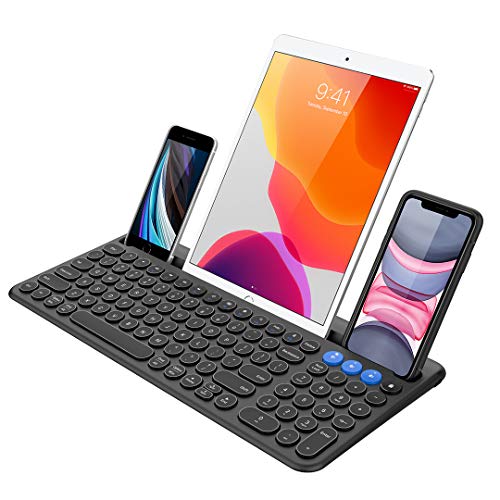 Arteck Bluetooth Keyboard with Cradle
|
7.8/10 | Buy |
Samsers Foldable Bluetooth Keyboard with Touchpad
This portable, foldable keyboard packs a sensitive touchpad and a built-in phone stand, making it ideal for on-the-go typing with tablets or phones. Its lightweight design and long battery life suit travelers and editors who need a compact input solution.
Pros
- Ultra-lightweight and foldable for portability
- Built-in touchpad with multi-touch support
- Long battery life: 48 hours use, 560 hours standby
- Includes phone stand holder for comfortable viewing
- Quiet keys for focused work
Cons
- Touchpad not compatible with older iOS and Android versions
- Not compatible with various computer sticks
- Limited color option (black only)
Xukinroy 10-Inch Ultra-Slim Bluetooth Keyboard
This compact Bluetooth keyboard pairs with iOS and Android devices for on-the-go typing. Its rechargeable battery lasts up to 20 days with daily use, and the scissor switches provide quiet, comfortable keystrokes. Ideal for tablet and phone users who need a portable keyboard.
Pros
- Ultra-slim and lightweight design
- Rechargeable with long battery life (up to 20 days)
- Automatic sleep to save power
- Quiet scissor-switch keys
- Broad compatibility with iOS, Android, iPadOS
Cons
- Compact keys may feel cramped for large hands
- No backlight for low-light typing
Logitech K400 Plus Wireless Touch TV Keyboard
The Logitech K400 Plus combines a wireless keyboard and touchpad into one device, ideal for controlling a PC-connected TV from the couch. Its long-lasting battery (up to 18 months) and spill-resistant design make it a practical choice for home theater setups. Plug-and-play setup via the Unifying receiver ensures easy compatibility with Windows, Android, and Chrome OS.
Pros
- Integrated touchpad eliminates need for separate mouse
- Up to 18 months battery life with on/off button
- Spill-resistant design for durability
- Plug-and-play setup with Unifying receiver
- Wide compatibility with Windows, Android, Chrome OS
Cons
- No backlight for typing in dark rooms
- Uses AA batteries rather than rechargeable
- Small touchpad dimensions (2.99 x 1.85 inches)
TOHAKATA Backlit Bluetooth Keyboard
This slim, portable keyboard offers seven-color LED backlighting and a quiet scissor-switch typing experience. It connects reliably via Bluetooth to tablets and phones, making it a practical travel companion for mobile typing.
Pros
- Seven-color backlight with adjustable brightness
- Quiet, scissor-switch keys for comfortable typing
- Rechargeable battery with auto-sleep to save power
- Compact and lightweight for easy portability
Cons
- Not compatible with laptops, computers, or Macs
- Auto-sleep can cause brief delay when waking
OMOTON Bluetooth Keyboard with Oversized Keycaps
This OMOTON Bluetooth keyboard delivers a comfortable typing experience thanks to keycaps that are 27% larger than standard, minimizing accidental presses. It pairs with Android, iOS, and Windows devices, and the seven-color backlight with adjustable brightness is handy for low-light use.
Pros
- Oversized keycaps reduce typos and fatigue
- Compatible with three major operating systems
- Seven-color backlight with three brightness levels
- Battery lasts up to 200 hours with backlight off
- Includes adjustable stand and Type-C charging
Cons
- Backlight use limits battery to 3-5 hours
Arteck Bluetooth Keyboard with Cradle
This Bluetooth keyboard from Arteck allows seamless switching between three connected devices with a single click. Its built-in cradle holds a smartphone or tablet for easy viewing and typing, and the rechargeable battery lasts up to six months. It works with Windows, iOS, Android, and Mac OS.
Pros
- Connects to three devices simultaneously
- Built-in cradle for phone or tablet
- Broad compatibility with major operating systems
- Long 6-month battery life
- Includes USB-C cable and 24-month warranty
Cons
- No backlit keys
Best Android Keyboard Buying Guide
Connectivity and Compatibility
All the keyboards in our list use Bluetooth to connect wirelessly to Android devices. Most support Bluetooth 5.0 or higher, which offers a reliable connection with low power consumption.
Compatibility is generally broad across Android smartphones, tablets, and even smart TVs running Android TV. Some models, like the Logitech K400 Plus, include a USB receiver for PCs but still work via Bluetooth with Android.
For the best experience, look for a keyboard that can pair with multiple devices and switch between them seamlessly, a feature often called multi-device pairing.
If you need a keyboard for both your Android tablet and your desktop, consider a model that can connect via Bluetooth and USB simultaneously.
It is also important to check whether the keyboard supports Android-specific shortcuts, such as Home, Back, and Recent Apps keys. Many keyboards designed for tablets include dedicated Android keys, which can save time and make navigation feel more natural.
Our guide to the best 10 keyless keyboards offers more insight into compact layouts that work well with mobile devices.
Form Factor and Portability
Portability is a major consideration when choosing a keyboard for on-the-go use with an Android phone or tablet.
Ultra-slim and foldable designs, such as the Samsers Foldable Bluetooth Keyboard, collapse to a size that fits easily into a bag or even a large pocket.
Full-size keyboards with built-in touchpads, like the Arteck Wireless Bluetooth Keyboard with Cradle, offer a more comfortable typing experience but take up more space. If you travel frequently, a lightweight and compact keyboard is a wise investment.
For more portable options, take a look at our selection of the best foldable keyboards for every traveler.
Consider also whether you need a keyboard that doubles as a stand for your tablet.
Some models include a cradle or a fold-out stand, which can be very convenient for typing on a phone or tablet without needing an extra accessory. The Arteck model is a great example of this all-in-one approach.
Battery Life and Charging
Battery life varies widely among Android keyboards. Some use replaceable coin-cell batteries that can last for months, while others have built-in rechargeable lithium-ion batteries that need to be charged every few weeks depending on usage.
Rechargeable models are generally more convenient and environmentally friendly. Many modern keyboards feature USB-C charging, which is fast and compatible with most phone chargers. When evaluating battery life, check user reports about real-world usage rather than just manufacturer claims.
If you often forget to charge, a keyboard with a long standby time and a visible battery indicator can save frustration.
Typing Experience
Comfort and accuracy are crucial for extended typing sessions. Key travel, spacing, and feedback vary across models. Scissor-switch mechanisms (common on slim keyboards) offer a shallow but crisp feel, while membrane keys can be softer and quieter.
Some users prefer a more tactile response, while others want a silent, low-profile key action.
If you plan to use the keyboard for long typing sessions, look for one with adequate key spacing and a layout that does not feel cramped.
The Logitech K400 Plus, for instance, is known for its comfortable, full-sized keys and integrated touchpad, making it a favorite for couch-based Android TV use. Our best couch keyboard guide covers more models optimized for living-room use.
Additional Features: Backlit Keys, Touchpad, and Media Controls
Extra features can greatly enhance the usability of an Android keyboard. Backlit keys are invaluable for typing in dimly lit environments, a feature found on models like the TOHAKATA Backlit Wireless Keyboard.
A built-in touchpad allows you to control your Android device without reaching for the screen, which is especially useful when the tablet is placed in a stand or connected to a TV.
Some keyboards also include dedicated media keys (play, pause, volume) and Android shortcut keys. Consider which features matter most for your typical usage scenario.
For example, if you frequently use your Android tablet for media consumption, a keyboard with media controls and a touchpad can be a game-changer.
Why You Should Trust Us
At BestProducts, we are committed to providing independent, trustworthy recommendations. We do not conduct our own product trials; our evaluations are grounded in research, published data, expert review consensus, and verified buyer feedback.
Every product in this guide has been scored on our 0, 10 BP Score, which reflects its performance across a consistent set of criteria relevant to Android keyboards: connectivity reliability, build quality, typing comfort, portability, battery life, and value.
We do not accept payment from manufacturers for placement in our reviews, and our affiliate commissions do not influence our rankings.
For more on our methodology, you can explore our other buying guides, such as our roundup of the best ergonomic split keyboards for a healthier workspace.
Final Thoughts
After extensive research, these are the Android keyboards that stand out in their respective categories:
- Best Overall: Samsers Foldable Bluetooth Keyboard with Touchpad, Combining a portable foldable design with a responsive touchpad, this keyboard offers the best balance of features and performance, earning the highest BP Score in our lineup.
- Best Budget Pick: Xukinroy Ultra-Slim Bluetooth Keyboard, At a remarkably low price, this ultra-slim keyboard delivers solid connectivity and a surprisingly comfortable typing experience, making it an unbeatable value for users on a tight budget.
- Best for TV Use: Logitech K400 Plus Wireless Touch TV Keyboard, With its integrated touchpad and full-sized layout, this keyboard is purpose-built for navigating Android TV and media centers, and it remains a favorite among couch typists.
- Best Backlit Option: TOHAKATA Backlit Wireless Bluetooth Keyboard, For those who type in low light, this model offers adjustable backlighting and a reliable Bluetooth connection at a very competitive price point.
Frequently Asked Questions
Can I use any Bluetooth keyboard with my Android phone or tablet?
Most Bluetooth keyboards work with Android devices, provided they support the Bluetooth HID (Human Interface Device) profile. However, some keyboards may lack Android-specific shortcut keys, and others might have limited compatibility with certain Android versions.
It is always a good idea to check user reviews for compatibility reports before purchasing.
What is the best keyboard for an Android tablet?
The best keyboard for an Android tablet depends on how you plan to use it. For productivity, a full-sized keyboard with a touchpad (like the Logitech K400 Plus or Arteck) is ideal.
For portability, a foldable keyboard (such as the Samsers) is a great choice. If you need backlighting, the TOHAKATA or OMOTON models are excellent. Consider your primary use case to narrow down the options.
Do I need a keyboard with a touchpad for Android?
A touchpad is not essential, but it can be very convenient when your tablet is in a stand or connected to an external display.
It allows you to control the cursor without reaching for the touchscreen, which is especially useful for selecting text, navigating menus, or using Android Desktop mode.
If you plan to use your tablet as a laptop replacement, a touchpad is highly recommended.
Are foldable keyboards durable?
Modern foldable keyboards are designed to withstand regular folding and unfolding. The Samsers Foldable Bluetooth Keyboard, for example, uses a sturdy hinge and durable materials.
While they may not feel as solid as a traditional full-sized keyboard, most well-reviewed models hold up well over time. Check user feedback regarding hinge longevity and key mechanism reliability.
How do I connect a Bluetooth keyboard to my Android device?
To connect a Bluetooth keyboard to an Android device, put the keyboard into pairing mode (usually by holding a button or switch). Then, on your Android device, go to Settings > Bluetooth and ensure Bluetooth is on.
Your keyboard should appear in the list of available devices; tap it to pair. You may be asked to enter a code on the keyboard and press Enter. Once connected, the keyboard will automatically reconnect in the future.
Can I use an Android keyboard with a Smart TV?
Yes, many Bluetooth keyboards work with Android TV and smart TVs that run Android. The Logitech K400 Plus is specifically designed for this purpose, with a touchpad and media keys that make navigating TV interfaces much easier.
Most standard Bluetooth keyboards will also connect and allow basic typing, though some advanced keys may not function.
About the author
Adrian covers digital pianos, keyboards, and drum kits for BestProducts, comparing key and pad feel, sound engines, and quiet practice options. He helps musicians find instruments that satisfy at home and on stage.