The Best Keyboard
Find the best keyboard for your needs with our expert picks covering mechanical, wireless, ergonomic, and budget options. Every model reviewed for performance and value.
 By Adrian Perez
Updated September 10, 2026
By Adrian Perez
Updated September 10, 2026
Finding the right keyboard can transform your daily computing experience, whether you’re typing documents, coding, or gaming. With so many options, from mechanical to membrane, wired to wireless, it’s important to know what matters for your workflow and budget.
Whether you need a compact model for a cluttered desk or a full-size ergonomic board for long hours, the choices can feel overwhelming.
BestProducts evaluated each keyboard against consistent criteria, analyzing specifications, expert review consensus, and verified buyer feedback to score each model on our 0 to 10 BP Score. Below are our top picks to help you find the best keyboard for your needs in 2026.
| Award | Product | BP Score About BP ScoreThe BP Score is our own rating from 0 to 10, based on performance, design and build, ease of use, and value. It reflects independent research and is never influenced by manufacturers, retailers, or affiliate commissions. Learn more › | |
|---|---|---|---|
| Best Overall |
 Kisnt KN85 75% Wireless Mechanical Keyboard
|
9.2/10 | Buy |
| Best Value |
 Razer Ornata V3 Low-Profile Keyboard
|
9.2/10 | Buy |
 Logitech Wave Keys MK670 Ergonomic Combo
|
9.2/10 | Buy | |
 Logitech Signature Slim K950 Wireless Keyboard
|
9.2/10 | Buy | |
| Best Premium |
 SteelSeries Apex Pro TKL Gen 3
|
9.2/10 | Buy |
| Best Budget |
 TECKNET RGB Backlit Gaming Keyboard
|
9.1/10 | Buy |
 Logitech G213 Prodigy Wired RGB Keyboard
|
9.1/10 | Buy | |
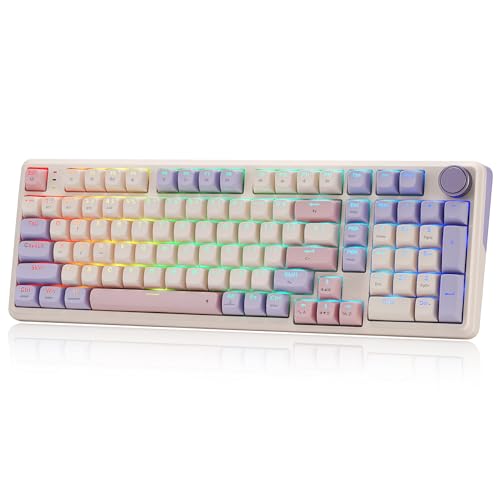 Redragon K768 PRO Wireless 8000mAh
|
9.1/10 | Buy | |
 AULA F75 Pro 75% Wireless Mechanical Keyboard
|
9.1/10 | Buy | |
 Logitech MX Keys S Mac Wireless Keyboard
|
9.1/10 | Buy |
Kisnt KN85 75% Wireless Mechanical Keyboard
This compact 85-key board blends a creamy, marbly typing feel with tri-mode wireless and hot-swappable switches. It is a solid pick for gamers or typists who want a space-saving layout and customizable RGB, though the lack of a numpad and Windows-only software for macros are notable trade-offs.
Pros
- Compact design frees desk space
- Buttery-smooth linear switches
- Rich, satisfying sound from gasket mount and foam
- Wireless with low-latency options
- Easy switch swapping without soldering
Cons
- No dedicated numpad
- Software only available for Windows
- RGB animation consumes battery quickly
Razer Ornata V3 Low-Profile Keyboard
This gaming keyboard combines low-profile keys with mecha-membrane switches for a comfortable, responsive typing experience. The UV-coated keycaps and magnetic wrist rest add durability and support for long sessions.
Pros
- Comfortable low-profile design
- Satisfying mecha-membrane switches
- Durable UV-coated keycaps
- Convenient media keys
- Supportive magnetic wrist rest
Cons
- Limited color option (black only)
- No wireless connectivity
Logitech Wave Keys MK670 Ergonomic Combo
The Logitech Wave Keys MK670 combo pairs a wavy ergonomic keyboard with a quiet, sculpted mouse for all-day comfort. It features a memory foam palm rest, compact layout to bring the mouse closer, and smart scrolling. Ideal for medium- to large-handed users seeking a comfortable computing experience.
Pros
- Wavy design promotes natural typing posture
- Memory foam palm rest reduces wrist pressure
- SilentTouch mouse with 90% less click noise
- SmartWheel for line-by-line or rapid scrolling
- Customizable via Logi Options+ app
Cons
- Only offered in one color (Graphite)
Logitech Signature Slim K950 Wireless Keyboard
For anyone juggling a laptop, phone, and desktop, the Logitech Signature Slim K950 pairs with three devices and switches between them with a tap. It delivers quiet, laptop-style typing in a full-size layout, and its Logi Options+ app unlocks extra shortcuts for work and home. A solid choice for a tidy, multi-device desk setup.
Pros
- Quiet typing keeps distractions to a minimum
- Switches between three paired devices with one tap
- Works across Windows, macOS, Chrome OS, Linux, iOS, and Android
- Customizable keys through Logi Options+ app
- Contains at least 48% post-consumer recycled plastic
Cons
- Logi Options+ customization only on Windows and macOS
SteelSeries Apex Pro TKL Gen 3
The SteelSeries Apex Pro TKL Gen 3 is a tenkeyless keyboard featuring OmniPoint 3.0 analog magnetic switches with adjustable actuation from 0.1mm to 4.0mm. Its Quickset auto-presets enable instant activation of Rapid Trigger, Rapid Tap, and Protection Mode per game, making it ideal for competitive gamers seeking customizable response and reduced errors.
Pros
- Adjustable actuation range (0.1mm to 4.0mm)
- Rapid Trigger for faster key resets
- Rapid Tap for better movement control
- Protection Mode minimizes accidental keypresses
- Onboard OLED for quick settings adjustments
Cons
- Tenkeyless design lacks dedicated number pad
- Wired-only connectivity (USB-C)
TECKNET RGB Backlit Gaming Keyboard
With its ergonomic layout and whisper-quiet keys, the TECKNET gaming keyboard balances comfort and discretion. The customizable RGB backlighting and 25 anti-ghost keys appeal to gamers, while the IP32 spill resistance adds peace of mind for any desk setup.
Pros
- Ergonomic design reduces hand fatigue
- Whisper-quiet switches for silent operation
- IP32 spill resistance protects against accidents
- 25 anti-ghost keys for responsive gaming
- Customizable RGB with 15 color modes
Cons
- ABS keycaps may wear over time
- Multimedia keys not compatible with Mac
- Automatic backlight sleep after 30 minutes
Logitech G213 Prodigy Wired RGB Keyboard
The Logitech G213 Prodigy is a full-sized wired gaming keyboard with customizable RGB lighting and a spill-resistant design. It offers a responsive typing experience and dedicated media controls, though it does not feature mechanical switches.
Pros
- Customizable RGB lighting per zone
- Spill-resistant and easy to clean
- Dedicated media controls and volume wheel
- Comfortable built-in palm rest
Cons
- Membrane keys not mechanical
- No USB pass-through port
- Only five lighting zones
Redragon K768 PRO Wireless 8000mAh
This wireless gaming keyboard combines a massive 8000mAh battery with tri-mode connectivity (USB-C, Bluetooth, 2.4GHz) for extended use between charges. Its gasket-mounted linear switches and PBT keycaps deliver a soft, durable typing feel, while the single knob controls brightness and media playback. Ideal for gamers who need long battery life and a customizable layout with hot-swappable switches.
Pros
- 8000mAh battery for weeks of use
- Tri-mode wireless plus USB-C wired
- Gasket mount with creamy linear switches
- Fade-resistant PBT keycaps with RGB
- Hot-swappable 3-pin or 5-pin switches
Cons
- Single color option (Lilac Land)
- Knob only control for media and lighting
- Software needed for advanced macros and lighting
AULA F75 Pro 75% Wireless Mechanical Keyboard
This compact 75% keyboard offers tri-mode connectivity and a hot-swappable design, making it versatile for both gaming and typing. The pre-lubed switches and layered silencers deliver a creamy, thocky feel, while the 4000mAh battery ensures long-lasting wireless use. Ideal for users who want a customizable, space-saving board with a volume knob and side-printed keycaps.
Pros
- Tri-mode connection with up to 5 devices
- Hot-swappable and easy to customize
- Large 4000mAh battery
- Smooth, creamy typing sound and feel
- Multifunction knob for quick controls
Cons
- No dedicated numpad
- Side-printed keycaps may take adjustment
- No wrist rest included
Logitech MX Keys S Mac Wireless Keyboard
This wireless keyboard is tailored for Mac users with a dedicated key layout and Apple-matching finishes. It offers a fluid typing experience with spherically dished keys and smart backlighting that adjusts to your environment.
Pros
- Mac-specific layout
- Comfortable low-profile design
- Smart backlighting
- Multi-device connectivity
- Recycled plastic construction
Cons
- No numeric keypad
- Requires Logi Options+ for full features
- No USB receiver included in box
Best Keyboard Buying Guide
Switch Types: Mechanical vs. Membrane
The switch type determines how a keyboard feels and sounds. Mechanical switches offer distinct tactile or linear feedback and are generally more durable, making them popular among gamers and heavy typists.
Membrane keyboards use a rubber dome under the keys, quieter and often cheaper, but less responsive.
If you prioritize a satisfying typing feel, look into models with dedicated mechanical switches; our best Cherry MX keyboard guide covers the most respected switch variants.
Some keyboards, like the Razer Ornata V3, use a hybrid mecha-membrane design for a middle ground. For pure performance, hot-swappable mechanical boards let you change switches without soldering.
Form Factor and Layout
Keyboard sizes range from full-size (with number pad) to 60% (no function row or arrows). A 75% layout, like that of the Kisnt KN85, keeps the arrow keys and function row in a compact footprint.
If you need a number pad for data entry, a full-size or TKL with a separate pad works. For a clutter-free desk, consider a tenkeyless design; our best 10 keyless keyboard picks show the top options.
Portability matters too: if you frequently move between setups, a 75% or 60% board is easier to pack. For living-room use, a full-size wireless model might be more comfortable.
Connectivity and Wireless Options
Wired keyboards offer the lowest latency and no battery concerns, ideal for competitive gaming. Wireless keyboards use Bluetooth or a 2.4 GHz dongle; many modern models support both, allowing you to switch between devices.
Look for keyboards with low-latency 2.4 GHz for gaming and Bluetooth for multi-device convenience. Our best foldable keyboard roundup includes ultra-portable wireless designs.
Battery life varies, some boards last weeks on a charge, others months. Models like the Redragon K768 PRO include a large 8000 mAh battery for extended use.
Ergonomics and Comfort
Long typing sessions can strain wrists and shoulders. Ergonomic features like a split layout, tenting, or a cushioned wrist rest improve comfort. The Logitech Wave Keys MK670 combines a wave-shaped design with a padded palm rest.
For a more specialized solution, see our best ergonomic split keyboard guide, which reviews models that separate the key halves to promote natural hand alignment.
Even without a split, choosing a keyboard with adjustable feet and a gently sloping profile can reduce strain. Key travel, short or long, also affects fatigue.
Backlighting and Build Quality
RGB backlighting lets you customize colors and effects, which is especially useful in low light. Most gaming keyboards have per-key RGB, while productivity boards often use white backlighting or none.
Build quality matters for longevity: metal top plates and double-shot PBT keycaps resist wear better than thin ABS. The SteelSeries Apex Pro TKL Gen 3 uses a durable aluminum frame and premium PBT caps.
If you often work in a shared space, a keyboard with quiet, dampened keys, like the Logitech Signature K950, helps avoid disturbing others.
Why You Should Trust Us
BestProducts is an independent review site that evaluates products through comprehensive research. We do not conduct our own product trials; our evaluations are grounded in research, published data, expert review consensus, and verified buyer feedback.
Each keyboard is scored on our 0 to 10 BP Score based on consistent criteria, including build quality, performance, features, and user satisfaction. Our team continuously monitors market releases and updates our recommendations to reflect the best options available in 2026.
Final Thoughts
After reviewing dozens of keyboards, these stand out for their performance, value, and user satisfaction. Each earned a top BP Score in its category.
- Best Overall: Kisnt KN85 Wireless Mechanical Keyboard, Combines a 75% layout, hot‑swappable switches, and creamy sound with tri‑mode connectivity, earning a perfect BP Score for its balanced feature set and outstanding typing experience.
- Best for Gaming: SteelSeries Apex Pro TKL Gen 3, Featuring OmniPoint 3.0 analog magnetic switches with rapid trigger and adjustable actuation, this board delivers tournament‑level responsiveness and OLED customization.
- Best Wireless Mechanical: AULA F75 Pro, A 75% wireless mechanical with pre‑lubed switches, side‑printed PBT keycaps, and a convenient knob; ideal for gamers and professionals who want cable‑free precision.
- Best Ergonomic Combo: Logitech Wave Keys MK670, This wave‑shaped ergonomic keyboard paired with a matching mouse reduces wrist strain and supports a natural typing posture, backed by solid battery life.
- Best Budget Pick: TECKNET Wired Gaming Keyboard, Offers full RGB backlighting and a metal‑panel design for under $26.99, making it an affordable entry into mechanical‑style gaming.
Frequently Asked Questions
Mechanical vs. membrane: Which keyboard type is better?
Mechanical keyboards generally offer better tactile feedback, longer lifespan, and easier customization through hot‑swappable switches. Membrane keyboards are quieter and cheaper but can feel mushy. If you type or game for hours, a mechanical board is usually worth the investment.
What keyboard size should I choose?
Full-size keyboards include a number pad, which is helpful for data entry. Tenkeyless (TKL) boards omit the number pad to save desk space while keeping arrow keys. 75% and 60% layouts are more compact, but may require function layers for navigation keys.
Think about how much desk space you have and whether you need a numpad.
Are hot‑swappable switches worth it?
Hot‑swappable keyboards let you change switches without soldering, making it easy to experiment with different feel and noise levels. They are especially useful if you want to customize your typing experience over time.
Many mechanical keyboards in our list, including the Kisnt KN85 and AULA F75 Pro, support hot‑swapping.
Wired or wireless keyboard for gaming?
For competitive gaming where every millisecond counts, a wired connection offers the lowest latency. However, modern wireless keyboards with 2.4 GHz technology (like the SteelSeries Apex Pro TKL Gen 3) can match wired performance closely.
Bluetooth is fine for casual gaming and typing but may add slight delay.
How important is backlighting?
Backlighting helps you see keys in dim environments and can add a personal touch through RGB customization. It is not essential for everyone, but if you often work or game at night, a backlit keyboard significantly improves usability.
Per‑key RGB also allows you to highlight specific game commands.
About the author
Adrian covers digital pianos, keyboards, and drum kits for BestProducts, comparing key and pad feel, sound engines, and quiet practice options. He helps musicians find instruments that satisfy at home and on stage.