The Best RGB Graphics Card
We've researched the top RGB graphics cards, evaluating performance, cooling, and software to help you find the best RGB graphics card for your gaming PC.
 By Irene Hopkins
Updated September 11, 2026
By Irene Hopkins
Updated September 11, 2026
RGB lighting has become a defining feature of modern PC builds, and a graphics card with vibrant, customizable LEDs can transform your rig into a personal light show.
If you’re aiming for a cohesive look, our roundup of the best looking graphics cards is a great starting point.
At BestProducts, we’ve researched the latest models from top brands, analyzing specifications, expert reviews, and verified buyer feedback to help you find the best RGB graphics card for your needs.
Our picks below represent the strongest contenders for gamers and PC enthusiasts who want both stunning visuals and reliable performance. Read on for our top recommendations.
| Award | Product | BP Score About BP ScoreThe BP Score is our own rating from 0 to 10, based on performance, design and build, ease of use, and value. It reflects independent research and is never influenced by manufacturers, retailers, or affiliate commissions. Learn more › | Price | |
|---|---|---|---|---|
| Best Overall |
 ASRock RX 9060 XT Steel Legend 16GB
|
9.7/10 | $539.99 | Buy |
| Best Budget |
 GIGABYTE Radeon RX 9070 GRE 12GB
|
9.7/10 | $549.99 | Buy |
| Best Value |
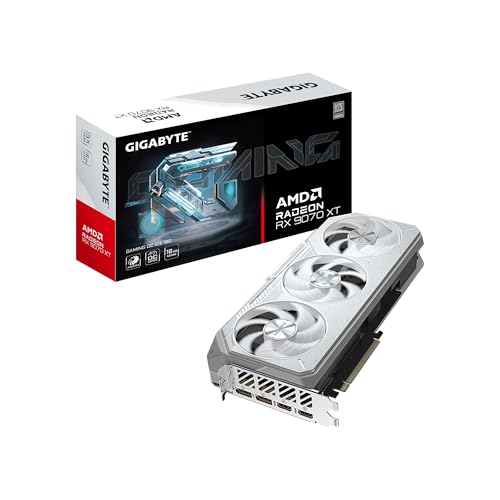 GIGABYTE RX 9070 XT Gaming OC 16GB
|
9.6/10 | $749.99 | Buy |
| Best Premium |
 ZOTAC GeForce RTX 5070 AMP White 12GB GDDR7
|
9.6/10 | $829.99 | Buy |
 GIGABYTE Radeon RX 9070 XT Gaming OC 16GB
|
9.5/10 | $799.28 | Buy | |
 PNY RTX 5080 Epic-X OC
|
9.5/10 | $1,799.99 | Buy | |
 ASUS Dual GeForce RTX 3050 OC 6GB
|
9.5/10 | $257.22 | Buy |
ASRock RX 9060 XT Steel Legend 16GB
ASRock's RX 9060 XT Steel Legend targets 4K gaming and content creation with 16GB GDDR6 VRAM and a 3275 MHz boost clock. The triple-fan 0dB cooling keeps noise low under light loads, while the metal backplate prevents GPU sag. PCIe 5.0 and DisplayPort 2.1a make it a future-proof choice for high-resolution displays.
Pros
- High 3275 MHz boost clock with 16GB VRAM
- Triple fan 0dB cooling for silent operation
- Reinforced metal backplate prevents sag
- Polychrome SYNC RGB lighting customization
- Latest PCIe 5.0 and DisplayPort 2.1a support
Cons
- Large 11.7-inch length may need big cases
- Not compatible with all prebuilt systems
GIGABYTE Radeon RX 9070 GRE 12GB
GIGABYTE's RX 9070 GRE is a mid-range graphics card built on the Radeon RX 9070 GRE with 12GB of GDDR6 memory. It stands out with its WINDFORCE cooling system that uses a Hawk fan and server-grade thermal gel, plus a dual BIOS switch for choosing between performance and silent operation.
Pros
- WINDFORCE cooling with Hawk fan and thermal gel
- 12GB GDDR6 on a 192-bit memory interface
- Dual BIOS for performance or silent modes
- RGB lighting for customization
- PCI Express 5.0 support
GIGABYTE RX 9070 XT Gaming OC 16GB
The GIGABYTE RX 9070 XT Gaming OC ICE stands out with its white design and robust WINDFORCE cooling, which uses server-grade thermal gel and dual BIOS for performance or silent operation. It's built for high-resolution gaming on AMD AM5 platforms, offering PCIe 5.0 and DisplayPort 2.1 support for future-proof connectivity.
Pros
- Powerful WINDFORCE cooling with server-grade thermal gel
- Dual BIOS for performance or silent operation
- Reinforced metal backplate for structural integrity
- Supports PCIe 5.0 and DisplayPort 2.1
- Customizable RGB lighting via GIGABYTE CONTROL CENTER
Cons
- Large 2.7-slot design may limit case compatibility
- White color scheme may not suit all PC builds
ZOTAC GeForce RTX 5070 AMP White 12GB GDDR7
A compact enthusiast card built around NVIDIA’s Blackwell architecture and DLSS 4, aimed at gamers who want SFF-friendly size with white aesthetics. Its triple 90mm IceStorm 2.0 cooling and pass-through airflow promise efficient thermal management in small builds.
Pros
- White color option fits custom builds
- Effective iceStorm 2.0 cooling design
- DLSS 4 support improves performance
- SFF-ready for small cases
- Includes GPU support stand
Cons
- Dimensions listed may miscue (12 x 1.6 x 0.1 inches likely inaccurate)
- Only 12GB VRAM may limit future high-res textures
GIGABYTE Radeon RX 9070 XT Gaming OC 16GB
This Gigabyte graphics card delivers the Radeon RX 9070 XT GPU with 16GB of GDDR6 memory, backed by a robust WINDFORCE cooling system and server-grade thermal gel for sustained performance. It's a solid pick for gamers and creators who need reliable cooling and the latest PCIe 5.0 connectivity.
Pros
- Triple-fan WINDFORCE cooling system
- Server-grade thermal gel for better heat transfer
- 16GB GDDR6 memory for demanding workloads
- PCIe 5.0 support for next-gen motherboards
- Built-in RGB lighting for customization
Cons
- Large dimensions may limit case compatibility
- Heavy build requires sturdy mounting
- Only available in black
PNY RTX 5080 Epic-X OC
Gamers and creators eyeing the latest NVIDIA Blackwell architecture will find this PNY card offers triple-fan cooling with a vapor chamber, customizable RGB, and software control. It's built to handle demanding workloads while keeping noise low when idle.
Pros
- Triple 100mm axial fans with 15% more airflow
- Stealth mode for silent operation at low temps
- Advanced vapor chamber and ultra-dense heatsink
- Customizable Epic-X ARGB lighting
Cons
- Available only in black color
ASUS Dual GeForce RTX 3050 OC 6GB
Based on its specs, the ASUS Dual GeForce RTX 3050 OC 6GB is an entry-level Ampere card that brings ray tracing and DLSS to 1080p gaming. Its compact 2-slot design and dust-resistant fan make it a practical option for small-form-factor builds, though the 6GB VRAM and modest boost clock limit its headroom for demanding titles.
Pros
- Ampere architecture with improved throughput
- Supports ray tracing and DLSS
- Efficient axial-tech fan with dust resistance
- Compact 2-slot design fits small cases
- Stainless steel bracket resists corrosion
Cons
- 6GB VRAM may limit performance in newer games
- Boost clock is relatively low at 1500 MHz
Best RGB Graphics Card Buying Guide
RGB Customization and Software Ecosystem
The quality of RGB implementation varies significantly between manufacturers. Some cards offer basic static lighting or a few preset effects, while others provide full per-LED control through intuitive software suites.
Brands like ASUS (Aura Sync), GIGABYTE (RGB Fusion), and ASRock (Polychrome Sync) allow you to synchronize lighting with your motherboard and other components.
If you plan to build a cohesive lighting theme, look for a card that supports your motherboard’s RGB ecosystem or offers standalone software with ample effects.
Advanced features include addressable RGB (aRGB) headers for external strips, memory-based lighting profiles, and integration with game telemetry (e.g., GPU temperature-based color changes).
For the most flexibility, consider cards that combine onboard lighting with software that doesn’t require constant internet connectivity.
Some high-end models also include physical lighting zones that can be customized independently, giving you greater creative control over your desktop PC aesthetics.
Performance and Cooling
RGB lighting adds no direct performance benefit, but the cooling solution around it does. Triple-fan designs with large heatsinks are common on RGB cards, as they need to dissipate heat efficiently while keeping noise levels low.
Many modern cards feature semi-passive fans that stop completely under low load, perfect for quiet operation when you’re not gaming. For a deeper look at quiet GPUs, see our guide on the best silent graphics cards.
Pay attention to the number of heat pipes, fin density, and whether the card uses a vapor chamber for better thermal transfer.
For high-resolution gaming or ray tracing, a card with ample VRAM and a robust power delivery system is essential.
Cards like the GIGABYTE RX 9070 XT Gaming OC and the PNY RTX 5080 Epic-X RGB are built to handle demanding titles at 1440p and 4K, while their RGB lighting adds visual flair.
Always check the required power supply wattage and physical dimensions, some RGB cards are longer and thicker, so measure your case clearance before purchasing. If you’re also upgrading your power supply, see our guide on power supplies to ensure compatibility.
Form Factor and Compatibility
Graphics cards with integrated RGB lighting often come in larger form factors to accommodate extra LED arrays and heatsinks. Check the card’s length, width (slot count), and whether it requires extra power cables that might interfere with cable management.
Most RGB cards are dual-slot or 2.5-slot designs, but some premium models occupy three slots.
If you have a compact case or a mini-ITX build, look for cards with a smaller footprint but still decent RGB, like the ASUS Dual GeForce RTX 3050, which balances size and lighting.
For more budget-friendly compact options, check out our roundup of the best budget PC graphics cards.
Additionally, consider the location of RGB connectors. Some cards have lighting zones on the side, top edge, or backplate. If your case has a glass side panel, side-mounted RGB is more visible.
For a fully lit system, you might also want to coordinate with other components like mechanical keyboards and gaming laptops for a unified look.
Price and Value
RGB graphics cards span a wide price range, from budget-friendly options around $257.22 to flagship models exceeding $1,799.99. Typically, the premium for RGB lighting alone is modest, often $20, 50 over a non-RGB variant.
The real value comes from the combination of performance, cooling, and software support.
A mid-range card like the ASRock RX 9060 XT Steel Legend offers excellent RGB and strong 1440p performance at a competitive price, making it a top pick for many builders.
If you’re on a tighter budget, the ASUS RTX 3050 provides decent 1080p gaming and basic RGB, while high-end options like the GIGABYTE RX 9070 XT Gaming OC ICE deliver premium lighting and top-tier performance.
For more affordable picks, see our guide on the best inexpensive graphics cards.
Consider your resolution and refresh rate needs first, then choose a card with the RGB features that match your style. For more context on building a complete system, check out our roundup of computer graphics cards for every build.
Ray Tracing, VRAM, and Future-Proofing
Many modern RGB cards support ray tracing and come with generous VRAM buffers. For ray tracing, NVIDIA’s RTX series and AMD’s RDNA 3/4 architecture offer hardware acceleration.
VRAM amounts range from 6GB on entry-level cards to 16GB or more on higher-end models. If you plan to keep your card for several years or play VR games, aim for at least 12GB VRAM.
The ZOTAC RTX 5070 AMP White Edition with 12GB GDDR7 is a solid choice for future-proofing, while the GIGABYTE RX 9070 GRE with 12GB GDDR6 balances cost and longevity.
To stay ahead of the curve, explore our guide to the best upcoming graphics cards.
Also consider connectivity: DisplayPort 2.1 and HDMI 2.1 support are becoming standard, enabling high refresh rates at 4K. If you own a high-refresh-rate monitor, ensure the card can output the required bandwidth. For monitors, see our guide on monitors to pair with your new GPU.
Why You Should Trust Us
At BestProducts, we are committed to providing honest, independent reviews. We do not conduct our own product trials; our evaluations are grounded in research, published data, expert review consensus, and verified buyer feedback.
Each graphics card is scored against a consistent set of criteria, including RGB software quality, cooling efficiency, performance benchmarks, build materials, and user satisfaction, using our proprietary BP Score (0 to 10).
This methodology ensures that every recommendation is backed by thorough analysis, not personal opinion or paid promotion.
We are entirely independent and earn a commission if you purchase through our links, at no extra cost to you.
Our editorial team has years of experience covering PC hardware, and we regularly update our guides to reflect the latest models and market changes. For more on how we review products, visit our main graphics card guide.
Final Thoughts
- Best Overall: ASRock Radeon RX 9060 XT Steel Legend 16GB, Combines outstanding performance, comprehensive RGB software, and a competitive price, earning the highest BP Score in our lineup for its balanced feature set.
- Best High-End RGB: PNY NVIDIA GeForce RTX 5080 Epic-X RGB OC, Delivers flagship ray-tracing power and elaborate lighting effects, ideal for enthusiasts who want the best visuals and performance.
- Best Mid-Range Value: GIGABYTE Gaming Radeon RX 9070 GRE 12GB, Excellent 1440p gaming performance with solid RGB customization at a price that won’t break the bank.
- Best Budget RGB: ASUS Dual GeForce RTX 3050 6GB, Affordable entry into RGB graphics with enough power for 1080p gaming and a compact size suitable for smaller builds.
Frequently Asked Questions
Do RGB graphics cards affect performance?
No, the RGB lighting itself has negligible impact on performance. It draws a tiny amount of power (usually less than 5 watts) and does not affect GPU clock speeds or frame rates. The cooling solution and power delivery are what determine performance, not the LEDs.
Can I control RGB lighting with my motherboard software?
Many RGB graphics cards are compatible with major motherboard RGB ecosystems like ASUS Aura Sync, GIGABYTE RGB Fusion, MSI Mystic Light, and ASRock Polychrome Sync. Check the card’s specifications to confirm compatibility.
Some cards also offer standalone software (e.g., ASUS GPU Tweak II, GIGABYTE AORUS Engine) for independent control.
What is the best RGB graphics card for 1440p gaming?
For smooth 1440p gaming with high settings and ray tracing, we recommend the ASRock RX 9060 XT Steel Legend or the GIGABYTE RX 9070 XT Gaming OC. Both offer excellent performance, ample VRAM, and robust RGB customization.
If you prefer NVIDIA, the ZOTAC RTX 5070 AMP is also a strong contender. For more 1440p-focused options, see our guide on the best graphics card for 2K gaming.
Is RGB lighting worth the extra cost?
It depends on your priorities. RGB adds aesthetic value and can unify your build’s theme. The cost premium is typically small ($20, 50) over non-RGB versions, and you often get better cooling or higher factory overclocks as well.
If you don’t care about lighting, you can save money by choosing a non-RGB card.
Do all RGB graphics cards require software to control lighting?
Most do, but some cards have hardware switches or default lighting modes that work without software. However, for full customization, like setting colors, effects, and synchronization, you’ll need the manufacturer’s utility or a third-party app like OpenRGB.
The best software suites are user-friendly and regularly updated.
Which brand has the best RGB implementation?
ASRock’s Polychrome Sync and GIGABYTE’s RGB Fusion are known for their reliability and wide compatibility. ASUS Aura Sync is also highly regarded for its ecosystem integration.
Among our picks, the ASRock RX 9060 XT Steel Legend stands out for its vivid lighting zones and intuitive software. For more on AMD options, check out our roundup of the best AMD graphics cards.
About the author
Irene reviews desktop PCs and monitors for BestProducts, weighing performance, upgradability, and panel quality for work and home. She helps readers build a desk setup that stays fast and comfortable for years.