The Best White Graphics Card
A white GPU is the easiest way to push a clean PC theme over the line. These picks balance cooling, performance, and style for every budget.
 By Irene Hopkins
Updated September 12, 2026
By Irene Hopkins
Updated September 12, 2026
A white graphics card can anchor an entire PC build. For gamers and creators who want a clean, bright system, the GPU is the most visible component, and a white version helps every other part feel intentional.
Manufacturers now offer white models across nearly every performance tier, so you no longer have to choose between style and capability.
BestProducts editors evaluate each card by analyzing published specifications, expert review consensus, verified buyer feedback, and public performance data. For a broader overview of the category, our video graphics card coverage explains the differences between entry-level, mid-range, and flagship models.
The best white graphics card for you depends on your monitor, case size, and budget. The picks below cover the widest range of use cases.
| Award | Product | BP Score About BP ScoreThe BP Score is our own rating from 0 to 10, based on performance, design and build, ease of use, and value. It reflects independent research and is never influenced by manufacturers, retailers, or affiliate commissions. Learn more › | |
|---|---|---|---|
| Best Overall |
 GIGABYTE Radeon RX 9060 XT 16GB Gaming OC ICE
|
9.2/10 | Buy |
| Best Premium |
 ASUS Prime RX 9070 XT 16GB White OC
|
9.2/10 | Buy |
| Best Budget |
 MOUGOL RX 580 8GB GDDR5
|
9.1/10 | Buy |
| Best Value |
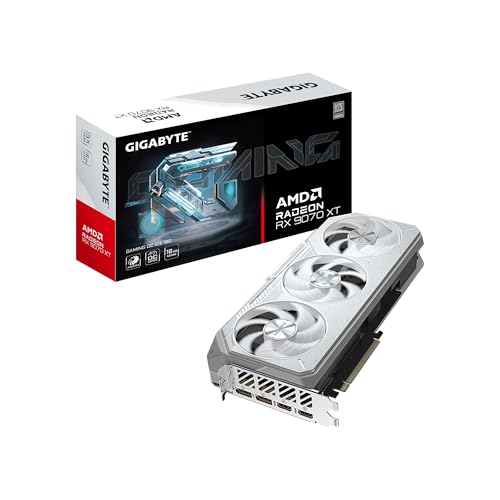 GIGABYTE RX 9070 XT Gaming OC 16GB
|
8.4/10 | Buy |
 XFX Swift RX 9060 XT OC 16GB
|
8.3/10 | Buy | |
 ASUS Dual RX 9060 XT 16GB GDDR6
|
8.3/10 | Buy | |
 ASRock RX 9070 XT Steel Legend 16GB
|
8.1/10 | Buy | |
 ASUS Prime RTX 5070 12GB GDDR7 OC
|
8.0/10 | Buy | |
 ASUS ROG Astral RTX 5080 16GB GDDR7
|
8.1/10 | Buy |
GIGABYTE Radeon RX 9060 XT 16GB Gaming OC ICE
Built for longevity on AM5 platforms, this GIGABYTE card emphasizes thermal management with its WINDFORCE cooling system and server-grade thermal gel. The 16GB VRAM and PCIe 5.0 support pair well with AMD Ryzen 9000 series, and the dual BIOS option lets users prioritize performance or silence.
Pros
- Server-grade thermal gel for superior heat transfer
- Alternate spinning Hawk fans reduce turbulence
- Reinforced metal backplate with I/O bracket support
- Dual BIOS flexibility (performance or silent modes)
- Customizable RGB lighting via GIGABYTE CONTROL CENTER
Cons
- 128-bit memory bus may limit bandwidth in memory-intensive tasks
- White-only color scheme may not suit all builds
ASUS Prime RX 9070 XT 16GB White OC
This white edition graphics card delivers strong out-of-the-box performance with a boost clock reaching 3030 MHz. Its updated axial-tech fans and phase-change thermal pad ensure effective cooling, while GPU Tweak III software gives you control over tuning and monitoring.
Pros
- High boost clock up to 3030 MHz
- Advanced axial-tech fans with barrier ring
- Phase-change GPU thermal pad for heat transfer
- 2.5-slot design for build flexibility
- Dual-ball fan bearings for longer lifespan
Cons
- White color may not suit all builds
- 2.5-slot size can block adjacent PCIe slots
- Heavy at 3.7 pounds
MOUGOL RX 580 8GB GDDR5
This budget-friendly GPU delivers solid 1080p performance in popular titles like Fortnite and GTA V, with triple-monitor support and a dual-fan cooling system for stable operation.
Pros
- Triple display support for productivity
- Compact size fits many cases
- Good 1080p gaming performance
- Efficient dual-fan cooling
- Supports modern graphics APIs
Cons
- Requires 500W power supply minimum
- Older 14nm architecture
- Limited to 1080p for newer titles
GIGABYTE RX 9070 XT Gaming OC 16GB
The GIGABYTE RX 9070 XT Gaming OC ICE stands out with its white design and robust WINDFORCE cooling, which uses server-grade thermal gel and dual BIOS for performance or silent operation. It's built for high-resolution gaming on AMD AM5 platforms, offering PCIe 5.0 and DisplayPort 2.1 support for future-proof connectivity.
Pros
- Powerful WINDFORCE cooling with server-grade thermal gel
- Dual BIOS for performance or silent operation
- Reinforced metal backplate for structural integrity
- Supports PCIe 5.0 and DisplayPort 2.1
- Customizable RGB lighting via GIGABYTE CONTROL CENTER
Cons
- Large 2.7-slot design may limit case compatibility
- White color scheme may not suit all PC builds
XFX Swift RX 9060 XT OC 16GB
With a white design and 16GB GDDR6 memory, this XFX card targets gamers seeking high frame rates at 1440p or entry-level 4K. The factory OC and RDNA 4 architecture support strong base and boost clocks without manual tuning.
Pros
- Large 16GB VRAM for modern textures
- High boost clock up to 3320 MHz
- White aesthetic suits light builds
- Factory overclocked for extra performance
Cons
- Only 2 display outputs (HDMI + DP)
- No fan-stop or silent mode confirmed
- Large size may not fit small cases
ASUS Dual RX 9060 XT 16GB GDDR6
The ASUS Dual RX 9060 XT is a white-themed graphics card that delivers high clock speeds with efficient cooling. Its axial-tech fans and dual BIOS profiles make it a flexible choice for gamers building a white PC.
Pros
- High boost clock up to 3250 MHz
- Efficient axial-tech fans with barrier ring
- 2.5-slot design for build compatibility
- 0dB technology for silent light gaming
- Dual BIOS profiles for flexibility
ASRock RX 9070 XT Steel Legend 16GB
This graphics card harnesses AMD's RDNA 4 architecture with 64 compute units, third-gen ray tracing, and a factory overclocked boost clock of 2970 MHz. Its 16GB GDDR6 memory on a 256-bit bus offers ample bandwidth for demanding 4K games and professional creative workloads. The triple-fan cooler and reinforced metal frame are built to handle sustained high performance.
Pros
- Factory overclocked for out-of-box peak performance
- 16GB GDDR6 VRAM suits 4K gaming and creation
- RDNA 4 with ray tracing and AI accelerators
- Triple-fan design for efficient heat dissipation
- Includes DisplayPort 2.1a and HDMI 2.1b outputs
Cons
- Large 2.9-slot design may not fit compact cases
- Requires 800W power supply and two 8-pin connectors
- White/grey color limits build aesthetic options
ASUS Prime RTX 5070 12GB GDDR7 OC
This white-themed GPU focuses on small form factor compatibility while delivering next-gen AI and DLSS 4 performance. Its axial-tech fans and dual BIOS profiles balance cooling and noise for varied use cases.
Pros
- High AI TOPS for modern games and apps
- DLSS 4 support for smooth frame generation
- Fits most small form factor cases
- Durable dual-ball bearing fans
- Quiet operation under low load
Cons
- Modest factory overclock (30 MHz boost over default)
- White color scheme may clash with non-white builds
ASUS ROG Astral RTX 5080 16GB GDDR7
This high-end graphics card leverages NVIDIA's Blackwell architecture and DLSS 4, delivering 1899 AI TOPS for demanding AI and gaming tasks. Its quad-fan design and vapor chamber cooling maintain performance under load, while the full metal construction and GPU Guard ensure durability. Ideal for enthusiasts building white-themed systems with ample case space.
Pros
- Exceptional AI performance with 1899 AI TOPS
- Advanced quad-fan cooling for improved airflow
- Patented vapor chamber with milled heatspreader
- Phase-change GPU thermal pad for optimal heat transfer
- Full metal diecast shroud and backplate for rigidity
Cons
- Large 3.8-slot design requires spacious case
- Heavy 6.3-pound weight needs sturdy support
Best White Graphics Card Buying Guide
Performance Tier and GPU Architecture
The right performance tier starts with the games and applications you use most. GPU architecture determines how well a card handles ray tracing, upscaling, and modern display features.
If you play competitive shooters at 1080p, a mainstream model is often enough. If you work with 4K textures or render in creative software, you want more video memory and a wider memory bus.
Current-generation cards from AMD and Nvidia bring frame generation and significant efficiency gains, and the market is full of white variants that retain the same hardware as black versions.
If you want to see the full performance spread, compare these with the best available graphics card options we profile separately.
At the same time, a lower-cost white card can still deliver excellent 1080p gaming, so do not overlook older generations if your budget is limited.
Cooling and Physical Fit
White shrouds do not change how a GPU is cooled, but the number of fans and the thickness of the heatsink do. Three-fan cards tend to run quieter at higher loads, while dual-fan cards fit easier in compact enclosures.
Measure the interior of your case, check the maximum GPU length, and count the available slot brackets before buying.
If silence matters, look for a model with a larger heatsink and low-noise fan curve. A white card that follows the same principles as a quiet silent graphics card can be just as unobtrusive as any dark-colored alternative.
Aesthetics, RGB, and Build Theme
Not all white cards look the same. Some have a bright white shroud with silver accents, others use a matte finish or include subtle gray panels.
If you want a seamless theme, look for a GPU with a white PCB or at least a shroud that extends past the cooler. For design inspiration, see what makes a best-looking graphics card stand out.
RGB lighting can be synchronized with other components, but too many colors can overwhelm a white case. Look for a card with addressable headers or a simple lighting zone. RGB graphics card models let you set a clean accent color instead of a rainbow.
Ports, Power Connections, and Compatibility
Make sure the card has enough DisplayPort and HDMI connections for your monitor setup. Current-generation cards ship with DisplayPort 2.1 and HDMI 2.1, which keep future displays running at high refresh rates. Check whether your monitor supports FreeSync or G-Sync and pair it with the matching platform.
AMD cards are covered in our Radeon graphics card roundup, while Nvidia models appear in the Nvidia graphics card guide. The white versions share the same ports and driver support as their regular counterparts.
Power delivery is another check. High-end GPUs can require two or three 8-pin connectors or a newer 12VHPWR connector. A quality power supply with enough headroom prevents shutdowns and keeps the build stable.
Why You Should Trust Us
BestProducts is an independent review site. We do not conduct our own product trials; our evaluations are grounded in research, published data, expert review consensus, and verified buyer feedback.
We evaluate each GPU against consistent criteria, including performance tiers, cooling, compatibility, and visual design. We score every product on a 0 to 10 BP Score, then rank the list so you can quickly see the strongest options.
Every score reflects a synthesis of expert analysis and owner experiences.
We also consider long-term reliability signals from verified buyers and keep the comparison updated as new white GPUs enter the market.
Final Thoughts
After weighing performance, cooling, design, and value, a few models stand out for different builders.
Best Overall: ASUS Prime Radeon RX 9070 XT 16GB White OC Edition. This card pairs a current RDNA 4 GPU with a clean white shell and earned the highest BP Score in our comparison for a strong balance of speed, thermals, and feature support.
Best Value for Mainstream Builds: GIGABYTE Radeon RX 9060 XT Gaming OC ICE 16G. With 16GB of memory and a high BP Score, it gives modern gaming rigs room to grow without reaching flagship prices.
Best Budget White Graphics Card: MOUGOL Radeon RX 580 8GB. This no-frills card is a low-cost entry point for light gaming, media builds, and basic creative work.
Best for High-End 4K Gaming: ASUS ROG Astral GeForce RTX 5080 16GB White OC Edition. A flagship-class Nvidia GPU designed for demanding resolutions and ray tracing, wrapped in a distinctive white and silver cooler.
Whatever your preference, choose a model that fits your case, monitor, and power budget. The best white graphics card is the one that disappears into your build visually while delivering the frame rates you need.
Frequently Asked Questions
Is a white graphics card slower than a black version?
No. Color is a shell over the same PCB and cooler. A white model uses the same GPU die, clock speeds, and memory configuration as its standard counterpart. Performance differences come from factory overclock settings, not paint.
Which white graphics card is best for a small form factor PC?
Look for a dual-fan card with a shorter PCB and a two-slot thermal design. Many white models now ship in compact configurations, and our small graphics card recommendations offer sizing guidance.
Do I need a special power supply for a white GPU?
No. The white color does not change power requirements. Use a quality PSU with enough wattage and the necessary connectors for the card. Our power supplies guide can help match the right unit.
What is the cheapest white graphics card worth buying?
The least expensive white cards are perfect for a first build, an HTPC, or a retro gaming setup. A white entry-level GPU can handle esports titles at modest settings, and our bargain graphics card picks show how capable low-cost models have become.
What is the best first graphics card for a beginner build?
A mainstream white card with generous memory is a great starting point because it leaves room for higher resolutions later. Start with a card that matches the connectors on your power supply and the size of your case.
Our beginning graphics card guide walks through the essential steps for a first upgrade.
About the author
Irene reviews desktop PCs and monitors for BestProducts, weighing performance, upgradability, and panel quality for work and home. She helps readers build a desk setup that stays fast and comfortable for years.