The Best Amd Graphics Card
We researched the top AMD Radeon GPUs from RX 7600 to RX 9070 XT, evaluating specs, expert consensus, and buyer feedback. Find the perfect card for your gaming or work needs.
 By Irene Hopkins
Updated September 11, 2026
By Irene Hopkins
Updated September 11, 2026
Choosing the best amd graphics card for your build can be overwhelming with the latest RDNA 3 and RDNA 4 architectures offering a wide range of performance and price points.
Whether you are building a budget-friendly gaming PC or a high-end workstation, our roundup helps you find the perfect GPU for your needs.
We evaluated each card based on specifications, expert review consensus, and verified buyer feedback, scoring them on our 0 to 10 BP Score. Below are our top picks for the best amd graphics card in 2026.
| Award | Product | BP Score About BP ScoreThe BP Score is our own rating from 0 to 10, based on performance, design and build, ease of use, and value. It reflects independent research and is never influenced by manufacturers, retailers, or affiliate commissions. Learn more › | |
|---|---|---|---|
| Best Overall |
 GIGABYTE Radeon RX 9060 XT 16GB Gaming OC ICE
|
9.2/10 | Buy |
| Best Budget |
 ASUS Dual RX 9060 XT 16GB
|
8.9/10 | Buy |
 ASRock RX 7700 XT Challenger 12GB
|
8.8/10 | Buy | |
 ASRock RX 9060 XT Challenger 16GB
|
8.4/10 | Buy | |
| Best Value |
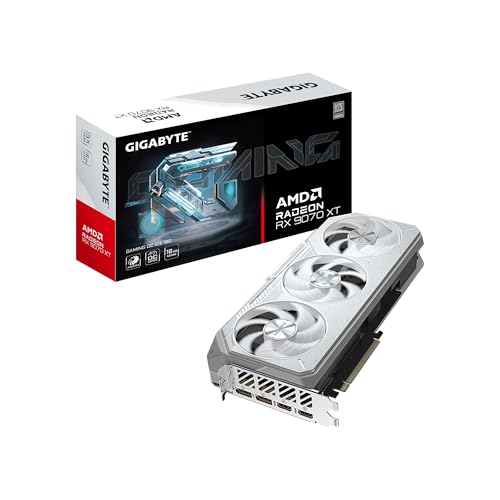 GIGABYTE RX 9070 XT Gaming OC 16GB
|
8.4/10 | Buy |
 XFX Speedster SWFT210 RX 7600 8GB GDDR6
|
8.3/10 | Buy | |
| Best Premium |
 GIGABYTE Radeon RX 9070 XT Gaming OC 16GB
|
8.1/10 | Buy |
 ASRock RX 9070 Challenger 16GB OC Graphics Card
|
8.0/10 | Buy | |
 ASRock RX 9070 XT Challenger 16GB
|
8.0/10 | Buy | |
 ASUS Prime RX 9070 XT 16GB
|
7.8/10 | Buy |
GIGABYTE Radeon RX 9060 XT 16GB Gaming OC ICE
Built for longevity on AM5 platforms, this GIGABYTE card emphasizes thermal management with its WINDFORCE cooling system and server-grade thermal gel. The 16GB VRAM and PCIe 5.0 support pair well with AMD Ryzen 9000 series, and the dual BIOS option lets users prioritize performance or silence.
Pros
- Server-grade thermal gel for superior heat transfer
- Alternate spinning Hawk fans reduce turbulence
- Reinforced metal backplate with I/O bracket support
- Dual BIOS flexibility (performance or silent modes)
- Customizable RGB lighting via GIGABYTE CONTROL CENTER
Cons
- 128-bit memory bus may limit bandwidth in memory-intensive tasks
- White-only color scheme may not suit all builds
ASUS Dual RX 9060 XT 16GB
The ASUS Dual RX 9060 XT 16GB is a graphics card built for quiet and efficient gaming. Its axial-tech fans and dual BIOS let you choose between silent operation and maximum performance. With a 2.5-slot design, it fits in many builds while delivering high clock speeds up to 3250 MHz.
Pros
- Axial-tech fans with barrier ring for high static pressure
- 2.5-slot design for broad case compatibility
- 0dB technology for silent light gaming
- Dual BIOS for quiet or performance modes
- Dual ball bearings for longer lifespan
ASRock RX 7700 XT Challenger 12GB
The ASRock Radeon RX 7700 XT Challenger delivers strong 1440p gaming performance with AMD's RDNA 3 architecture and 12GB of GDDR6 memory. Its dual-fan cooling system with 0dB silent mode keeps noise low during lighter tasks.
Pros
- High-performance RDNA 3 architecture
- Fast boost clock up to 2584 MHz
- 12GB GDDR6 memory for demanding games
- 0dB silent cooling at low temperatures
- Durable metal backplate and DisplayPort 2.1 outputs
Cons
- Compatibility limited for pre-built systems; requires verification of PSU, chassis, and motherboard
ASRock RX 9060 XT Challenger 16GB
Built on AMD's RDNA 4 architecture, the ASRock RX 9060 XT Challenger targets smooth 1440p gaming with a 3290 MHz boost clock and 16GB of GDDR6 memory. Its dual-fan design supports 0dB silent operation for quiet performance in lighter tasks.
Pros
- High boost clock up to 3290 MHz
- 16GB GDDR6 memory for modern game textures
- 0dB Silent mode for quiet operation
- RDNA 4 with updated ray tracing and AI
Cons
- 128-bit memory bus is narrow for 16GB
- Requires 550W PSU and careful case clearance
GIGABYTE RX 9070 XT Gaming OC 16GB
The GIGABYTE RX 9070 XT Gaming OC ICE stands out with its white design and robust WINDFORCE cooling, which uses server-grade thermal gel and dual BIOS for performance or silent operation. It's built for high-resolution gaming on AMD AM5 platforms, offering PCIe 5.0 and DisplayPort 2.1 support for future-proof connectivity.
Pros
- Powerful WINDFORCE cooling with server-grade thermal gel
- Dual BIOS for performance or silent operation
- Reinforced metal backplate for structural integrity
- Supports PCIe 5.0 and DisplayPort 2.1
- Customizable RGB lighting via GIGABYTE CONTROL CENTER
Cons
- Large 2.7-slot design may limit case compatibility
- White color scheme may not suit all PC builds
XFX Speedster SWFT210 RX 7600 8GB GDDR6
This RDNA 3 card pairs the RX 7600 chipset with 8GB of GDDR6 memory and a boost clock up to 2655 MHz. The dual-fan SWFT210 cooler keeps the layout straightforward, making it a practical choice for a 1080p gaming build.
Pros
- AMD RDNA 3 architecture
- 8GB GDDR6 memory
- Dual-fan cooling design
- High 2655 MHz boost clock
Cons
- 8GB VRAM can limit high-resolution textures
- 9.5-inch length may be tight for compact cases
GIGABYTE Radeon RX 9070 XT Gaming OC 16GB
This Gigabyte graphics card delivers the Radeon RX 9070 XT GPU with 16GB of GDDR6 memory, backed by a robust WINDFORCE cooling system and server-grade thermal gel for sustained performance. It's a solid pick for gamers and creators who need reliable cooling and the latest PCIe 5.0 connectivity.
Pros
- Triple-fan WINDFORCE cooling system
- Server-grade thermal gel for better heat transfer
- 16GB GDDR6 memory for demanding workloads
- PCIe 5.0 support for next-gen motherboards
- Built-in RGB lighting for customization
Cons
- Large dimensions may limit case compatibility
- Heavy build requires sturdy mounting
- Only available in black
ASRock RX 9070 Challenger 16GB OC Graphics Card
This triple-fan GPU is built for 1440p/4K gaming with AMD's RDNA 4 architecture and a factory overclock to 2520 MHz boost. Its 16GB GDDR6 memory and 256-bit bus handle high-res textures and ray tracing smoothly, while the 0dB silent mode keeps things quiet under light loads.
Pros
- Factory overclocked for out-of-box performance
- 16GB GDDR6 on 256-bit bus for high bandwidth
- Triple-fan design with 0dB silent mode
- PCIe 5.0 ready for future systems
- RDNA 4 with RT and AI accelerators
Cons
- 2.5-slot card may not fit compact cases
- Requires 700W PSU and two 8-pin connectors
ASRock RX 9070 XT Challenger 16GB
Gamers seeking smooth 4K gaming with ray tracing will find the ASRock RX 9070 XT Challenger a capable choice. It leverages AMD's RDNA 4 architecture with AI accelerators, a 2970 MHz boost clock, and triple-fan cooling that stays silent in light loads.
Pros
- RDNA 4 architecture with improved ray tracing
- High 2970 MHz boost clock
- Triple-fan cooling with 0dB silent mode
- PCIe 5.0 and modern DisplayPort 2.1a support
Cons
- Large triple-fan design may not fit small cases
- Requires an 800W power supply minimum
- Heavy at over 2.2 pounds
ASUS Prime RX 9070 XT 16GB
The ASUS Prime RX 9070 XT pairs axial-tech fans with a phase-change GPU thermal pad for efficient cooling, while the dual BIOS switch lets you choose between quiet and performance modes. Its 0dB technology keeps the card silent during light gaming, making it a solid pick for gamers who value both performance and low noise.
Pros
- Axial-tech fans with barrier ring for improved airflow
- Phase-change thermal pad reduces GPU temperatures
- 0dB technology enables silent light gaming
- Dual BIOS switch for performance or quiet profile
- Dual-ball fan bearings for extended lifespan
Best Amd Graphics Card Buying Guide
Performance and Resolution Targets
Your target resolution and frame rate largely determine which GPU tier you need. For 1080p gaming at high settings, cards like the RX 7600 deliver smooth performance without overspending.
If you game at 1440p, consider models with at least 12GB VRAM and higher clock speeds, such as the RX 7700 XT. For 4K or high-refresh-rate gaming, the RX 9070 XT series offers the headroom to handle demanding titles.
Pairing your GPU with a capable 2K gaming monitor ensures you get the most out of your investment.
AMD’s RDNA 4 architecture brings improved ray tracing and AI accelerators, making newer cards better suited for next-gen games. However, RDNA 3 remains a strong choice for traditional rasterization and value. Our dedicated AMD guide breaks down the differences between generations in more detail.
VRAM Capacity
Video memory is critical for texture-heavy games and creative workloads. 8GB is the baseline for modern 1080p gaming, but 12GB or 16GB is recommended for 1440p and 4K, especially if you use high-resolution texture packs or run multiple displays.
The RX 7700 XT with 12GB and the RX 9070 series with 16GB future-proof your system for upcoming titles. If you work with Photoshop or video editing, larger VRAM buffers large files and complex layers.
All cards in our list use GDDR6 memory, with the RX 9070 XT models featuring faster memory clocks. For most gamers, 16GB is the sweet spot for longevity. Budget buyers can still get excellent 1080p performance with 8GB cards like the RX 7600.
Cooling System and Build Quality
Effective cooling keeps performance stable and noise low under load. Dual-fan designs from ASRock and ASUS strike a balance between size and thermal efficiency, while triple-fan solutions on the RX 9070 XT models handle higher heat output.
Features like 0dB silent mode allow fans to stop completely during light use. A sturdy cooler also extends card lifespan. For compact builds, check the card’s dimensions and your case clearance.
Some cards require up to a 2.7-slot thickness, so measure carefully.
Build quality matters for long-term reliability. Reinforced backplates and server-grade thermal gel, found on GIGABYTE’s Gaming OC ICE series, reduce flex and improve heat transfer. Our computer graphics card roundup covers more detail on what to look for in cooling.
Connectivity and Features
Modern AMD cards support PCIe 5.0 for faster bandwidth with compatible motherboards, though PCIe 4.0 remains sufficient for current games. Display outputs include HDMI 2.1 and DisplayPort 2.1, enabling high refresh rates at 4K and multi-monitor setups.
Some models also feature LED indicators and dual BIOS switches for overclocking flexibility. If you have an older system, check PCIe 3.0 compatibility; most cards still work but may have minor bandwidth limitations.
Additional features like AMD FidelityFX Super Resolution (FSR) and driver-level enhancements add value. For VR or productivity tasks, consider the card’s encoder support. A good power supply unit is essential; most cards recommend a 600W to 800W PSU.
Why You Should Trust Us
BestProducts is an independent review site that evaluates products based on thorough research.
Each amd graphics card in this roundup receives a BP Score from 0 to 10, assessed against a consistent set of criteria including specifications, expert review consensus, verified buyer feedback, and published data with cited sources.
We do not conduct our own product trials; our evaluations are grounded in research, published data, expert review consensus, and verified buyer feedback. Our affiliate relationships help fund our operations but never influence our ratings.
For more on how we review, see our computers and office category.
Final Thoughts
After analyzing the latest AMD GPUs, we’ve selected the following standouts based on performance, value, and user satisfaction.
- Best Overall: GIGABYTE Radeon RX 9060 XT Gaming OC ICE 16G, This card achieves the highest BP Score in our analysis thanks to its excellent balance of 16GB VRAM, efficient cooling, and strong 1080p/1440p performance at a reasonable price.
- Best for 1440p Gaming: ASRock Radeon RX 7700 XT Challenger 12GB OC, With 12GB VRAM and a high boost clock, it delivers smooth frame rates at 1440p and earned a top-tier BP Score in our evaluation.
- Best Value: XFX Speedster SWFT210 Radeon RX 7600 8GB, For budget builders, this card offers reliable 1080p gaming and a strong BP Score, making it the most cost-effective option in our lineup.
Frequently Asked Questions
Is AMD Radeon good for gaming?
Yes, AMD Radeon cards offer excellent gaming performance, especially in rasterization. The latest RDNA 4 models also improve ray tracing and support FSR, making them strong competitors to NVIDIA. For a broader look at options, refer to our general graphics card guide.
How much VRAM do I need for gaming?
For 1080p, 8GB is sufficient for most games. For 1440p, 12GB is recommended, and for 4K or heavy modding, 16GB is ideal. Our picks range from 8GB to 16GB to cover different budgets.
What is the difference between RDNA 3 and RDNA 4?
RDNA 4 brings improved ray tracing performance, AI accelerators, and higher clock speeds. RDNA 3 still offers great value and efficiency. Both are compatible with modern features like FSR and PCIe 5.0. For a detailed comparison, check our PCI Express x16 options article.
Are AMD cards good for ray tracing?
With RDNA 4, AMD has significantly improved ray tracing performance. While still behind NVIDIA’s top-tier RTX cards in heavy ray tracing, the RX 9070 XT series handles light to moderate ray tracing well. For most gamers, the performance is more than adequate.
Which AMD card is best for 4K?
The RX 9070 XT models (e.g., ASUS Prime, GIGABYTE Gaming OC) are the best choices for 4K gaming, offering high frame rates with upscaling. They also feature 16GB VRAM to handle 4K textures. Pair with a high-quality monitor for the best experience.
How to choose between AMD and NVIDIA?
AMD generally offers better value for rasterization and more VRAM at a given price, while NVIDIA excels in ray tracing and AI features like DLSS. For pure gaming performance per dollar, AMD is often the winner.
Your choice may also depend on software compatibility and ecosystem preferences.
About the author
Irene reviews desktop PCs and monitors for BestProducts, weighing performance, upgradability, and panel quality for work and home. She helps readers build a desk setup that stays fast and comfortable for years.