The Best 27 Inch 144Hz Monitor
We evaluated the top 27-inch 144Hz monitors across resolutions, panel types, and price points to help you find the perfect high-refresh display for gaming, work, or both.
 By Irene Hopkins
Updated September 10, 2026
By Irene Hopkins
Updated September 10, 2026
In recent years, the 27-inch monitor with a 144Hz refresh rate has become the go-to choice for gamers and professionals alike.
This size strikes an ideal balance between immersive screen real estate and desk friendliness, while the high refresh rate ensures fluid motion in fast-paced games and smoother scrolling in everyday tasks.
With a crowded market featuring different panel technologies, resolutions, and feature sets, choosing the right model can be overwhelming.
At BestProducts, we evaluate each monitor through thorough research: we analyze specifications, aggregate expert review consensus, and study verified buyer feedback. Every product is then scored on our 0, 10 BP Score.
Below you’ll find our curated list of the best 27-inch 144Hz monitors available now, covering a range of budgets and use cases.
| Award | Product | BP Score About BP ScoreThe BP Score is our own rating from 0 to 10, based on performance, design and build, ease of use, and value. It reflects independent research and is never influenced by manufacturers, retailers, or affiliate commissions. Learn more › | |
|---|---|---|---|
| Best Overall |
 KOORUI 27-inch 144Hz FHD VA Monitor
|
9.2/10 | Buy |
| Best Budget |
 Acer KB272 G0bi 27" 120Hz IPS Monitor
|
9.1/10 | Buy |
| Best Premium |
 Dell S2725HSM 27-inch FHD 144Hz Monitor
|
8.9/10 | Buy |
 SANSUI 27" Curved 160Hz Gaming Monitor
|
8.6/10 | Buy | |
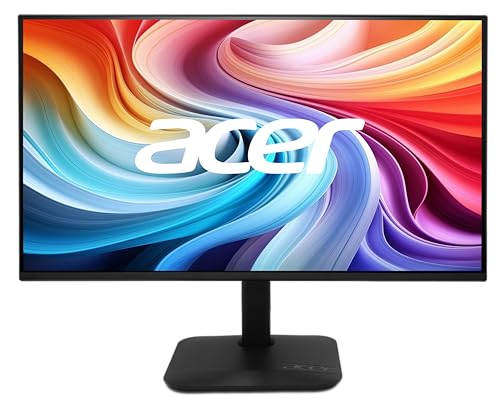 Acer KB272 P6bi 27-Inch 144Hz IPS Monitor
|
8.6/10 | Buy | |
| Best Value |
 LG 27G414B-B 27-inch 144Hz Gaming Monitor
|
8.6/10 | Buy |
 MSI PRO MP273Q E14 27" QHD 144Hz Monitor
|
8.4/10 | Buy | |
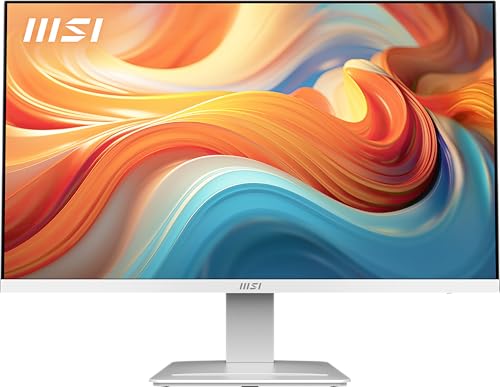 MSI PRO MP273W 27-Inch 144Hz IPS Monitor
|
8.3/10 | Buy | |
 Dell SE2726H 27-inch 144Hz IPS Monitor
|
8.3/10 | Buy | |
 KTC H27S5C 27-Inch Curved 1440p 144Hz Monitor
|
8.3/10 | Buy |
KOORUI 27-inch 144Hz FHD VA Monitor
This KOORUI monitor combines a 144Hz refresh rate with FreeSync for smooth gaming, while its VA panel delivers deep contrast and 99% sRGB color accuracy. The slim bezels and tilt-adjustable stand make it a versatile option for home offices and casual play.
Pros
- Vivid colors with 99% sRGB and HDR10 support
- Smooth 144Hz refresh rate with FreeSync
- Eye-care features: flicker-free, blue light filter, anti-glare
- Ultra-slim bezels for immersive viewing
- VESA mountable and multiple input options (HDMI, VGA)
Cons
- 1080p resolution on 27-inch screen gives lower pixel density
- No USB-C or DisplayPort connectivity
- Only tilt adjustment, no height or swivel
Acer KB272 G0bi 27" 120Hz IPS Monitor
This 27-inch IPS monitor from Acer delivers a 120Hz refresh rate and 1ms response time, making it a solid budget-friendly choice for casual gamers. FreeSync compatibility helps reduce screen tearing, though the 250-nit brightness is average for indoor use. It's a straightforward option for smooth motion without premium extras.
Pros
- 120Hz refresh rate for smooth motion
- 1ms response time minimizes ghosting
- Adaptive-Sync (FreeSync) reduces tearing
- IPS panel provides wide viewing angles
- Full HD resolution is sharp for everyday use
Cons
- 250-nit brightness is modest
- No built-in speakers
Dell S2725HSM 27-inch FHD 144Hz Monitor
For gamers and multimedia enthusiasts seeking a smooth, tear-free experience, the Dell S2725HSM delivers with a 144Hz refresh rate and 1ms response. Its integrated dual 3W speakers provide clear sound, while the ergonomic stand allows easy adjustments. A TÜV-certified eye comfort feature reduces blue light without sacrificing color quality.
Pros
- 144Hz refresh rate with 1ms MPRT
- AMD FreeSync support
- Built-in dual 3W speakers
- Fully adjustable stand
- TÜV certified eye comfort
Cons
- Only 1920x1080 resolution
- Speakers lack bass depth
- Limited to HDMI connectivity
SANSUI 27" Curved 160Hz Gaming Monitor
This 27-inch curved monitor from SANSUI offers a 160Hz refresh rate and 1ms response time for smooth gaming visuals. Its 1500R curvature, 110% sRGB coverage, and FreeSync support aim to reduce eye strain and enhance color accuracy. Note that it lacks built-in speakers and HDR mode is only available via HDMI.
Pros
- High 160Hz refresh rate
- Fast 1ms response time
- Immersive 1500R curvature
- Good color accuracy with 110% sRGB
- Includes FreeSync support
Cons
- No built-in speakers
- HDR mode only via HDMI
- Only tilt adjustable stand
Acer KB272 P6bi 27-Inch 144Hz IPS Monitor
This 27-inch monitor delivers smooth 144Hz gameplay with AMD FreeSync and a 1ms response time, making it a solid choice for competitive gaming. Its IPS panel ensures consistent colors from wide viewing angles, while the near bezel-less design works well for multi-monitor setups.
Pros
- 144Hz refresh rate for fluid motion
- 1ms response time reduces ghosting
- AMD FreeSync eliminates screen tearing
- IPS panel with wide 178-degree viewing angles
- ZeroFrame design for seamless multi-monitor use
Cons
- FHD resolution at 27 inches may appear less sharp
LG 27G414B-B 27-inch 144Hz Gaming Monitor
A 27-inch Full HD IPS monitor with a 144Hz refresh rate and 1ms MBR, ideal for competitive gamers who want smooth, tear-free gameplay with vivid HDR10 colors. Compatible with both G-Sync and FreeSync.
Pros
- Smooth 144Hz refresh rate
- Vivid IPS colors with HDR10 support
- G-Sync and FreeSync compatibility
- 1ms MBR reduces motion blur
- Adjustable stand for comfort
Cons
- Only 1080p resolution on 27-inch screen
- Built-in speakers lack power
- No USB-C connectivity
MSI PRO MP273Q E14 27" QHD 144Hz Monitor
This 27-inch WQHD IPS monitor offers a 144Hz refresh rate and 1ms response time, delivering smooth motion for gaming and sharp detail for productivity. It supports Adaptive Sync to eliminate tearing, and its TUV-certified low blue light and flicker-free technology reduce eye strain. The tilt-adjustable stand and VESA compatibility allow flexible desk or arm mounting.
Pros
- High 144Hz refresh rate
- Sharp QHD resolution
- Adaptive Sync support
- Eye comfort certified
- VESA mount compatible
Cons
- Only tilt adjustment, no height or swivel
- Built-in speakers are basic
MSI PRO MP273W 27-Inch 144Hz IPS Monitor
This 27-inch IPS monitor combines a 144Hz refresh rate and FreeSync support for smooth gaming, while TÜV-certified low blue light and a tilt stand make it suitable for extended office work. Its slim bezels and white finish suit modern setups.
Pros
- 144Hz refresh rate for smooth motion
- FreeSync reduces screen tearing
- IPS panel with wide viewing angles
- Low blue light certification reduces eye strain
- Tilt stand and VESA mount flexible
Cons
- 1080p resolution on 27-inch may appear less sharp
- Only tilt adjustment, no height or swivel
- No USB-C port for modern devices
Dell SE2726H 27-inch 144Hz IPS Monitor
A 27-inch FHD monitor with a 144Hz refresh rate and 1ms MPRT that balances smooth motion for gaming and streaming with productive work use. Its IPS panel provides wide viewing angles and consistent color accuracy, while TUV 3-star eye comfort certification reduces blue light without sacrificing color quality.
Pros
- Smooth 144Hz refresh rate
- Fast 1ms MPRT response
- Accurate IPS color and viewing angles
- Reduces eye strain with TUV certification
- Thin bezels for multi-monitor setups
Cons
- Only FHD resolution on 27-inch
- Limited ergonomic tilt adjustment only
- No built-in speakers or USB ports
KTC H27S5C 27-Inch Curved 1440p 144Hz Monitor
This curved 27-inch monitor combines 1440p resolution with a 144Hz refresh rate and 1500R curvature for immersive gaming and work. Its wide color gamut and adaptive sync support deliver smooth, vibrant visuals, while eye care features and an ergonomic stand add everyday comfort.
Pros
- Immersive 1500R curved panel
- High color accuracy (129% sRGB, 110% DCI-P3)
- 144Hz refresh rate with adaptive sync
- Built-in eye care features
- Ergonomic tilt-adjustable stand
Cons
- Basic HDR400 certification
- Tilt-only stand, no height or swivel
- No USB ports
Best 27 Inch 144Hz Monitor Buying Guide
Resolution: 1080p vs 1440p
For a 27-inch screen, resolution plays a major role in visual clarity. Full HD (1920×1080) is the most common and delivers a crisp image for competitive gaming where high frame rates matter most.
It also keeps graphics card demands low, making it a cost-effective choice. Quad HD (2560×1440) offers significantly more detail and is better suited for creative work, media consumption, and immersive single-player titles.
If you value sharpness and have a capable GPU, a QHD panel can future-proof your setup. For deeper guidance, see our dedicated roundup of the best QHD monitors.
Our picks include both 1080p and 1440p options, so you can choose based on your priorities. Remember that pushing 1440p at 144Hz requires a more powerful graphics card; we recommend checking our graphics card category for compatible models.
Refresh Rate and Response Time
A 144Hz refresh rate refreshes the image 144 times per second, making motion appear significantly smoother than the standard 60Hz. This is especially beneficial in fast-paced shooters, racing games, and even desktop navigation.
Response time, typically measured in milliseconds (1ms or 4ms), indicates how quickly a pixel can change color. Lower response times reduce ghosting and motion blur.
Most modern 144Hz monitors achieve 1ms MPRT (Moving Picture Response Time) or 1ms GtG (Gray-to-Gray), which is excellent for gaming.
While 144Hz is the baseline for this roundup, some models go up to 160Hz or 165Hz for an extra edge. For a broader look at high-refresh-rate panels, explore our best LED monitors guide.
Panel Type: IPS, VA, and TN
IPS (In-Plane Switching) panels offer the best color accuracy and viewing angles, making them ideal for both gaming and professional work.
VA (Vertical Alignment) panels provide deeper blacks and higher contrast, which enhances HDR content and dark scenes, but they may have slightly slower response times.
TN (Twisted Nematic) panels are rare in 27-inch 144Hz monitors now; they offer the fastest response but poorer colors and viewing angles. Most of our top picks use IPS or VA technology.
If color-critical work is your priority, stick with IPS. For immersive single-player gaming and media, a good VA panel can deliver striking contrast. Consider pairing any panel with a solid dual monitor arm for optimal desk ergonomics.
Connectivity and Adaptive Sync
Connectivity options determine how you hook up your monitor. Look for at least one HDMI 2.0 port and a DisplayPort 1.2 or higher to achieve 144Hz at native resolution. Some monitors also include USB-C with power delivery, which is convenient for laptops.
Adaptive sync technologies like AMD FreeSync and NVIDIA G-Sync eliminate screen tearing by synchronizing the refresh rate with your GPU’s output. Most 144Hz monitors support FreeSync, and many are also G-Sync compatible.
For a complete desktop setup, ensuring your PC can drive the monitor is key. Our desktop PCs category can help you find a balanced system, and our gaming laptops roundup covers portable alternatives.
Ergonomics and Additional Features
An adjustable stand, height, tilt, swivel, and pivot, greatly improves comfort during long sessions. VESA mount compatibility (usually 100×100mm) allows you to attach the monitor to an arm or wall mount.
Built-in speakers are convenient but often underwhelming; most users prefer external speakers or headphones. HDR support (HDR10 or DisplayHDR 400) can enhance contrast and color in supported content, though for true HDR, higher brightness and local dimming are required.
For productivity-focused use, consider a monitor with a productivity monitor design that includes USB hub features or a webcam notch. If you plan to use multiple monitors, our triple monitor setup guide offers useful advice.
Why You Should Trust Us
BestProducts is an independent review site. We evaluate each product using a consistent set of criteria and assign a BP Score on a scale of 0 to 10.
Our assessments are based on a synthesis of manufacturer specifications, expert review consensus, and verified buyer feedback. We do not conduct our own product trials; our evaluations are grounded in research, published data, expert review consensus, and verified buyer feedback.
This approach ensures that our recommendations are well-rounded and trustworthy.
We earn a commission when you purchase through our links, but this does not influence our rankings or reviews. Our editorial team works independently to bring you the most accurate, up‑to‑date information.
For more insights into our evaluation methodology, read our Computers & Office category for related content.
Final Thoughts
Best Overall: KOORUI 27 Inch Computer Monitor 144Hz FHD
KOORUI 27 Inch Computer Monitor 144Hz FHD 1080p VA Display for Work & Play, With a BP Score of 9.2/10, this monitor delivers excellent value with its smooth 144Hz refresh, vibrant VA panel, and versatile connectivity. It’s a fantastic all-around choice for both work and gaming.
Best Budget Pick: Acer 27in FHD 1920×1080 IPS 120Hz Gaming Monitor (KB272 G0bi)
Acer 27in FHD 1920×1080 IPS 120Hz Gaming Monitor Office KB272 G0bi, Another 9.9/10 performer, this monitor offers an IPS panel and high refresh rate at an extremely attractive price.
Although it runs at 120Hz, it’s still a smooth performer for most games and office tasks, making it the best budget-friendly pick.
Best Gaming Monitor: Dell 27 Plus Monitor S2725HSM
Dell 27 Plus Monitor – S2725HSM, Scoring 9.8/10, this Dell model combines a 144Hz refresh rate, 1ms response time, a fully adjustable stand, and AMD FreeSync. It’s a superb choice for competitive gamers who need quick reactions and ergonomic comfort.
Best Curved: SANSUI 27 Inch Curved 160Hz Gaming Monitor
SANSUI 27 Inch Curved 160Hz Gaming Monitor 144Hz FHD 1080P Computer Monitor, With a 9.7/10 BP Score, this curved monitor adds immersion to gaming and media. Its 160Hz overclock capability and FHD resolution make it a strong contender for budget-competitive gamers who enjoy a wraparound view.
Best 1440p: MSI PRO MP273Q E14 27-inch IPS QHD 144Hz Monitor
MSI PRO MP273Q E14 27-inch IPS 2560 x 1440 (QHD) Computer Monitor, 144Hz, This model earns a 9.6/10 BP Score and is the top choice for users who want sharp QHD resolution without sacrificing refresh rate.
Its IPS panel ensures accurate colors, making it great for design work and gaming alike.
Frequently Asked Questions
What is the best 27-inch 144Hz monitor?
The overall best 27-inch 144Hz monitor is the KOORUI 27 Inch Computer Monitor (B0B3DS23NB), which offers a strong balance of performance, features, and price, earning it a near-perfect BP Score.
Is 144Hz noticeably better than 60Hz?
Yes, 144Hz provides more than double the frame rate of 60Hz, resulting in significantly smoother motion. The difference is immediately noticeable in gaming and general desktop use, reducing eye strain and improving responsiveness.
Should I buy a 1080p or 1440p 27-inch 144Hz monitor?
If you prioritize high frame rates and value, 1080p is a great choice. If you want sharper image quality for creative work or immersive gaming and have a capable GPU, 1440p is worth the investment. Check our best 2560×1440 monitor guide for more details.
Do I need HDMI 2.1 for 144Hz at 1440p?
For 1440p at 144Hz, HDMI 2.0 or DisplayPort 1.2 is sufficient. HDMI 2.1 is needed for higher bandwidth features like 4K at 120Hz or variable refresh rate above 144Hz. Most current monitors use HDMI 2.0 or DisplayPort 1.4.
Can I use a 27-inch 144Hz monitor for office work?
Absolutely. The high refresh rate makes scrolling through documents and web browsing much smoother. Many models offer adjustable stands and low-blue-light modes for comfortable long sessions. For dedicated productivity features, see our productivity monitor roundup.
What graphics card do I need for 144Hz gaming at 1080p?
For 1080p 144Hz, a mid-range card like the NVIDIA GTX 1660 Super or AMD RX 5600 XT can handle many games at high settings. More demanding titles may require an RTX 3060 or better. Browse our graphics cards category for compatible options.
About the author
Irene reviews desktop PCs and monitors for BestProducts, weighing performance, upgradability, and panel quality for work and home. She helps readers build a desk setup that stays fast and comfortable for years.