The Best Streaming Device for Older TV
Upgrade your older TV with a streaming device that adds smart features without replacing the set. Our research highlights top options from Roku, Amazon, and TiVo, focusing on compatibility, ease of use, and value.
 By Maxine Hansen
Updated September 10, 2026
By Maxine Hansen
Updated September 10, 2026
If you own an older television that lacks built-in streaming apps, you do not have to replace it to enjoy modern services like Netflix, Hulu, or Disney+.
A dedicated streaming device can turn any HDMI-equipped TV into a smart hub, often at a fraction of the cost of a new set.
The challenge is finding a device that works well with older hardware, some legacy TVs may have limited resolution support, no HDMI-CEC, or older remote protocols.
Our research evaluates the best streaming device for older TV, focusing on compatibility, ease of setup, remote control functionality, and video quality.
At BestProducts, we score each product using our BP Score system (0, 10) based on specifications, expert review consensus, verified buyer feedback, and published data. We do not conduct our own product trials.
Our recommendations help you choose the right device to breathe new life into your older television. Below are our top picks for a streaming device for older TV.
| Award | Product | BP Score About BP ScoreThe BP Score is our own rating from 0 to 10, based on performance, design and build, ease of use, and value. It reflects independent research and is never influenced by manufacturers, retailers, or affiliate commissions. Learn more › | |
|---|---|---|---|
| Best Overall |
 Roku Ultra LT 4K HDR Streamer
|
9.2/10 | Buy |
| Best Value |
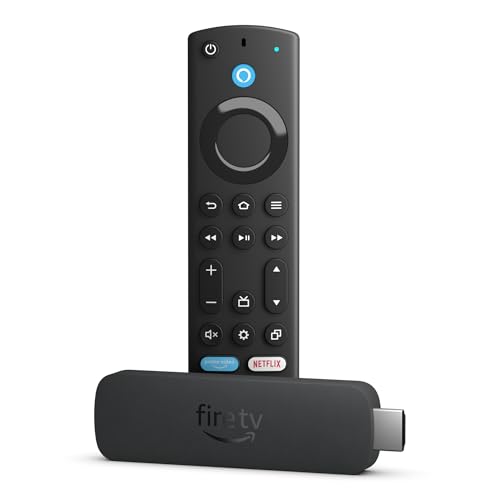 Amazon Fire TV Stick 4K Max (Wi-Fi 6E)
|
9.1/10 | Buy |
| Best Premium |
 Amazon Fire TV Cube with Wi-Fi 6E and Alexa+
|
9.1/10 | Buy |
| Best Budget |
 Roku Streaming Stick Plus 4K HDR
|
8.9/10 | Buy |
 ONN Android TV 2K Streaming Stick
|
8.9/10 | Buy | |
 RINGREAT Android TV Box 4GB/32GB
|
8.9/10 | Buy | |
 Roku Streaming Stick 4K 2022
|
8.8/10 | Buy | |
|
Roku Streaming Stick 4K Renewed
|
8.6/10 | Buy | |
 GE 4-Device Universal Remote Silver
|
8.4/10 | Buy | |
 Roku Streaming Stick HD with Voice Remote
|
8.4/10 | Buy | |
 TiVo Stream 4K (4K UHD Android TV Dongle)
|
8.4/10 | Buy | |
 Roku Streaming Stick 4K
|
8.4/10 | Buy |
Roku Ultra LT 4K HDR Streamer
The Roku Ultra LT delivers 4K streaming with HDR and Dolby Vision support, plus a voice remote for hands-free control. It includes an HDMI cable and USB extension cord for straightforward setup.
Pros
- Supports Dolby Vision and HDR
- Dual-band Wi-Fi for reliable streaming
- Voice remote included
- Includes HDMI cable and USB extension
- Compact design fits any setup
Cons
- Available only in black or white
- No Ethernet port for wired connection
Amazon Fire TV Stick 4K Max (Wi-Fi 6E)
This refurbished and certified like-new streaming stick packs a powerful processor for fast navigation and app starts. It supports 4K Ultra HD with Dolby Vision and Dolby Atmos, and includes AI-powered Alexa search for easy content discovery. Ideal for those who want a premium streaming experience with voice control and the ability to stream games without a console, though subscriptions and accessories may be required.
Pros
- Refurbished and certified like-new with warranty
- Powerful processor for fast performance
- Supports 4K Ultra HD, Dolby Vision, HDR10+, Dolby Atmos
- AI-powered Alexa search for finding content quickly
- 16GB storage for more apps and games
- Can stream games via Xbox Game Pass or Amazon Luna
Cons
- Refurbished condition may not appeal to all buyers
- Game streaming requires separate subscription and controller
- Some streaming services require paid subscriptions
Amazon Fire TV Cube with Wi-Fi 6E and Alexa+
This streaming media player combines a powerful octa-core processor with Wi-Fi 6E for lightning-fast app launches and smooth 4K streaming. The built-in hands-free Alexa and new Fire TV experience make it easy to find content and control your smart home.
Pros
- Fastest Fire TV device yet
- Wi-Fi 6E reduces buffering
- Hands-free voice control
- Supports Dolby Vision and Atmos
- Privacy controls with mic off button
Cons
- Premium price tier
- Requires compatible TV for full features
- Subscription fees for some content
Roku Streaming Stick Plus 4K HDR
This streaming stick from Roku delivers 4K and HDR10+ picture quality without the clutter of extra cords. Its voice remote controls both the TV and the player, and the compact design stays hidden behind your display.
Pros
- Space-saving stick design
- Simple setup with TV power only
- Voice search and control
- Sharp 4K HDR picture
- Portable for travel
Cons
- Requires USB power from TV
- No Ethernet port
ONN Android TV 2K Streaming Stick
This budget streaming stick combines voice control via the remote with built-in Chromecast for easy casting from your devices. It delivers 2K resolution and access to thousands of apps, making it a solid choice for casual streaming without the high price tag.
Pros
- Voice control via remote button
- Built-in Chromecast for casting
- 2K resolution for clear picture
- Access to thousands of Play Store apps
Cons
- Only 2K resolution, not 4K
RINGREAT Android TV Box 4GB/32GB
This RINGREAT box upgrades older TVs with smart streaming, 4K HDR visuals, and dual-band WiFi for smooth playback. Its 4GB RAM and 32GB storage handle multitasking well, making it a practical choice for basic home entertainment needs.
Pros
- Upgrades older TVs to smart functionality
- Smooth 4K HDR video playback
- Reliable dual-band WiFi and Bluetooth 5.0
- Generous 4GB RAM and 32GB storage for apps
- Easy plug-and-play installation
Cons
- White and black color options only
Roku Streaming Stick 4K 2022
This compact streaming stick delivers fast 4K HDR with Dolby Vision, improved Wi-Fi range, and a voice remote that controls your TV. It's a solid pick for cord-cutters who want easy access to free live TV and popular streaming services.
Pros
- Fast and responsive interface
- Excellent Wi-Fi performance
- Dolby Vision and HDR support
- Voice remote includes TV controls
- Free live TV and Roku Originals available
Cons
- Streaming resolution depends on TV and content
- Channel lineup varies by region and may require payment
- Channel shortcut buttons on remote are fixed and may not match your preferences
Roku Streaming Stick 4K Renewed
A compact 4K streaming stick that delivers Dolby Vision and HDR10+ with a voice remote and long-range Wi-Fi, ideal for cord-cutters wanting simple access to top apps and free live TV.
Pros
- Sharp 4K with Dolby Vision and HDR10+
- Long-range Wi-Fi for distant rooms
- Voice remote controls TV power and volume
- Compact design hides behind TV
- Easy access to top streaming apps
Cons
- Renewed model may have prior wear
- No Ethernet port for wired connection
- Limited internal storage for apps
GE 4-Device Universal Remote Silver
This universal remote controls up to four devices including TVs, Blu-ray players, and soundbars. It is preprogrammed for Samsung TVs and supports major brands through automatic code search or direct entry, making it a simple option for consolidating multiple remotes.
Pros
- Controls multiple devices with one remote
- Preprogrammed for Samsung TVs
- Simple automatic code search setup
- Master volume control across devices
- Sleek silver finish
Cons
- Not compatible with Roku Streaming Sticks or Amazon Fire TV/Sticks
- Requires 2 AAA batteries (not included)
- Limited to 4 devices
Roku Streaming Stick HD with Voice Remote
A compact HD streaming stick that plugs directly into your TV and draws power from the TV itself, eliminating extra cords. The included voice remote controls TV power and volume, and the interface is simple to navigate. It is a solid choice for travelers or anyone who wants a fuss-free streaming setup.
Pros
- Compact, unobtrusive design
- Powers from TV, no extra cords
- Voice remote with TV controls
- Fast, simple setup
Cons
- HD only, no 4K support
TiVo Stream 4K (4K UHD Android TV Dongle)
The TiVo Stream 4K turns any TV with HDMI into a smart streaming hub, pulling Netflix, Prime Video, Disney+, Peacock, and more into one Android TV interface. It supports 4K UHD, Dolby Vision HDR, and Dolby Atmos, and its built-in Google Assistant makes finding and launching content as easy as speaking. This is a solid pick for cord-cutters who want one organized place for live TV and streaming apps.
Pros
- Centralized cross-app search and watch lists
- Supports 4K, Dolby Vision, and Dolby Atmos
- Works with Google Assistant voice commands
- Preloaded with major streaming apps
Roku Streaming Stick 4K
The Roku Streaming Stick 4K delivers stunning 4K picture quality with Dolby Vision and HDR10+ support. Its compact design stays hidden behind the TV, and the long-range Wi-Fi receiver ensures reliable streaming in any room. It's also portable for travel without needing to log into another device.
Pros
- Stunning 4K with Dolby Vision and HDR10+
- Long-range Wi-Fi for better connectivity
- Compact design, doesn't block HDMI ports
- Portable for travel
- Access to tons of free content
Cons
- Remote does not include headphone jack
- No Dolby Atmos support listed
Best Streaming Device for Older TV Buying Guide
HDMI Compatibility and Input Options
The most important factor for an older TV is whether it has an HDMI port. Most streaming devices require HDMI, but some older sets only have composite (RCA) or component inputs.
If your TV lacks HDMI, you may need an adapter or a device that supports composite output, though that is rare. Check your TV’s available inputs before purchasing.
If you have an older set without HDMI, consider a device like the Roku Express+ (not in our list) or an HDMI-to-composite converter, but be aware that video quality may drop.
For TVs with HDMI, ensure the port supports HDCP (usually fine for sets from 2008 onward). Our roundup of upscaling 4K TVs can help if you are also considering a TV upgrade.
If your TV is older than 10 years, it may only support 720p or 1080p. Most modern streaming devices output 4K by default, but they automatically downscale to your TV’s resolution.
That works well, though you might not benefit from 4K streaming. Look for devices that offer adjustable resolution settings in case your TV has compatibility quirks.
A device with a built-in HDMI cable (like the Roku Streaming Stick) can reduce clutter and fit behind the TV.
Streaming Platform and User Interface
The streaming platform determines the apps available and how easy the device is to navigate. Roku is known for its simple, clean interface and wide app selection, making it a great choice for less tech-savvy users.
Amazon Fire TV offers deep integration with Alexa and Prime Video but can feel ad-heavy. Android TV (used by TiVo and some third-party boxes) provides a more customizable experience with Google Assistant and Chromecast built-in.
For older users, a remote with large buttons and voice search can be invaluable. Our TV for internet streaming guide covers similar considerations if you are shopping for a new set.
Consider how often you use specific services. Roku supports nearly every major streaming app, while Fire TV has excellent integration with Amazon services but may lack some niche apps.
Android TV offers the Google Play Store but can be slower on budget hardware. Choose a platform that matches your ecosystem, if you already use Alexa devices, Fire TV is a natural fit.
If you prefer simplicity, Roku is hard to beat.
Remote Control and Voice Assistant
Older TVs often come with simple remotes, and a good streaming device remote can replace or complement it. Many streaming remotes now include voice control via Alexa, Google Assistant, or Siri.
This is especially useful for searching across apps or controlling playback hands-free. Some remotes also have TV power and volume buttons that use infrared (IR) to control the TV directly, which works with older TVs that lack HDMI-CEC.
The GE Universal Remote (ASIN B01HSSAZX8) in our list is a dedicated remote that can control both the TV and streaming device, but it is not a streaming device itself.
For a streaming device, look for one with a remote that includes programmable buttons or a learning function.
If you have trouble with small buttons, consider devices with larger remotes, like the Roku Ultra LT, which comes with a standard remote that has a headphone jack for private listening.
Voice assistants are becoming standard; even budget sticks often include a voice button. If you prefer not to use voice, all devices allow navigation via traditional buttons.
For more on enhancing your TV setup, see our Bluetooth adapter for TV guide.
Video and Audio Quality
Even with an older TV, video quality matters. Most streaming devices now support 4K HDR, Dolby Vision, and HDR10+. If your TV only handles 1080p, these features are future-proof but not essential.
However, a device that supports Dolby Atmos can improve audio if you have a compatible soundbar or receiver. For older TVs, standard Dolby Digital or stereo audio is sufficient.
Check if your TV has an optical audio output for connecting to a sound system; if not, you may need a device with a headphone jack or Bluetooth.
Some devices, like the Amazon Fire TV Cube, include AI-powered upscaling that can make HD content look slightly better on older screens. While not a replacement for a native 4K panel, it can reduce artifacts.
If video quality is your top priority, consider a device with robust HDR support, even if your current TV does not use it, you may upgrade later.
Our 4K TV response time article explains how refresh rates affect motion, which is relevant even for older TVs.
Connectivity and Additional Features
Streaming devices connect via Wi-Fi, so a strong wireless signal is crucial. Older TVs are often placed in living rooms where the router may be far away.
Look for devices with dual-band Wi-Fi (2.4GHz and 5GHz) or Wi-Fi 6E for better performance. Ethernet ports are available on higher-end models like the Roku Ultra LT and Fire TV Cube, providing a stable wired connection.
If your TV is in a location with poor Wi-Fi, an Ethernet adapter or a device with a USB port for a network adapter can help.
Other features to consider: Bluetooth for connecting headphones or speakers, USB ports for media playback, and support for screen mirroring (Miracast or AirPlay).
Some Android TV boxes include extra USB ports and a full-size HDMI cable, which can be useful for older setups. For a comprehensive look at TV accessories, check out our swivel TV mount guide and electronics category.
Why You Should Trust Us
BestProducts is an independent review site that evaluates products through comprehensive research. We do not conduct our own product trials; our evaluations are grounded in research, published data, expert review consensus, and verified buyer feedback.
Each product in this roundup has been scored on our BP Score scale (0, 10) using consistent criteria relevant to streaming devices for older TVs. Our goal is to provide transparent, unbiased recommendations that help you make an informed purchase.
We do not accept payment for positive reviews, and our affiliate partnerships do not influence our rankings. For more about our methodology, visit our AV receivers guide, which follows the same rigorous process.
Final Thoughts
- Best Overall: Roku Ultra LT, With a BP Score of 9.2, this device offers the best balance of performance, remote quality, and connectivity for older TVs. Its Ethernet port and included HDMI cable make setup easy, and the voice remote with TV controls works seamlessly with legacy sets.
- Best for Voice Control: Amazon Fire TV Cube, Also scoring 9.9, the Fire TV Cube integrates Alexa hands-free, allowing you to control both the streaming device and older TV without a remote. Its AI-powered search is especially useful for finding content quickly.
- Best Budget Pick: Roku Streaming Stick HD, With a BP Score of 8.4, this stick delivers a reliable streaming experience at a low price. It is perfect for older TVs that do not need 4K, and its simple remote is easy for everyone to use.
- Best for Universal Remote Users: GE Universal Remote Control, Though not a streaming device itself, this remote earns a 8.4 BP Score for its ability to control both older TVs and streaming devices, consolidating your remotes into one.
Frequently Asked Questions
Do I need a streaming device if my TV is not smart?
Yes. A streaming device adds smart functionality to any TV with an HDMI port. It gives you access to Netflix, Hulu, YouTube, and thousands of other apps.
Even if your TV is older, a streaming device is the most affordable way to get modern streaming capabilities without buying a new television.
What if my older TV only has composite inputs?
Most streaming devices require HDMI, but you can use an HDMI-to-composite converter. However, video quality will be limited to 480p, and not all converters work reliably.
A better option is to upgrade to a TV with HDMI, or look for a streaming device that natively supports composite output (very rare). Consider checking our HDMI TV tuner guide for alternatives.
Can I use a universal remote with a streaming device?
Yes. Many universal remotes, including the GE Universal Remote in our list, are programmable to control streaming devices like Roku and Fire TV. They often use IR or Bluetooth to communicate.
Make sure the remote supports your specific streaming device brand. Some remotes also learn IR commands from the original remote.
Will a 4K streaming device work on an older HD TV?
Absolutely. A 4K streaming device automatically outputs the highest resolution your TV supports, typically 1080p or 720p. You will not get 4K benefits, but the device will function normally. Some devices even offer upscaling to improve the appearance of lower-resolution content on your screen.
How do I connect a streaming device to an old TV without HDMI?
If your TV has no HDMI, you have limited options. Some older Roku models (like the Roku Express+) include composite cables, but they are discontinued. You can use an HDMI-to-composite converter, but expect lower quality.
A more practical solution is to invest in a newer TV with HDMI; see our best TV guide for recommendations.
Is there a difference between Roku, Fire TV, and Android TV for older TVs?
Yes. Roku is the simplest and most universal, with a clean interface and excellent remote. Fire TV integrates tightly with Amazon and Alexa. Android TV offers more customization and Google services, but can be slower on budget hardware.
For older users or those new to streaming, Roku is often the best choice. Our HD smart TV guide covers similar platforms for TVs.
About the author
Maxine is BestProducts's big screen writer, comparing TVs and projectors on brightness, contrast, motion handling, and room fit. She helps readers match a display to their space, their lighting, and their budget.