The Best Swivel TV Mount
We analyzed the top swivel TV mounts based on weight capacity, motion range, installation ease, and verified user feedback. Our roundup highlights picks for corner setups, large screens, and budget buyers.
 By Maxine Hansen
Updated September 10, 2026
By Maxine Hansen
Updated September 10, 2026
Swivel TV mounts give you the flexibility to adjust your television‘s angle without moving the entire set, ideal for corner setups, open-floor plans, or rooms with multiple seating areas.
Unlike fixed brackets, a quality swivel mount lets you tilt, extend, and rotate the screen on demand, reducing glare and improving the viewing experience from nearly any spot.
With so many options on the market, choosing the right mix of weight capacity, motion range, and installation ease can feel overwhelming. That‘s where our research comes in.
BestProducts has analyzed dozens of swivel TV mounts based on published specifications, expert review consensus, and verified buyer feedback. Each model has been evaluated against a consistent set of criteria and scored using our 0, 10 BP Score system.
Whether you need a compact mount for a bedroom TV or a long, arm bracket for a corner installation, the list below highlights the top performers for 2026.
| Award | Product | BP Score About BP ScoreThe BP Score is our own rating from 0 to 10, based on performance, design and build, ease of use, and value. It reflects independent research and is never influenced by manufacturers, retailers, or affiliate commissions. Learn more › | |
|---|---|---|---|
| Best Overall |
 Pipishell Full Motion TV Mount 26-65 inch
|
9.2/10 | Buy |
| Best Premium |
 USX MOUNT Corner TV Mount 31.22" Arm
|
9.2/10 | Buy |
 USX MOUNT XML006-24K Full Motion Mount
|
9.2/10 | Buy | |
 Perlegear Corner TV Wall Mount for 37-75" TVs
|
9.2/10 | Buy | |
| Best Budget |
 USX MOUNT Full Motion TV Mount 26-60
|
9.1/10 | Buy |
 PERLESMITH PSXLF01 Long Arm TV Mount
|
9.1/10 | Buy | |
 Pipishell Full Motion TV Mount 13-43 inch
|
8.9/10 | Buy | |
 Perlegear Full Motion TV Mount 26-65 inch
|
8.9/10 | Buy | |
| Best Value |
 Pipishell Full Motion TV Mount 26-74
|
8.9/10 | Buy |
 USX MOUNT Swivel TV Wall Mount 26-60"
|
8.9/10 | Buy | |
 PERLESMITH PSTVS33 Swivel TV Stand
|
8.9/10 | Buy |
Pipishell Full Motion TV Mount 26-65 inch
This full motion mount offers a good balance of flexibility and space savings: it extends 17 inches, tilts and swivels for custom viewing angles, yet retracts to just 2.36 inches. The single-stud design simplifies installation in tight spots or corners, and the reinforced arms support TVs up to 80 lbs.
Pros
- Wide VESA compatibility
- Thick, sturdy articulating arms
- Good tilt and swivel range
- Extends and retracts for flexible positioning
- Single-stud mount simplifies installation
Cons
- Requires stud, cannot mount on drywall alone
- Maximum VESA 400x400 may not fit larger TVs
- Limited tilt range (-15 to +5 degrees)
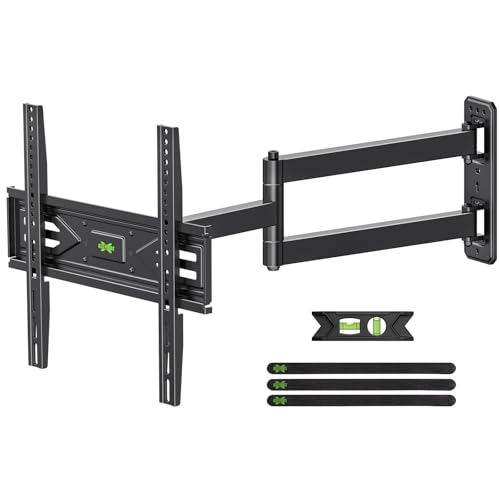
USX MOUNT Corner TV Mount 31.22" Arm
This corner TV wall mount from USX MOUNT features a long 31.22-inch arm that allows you to position your TV in unused corners. It supports 26-65 inch TVs up to 80 lbs with smooth swivel and tilt. The UL-listed safety and easy installation make it a reliable choice for maximizing viewing angles.
Pros
- UL-listed to safely hold up to 80 lbs
- Extends 31.22 inches for flexible positioning
- Smooth swivel and tilt adjustments
- Easy installation with pre-labeled hardware
- Supports VESA up to 400x400mm
Cons
- Concrete anchor hardware not included in box
- Arm length may not suit very shallow corners
USX MOUNT XML006-24K Full Motion Mount
For TVs between 42 and 85 inches, this USX MOUNT full-motion bracket offers generous articulation plus easy centering on 24-inch studs. Its dual arms allow ±45° swivel and 16.67-inch extension, and the included template and pre-labeled hardware simplify installation.
Pros
- Full motion with swivel, tilt, and leveling
- Supports 16, 18, and 24 inch stud spacing
- Comes with bubble level and mounting template
- Pre-labeled hardware for easy installation
- Low profile retracts to 2.58 inches
Cons
- Maximum VESA 600x400mm limits some large TVs
- Concrete anchors not included; must request
Perlegear Corner TV Wall Mount for 37-75" TVs
This full-motion corner mount offers an extended 32-inch reach and smooth swivel, tilt, and leveling adjustments. It's a secure, space-saving solution for larger TVs in tight or angled spaces.
Pros
- Very long 32-inch extension for corner setups
- Wide VESA and size compatibility
- Tool-free tilt adjustment
- Post-install leveling for easy alignment
- UL-listed for safety up to 100 lbs
Cons
- Not for drywall alone, requires studs or solid wall
- Single stud mount may limit placement options
USX MOUNT Full Motion TV Mount 26-60
This full motion TV mount fits most 26- to 60-inch TVs with a weight capacity of 77 pounds. It offers 90-degree swivel and tilt adjustments to reduce glare, and can extend up to 15.75 inches or retract to just 2 inches from the wall. Installation is simplified with pre-labeled hardware and the brand backs it with a 10-year customer service.
Pros
- Universal fit for VESA up to 400x400mm
- Full motion with swivel and tilt
- Space-saving design with retraction to 2 inches
- Easy installation with labeled hardware
- 10-year customer service from US-based support
Cons
- Maximum weight capacity only 77 lbs
PERLESMITH PSXLF01 Long Arm TV Mount
This full motion mount extends 42.72 inches for flexible positioning, supports TVs from 42 to 90 inches up to 150 pounds, and retracts to 4.5 inches when not in use. It includes cable management clips and allows tilt and level adjustments to reduce glare.
Pros
- 42-inch extension for flexible viewing
- Supports up to 150 pounds
- Retracts to 4.5 inches to save space
- Includes cable management clips
- Easy installation with template
Cons
- No dedicated corner mount template included
- No built-in bubble level on bracket
- May require two people for heavy 90-inch TVs
Pipishell Full Motion TV Mount 13-43 inch
This full-motion wall mount fits 13- to 43-inch TVs and monitors up to 44 lbs with VESA up to 200x200mm. It offers tilt, 360-degree rotation, and up to 90-degree swivel, extends 14.59 inches, and retracts to 2.7 inches. Single-stud installation and included hardware simplify mounting.
Pros
- Full motion: tilt, swivel, rotate
- Extends 14.59 in, retracts to 2.7 in
- Compatible with VESA 75x75 to 200x200mm
- Single-person installation with removable plate
- 5-year customer service included
Cons
- Tilt range limited to +9/-11 degrees
- Max swivel depends on screen size
- Weight limit 44 lbs may be restrictive
Perlegear Full Motion TV Mount 26-65 inch
With tool-free tilt and full swivel range, this Perlegear mount helps reduce glare and center your screen from any corner. Its heavy-duty steel arms are rated to hold up to 82 pounds, and the design extends 17.3 inches or sits just 3 inches from the wall.
Pros
- Wide VESA compatibility (100x100 to 400x400)
- Tool-free tilt and ±90° swivel
- Space-saving extension range
- Easy 3-step installation
Cons
- 82 lb weight limit
- No cable management system
- Maximum VESA pattern 400x400
Pipishell Full Motion TV Mount 26-74
This full-motion mount from Pipishell accommodates a wide range of TV sizes and VESA patterns, with strong dual arms supporting up to 99 pounds. It offers ample adjustability with tilt, swivel, and leveling to reduce glare and optimize viewing angles. A good choice for rooms with multiple seating areas, it extends up to 15.34 inches and collapses to just under 4 inches from the wall.
Pros
- Universal fit for 26-74 inch TVs and VESA up to 400x400mm
- Heavy-gauge steel supports up to 99 pounds
- Full motion: tilt, swivel, and leveling adjustments
- Space-saving: extends 15.34 inches, collapses to 3.98 inches
- Easy installation with included hardware and instructions
Cons
- Limited tilt range (only +5 to -15 degrees)
- Does not fit 24-inch wood studs (separate model needed)
USX MOUNT Swivel TV Wall Mount 26-60"
This full-motion wall mount supports 26- to 60-inch TVs up to 80 pounds with VESA patterns from 75x75mm to 400x400mm. Its articulating arm extends nearly 20 inches and swivels up to 90 degrees for versatile viewing angles, and the included paper template simplifies installation.
Pros
- Fits most 26-60 inch TVs up to 80 lbs
- Full motion with tilt and swivel
- Extends up to 19.37 inches
- Easy installation with paper template
- Security lock screws prevent falling
- Post-installation leveling adjustment
Cons
- Concrete anchors not included (must contact manufacturer)
- Maximum swivel angle depends on TV size
- Tilt range limited to +5/-12 degrees
PERLESMITH PSTVS33 Swivel TV Stand
For a tabletop TV stand that adapts to your room, the PERLESMITH PSTVS33 offers a 50-degree swivel and 12 height adjustments for screens from 24 to 60 inches. It supports up to 99 pounds on a tempered glass base and steel frame, and assembly is straightforward with labeled hardware and cable clips.
Pros
- Wide VESA and size compatibility
- 50 degree swivel range left or right
- 12 height positions reduce neck and eye strain
- Sturdy tempered glass base with steel construction
- Easy assembly with labeled hardware and cable clips
Cons
- Only available in black finish
- Maximum weight capacity limited to 99 lbs
- Requires a level tabletop for stability
Swivel TV Mount Buying Guide
Weight Capacity and VESA Pattern
Every swivel mount lists a maximum weight limit and a VESA (Video Electronics Standards Association) pattern range. The VESA pattern, measured in millimeters between mounting holes, must match your TV‘s rear screw layout.
Common patterns include 200×200 mm, 400×400 mm, and 600×400 mm. A mount rated for at least 10, 15 lb over your TV‘s actual weight adds a safety margin.
For larger flat‑screen TVs exceeding 70 inches, a mount with a 600×400 VESA pattern and a capacity of 110 lb or more is typical. Always check these specs against your TV‘s manual before purchasing.
If you own a particularly heavy television, consider a full‑motion bracket with dual articulating arms. These distribute weight more evenly and reduce stress on wall studs. For lighter sets under 44 lb, a compact single‑arm design may suffice and is easier to install.
Range of Motion: Swivel, Tilt, and Extension
The defining feature of a swivel mount is its ability to rotate the TV left and right after installation. Swivel angles typically range from 30° to 60° each direction; a wider arc is helpful for corner placements.
Tilt adjustment (usually between, 5° and +15°) reduces overhead glare, while extension depth, measured from the wall, determines how far the TV pulls forward.
Long‑arm mounts can extend 20, 30 inches, allowing the screen to clear furniture or align with seating in deep rooms.
For rooms with multiple viewing zones, a mount that combines generous swivel with smooth articulation is key. Some models also offer leveling after installation, so you can correct slight misalignment without loosening bolts.
If you‘re installing a mount in a corner, look for models specifically designed with an extra‑long arm, these can place the TV directly in the corner while still providing good swivel range.
Installation and Stud Compatibility
Most full‑motion mounts require attachment to wood studs at 16‑inch or 24‑inch centers. Single‑stud designs are available for lighter loads and simplified installation, but they limit motion range. For heavier TVs, a dual‑stud mount provides greater stability.
Always confirm the mount‘s wall plate fits your stud spacing, some brackets include sliding plates that adapt to non‑standard layouts.
Concrete or brick walls require masonry anchors and may need specialized mounting kits. Many modern mounts come with a bubble level, template, and all necessary hardware.
If you‘re not comfortable with power tools, consider a table‑top swivel stand, these sit on furniture and require no drilling, making them ideal for rental spaces or temporary setups.
A dedicated tire gauge might not be relevant here, but a good mounting template certainly is.
Build Quality and Cable Management
The construction of a swivel mount directly affects long‑term reliability. Look for mounts made from heavy‑gauge steel with a corrosion‑resistant finish. Welded joints and double‑sheared arms indicate a sturdier build that resists sagging over time.
The included hardware should be zinc‑plated or stainless steel to prevent rust.
Cable management is often overlooked but matters for a clean appearance. Many mounts feature plastic clips or removable covers that route HDMI, power, and audio cables along the arm, hiding them behind the TV.
This is especially useful when combining the mount with a DVD player or home theater speaker setup. A mount that incorporates smooth cable channels will save you from wrestling with tangled wires later.
Special Use Cases: Corner Mounts and Long Arms
Corner installations present unique challenges. Standard mounts may not provide enough swivel or extension to center the TV in the corner.
Dedicated corner mounts typically have a long single arm (up to 31 inches) that pivots at the wall plate and the TV bracket, allowing the screen to sit flush against the corner when not in use.
These are ideal for rooms where the TV must be placed between two windows or next to a fireplace.
Long‑arm mounts also benefit deep cabinets or media consoles, they let you pull the TV forward to clear shelving.
When choosing a long‑arm design, check the mount‘s load capacity at full extension; some reduce weight limits as the arm lengthens.
If you frequently adjust the angle, look for models with smooth, gas‑assisted motion or friction‑controlled hinges.
Why You Should Trust Us
BestProducts is an independent review site dedicated to helping you find the best products for your needs. We do not conduct our own product trials; our evaluations are grounded in research, published data, expert review consensus, and verified buyer feedback.
Every product in our roundups is scored using the BP Score system (0, 10), applying a consistent set of criteria tailored to each category, including weight capacity, motion range, build quality, installation ease, and value from verified customer experiences.
We are transparent about our affiliate relationships: if you make a purchase through links on our site, we may earn a small commission at no extra cost to you. This does not influence our rankings or editorial choices.
Our team of editors and researchers independently selects each product based on merit, not sponsorship. For more details, see our full editorial policy.
Final Thoughts
Best Overall: USX Mount UL Listed TV Wall Mount offers a robust 110 lb capacity, wide VESA compatibility up to 600×400 mm, and dual articulating arms that provide smooth swivel and tilt.
Its high BP Score reflects strong expert consensus and positive verified buyer feedback across various TV sizes.
Best Budget Pick: Pipishell Full Motion TV Wall Mount delivers impressive motion range and solid build quality at an entry‑level price point. It earned a top BP Score in its category, making it a smart choice for buyers who want full adjustability without overspending.
Best for Corner Installations: USX MOUNT Corner TV Wall Mount features a 31.22‑inch long arm that centers the TV in tight corners while maintaining excellent swivel and tilt. Its specialized design and strong BP Score make it the ideal solution for unconventional layouts.
Frequently Asked Questions
What is a swivel TV mount?
A swivel TV mount attaches to the wall and allows you to rotate the television horizontally (left or right) after installation. Many models also include tilt and extension features, making them “full‑motion” mounts.
Swivel mounts are particularly useful in open‑floor‑plan homes or rooms where seating is not directly in front of the TV.
How do I know if a TV mount fits my TV?
Check your TV‘s VESA pattern (the spacing of the mounting holes on the back, e.g., 200×200 mm or 400×400 mm) and its weight. The mount must support both the VESA pattern and the TV‘s weight.
Most mounts list a VESA range and a weight limit. Measure your TV‘s weight (including any attached soundbar or base) and compare it to the mount‘s maximum capacity, leaving a 10, 15 % safety margin.
Can I install a full motion mount on a single stud?
Yes, but only if the mount is designed for single‑stud installation and the TV weight is within its limit. Single‑stud mounts are generally rated for lighter TVs (under 80 lb) and have a narrower range of motion.
For heavier televisions or larger screens, a dual‑stud mount provides better stability.
What is VESA and why does it matter?
VESA (Video Electronics Standards Association) defines the standard hole pattern on the back of a TV. It‘s measured in millimeters (width × height). The mount must match this pattern exactly, or you‘ll need an adapter.
Using the wrong VESA pattern can result in an unstable installation or damage to the TV.
Are swivel mounts safe for large TVs?
Yes, provided the mount is rated for the TV‘s size and weight, and it is properly installed into wall studs or solid concrete.
For TVs over 65 inches, choose a mount with dual arms and a weight rating at least 20 % above your TV‘s actual weight. Following the manufacturer‘s installation instructions and using all supplied hardware is critical for safety.
About the author
Maxine is BestProducts's big screen writer, comparing TVs and projectors on brightness, contrast, motion handling, and room fit. She helps readers match a display to their space, their lighting, and their budget.