The Best Ultra Wide Curved Monitor
Find the perfect ultra wide curved monitor for your desk. Our research-backed picks cover value, gaming, productivity, and immersion, all scored with our transparent BP Rating system.
 By Irene Hopkins
Updated September 10, 2026
By Irene Hopkins
Updated September 10, 2026
Ultra-wide curved monitors have transformed the way we work and play, offering an expansive field of view that pulls you into your content.
Whether you are a creative professional editing timelines, a stock trader monitoring multiple charts, or a gamer seeking total immersion, these monitors deliver a panoramic experience that standard 16:9 screens simply cannot match.
At BestProducts, we evaluate each model against consistent criteria and score it on our 0 to 10 BP Score. Our recommendations are based on specifications, expert review consensus, and verified buyer feedback, ensuring you get a reliable pick for your desk.
Below, you will find our top-rated ultra wide curved monitors for 2026, each carefully selected to suit different needs and budgets.
| Award | Product | BP Score About BP ScoreThe BP Score is our own rating from 0 to 10, based on performance, design and build, ease of use, and value. It reflects independent research and is never influenced by manufacturers, retailers, or affiliate commissions. Learn more › | |
|---|---|---|---|
| Best Overall |
 Samsung LS34C502GANXZA 34-Inch Ultra-WQHD Monitor
|
9.2/10 | Buy |
| Best Premium |
 Samsung Odyssey G9 G91F 49-inch
|
9.2/10 | Buy |
| Best Budget |
 Gawfolk 34" UWQHD 165Hz Curved Monitor
|
9.1/10 | Buy |
 Sceptre C345B-QUT168 34-inch Curved Ultrawide WQHD
|
9.1/10 | Buy | |
| Best Value |
 LG 34SR60QC-W 34" QHD Curved Smart Monitor
|
9.1/10 | Buy |
 INNOCN 49C1R 49-Inch Curved Ultrawide Monitor
|
9.1/10 | Buy | |
 Philips 346E2CUAE 34-Inch UWQHD Curved Monitor
|
8.9/10 | Buy | |
 Alienware AW3425DWM 34-inch WQHD Gaming Monitor
|
8.9/10 | Buy | |
 ZZA 34-Inch Ultrawide WQHD Curved Monitor
|
8.8/10 | Buy | |
 Samsung Odyssey Neo G9 G95NC 57-Inch Dual UHD
|
8.6/10 | Buy |
Samsung LS34C502GANXZA 34-Inch Ultra-WQHD Monitor
For multitaskers, the 34-inch ViewFinity S50GC uses a 21:9 Ultra-WQHD panel to give you room for side-by-side work without a second screen. A 100Hz refresh rate and AMD FreeSync make motion smoother in games and video, while HDR10 support adds more than 1 billion colors. Eye care features adjust brightness to your room, and PIP/PBP let you monitor two inputs at once.
Pros
- Wide 21:9 screen with minimal bezel
- 100Hz refresh rate keeps motion smooth
- HDR10 delivers over a billion colors
- FreeSync reduces tearing in games
- PIP/PBP support two inputs at once
Cons
- 5ms response is not the fastest for competitive gaming
- 300 cd/m² brightness limits HDR impact
Samsung Odyssey G9 G91F 49-inch
If you want the ultimate panoramic gaming experience, the Samsung Odyssey G9 G91F wraps you in a 1000R curved 49-inch screen that's like two monitors side by side. Its 144Hz refresh rate and 1ms response time keep fast-paced action smooth, while HDR600 and AMD FreeSync Premium Pro enhance visuals and eliminate tearing.
Pros
- Immersive 1000R curved display
- Ultra-wide 32:9 for multitasking
- 144Hz refresh rate and 1ms response
- DisplayHDR 600 for vivid contrast
- AMD FreeSync Premium Pro
Cons
- Large and heavy, requires ample desk space
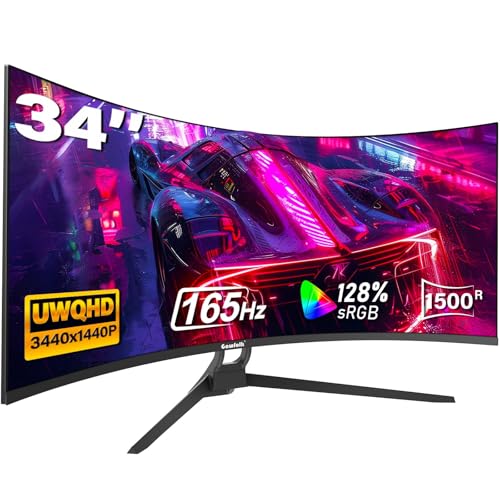
Gawfolk 34" UWQHD 165Hz Curved Monitor
This 34-inch ultrawide monitor delivers a 3440x1440 resolution and 165Hz refresh rate with Adaptive Sync, providing smooth gameplay and expanded screen space. The 1500R curvature and 128% sRGB coverage enhance immersion, while multiple HDMI and DisplayPort inputs offer flexible connectivity.
Pros
- High 165Hz refresh rate with Adaptive Sync
- 34% more screen space for multitasking
- Vivid colors with 128% sRGB coverage
- Multiple HDMI and DisplayPort inputs
- 12-month worry-free warranty
Cons
- Limited to 8-bit color depth
- Brightness of 300 cd/m² may be modest for HDR
- No USB-C connectivity
Sceptre C345B-QUT168 34-inch Curved Ultrawide WQHD
This ultrawide monitor brings vivid WQHD detail and fast 1ms response to gamers seeking an immersive curved display. With 99% sRGB coverage and built-in speakers, it covers both creative and everyday use.
Pros
- Sharp WQHD ultrawide resolution
- Fast 1ms response time for gaming
- High color accuracy with 99% sRGB
- Immersive R1500 curve
- Built-in speakers save desk space
Cons
- No HDMI input mentioned
- Limited ergonomic adjustability likely
- Speakers may lack deep bass
LG 34SR60QC-W 34" QHD Curved Smart Monitor
This 34-inch ultrawide QHD curved monitor doubles as a smart TV with built-in webOS streaming apps. It supports AirPlay 2 mirroring and includes a 100Hz refresh rate, making it suitable for both productivity and casual entertainment.
Pros
- Built-in webOS with streaming apps and free LG Channels
- Ultrawide 21:9 curved display with 99% sRGB color gamut
- Supports Apple AirPlay 2 and HomeKit wireless casting
- Cloud PC access without a computer via webOS
- Two HDMI and three USB ports for versatile connectivity
Cons
- Limited to 100Hz refresh rate
- No ergonomic stand adjustments (height, pivot)
- Magic Remote sold separately
INNOCN 49C1R 49-Inch Curved Ultrawide Monitor
This 49-inch VA panel offers a 5120x1440 resolution at 120Hz with Adaptive-Sync, combining an immersive 32:9 curved display with solid color accuracy from 99% sRGB and HDR400 support. Its USB-C port with 65W power delivery and full ergonomic adjustments make it a versatile choice for work and play.
Pros
- Ultrawide 32:9 5120x1440 resolution
- 120Hz refresh rate with Adaptive-Sync
- 99% sRGB and HDR400 color performance
- USB-C 65W power delivery and extensive ports
- Height/tilt adjustable stand with PIP/PBP
Cons
- Built-in speakers likely lack audio quality
- HDR400 is entry-level HDR performance
Philips 346E2CUAE 34-Inch UWQHD Curved Monitor
For users seeking an expansive ultra-wide workspace combined with gaming capabilities, the Philips 346E2CUAE delivers a 34-inch UWQHD curved panel with a fast 100Hz refresh and 1ms response. Its USB-C port with power delivery simplifies cable management, while wide color coverage ensures vibrant visuals. This monitor suits both productivity and light gaming.
Pros
- UltraWide QHD resolution for expanded workspace
- Fast 1ms MPRT response and 100Hz refresh with Adaptive-Sync
- USB-C with power delivery for single-cable convenience
- Wide color gamut (121.3% sRGB, 99.5% NTSC)
Cons
- Heavy at 27.8 pounds
- No built-in speakers
Alienware AW3425DWM 34-inch WQHD Gaming Monitor
This ultrawide monitor delivers smooth 180Hz performance with WQHD resolution and a 1500R curve for immersive gaming. It supports AMD FreeSync Premium and VESA AdaptiveSync to minimize screen tearing. The hardware-based low blue light solution helps reduce eye strain during long sessions.
Pros
- Excellent color accuracy with DCI-P3 95% coverage
- Smooth 180Hz refresh rate with 1ms response
- Immersive 1500R curve for ultrawide gaming
- AMD FreeSync Premium and VESA AdaptiveSync support
- Hardware-based low blue light reduces eye strain
Cons
- No built-in speakers
ZZA 34-Inch Ultrawide WQHD Curved Monitor
This 34-inch ultrawide monitor from ZZA offers a 3800R curve and WQHD resolution for expansive views in gaming and productivity. Its 100Hz refresh rate and built-in speakers make it a functional all-in-one display for users seeking smooth motion and convenience.
Pros
- Immersive 34-inch curved screen
- Smooth 100Hz refresh rate
- Rich 100% sRGB color accuracy
- Built-in speakers save desk space
- Versatile HDMI and DisplayPort inputs
Cons
- Only 100Hz refresh rate, not for high-end gaming
- No adjustable stand included
- Limited to 3800R curvature, less aggressive curve
Samsung Odyssey Neo G9 G95NC 57-Inch Dual UHD
This 57-inch curved monitor delivers dual 4K resolution in a single screen, effectively replacing two UHD monitors with a seamless, immersive view. Its 240Hz refresh rate, 1ms response time, and DisplayPort 2.1 input make it a top choice for competitive gamers seeking ultra-wide, high-performance visuals.
Pros
- World's first dual UHD resolution for expansive workspace
- 240Hz refresh rate and 1ms response time
- Quantum Mini LEDs with 2,392 local dimming zones
- VESA DisplayHDR 1000 for vivid contrast
- AMD FreeSync Premium Pro for smooth gameplay
Cons
- Large size and weight (41.9 lbs) may require sturdy desk
- Premium pricing limits accessibility
Best Ultra Wide Curved Monitor Buying Guide
Resolution and Aspect Ratio
The most common aspect ratios for ultra-wide monitors are 21:9 and 32:9, with 21:9 being the standard for 34-inch models and 32:9 for larger 49-inch screens. Resolution typically ranges from WQHD (3440×1440) on 34-inch panels to DQHD (5120×1440) on the biggest displays.
A higher pixel density means sharper text and finer detail, which is especially important for productivity tasks like editing large spreadsheets or viewing complex design software.
For most users, 3440×1440 on a 34-inch screen strikes an excellent balance between clarity and performance. If you demand even more screen real estate, a 49-inch 5120×1440 monitor provides a dual-monitor experience without the bezel gap.
Consider pairing one with a high-resolution QHD monitor for a secondary display setup.
Refresh Rate and Response Time
Refresh rate determines how smoothly motion appears on screen. For everyday office work, 60Hz is sufficient, but for gaming or fast-paced video editing, 100Hz or higher is ideal. Many ultra-wide monitors now offer 120Hz, 144Hz, or even 180Hz.
A 1ms response time (MPRT) helps reduce ghosting in competitive games. Even if you are not a hardcore gamer, a higher refresh rate makes scrolling through web pages and documents feel more fluid.
Combined with adaptive sync technologies like FreeSync or G-Sync, you get tear-free visuals. For an immersive gaming rig, check out our guide to graphics cards that can drive high-frame-rate ultra-wide resolutions.
Panel Type: VA, IPS, or OLED
The panel technology greatly impacts color accuracy, contrast, and viewing angles. VA panels provide deep blacks and high contrast ratios, making them excellent for media consumption and dimly lit rooms.
IPS panels offer superior color reproduction and wider viewing angles, which is crucial for color-critical work.
OLED panels take it a step further with perfect blacks and vibrant colors, but they tend to be more expensive and may be prone to burn-in.
For a mix of productivity and gaming, a good VA panel with high refresh rate is a solid choice. If color accuracy is your priority, an IPS monitor will serve you well.
To see how different panels perform in various scenarios, read our LED monitor recommendations.
Curvature and Immersion
Curvature is measured by the radius (e.g., 1500R, 1800R, 1000R). A lower number means a tighter curve, which wraps around your field of view more effectively.
For a 34-inch monitor, a 1500R or 1800R curve offers a natural viewing experience. For 49-inch monitors, a 1000R curve matches the human eye’s natural shape, delivering deep immersion.
The right curve reduces eye strain by allowing your eyes to focus on the entire screen without turning your head.
If you plan to share your screen or use it for collaborative work, a less aggressive curve (like 3800R) might be more versatile. A comfortable ergonomic setup also includes a dual monitor arm if you add a second screen.
Connectivity and Ergonomics
Modern ultra-wide monitors should offer at least one DisplayPort and HDMI input, plus USB-C with power delivery for seamless laptop connectivity. USB-C is especially handy for creative professionals who need to charge their device while displaying video.
Also check for built-in speakers, headphone jacks, and USB hubs. Ergonomics matter for long sessions: look for height adjustment, tilt, and swivel. Some models even support pivot (rotation to portrait) which is less common on ultra-wide screens.
A fully adjustable stand helps maintain a healthy posture. For a complete workspace, consider teaming your monitor with a high-quality office chair from our guide.
Budget Considerations
Ultra-wide curved monitors span a wide price range, from under $200 to over $1,000. Entry-level models with 2560×1080 resolution and 75Hz refresh rate are affordable but lack sharpness.
Mid-range options around the $192.99 – $1,449.99 mark offer WQHD resolution and 100-165Hz refresh rates, a sweet spot for most users. Premium monitors with 5K2K resolutions, OLED panels, or ultra-fast refresh rates command a higher price.
Determine your primary use case: if gaming is your focus, invest in high refresh rate and low response time; for productivity, prioritize resolution and ergonomics. Our 2560×1440 monitor roundup offers additional budget-friendly choices if you prefer a standard aspect ratio.
Why You Should Trust Us
At BestProducts, we are committed to independent, transparent reviews. Each product featured in this guide is evaluated using our proprietary BP Score, a 0-to-10 rating system that combines objective specifications, consensus among professional reviewers, and feedback from verified buyers.
We do not conduct our own product trials; our evaluations are grounded in research, published data, expert review consensus, and verified buyer feedback. Our methodology ensures that you receive unbiased recommendations based on real-world performance and value.
We may earn a commission if you purchase through our Amazon links, but this does not influence our rankings. For more insight into our review process, explore our Computers & Office category where we apply the same rigorous standards.
Final Thoughts
After thorough research, these are our top picks in the ultra wide curved monitor category, each earning a high BP Score for its specific strengths.
- Best Overall: Samsung 34″ ViewFinity S50GC Series Ultra-WQHD Monitor, With a perfect balance of resolution, refresh rate, and connectivity, this monitor delivers outstanding all-around performance for both work and play, earning a top-tier BP Score.
- Best for Gaming: SAMSUNG 49-inch Odyssey G9 (G91F) DQHD, Its 144Hz refresh rate, DisplayHDR 600, and fast response time make every game smooth and immersive, ideal for competitive and cinematic experiences alike.
- Best Budget: Sceptre 34-Inch Curved Ultrawide WQHD Monitor, This monitor offers exceptional value with WQHD resolution, up to 180Hz refresh rate, and 1ms response time at a price that won’t break the bank.
- Best for Productivity: LG 34SR60QC-W 34-inch QHD Curved Smart Monitor, With built-in webOS, AirPlay2, and multiple screen-sharing features, it doubles as a stand-alone streaming device while handling spreadsheets and documents with ease.
- Most Immersive: INNOCN 49″ Curved Monitor Ultrawide Gaming 5K2K 120Hz, The massive 49-inch 32:9 screen with 5K2K resolution and HDR400 provides an unparalleled panoramic view that fully surrounds you.
For more options tailored to specific uses, check out our productivity monitor guide and smart monitor guide.
Frequently Asked Questions
What resolution should I look for in an ultra wide curved monitor?
For a 34-inch monitor, WQHD (3440×1440) is the sweet spot, it provides crisp text and enough detail for gaming and productivity. For 49-inch displays, DQHD (5120×1440) offers a true dual-monitor workspace. Avoid 2560×1080 on larger screens as the pixel density is low.
Is 100Hz good for gaming on an ultra-wide monitor?
Yes, 100Hz is a great starting point for smooth gameplay, especially in single-player titles. Competitive players might prefer 144Hz or higher for an edge in fast-paced shooters. Most modern GPUs can handle 100Hz at WQHD resolution comfortably.
Do curved monitors cause eye strain?
When properly set up, a curved monitor can actually reduce eye strain by keeping the entire screen at a consistent distance from your eyes. However, choosing the wrong curvature or sitting too close can cause discomfort.
A 1500R to 1800R curve works well for most desk setups.
Can I use a ultra wide curved monitor for productivity?
Absolutely. The extra horizontal screen real estate allows you to run multiple windows side-by-side without needing a second monitor. Features like Picture-in-Picture (PiP) and Picture-by-Picture (PbP) are common on higher-end models, making multitasking effortless.
Our monitor for reading guide also covers comfort features for long work sessions.
What is the difference between VA and IPS panels in curved monitors?
VA panels offer higher contrast ratios and deeper blacks, making them better for movies and dark-room gaming. IPS panels provide more accurate colors and wider viewing angles, which is important for photo editing or if you share your screen.
Curved VA monitors are common, but curved IPS options are also available at a premium.
About the author
Irene reviews desktop PCs and monitors for BestProducts, weighing performance, upgradability, and panel quality for work and home. She helps readers build a desk setup that stays fast and comfortable for years.