The Best USB-C Monitor
Simplify your desk with a single-cable solution. Our top picks, from 4K UHD to budget-friendly models, are based on expert reviews and owner feedback.
 By Irene Hopkins
Updated September 16, 2026
By Irene Hopkins
Updated September 16, 2026
USB-C monitors simplify your workspace by combining power delivery, video, and data over a single cable.
Whether you are setting up a home office, upgrading a creative station, or adding a second screen to your laptop, the right best USB-C monitor makes the transition seamless.
Our research team has evaluated dozens of models using detailed specifications, expert review consensus, and verified owner feedback to bring you the most reliable options.
For a broader look at all types of displays, consult our best computer monitor for every workspace. Below you will find our curated top picks.
| Award | Product | BP Score About BP ScoreThe BP Score is our own rating from 0 to 10, based on performance, design and build, ease of use, and value. It reflects independent research and is never influenced by manufacturers, retailers, or affiliate commissions. Learn more › | |
|---|---|---|---|
| Best Overall |
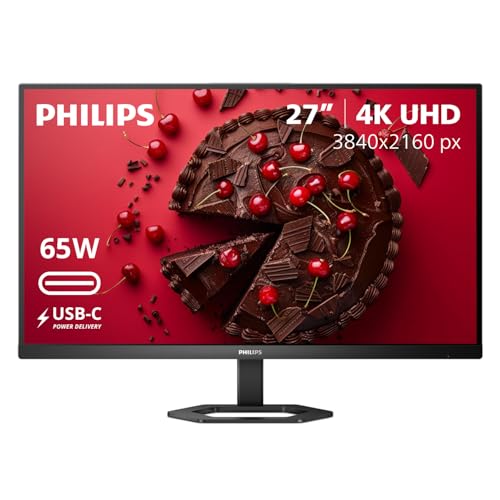 Philips 27E1N5900R 27" 4K UHD IPS Monitor
|
9.2/10 | Buy |
| Best Premium |
 Dell S2725QC 27" 4K 120Hz Monitor
|
9.2/10 | Buy |
| Best Budget |
 MNN 15.6" FHD USB-C Portable Monitor
|
9.1/10 | Buy |
 SANSUI 27-Inch 120Hz Curved Monitor
|
8.9/10 | Buy | |
| Best Value |
 ViewSonic VA2448-MHU 24-Inch 120Hz USB-C Monitor
|
8.8/10 | Buy |
 Dell S2725DC 27-inch QHD 144Hz Monitor
|
8.4/10 | Buy | |
 Dell S2725QS 27-Inch 4K 120Hz IPS
|
8.3/10 | Buy | |
 BenQ GW2490C 24-Inch 144Hz IPS Monitor
|
8.1/10 | Buy | |
 ASUS ProArt PA247CV 24-Inch 1080p USB-C Monitor
|
7.8/10 | Buy |
Philips 27E1N5900R 27" 4K UHD IPS Monitor
This 27-inch 4K IPS monitor combines sharp UHD resolution with USB-C connectivity that delivers up to 65W of power delivery, making it a versatile choice for productivity and content creation. Its DisplayHDR 400 certification and ergonomic stand with height, pivot, and tilt adjustments enhance both visual quality and comfort.
Pros
- Sharp 4K UHD resolution with accurate IPS colors
- USB-C with 65W power delivery for single-cable setup
- DisplayHDR 400 for improved brightness and contrast
- MultiView supports dual-device input simultaneously
- Fully ergonomic stand with height, pivot, and tilt
Cons
- Heavy at over 30 pounds
- No built-in speakers listed
Dell S2725QC 27" 4K 120Hz Monitor
For those seeking a 4K monitor that handles both productivity and casual gaming, the Dell S2725QC offers a compelling mix: a sharp 27-inch IPS panel with 120Hz refresh rate and FreeSync Premium. Its USB-C connectivity with 65W power delivery keeps your desk tidy, while the improved audio system and low blue light feature add to all-day comfort.
Pros
- Low blue light ComfortView Plus reduces eye strain
- 120Hz refresh rate with FreeSync Premium for smooth visuals
- Vivid 4K UHD IPS with 99% sRGB and 1500:1 contrast
- Improved sound quality with deeper frequency response
- Single USB-C cable with 65W power delivery simplifies setup
Cons
- 4ms response time may not suit competitive gaming
- 99% sRGB coverage limits color-critical tasks
- Stand does not appear to offer height adjustment
MNN 15.6" FHD USB-C Portable Monitor
This portable monitor delivers a crisp 1080p IPS display and simplified connectivity via dual USB-C ports. Its smart cover doubles as a stand, making it a convenient second screen for travelers and remote workers on the go.
Pros
- Full HD IPS panel with HDR support
- Plug-and-play dual USB-C ports
- Lightweight and ultra-slim design
- Protective smart cover acts as stand
- Multiple display modes (copy, extend, portrait)
Cons
- Requires USB-C DP Alt Mode or Thunderbolt 3
- No built-in battery for true portability
- Glossy screen can cause glare in bright light
SANSUI 27-Inch 120Hz Curved Monitor
This SANSUI curved monitor delivers a smooth 120Hz refresh rate and fast 1ms response time, making it a solid choice for budget-conscious gamers and home office users. Its USB-C connectivity and built-in speakers add convenience, while the 4000:1 contrast ratio and 110% sRGB coverage provide vibrant visuals.
Pros
- High 120Hz refresh rate for smooth motion
- Fast 1ms response time reduces ghosting
- USB-C port adds modern connectivity
- Good contrast ratio for deeper blacks
- Built-in speakers save desk space
Cons
- Speakers are only 2W, may lack volume
- HDMI 1.4 limits bandwidth for higher resolutions
- Limited to 300 nits brightness
ViewSonic VA2448-MHU 24-Inch 120Hz USB-C Monitor
This 24-inch IPS monitor from ViewSonic delivers a smooth 120Hz refresh rate and USB-C connectivity with passthrough power. It is a solid choice for home offices or study spaces seeking clear visuals and reduced eye fatigue.
Pros
- 120Hz refresh rate for fluid motion
- USB-C with passthrough power charging
- IPS panel gives consistent colors
- Eye care features reduce fatigue
- Multiple input options including VGA
Cons
- Only 1080p resolution
- Limited ergonomic adjustability
- Speakers not mentioned in specs
Dell S2725DC 27-inch QHD 144Hz Monitor
This 27-inch QHD monitor combines a 144Hz refresh rate with a 1500:1 contrast ratio for vivid, tear-free visuals, making it a solid choice for entertainment and light gaming. USB-C with 65W power delivery reduces cable clutter, while the ergonomic stand and built-in dual 3W speakers add everyday convenience.
Pros
- QHD resolution with high contrast ratio
- 144Hz refresh rate and 1ms MPRT
- USB-C with 65W power delivery
- Ergonomic stand (height, tilt, pivot, swivel)
- TUV-certified eye comfort technology
Cons
- 65W USB-C may not suffice for large laptops
- Integrated 3W speakers lack bass depth
Dell S2725QS 27-Inch 4K 120Hz IPS
A 27-inch 4K IPS monitor with a 120Hz refresh rate and AMD FreeSync Premium for smooth visual performance. Its ComfortView Plus reduces blue light while maintaining color accuracy, and the built-in speakers offer improved audio. Ideal for mixed productivity and light gaming, though the 99% sRGB coverage limits high-end color work.
Pros
- 4K resolution with 120Hz refresh rate
- AMD FreeSync Premium for tear-free gaming
- ComfortView Plus reduces blue light without color shift
- Ultra-thin bezels for a sleek design
- Improved built-in speakers with deeper sound
Cons
- 99% sRGB coverage not suitable for professional color work
- HDR readiness is basic, not full HDR certification
BenQ GW2490C 24-Inch 144Hz IPS Monitor
This 24-inch IPS monitor combines a smooth 144Hz refresh rate with BenQ's eye-care technologies, making it a solid choice for both home office tasks and casual gaming. USB-C connectivity simplifies cable management, while the slim bezel and energy-efficient design suit corporate deployments.
Pros
- Eye-care technologies reduce strain during long sessions
- USB-C one-cable connection for video, data, and power
- 144Hz refresh rate for smoother scrolling and gaming
- Ultra-slim bezel for a clean multi-monitor setup
- Energy-efficient design lowers operating costs
Cons
- 1080p resolution may lack sharpness for detailed work
- 24-inch screen size may feel small for heavy multitasking
ASUS ProArt PA247CV 24-Inch 1080p USB-C Monitor
This 24-inch Full HD IPS monitor is factory calibrated for Delta E < 2 color accuracy and covers 100% sRGB and Rec. 709, making it a solid choice for color-critical work. It includes USB-C with 65W power delivery, daisy-chain support, and a 5-year warranty, plus a free Adobe Creative Cloud subscription.
Pros
- Factory calibrated for excellent color accuracy
- Wide 100% sRGB and Rec. 709 gamut
- USB-C with 65W power delivery
- Daisy-chain support for multi-monitor setups
- 5-year warranty with registration
Cons
- Only 1920x1080 resolution may limit screen real estate
Best USB-C Monitor Buying Guide
Panel Type and Color Accuracy
IPS panels dominate the USB-C monitor segment because they deliver consistent color from wide viewing angles and are less susceptible to shifting when you lean in.
VA screens can provide deeper black levels, but they often suffer from slower pixel transitions. For general productivity and creative work, an IPS panel remains the most versatile.
Our best IPS monitor guide covers extra detail on how different panel technologies perform.
Color accuracy is especially important if you edit photos, videos, or design public. Many models achieve 99% sRGB coverage, while professional options like ASUS ProArt are factory‑calibrated to Delta E <2. For other home office needs, check our best home monitor for every use.
Resolution and Refresh Rate
Resolution determines the clarity of your on‑screen content, and USB‑C monitors are available from 1080p all the way to 4K.
4K models provide crisp detail for spreadsheets and high‑resolution video, while 1080p keeps costs low and works well for standard office tasks.
Refresh rate, meanwhile, affects on‑screen motion, 120 Hz or higher reduces eye strain and makes casual gaming feel smoother. For a deep dive into high‑speed panels, see our best gaming monitor pick.
Upscaling to QHD or 4K may require a moderately powerful laptop, but many devices can handle 4K at 60 Hz without issue. Gamers who want a high‑refresh‑rate 4K experience should pay attention to the Dell S2725QC in our list.
USB-C Connectivity and Power Delivery
The defining feature of these monitors is the USB-C port. Look for support for DisplayPort Alt Mode and power delivery at least 65W to charge a typical lightweight laptop. Some high‑end models deliver 90W, enough for larger laptops.
The monitor’s USB‑C input can also act as a hub, eliminating the need to connect a separate power brick.
This is especially valuable when you are moving between the desk and a different location; the best portable monitor article highlights ultra‑light models.
Check whether the USB-C port supplies data transfer (USB 3.2) and video simultaneously. Many monitors also include an upstream USB-CT Type-B plus additional downstream Type‑M ports for full hub and stick.
Size, Form Factor, and Ergonomics
You can choose between 24‑inch and 27‑inch models based on your desk depth and viewing distance. The 27‑inch size is ideal for multitasking without overwhelming a standard desk.
Look for an adjustable stand that offers height, tilt, pivot, and portrait orientation, this is key to comfortable long‑session work. Many monitors are also VESA compatible, simplifying a dual‑monitor setup.
For detailed advice on pairing several screens together, read our best two monitor guide.
Compact 24‑inch models like ViewSonic VA2448‑MHU are better for tight spaces or as a secondary monitor. If you need portrait mode for coding or reading, choose a model with a pivot base.
Additional Connectivity and Video Features
Beyond the USB‑C primary connection, additional HDMI and DisplayPort inputs expand compatibility with older devices and gaming consoles.
USB‑A downstream ports are also useful for plugging in a mouse or keyboard, many monitors include speakers that are okay for casual listening but not for high‑quality audio.
Look for FreeSync Premium compatibility if you plan to game via a compatible laptop. For those interested in a deeper desk integration, our best office monitor guide cators how versatile a modern display can be.
Sustainability and Build Quality
Build quality is often reflected in the price range, but all monitors in our selection meet the requirements for day‑to‑day durability. Many are built from recycled plastic, and energy‑eficiency labels such as Energy Star are common.
Brands like Dell and BenQ carry high reliability ratings. For power supply concerns, refer to our power supplies buying guide.
Why You Should Trust Us
BestProducts is an independent source of product evaluations. We assess each monitor against the same set of criteria, using supplier specifications, aggregated expert reviews, verified buyer feedback, and published data.
We then assign each product a BP Score from 0 to 10, giving a clear picture of how it stacks up within its class. You can rest assured that our process is transparent and that our recommendations are based on thorough research.
We do not conduct our own product trials; our evaluations are grounded in research, published data, expert review consensus, and verified buyer feedback. Our editorial team maintains strict independence, and affiliate revenue does not influence our rankings or picks.
Final Thoughts
Best Overall: Philips 27E1N5900R, A 27‑inch 4K UHD IPS monitor that combines an edge‑to‑edge display with strong USB‑C charging and HDR400. Its balanced spec and excellent build earn it the highest overall BP Score.
Best for Media and Gaming: Dell S2725QC, This 4K 120 Hz IPS panel with FreeSync Premium delivers smooth motion for casual gaming and precise color for creative work. One of the best for high‑refresh 4K.
Best Budget Pick: ViewSonic VA2448-MHU, A 24‑inch 1080p 120 Hz IPS monitor that offers USB‑C versatility at a low price. It’s a fantastic entry‑level pick for home or secondary workstation use.
Best for Multi‑Device Workflows: Dell 27 Plus QHD USB‑C Monitor (S2725DC), A 27‑inch QHD 144 Hz display that offers height, tilt, swivel, and pivot. Its adjustable stand and sharp resolution suit users who switch between laptops and desktops.
Frequently Asked Questions
What Is a USB‑C Monitor and How Does It Work?
A USB‑C monitor streams video and data over a single USB‑C cable while delivering power to your laptop.
It uses the USB 3.1 or 3.2 standard and DisplayPort Alt Mode to handle the signal, effectively replacing a separate power brick and video cable. For a deeper look at professional use explore best WFH monitor.
Can I Use Any USB‑C Monitor with a MacBook or PC?
As long as the monitor supports DisplayPort Alt Mode and supplies at least the power your laptop requires, it works with both MacBook and Windows devices. Many are designed to be plug‑and‑play. For more laptop compatibility tips, see best portable monitors.
How Much Power Delivery Do I Need for USB‑C Charging?
For typical 12‑inch to 14‑inch laptops, 45‑65 W is sufficient to charge during light to moderate use. Larger machines with dGPUs may require 85 W or more. Our picks cover common ranges from 65W up to 90W.
Is a USB‑C Monitor Good for Gaming?
Yes, many USB‑C monitors now offer 120 Hz to 165 Hz refresh rates with Adaptive Sync or FreeSync Premium. If gaming is your priority, check our best HDR monitor for a higher dynamic range.
Can I Use a USB‑C Monitor Over a Hub or Docking Station?
Yes, USB‑C hubs that also support DisplayPort pass‑through work with a monitor. However, for the best performance, it is recommended to connect the monitor directly to the laptop’s USB‑C port.
For dual screen setups, a hub can help; read best second monitor guide.
What Is the Difference Between USB‑C Monitor and Regular Monitor?
A regular monitor uses HDMI or DisplayPort only, while a USB‑C monitor includes a port that can transmit video, data, and power over one cable. If you own a modern laptop with USB‑C, it simplifies your desk considerably.
About the author
Irene reviews desktop PCs and monitors for BestProducts, weighing performance, upgradability, and panel quality for work and home. She helps readers build a desk setup that stays fast and comfortable for years.