The Best Aftermarket CPU Cooler
From budget air coolers to high-end AIOs, we've researched the top aftermarket CPU coolers to help you keep your processor cool and quiet.
 By Teresa Price
Updated September 12, 2026
By Teresa Price
Updated September 12, 2026
Upgrading your CPU cooler is one of the most impactful and cost‑effective improvements you can make to your PC. A stock cooler often struggles under sustained loads, leading to higher temperatures, thermal throttling, and increased fan noise.
An aftermarket CPU cooler not only lowers temperatures but also allows your processor to maintain boost clocks longer, resulting in snappier performance in games and productivity tasks.
Whether you are building a new rig or breathing life into an existing one, choosing the right cooler ensures your system runs quietly and reliably for years.
BestProducts evaluated dozens of models against consistent criteria, specifications, expert review consensus, verified buyer feedback, and published performance data, and scored each on our 0‑to‑10 BP Score.
The result is a curated list of the top aftermarket CPU coolers for every need and budget. Below you will find our top picks, followed by a detailed buying guide to help you make the right choice.
| Award | Product | BP Score About BP ScoreThe BP Score is our own rating from 0 to 10, based on performance, design and build, ease of use, and value. It reflects independent research and is never influenced by manufacturers, retailers, or affiliate commissions. Learn more › | |
|---|---|---|---|
| Best Overall |
 Thermalright AXP90 X36 Low Profile Cooler 36mm
|
9.2/10 | Buy |
| Best Value |
 Thermalright Peerless Assassin 120 SE Dual 120mm
|
9.2/10 | Buy |
| Best Premium |
 ARCTIC Liquid Freezer III Pro 360 A-RGB
|
9.2/10 | Buy |
 be quiet! Dark Rock Pro 6 Dual-Tower CPU Cooler
|
9.2/10 | Buy | |
 Cooler Master V4 Alpha 3DHP Dual-Fan Cooler
|
9.1/10 | Buy | |
 Thermalright Peerless Assassin 120 SE ARGB Dual
|
9.1/10 | Buy | |
 Cooler Master Hyper 212 Black Air Cooler
|
9.1/10 | Buy | |
| Best Budget |
 AMD Wraith Stealth AM4 CPU Cooler
|
8.9/10 | Buy |
 Cooler Master i30 92mm Intel CPU Cooler
|
8.9/10 | Buy | |
 ID-COOLING SE-903-XT V2 Compact CPU Cooler
|
8.9/10 | Buy | |
 Thermalright Assassin X120 Refined SE
|
8.9/10 | Buy |
Thermalright AXP90 X36 Low Profile Cooler 36mm
This compact CPU cooler stands just 36mm tall, making it a solid choice for small form factor or ITX builds. It uses four 6mm heatpipes and a slim 90mm fan, and supports both Intel and AMD sockets without the noise of a larger cooler.
Pros
- Ultra-low 36mm profile for compact builds
- Supports modern Intel and AMD sockets
- Nickel plating resists corrosion over time
- Quiet operation at under 22.4 dBA
- Four heatpipes improve cooling performance
Cons
- Limited height may restrict fan upgrades
- No included fan speed controller
Thermalright Peerless Assassin 120 SE Dual 120mm
The Thermalright Peerless Assassin 120 SE is a dual-tower air cooler designed for high-performance PCs. It combines six AGHP heat pipes with two 120mm PWM fans that spin up to 1550RPM, pushing 66.17CFM of airflow at a rated noise of 25.6dB(A) or less. This cooler fits Intel LGA 115X/1200/1700/1851 and AMD AM4/AM5 platforms while clearing tall memory modules.
Pros
- Dual 120mm PWM fans deliver up to 66.17CFM
- Six AGHP heat pipes for efficient heat transfer
- Stays quiet at 25.6dB(A) or less
- Leaves room for RAM modules
- Supports Intel LGA 115X/1200/1700/1851 and AMD AM4/AM5
Cons
- AMD install requires original motherboard backplate
- Tall 155mm design may not fit small cases
ARCTIC Liquid Freezer III Pro 360 A-RGB
This AIO cooler prioritizes efficient heat transfer with a native offset mount that shifts the cold plate center toward the CPU hotspot. Its integrated VRM fan and contact frame for Intel LGA1851 and LGA1700 help maintain stable performance under load.
Pros
- Excellent cooling performance under high load
- Quieter than previous P12 fans at low speeds
- VRM fan helps maintain stable power delivery
- Neat cable management reduces clutter
Cons
- Only one color option (black)
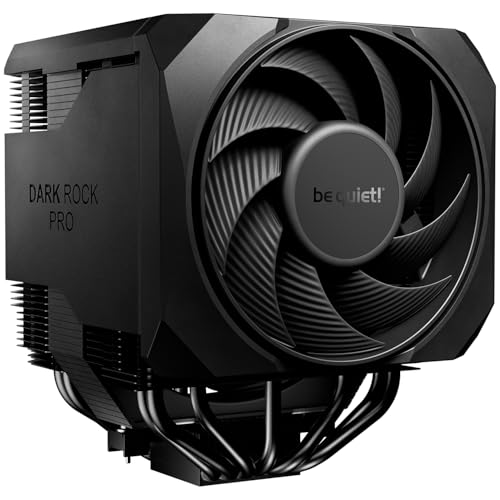
be quiet! Dark Rock Pro 6 Dual-Tower CPU Cooler
The be quiet! Dark Rock Pro 6 is a dual-tower air cooler with seven heatpipes and two PWM fans, designed for high-end systems. Its active mode switch allows semi-passive operation for near-silent cooling under low loads.
Pros
- Ultra-quiet operation in both modes
- Exceptional cooling for high-TDP processors
- Easy installation with pre-installed mounting bridge
- Rail-mounted front fan improves case compatibility
- Includes liquid metal thermal grease
Cons
- Large dual-tower design may limit small case fit
- Heavy at nearly 3 pounds
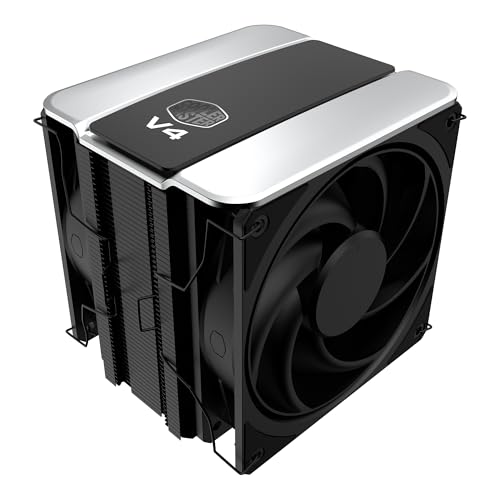
Cooler Master V4 Alpha 3DHP Dual-Fan Cooler
This single-tower CPU cooler uses patented 3DHP heat pipes for 30% better cooling than standard designs, while reducing fan noise up to 2.2 times. Its pre-installed dual Mobius 120mm fans in a push-pull configuration deliver enhanced airflow, and the minimalist black design fits most systems.
Pros
- 30% better cooling than standard designs
- Up to 2.2x quieter operation
- Enhanced airflow with push-pull fans
- Broad socket compatibility
- Sleek minimalist design
Thermalright Peerless Assassin 120 SE ARGB Dual
This dual-tower air cooler from Thermalright packs six heat pipes and two ARGB PWM fans to handle CPUs up to 245W TDP. It is a strong mid-range to high-end cooling option for gamers and builders who want reliable performance without moving to liquid cooling.
Pros
- High cooling capacity for its size
- Dual ARGB fans with low noise (25.6 dBA)
- Wide socket compatibility including LGA1851
- Good value for dual-tower performance
Cons
- Heatsink may block some RAM slots
- No included thermal paste mentioned
- Only 1500 RPM fan speed may limit extreme overclocking
Cooler Master Hyper 212 Black Air Cooler
This CPU air cooler uses four heat pipes and a copper base to deliver reliable cooling for AMD R7 and Intel i7 processors. Its SickleFlow 120 Edge fan provides quiet PWM operation, while the redesigned brackets simplify installation on AM5 and LGA 1851/1700 motherboards. The compact 152mm height ensures wide chassis compatibility.
Pros
- Effective cooling for mainstream CPUs
- Quiet PWM fan with wide speed range
- Easy installation with included thermal paste
- Compact design fits most cases
- Black finish looks sleek
Cons
- Only available in black
AMD Wraith Stealth AM4 CPU Cooler
For budget AM4 builds, this stock cooler offers a straightforward installation with pre-applied thermal paste and direct screw mounting. Its slim aluminum heatsink and 90mm PWM fan provide adequate cooling for standard processors.
Pros
- Pre-applied thermal paste for quick setup
- Direct screw mounting to AM4 motherboard
- Compact slim design fits small cases
- 4-pin PWM fan for variable speed control
Cons
- AM4 socket only
Cooler Master i30 92mm Intel CPU Cooler
A compact and quiet CPU cooler designed for Intel LGA115x sockets. Its 92mm fan operates at a low 22dBA noise level and uses an alloy bearing for reliability, while the prepasted thermal compound simplifies installation.
Pros
- Low noise level at 22dBA
- Preapplied thermal paste for easy setup
- Alloy bearing for long durability
- Compact size fits tight cases
- Includes backplate for secure mounting
Cons
- 3-pin connector without PWM control
- Only supports Intel LGA115x sockets
- No AMD socket compatibility
ID-COOLING SE-903-XT V2 Compact CPU Cooler
This compact CPU air cooler from ID-COOLING features an upgraded 100mm fan and a refined design that improves airflow while maintaining low noise. Its universal mounting bracket and low-profile footprint make it an easy fit for small form factor and mid-range systems.
Pros
- Compact low-profile size
- Upgraded 100mm fan improves airflow
- Easy universal mounting bracket
- Secure fin locking reduces vibration
- Good compatibility with ITX and mATX cases
Cons
- Limited to 150W TDP cooling
Thermalright Assassin X120 Refined SE
A compact CPU air cooler that uses 4 heat pipes with AGHP technology to work well in any orientation, plus a 120mm PWM fan. It fits medium-sized cases and covers modern Intel and AMD sockets.
Pros
- Handles inverse gravity in any mounting orientation
- Low-noise PWM fan (under 25.6 dB)
- Compact 148mm height fits many mid-towers
- Covers both Intel and AMD recent sockets
Cons
- Limited to medium cases due to 148mm height
- No included extra fan or RGB
- Weight may stress some budget motherboards
Best Aftermarket CPU Cooler Buying Guide
Type: Air Cooler vs. AIO Liquid Cooler
The first decision is whether to go with a traditional air cooler or an all‑in‑one (AIO) liquid cooler. Air coolers are simpler, generally more affordable, and have fewer failure points, no pump or liquid to leak.
Tower‑style air coolers with multiple heat pipes and large heatsinks can rival many 240‑mm AIOs in thermal performance while often running quieter.
On the other hand, AIO coolers excel at moving heat away from the CPU quickly, making them ideal for high‑end processors that generate a lot of heat, especially in compact cases where airflow is limited.
AIOs also offer more room for RAM clearance and can be positioned to exhaust heat directly out of the case.
For most builders, a quality air cooler like the Thermalright Peerless Assassin 120 SE delivers excellent performance without the complexity of liquid cooling.
If you prioritize absolute thermal headroom for overclocking or prefer the aesthetics of a pump block, an AIO such as the ARCTIC Liquid Freezer III Pro 360 is a strong contender.
Size and Compatibility
Before buying, measure the clearance inside your case. CPU cooler height is critical for air coolers, most mid‑tower cases accept coolers up to 155, 160 mm.
Low‑profile coolers like the Thermalright AXP90 X36 are designed for small form‑factor builds where space is at a premium.
For AIOs, you need to ensure your case supports the radiator size (120, 240, 280, or 360 mm) and that there is enough space for the radiator + fan thickness.
Also verify that the cooler is compatible with your CPU socket, modern coolers typically support LGA 1700/1851 and AM5, but always double‑check for older sockets.
Socket support is especially important if you are using an Intel platform. Our dedicated Intel CPU cooler guide can help you find a model that fits your specific LGA socket.
For compact builds, a compact CPU cooler might be the best option to avoid clearance issues with the side panel or RAM.
Thermal Performance and TDP Rating
Thermal Design Power (TDP) is a rough indicator of how much heat a cooler can dissipate, though real‑world performance depends on fan speed, heatsink design, and ambient temperature.
For a mainstream processor like an Intel Core i5 or AMD Ryzen 5, a cooler rated for 150, 200 W TDP is sufficient.
High‑end chips like the Core i9 or Ryzen 9 can exceed 250 W under load, so you will need a cooler with a TDP rating of 250 W or more, such as the be quiet!
Dark Rock Pro 6 (300 W TDP) or a 360‑mm AIO.
When comparing coolers, look at the number and diameter of heat pipes (more pipes generally mean better heat transfer) and the size of the heatsink.
For example, the Peerless Assassin 120 SE uses six heat pipes and a dual‑tower design to handle high thermal loads efficiently.
Noise Levels and Fan Quality
Fan noise is a major consideration, especially if you use your PC for quiet work or media consumption. Premium air coolers and AIOs often include high‑quality fans with fluid dynamic bearings that produce lower noise at a given RPM.
Look for fans with a low decibel rating (dBA) and PWM control for automatic speed adjustment. Some coolers, like the Dark Rock Pro 6, are engineered specifically for near‑silent operation, making them a great choice for quiet builds.
If you need a very small cooler for a compact system, a small CPU cooler may sacrifice some noise performance, but modern slim fans are remarkably quiet.
Price and Value
Aftermarket CPU coolers range from under $20 to well over $100. Budget models, such as the ID‑COOLING SE‑903‑XT V2 and the Cooler Master Hyper 212 Black, offer solid performance for everyday computing and light gaming.
Mid‑range options like the Peerless Assassin 120 SE provide enthusiast‑grade cooling at a very reasonable price. High‑end air coolers and AIOs cost more but deliver the thermal headroom needed for overclocking and sustained heavy workloads.
Our budget CPU cooler guide highlights the best affordable picks if you are on a tight budget.
Installation and Ease of Use
Ease of installation varies widely. Many modern coolers use tool‑less mounting systems for Intel and AMD sockets, making the process straightforward even for first‑time builders.
Some coolers, especially large dual‑tower air coolers, require you to install a backplate and may need a screwdriver. AIO coolers involve mounting the radiator and pump block, which can be more complex but are still manageable with clear instructions.
If you prefer a hassle‑free experience, look for models that come with pre‑applied thermal paste and clear manuals. Our easy CPU cooler guide covers models that are particularly beginner‑friendly.
Additional Considerations: Aesthetics and RGB
For many builders, the look of the cooler matters. RGB lighting, blacked‑out heatsinks, and sleek pump designs can complement your build’s theme. The Peerless Assassin 120 SE ARGB offers addressable RGB fans that sync with your motherboard.
If aesthetics are a top priority, our best‑looking CPU cooler guide showcases the most visually striking options.
However, remember that a cooler’s primary job is to keep your CPU cool, let performance and noise be your main decision drivers.
Why You Should Trust Us
BestProducts is an independent review site that does not sell products. We evaluate each item using our proprietary BP Score (0, 10) based on consistent criteria: detailed specifications, consensus from expert reviews, verified buyer feedback, and published performance data from reputable sources.
We do not conduct our own product trials; our evaluations are grounded in research, published data, expert review consensus, and verified buyer feedback. Our goal is to provide you with accurate, unbiased information so you can make a confident purchase.
Every product in this guide was selected after thorough analysis, and we update our recommendations regularly to reflect new releases and price changes.
For more information on how we evaluate coolers, you can explore our high‑performance cooler roundup and other dedicated guides. We also maintain a downfire CPU cooler guide for those interested in that specific form factor.
Final Thoughts
After evaluating the current market, we have awarded the following top honors:
- Best Overall: Thermalright Peerless Assassin 120 SE, Excellent thermal performance, six heat pipes, dual 120‑mm fans, and a price that undercuts most competitors. It earned a top BP Score in our analysis for its balance of cooling, noise, and value.
- Best Budget: ID‑COOLING SE‑903‑XT V2, A compact, low‑cost air cooler that handles up to 150 W TDP, perfect for budget builds or office PCs. It offers solid cooling for the price.
- Best AIO: ARCTIC Liquid Freezer III Pro 360, A 360‑mm liquid cooler with A‑RGB fans and exceptional thermal capacity. It keeps even the hottest processors in check while remaining quiet under normal loads.
- Best Low Profile: Thermalright AXP90 X36, Only 36 mm tall, this cooler fits in the tightest ITX cases without sacrificing too much performance. It is our top pick for small‑form‑factor builds.
- Best Premium Air Cooler: be quiet! Dark Rock Pro 6, With a massive 300 W TDP rating and near‑silent operation, this dual‑tower cooler is ideal for enthusiasts who demand the best air cooling available.
For other specialized needs, check out our mounted CPU cooler guide or low‑profile cooler guide.
Frequently Asked Questions
Do I really need an aftermarket CPU cooler?
If you use your PC for gaming, video editing, 3D rendering, or any task that pushes the CPU, an aftermarket cooler is highly recommended.
Stock coolers are often adequate for basic use but can become loud and allow thermal throttling under load. An aftermarket cooler will keep temperatures lower, reduce noise, and often let your CPU maintain higher boost clocks for longer.
Air cooler or AIO: which is better for me?
For most users, a quality air cooler offers the best value and reliability. Air coolers are simpler, cheaper, and less prone to failure.
AIOs are better for extreme overclocking, very high‑TDP CPUs, or when you want to exhaust heat directly out of the case. AIOs also look more modern and can improve RAM clearance in some builds.
Consider your budget, case size, and performance needs when deciding.
How do I know if a cooler fits my CPU socket?
Check the manufacturer’s specifications for socket compatibility. Most modern coolers support Intel LGA 1700, 1200, 115X, and AMD AM4/AM5. Some older coolers may require separate mounting kits for newer sockets. Our Skylake CPU cooler guide covers compatibility for older platforms as well.
What is TDP and how much do I need?
TDP (Thermal Design Power) is a rating that indicates the maximum heat a cooler can dissipate under typical use. For a 65 W CPU, a cooler rated for 100 W is more than enough.
For a 125 W CPU, aim for 200 W or higher. High‑end CPUs that draw 250 W or more need coolers rated at 300 W or a robust AIO. Always leave some headroom for ambient temperature variations and overclocking.
Can I use an aftermarket cooler with a stock Intel/AMD bracket?
Most aftermarket coolers include their own mounting hardware that uses the stock backplate on Intel and AMD motherboards. Some coolers require you to remove the stock retention mechanism and install a custom backplate. Always read the installation manual before purchasing.
Many coolers come with clear instructions and all necessary tools.
How often should I replace thermal paste?
Thermal paste can last for years, but it is good practice to replace it whenever you remove the cooler. Most aftermarket coolers come with pre‑applied paste or a small tube.
If you notice higher‑than‑normal temperatures, replacing the paste is a simple fix. For long‑term builds, high‑quality pastes like Arctic MX‑6 or Thermal Grizzly Kryonaut offer excellent longevity.
About the author
Teresa covers hiking backpacks and coolers for BestProducts, comparing carry comfort, capacity, ice retention, and rugged build quality. She helps readers haul gear and keep food cold on long trips.