The Best Steelseries Keyboard
We break down the top SteelSeries keyboards for every type of user, from flagship OmniPoint switches to budget-friendly models. Find your best mechanical keyboard here.
 By Adrian Perez
Updated September 11, 2026
By Adrian Perez
Updated September 11, 2026
SteelSeries has built a reputation for pushing the boundaries of mechanical gaming keyboards, from the hypermagnetic OmniPoint switches in the Apex Pro line to the hot-swap optical design of the Apex 9.
We have spent hours analyzing product specifications, studying expert review consensus, and collecting verified buyer feedback to identify the best Steelseries Keyboard for your setup.
For a wider perspective on general keyboard choices, check our guide to the best keyboard for every typist and gamer.
Our selections come from a systematic assessment of each model’s build, connectivity, switch options, and feature set. We then score it using proprietary BP Score framework (0, 10) based on specifications, professional reviewers’ consensus, and real‑world customer experiences.
Below you will find our top recommendations, suitable for any budget and play style.
| Award | Product | BP Score About BP ScoreThe BP Score is our own rating from 0 to 10, based on performance, design and build, ease of use, and value. It reflects independent research and is never influenced by manufacturers, retailers, or affiliate commissions. Learn more › | Price | |
|---|---|---|---|---|
| Best Overall |
 SteelSeries Apex 9 TKL Optical Keyboard
|
9.9/10 | $108.63 | Buy |
| Best Value |
 SteelSeries Apex Pro TKL Gen 3
|
9.9/10 | $176.89 | Buy |
| Best Premium |
 SteelSeries Apex Pro Mini Wireless 60% Keyboard
|
9.9/10 | $189.99 | Buy |
| Best Budget |
 SteelSeries Apex 3 TKL Compact Keyboard
|
9.8/10 | $49.97 | Buy |
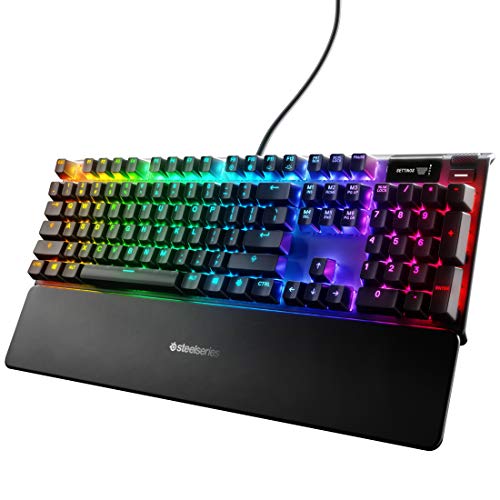 SteelSeries Apex 7 Mechanical Keyboard
|
9.8/10 | $137.97 | Buy | |
 SteelSeries Apex Pro TKL Gen 3 OmniPoint 3.0
|
9.8/10 | $178.99 | Buy | |
|
SteelSeries Apex 7 Blue Switch Gaming Keyboard
|
9.8/10 | $159.99 | Buy | |
 SteelSeries Apex Pro TKL Wireless
|
9.6/10 | $159.89 | Buy | |
 SteelSeries Apex Pro OmniPoint 2.0 Keyboard
|
9.6/10 | $186.00 | Buy | |
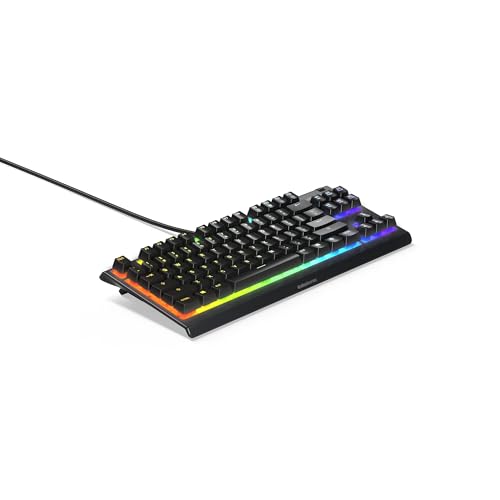 SteelSeries Apex 3 TKL RGB Gaming Keyboard
|
9.5/10 | $24.39 | Buy |
SteelSeries Apex 9 TKL Optical Keyboard
This tenkeyless keyboard uses custom optical switches for faster actuation and offers adjustable actuation depth, hot-swappable switches, and durable PBT keycaps. Its compact design and Rapid Tap feature make it suitable for competitive gamers who prioritize speed and customization.
Pros
- Extremely fast optical actuation
- Adjustable actuation depth
- Hot-swappable switches
- Compact tenkeyless design
- High-quality PBT keycaps
Cons
- No wireless connectivity
- No wrist rest included
- Requires GG software for advanced features
SteelSeries Apex Pro TKL Gen 3
The SteelSeries Apex Pro TKL Gen 3 is a tenkeyless keyboard featuring OmniPoint 3.0 analog magnetic switches with adjustable actuation from 0.1mm to 4.0mm. Its Quickset auto-presets enable instant activation of Rapid Trigger, Rapid Tap, and Protection Mode per game, making it ideal for competitive gamers seeking customizable response and reduced errors.
Pros
- Adjustable actuation range (0.1mm to 4.0mm)
- Rapid Trigger for faster key resets
- Rapid Tap for better movement control
- Protection Mode minimizes accidental keypresses
- Onboard OLED for quick settings adjustments
Cons
- Tenkeyless design lacks dedicated number pad
- Wired-only connectivity (USB-C)
SteelSeries Apex Pro Mini Wireless 60% Keyboard
This 60% keyboard from SteelSeries packs OmniPoint 2.0 adjustable switches that let you set per-key actuation from 0.1 to 4.0mm. It supports dual wireless via 2.4GHz or Bluetooth 5.0 and features rapid trigger and 2-in-1 action keys for competitive gaming. The compact design with a premium aluminum top plate suits gamers who want speed and customization in a small footprint.
Pros
- Fully customizable per-key actuation (0.1-4.0mm)
- Rapid trigger reduces latency from key travel
- 2-in-1 action keys for dual functions per key
- 20x faster actuation than mechanical keyboards
- Lag-free Quantum 2.0 wireless with Bluetooth 5.0
Cons
- 60% layout may lack dedicated arrow keys for some
- No included wrist rest or carrying case
- Only available in black color option
SteelSeries Apex 3 TKL Compact Keyboard
A tenkeyless RGB keyboard with IP32 water and dust resistance. Whisper quiet switches and anti-ghosting make it a practical choice for gamers who value durability and a compact layout.
Pros
- Compact tenkeyless design popular among pros
- Whisper quiet low-friction switches
- IP32 water and dust resistant
- PrismSync RGB with millions of colors
- Dedicated multimedia controls with volume roller
Cons
- Only 8-zone RGB, not per-key
- No included wrist rest
- ABS keycaps may wear sooner than PBT
SteelSeries Apex 7 Mechanical Keyboard
This full-length gaming keyboard from SteelSeries combines a durable aircraft-grade aluminum frame with an integrated OLED smart display that shows in-game info, Spotify, and Discord updates. The linear red switches offer quiet operation, making it a solid choice for gamers who need responsive performance without the clicky noise.
Pros
- OLED smart display for real-time game and app info
- Aircraft-grade aluminum alloy construction
- Customizable per-key RGB with 16.8 million colors
- Premium magnetic wrist rest included
- Linear and quiet red mechanical switches
Cons
- Low-profile wrist rest may not suit everyone
- No dedicated macro keys
- Software needed for full customization
SteelSeries Apex Pro TKL Gen 3 OmniPoint 3.0
The SteelSeries Apex Pro TKL Gen 3 is a competitive gaming keyboard featuring OmniPoint 3.0 Hall Effect switches with adjustable actuation and rapid trigger technology. It offers protection mode to prevent accidental key presses and ready-to-use game presets. Ideal for esports players seeking minimal latency and customizable response.
Pros
- Fastest keyboard with 20x faster actuation
- 40 adjustable actuation levels per key
- Rapid Trigger and Rapid Tap for low latency
- Protection mode reduces accidental key presses
- PBT keycaps and USB-C connectivity
Cons
- Wired only, no wireless option
- TKL layout lacks numpad
- Only available in black
SteelSeries Apex 7 Blue Switch Gaming Keyboard
This mechanical keyboard combines a durable aircraft-grade aluminum frame with an integrated OLED smart display for real-time game, Spotify, and Discord info. Its tactile and clicky Blue switches and per-key RGB lighting appeal to gamers who want precise feedback and customization.
Pros
- OLED display provides useful at-a-glance info
- Sturdy aluminum build lasts for years
- Per-key RGB customization is extensive
- Magnetic wrist rest improves comfort
- Tactile Blue switches offer satisfying feedback
Cons
- Blue switches are loud for shared spaces
- Full-length size may crowd smaller desks
- No wireless connectivity option
SteelSeries Apex Pro TKL Wireless
This tenkeyless gaming keyboard from SteelSeries features OmniPoint 2.0 HyperMagnetic switches with per-key adjustable actuation from 0.1 to 4.0mm, plus Rapid Trigger for near-instant response. Its dual wireless connectivity (2.4GHz and Bluetooth 5.0) and premium aluminum build make it a top choice for competitive esports players who want customization and speed.
Pros
- Per-key adjustable actuation range
- Rapid Trigger for instant response
- Fast actuation and response times
- Reliable dual wireless connectivity
- Durable aluminum and PBT construction
SteelSeries Apex Pro OmniPoint 2.0 Keyboard
This keyboard uses OmniPoint 2.0 HyperMagnetic switches with per-key adjustable actuation from 0.1 to 4.0mm, plus Rapid Trigger to eliminate physical switch latency. The OLED smart display provides game and app info, and the USB passthrough adds convenience. It is a premium wired keyboard built for competitive gamers who want precise, ultra-fast key responses.
Pros
- Fully customizable per-key actuation (40 levels)
- Rapid Trigger reduces latency from physical switch movement
- 2-in-1 action keys for dual functions per key
- OLED smart display with clickable metal roller
- 20x faster actuation and 11x faster response
Cons
- Wired only, no wireless connectivity
- Full-size layout may be bulky for small desks
SteelSeries Apex 3 TKL RGB Gaming Keyboard
A renewed tenkeyless keyboard that prioritizes durability and quiet operation, making it a solid pick for gamers who value a compact layout and spill resistance.
Pros
- Compact tenkeyless design favored by pros
- Whisper quiet switches for near silent use
- IP32 water and dust resistant for extra durability
- PrismSync RGB with millions of colors and effects
- Dedicated multimedia controls with volume roller
Cons
- Renewed product may show signs of previous use
- No dedicated macro keys for advanced customization
- Only 8-zone RGB, not per-key lighting
SteelSeries Keyboard Buying Guide
Switch Type and Actuation
SteelSeries offers a range of switch technologies. The magnetic OmniPoint switches allow, millimeter, click adjustability from 0.1mm to 2.8mm, a fantastic advantage for gamers who need the quickest response or prefer a much deeper press.
Our best FPS keyboard guide highlights how adjustable actuation can improve performance in fast‑paced shooters. For those who want a classic mechanical feel, the Apex 7 delivers red (linear) or blue (tactile) options.
The Apex 9 TKL takes customis even further with hot-swappable optical switches, letting you change switches without soldering. For quiet typing settings, linear reds are almost silent; our best quiet keyboard guide covers more low‑noise builds.
Hybrid ventilation to evaluation and change your switch, long considered a benchmark part for many.
Form Factor and Layout
The physical size of a keyboard affects desk space and portability. SteelSeries offers full-size (Apex 7), tenkeyless (Apex Pro TKL, Apex 9 TKL), and a 60% design (Apex Pro Mini).
Tenkeyless save arm travel and free up mouse space without sacrificing the navigation cluster. Our tactical calls you to best will display full tenkeyless keyboard guide and best 10 keyless keyboard guide.
For the smallest possible footprint, the 60% layout sacrifices both the number pad and the top function but is supremely portable; our best small keyboard guide embodies these sizes.
If you still need a numpad and media keys, full‑size units like the Apex Sec Serie media and USB passthrough. Part of the layout will also affect the weight of the keyboard for transport etc. The right layout speeds you easier over time.
Connectivity and Passthrough
SteelSeries keyboards come in wired (USB‑C) and wireless (Bluetooth/2.4GHz) varieties. Wired keyboards give you a stable, low‑latency performance, check our wired keyboard options for our favorite reliable picks.
Wireless ones are more placeholder and keep your desk tidy, see our favourite portable keyboard guide for top tier travel picks. The Apex 7 also adds a USB passthrough, a useful feature for quickly plugging in a mouse or headset.
For a deeper understanding of USB‑C connectivity, our best USB keyboard guide provides comprehensive advice.
Build Quality and Keycaps
Materials impact keyboard liveliness and longevity. Premium SteelSeries models like the Apex Pro lineup feature a durable brushed aluminum top plate and double‑shot PBT keycaps that resist shine over time. These are backbone for daily strenous use.
Many prime alternatives cover the best slim keyboard guide if you prefer a low‑profile stance. Stabilization and solid surfaces ensure keys remain unwobble. For comfort considerations, we dedicated the best engineering room keyboard guide pre‑curvature thought.
For extra layer of protection, the Apex 3 TKL features an IP32 water and dust guard, a wise pick for those with drinks near the station.
Keycaps duty through long gaming sessions, allowing PBT to stay to not shiny over many years. Good builds alloy upped plastic survive travel frequent.
Extra Features and Software
Premium SteelSeries models integrate an OLED ”screen” and dedicated media controls, offering real‑time game information or software settings. The Apex Pro TKL Gen 3 includes swift activation like Rapid Trigger, also support ”Rapid Tap”.
These functions are exactly what our ergonic keyboard guide provides about synthetic actions. For numerous macro assignments, the SteelSeries Engine software unlocks layerable configurations, particularly helpful for long scripts.
The full per‑key RGB gives plenty of customising for creativity and adjustment.
Switch and model differences also include protect mode for avoidance of corner overlap. For abilities beyond gaming, explore our best quiet keyboard guide to ensure silent or casual use. Merging all, these extras extend value overarching use.
Why You Should Trust Us
At BestProducts we pride ourselves on independent product analysis.
We rate each keyboard on our BP Score (0% scale) using a rigorous methodology that includes: a thorough cross‑analysis of technical specifications; reading through common expert consensus; processing thousands of verified buyer reviews; and incorporating published data from valuable reporting.
We do not conduct our own product trials; our evaluations team put research, data, expert consensus, and real buyer feedback. This ensures that our recommendations are based on holistic view of each product.
By using our BP Score, you get a transparent, balanced, and production across comparisons.
Final Thoughts
Best Overall: SteelSeries Apex Pro TKL Gen 3, The new acts to flex, hypermagnetic OmniPoint switches with Rapid Tap and a and OLED screen, earning the top BP Score 9.9%.
Best for Customization: SteelSeries Apex 9 TKL, Hot-swappable optical switches allow you to replace switches any time, also ideal for tinkerers (BP 9.9).
Best for Portability: SteelSeries Apex Pro Mini Wireless, Combining 60 scale and dual‑mode wireless, though compact but tough performance (BP 9.9).
Best Budget: SteelSeries Apex 3 TKL, IP32 water‑resistant and whisper‑quiet membrane switches gives excellent e for beginners (BP 9.8).
Best Classic Display: SteelSeries Apex 7, Full-size comfortable linear red switches plus OLED screen and pass‑through hub (BP 9.8).
Frequently Asked Questions
Do SteelSeries keyboards support hot-swap?
The Apex 9 TKL is currently the only model in the lineup fully hot-swappable for optical mechanical switches. It lets you swap key linen without any soldering, making it best for custom switch consumers.
Are SteelSeries OmniPoint switches better than traditional mechanical?
OmniPoint switches provide unmatched adjustable actuation, allowing you to prioritize a range from 0.1mm to 2.2mm. This gives an edge for responsive gamers, whereas traditional mechanicals may prefer fixed consistency in typing. In many end use, they are considered superior for competitive play.
Which SteelSeries keyboard is best for programming and typing?
For longer type sessions, the Apex 7 red switches or the OmniPoint Pro with a long reset range provides more comfort and minimal noise. The linear pressure also helps performance.
Our external keyboard for best ergonomic keyboard guide is worth a look if your setup conditions are on posture too.
What is the difference between Apex Pro TKL Gen 2 and Gen 3?
The Gen 3 uses the newest OmniPoint 3.0 switches and adds Rapid Tap/SOCD alongside adjustments otherwise thinner. It’s faster and tighter linear performance than Gen 2. However, Gen 3 may cost similar but still get vastly increased response.
Can these work on macOS?
Keyboards from SteelSeries use default keyboard actions fully work on macOS via USB/Bluetooth, but at missing some mappings (“ engine software not supported on macOS. They’ll plug bool or bluet enough to create simple typing on gaming).
About the author
Adrian covers digital pianos, keyboards, and drum kits for BestProducts, comparing key and pad feel, sound engines, and quiet practice options. He helps musicians find instruments that satisfy at home and on stage.