The Best Backlit Mechanical Keyboard
Discover the top backlit mechanical keyboards for gaming and typing in 2026. Our expert-curated roundup covers full-size, TKL, and compact models from Redragon, Logitech, RK Royal Kludge, and AULA, all scored on the BP Scale.
 By Josephine Mason
Updated September 11, 2026
By Josephine Mason
Updated September 11, 2026
A backlit mechanical keyboard combines the tactile satisfaction of mechanical switches with illuminated keycaps, making it an essential tool for late-night gaming, productivity in dim environments, or simply adding a cohesive aesthetic to your desk.
With options ranging from compact wireless boards to full-size RGB monsters, the category has grown immensely in 2026, offering something for every preference and budget.
At BestProducts, we’ve evaluated dozens of models through a rigorous research process, analyzing specifications, expert review consensus, and verified buyer feedback, to identify the best backlit mechanical keyboards on the market.
Our curated list below highlights top performers from trusted brands like Redragon, Logitech, RK Royal Kludge, and AULA, each scored on our 0, 10 BP Scale.
Whether you’re after a budget-friendly workhorse or a premium wireless board, our picks will help you find the perfect illuminated keyboard for your setup.
| Award | Product | BP Score About BP ScoreThe BP Score is our own rating from 0 to 10, based on performance, design and build, ease of use, and value. It reflects independent research and is never influenced by manufacturers, retailers, or affiliate commissions. Learn more › | |
|---|---|---|---|
| Best Overall |
 AULA S99 96% Wireless Keyboard
|
9.2/10 | Buy |
| Best Value |
 Redragon K556 Wired RGB Mechanical Keyboard
|
9.1/10 | Buy |
 Redragon K580 Wired Mechanical Keyboard
|
8.9/10 | Buy | |
| Best Premium |
 RK Royal Kludge R98 Pro 96% Keyboard
|
8.9/10 | Buy |
| Best Budget |
 Redragon K671 Mechanical Keyboard
|
8.8/10 | Buy |
 Logitech G413 TKL SE Mechanical Keyboard
|
8.8/10 | Buy | |
 Newmen GM325Pro 104-Key Red Switch Keyboard
|
8.6/10 | Buy | |
 AULA F2088 Typewriter Mechanical Keyboard
|
8.6/10 | Buy | |
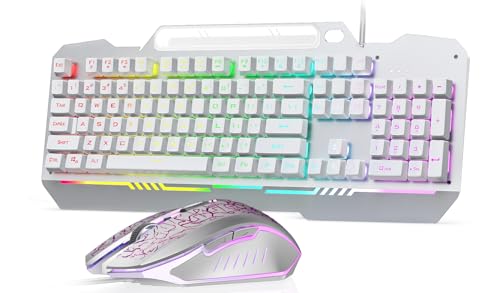 AULA T102 White Full-Size Keyboard & Mouse Combo
|
8.3/10 | Buy | |
 RK ROYAL KLUDGE S108 Typewriter Keyboard
|
8.0/10 | Buy | |
 Logitech G413 SE Full-Size Mechanical Keyboard
|
8.0/10 | Buy | |
 Logitech MX Mechanical Tactile Keyboard
|
7.8/10 | Buy |
AULA S99 96% Wireless Keyboard
The AULA S99 is a versatile wireless gaming keyboard with a compact 96% layout that retains a numpad. It offers three connectivity options, customizable RGB lighting, and macro support, making it suitable for both gaming and office use.
Pros
- Three connection modes (Bluetooth 5.0, 2.4GHz, wired)
- RGB backlit with customizable lighting via macro software
- 96% full-size layout with separate numpad
- Ergonomic 2-stage kickstand for tilt adjustment
- Dual-mode rotary knob for volume and lighting control
Cons
- Relatively heavy at 2.34 lbs
- Large footprint may not suit small desks
Redragon K556 Wired RGB Mechanical Keyboard
This full-size mechanical keyboard features a sturdy aluminum frame that resists flex during fast-paced gaming. Its hot-swappable switch sockets let you change switches without soldering, and the included Brown switches offer a comfortable tactile bump for typing and gaming. With 20 RGB presets and anti-ghosting for all 104 keys, it's a solid wired option for gamers who want durability and customization without breaking the bank.
Pros
- Sturdy aluminum construction
- Hot-swappable switch sockets
- Vibrant RGB with 20 presets
- Full anti-ghosting for 104 keys
- Plug-and-play with Windows and Mac
Cons
- Weighs over 2.2 pounds, not very portable
- Full customization requires companion software
Redragon K580 Wired Mechanical Keyboard
This wired mechanical gaming keyboard delivers tactile Blue switches and dedicated macro keys for recording combos on-the-fly without software. Its built-in media wheel and hot-swappable socket make it a versatile pick for budget-conscious gamers who want customizability and durability.
Pros
- Hot-swappable switch socket
- Dedicated macro keys without software
- Full anti-ghosting for gaming
- Media wheel and controls onboard
- Durable 50 million keystroke rating
Cons
- Blue switches are loud for shared spaces
- No wireless connectivity option
RK Royal Kludge R98 Pro 96% Keyboard
For typists and gamers who love a creamy sound, this gasket-mounted 96% keyboard offers a thocky feel with pre-lubed linear switches. The hot-swappable board, MDA profile PBT keycaps, and volume knob add customization and convenience.
Pros
- Gasket mount with five-layer foam for deep, creamy sound
- Pre-lubed linear cream switches for smooth keystrokes
- Hot-swappable for 3/5-pin switches
- MDA profile PBT keycaps with double-shot legends
- Detachable aluminum volume knob and indicator lights
Cons
- Wired connection only, no wireless option
- No dedicated media keys beyond volume knob
Redragon K671 Mechanical Keyboard
This wired keyboard from Redragon packs 11 backlight modes and macro support into a durable frame with double-shot PBT keycaps. The hot-swappable red switches and full anti-ghosting make it a solid choice for RPG and MMO gamers who want customization without a premium price.
Pros
- 11 programmable backlight modes with 5 brightness levels
- Hot-swappable red switches with 4 spare switches included
- Full keys anti-ghosting for simultaneous key presses
- Double-shot PBT keycaps for durability and clear backlight
- Macro editing via software for remapping and shortcuts
Cons
- Backlight color is not customizable (fixed per mode)
- No wireless connectivity option
- Limited to linear red switch feel only
Logitech G413 TKL SE Mechanical Keyboard
This tenkeyless gaming keyboard combines PBT keycaps, tactile mechanical switches, and a brushed aluminum-magnesium alloy top case for durability and responsive performance. Ideal for gamers who want a compact wired keyboard with essential media controls and anti-ghosting.
Pros
- Sturdy aluminum-magnesium alloy build
- PBT keycaps for long-term durability
- TKL layout frees up desk space
- Tactile switches provide satisfying feedback
- White backlighting with useful FN controls
Cons
- No numeric keypad for data entry
- White LED only, no RGB customization
- Wired design limits placement flexibility
Newmen GM325Pro 104-Key Red Switch Keyboard
This full-size mechanical keyboard from Newmen uses linear red switches for smooth, quiet keystrokes and a metal top plate for stability. Its RGB side lighting and detachable cable add convenience, while the customization software allows key remapping and macro recording.
Pros
- Durable metal top plate
- Smooth linear red switches
- Full-key rollover for accurate input
- Detachable USB cable for portability
- Customizable software for macros and lighting
Cons
- Key lighting limited to preset rainbow effects, not per-key RGB
- Wired only, no wireless connectivity
AULA F2088 Typewriter Mechanical Keyboard
With its retro round keycaps and clicky blue switches, the AULA F2088 delivers a nostalgic typing feel paired with a colorful rainbow backlight. A media control knob, magnetic wrist rest, and anti-ghosting support make it a functional pick for both gaming and daily typing.
Pros
- Retro typewriter style round keycaps
- Clicky blue switches with tactile feedback
- Media control knob and 19 backlight effects
- Sturdy aluminum panel and magnetic wrist rest
- 104-key anti-ghosting for gaming
Cons
- Wired-only connection, no wireless option
- Blue switches are loud for quiet environments
- Rainbow backlight not per-key RGB
AULA T102 White Full-Size Keyboard & Mouse Combo
This combo offers a durable full-size keyboard with aluminum top panel and a programmable 4-DPI gaming mouse, all in white. The membrane keyboard provides spill resistance and 16 backlight effects, making it a budget-friendly choice for office or casual gaming use.
Pros
- Aluminum panel adds sturdiness
- Spill resistant for everyday accidents
- Includes matching RGB mouse
- Plug-and-play easy setup
- White design fits bright setups
Cons
- Membrane key feel not mechanical
- No software for custom lighting or macros
- Large full-size footprint
RK ROYAL KLUDGE S108 Typewriter Keyboard
This retro mechanical keyboard blends vintage typewriter aesthetics with modern gaming features like per-key RGB backlighting and 108-key anti-ghosting. The blue switches offer a clicky, tactile feel suited for gamers and typists who enjoy audible feedback, while the detachable wrist rest and aluminum panel add comfort and durability.
Pros
- Clicky blue switches with tactile feedback
- Customizable per-key RGB backlighting
- Detachable ergonomic wrist rest
- 108-key anti-ghosting for accurate keystrokes
- Sturdy aluminum alloy panel
Cons
- Loud clicky switches may disturb others
- Round keycaps may reduce touch-typing comfort
- Wired connection limits placement flexibility
Logitech G413 SE Full-Size Mechanical Keyboard
This full-size mechanical keyboard from Logitech G pairs durable PBT keycaps with tactile switches for reliable performance. Its aluminum-magnesium alloy frame adds stiffness, while white LED backlighting and dedicated media controls boost everyday usability.
Pros
- Durable PBT keycaps resist heat and wear
- Tactile mechanical switches for precise input
- Sturdy aluminum-magnesium alloy top case
- Anti-ghosting with 6-key rollover
- Convenient FN media controls
Cons
- White LED only, no RGB customization
- Full-size layout may be large for compact setups
Logitech MX Mechanical Tactile Keyboard
A low-profile mechanical keyboard that pairs tactile feedback with quieter operation, making it suitable for shared workspaces. Its smart backlighting and multi-device support add convenience, while the long battery life with backlight off reduces charging frequency.
Pros
- Tactile quiet switches for precise feedback
- Low-profile keys enhance ergonomic comfort
- Smart illumination adjusts to ambient light
- Pairs with up to 3 devices via Bluetooth
- Up to 10 months battery with backlight off
Cons
- Only 15 days battery with backlight on
- Full-size layout may occupy desk space
- Advanced customization requires Logi Options+
Best Backlit Mechanical Keyboard Buying Guide
Switch Types: Linear, Tactile, Clicky
The switch type defines the feel and sound of a keyboard. Linear switches (like Reds) provide a smooth, quiet press ideal for rapid double-taps in fast-paced games.
Tactile switches (such as Browns) offer a noticeable bump during actuation, giving you precise feedback for typing without the noise.
Clicky switches (like Blues) produce an audible click sound, favored by those who want a classic typewriter feel but may be disruptive in shared spaces.
For a deeper dive into how switch types compare across different price brackets, refer to our collection of recommended mechanical keyboards. If you’re on a tight budget, our roundup of affordable entry-level keyboards highlights boards that still offer solid switch quality.
Form Factor: Full-Size, TKL, and Compact
Full-size keyboards (with a number pad) are the best choice for spreadsheets and data entry, but they take up more desk space. Tenkeyless (TKL) boards remove the numpad for a more compact layout while retaining arrow keys and function rows.
Compact 96% and 75% layouts shrink the footprint further by merging navigation keys, making them ideal for small desks or travel.
If you already know you want a numpad, check out our guide to full-size mechanical keyboards. For those considering a TKL design, our wireless tenkeyless mechanical keyboard picks cover the best options in that space.
Backlighting and Customization
Backlighting ranges from simple single-color LEDs to per-key RGB with software-controlled effects. Gamers often prefer per-key RGB for in-game alert zones, while professionals might opt for a subtle white backlight to avoid distraction. Many boards offer onboard effects (wave, breathing, reactive) without needing additional software.
Keycap material also matters: double-shot PBT keycaps resist shine and fading better than ABS, especially under constant backlighting. For a broader look at how lighting and build interact, explore our computers & office section for related guides on peripherals.
Build Quality and Design
The frame material, plastic or aluminum, directly affects durability and weight. Aluminum plates add rigidity and a premium feel, while high-grade plastic keeps costs down. A detachable wrist rest can reduce fatigue during long sessions, and adjustable feet allow fine-tuning the typing angle.
When paired with a comfortable seating solution, a well-built keyboard becomes part of an ergonomic workspace. Read our recommendations for ergonomic office chairs to complete your setup.
Additional Features: Hot-Swappable Switches, Macros, and Connectivity
Hot-swappable keyboards allow you to change switches without soldering, a boon for enthusiasts who want to experiment with different feel. Macro keys and a media wheel are handy for productivity or game commands, letting you assign complex shortcuts.
Wireless connectivity (2.4 GHz or Bluetooth) reduces cable clutter and works across multiple devices.
For wireless models, see our dedicated reviews of wireless mechanical keyboards and Bluetooth mechanical keyboards. If you’re after an extremely tight budget, our budget mechanical keyboard guide (note: the URL is correctly spelled as provided) can help you find a deal.
Why You Should Trust Us
At BestProducts, we are committed to delivering unbiased, research-driven recommendations. Every product in this guide has been evaluated against a consistent set of criteria and assigned a BP Score from 0 to 10.
Our process relies on specifications, expert review consensus, verified buyer feedback, and published data from reputable sources. We do not conduct our own product trials; our evaluations are grounded in research, published data, expert review consensus, and verified buyer feedback.
This transparent methodology ensures that our picks reflect the genuine strengths and weaknesses of each model, helping you make an informed purchase.
BestProducts is an independent publisher, we don’t sell products, and we don’t accept paid placements. When you buy through our links, we may earn a small commission at no extra cost to you, which supports our editorial independence.
Final Thoughts
- Best Overall: Redragon K556 Wired RGB Mechanical Gaming Keyboard, This full-size board earned a near-perfect BP Score thanks to its solid aluminum build, responsive switches, and vibrant per-key RGB. An outstanding all-rounder at a reasonable price.
- Best Value: Redragon K580 Wired RGB Mechanical Gaming Keyboard, Offering macro keys, a media wheel, and the same high backlight quality as the top pick, the K580 delivers excellent performance for less, securing a top-tier BP Score.
- Best Wireless Pick: AULA 99 Key Wireless Gaming Keyboard, Matching the highest BP Score in our lineup, this compact wireless board combines Bluetooth and 2.4 GHz connectivity with a full set of keys, ideal for clutter-free workspaces.
- Best for Typing: Logitech MX Mechanical Wireless Illuminated Keyboard, With low-profile tactile switches and a premium finish, this keyboard is built for productivity. Its excellent build quality and quiet operation make it a top choice for office use.
For a broader look at how these keyboards fit into a complete gaming or productivity setup, consider our guides on gaming laptops and gaming monitors to pair with your new board.
Frequently Asked Questions
What is a backlit mechanical keyboard?
A backlit mechanical keyboard uses individual LEDs under or inside the keycaps to illuminate the legends. This makes the keys visible in low light and often allows for customizable lighting effects. The mechanical switches beneath provide distinct tactile feedback and durability compared to membrane keyboards.
Are backlit mechanical keyboards good for gaming?
Yes. The combination of fast, reliable switch actuation and per-key backlighting is ideal for gaming. Many models feature anti-ghosting and N-key rollover, ensuring all key presses are registered, while RGB lighting can be used to highlight in-game controls or create immersive effects.
How do I choose the right switch type?
Consider your primary use: linear switches (like Reds) are best for rapid tapping in FPS games; tactile switches (like Browns) suit both typing and gaming with a subtle bump; clicky switches (like Blues) provide audible feedback preferred by heavy typists.
Some models from our guide include hot-swappable sockets, letting you swap switches easily.
Can I change the keycaps on a backlit mechanical keyboard?
Most mechanical keyboards with a standard stem design (typically Cherry MX cross-shaped) allow for keycap replacement. Ensure the new keycaps are compatible with the backlighting, translucent legends or shine-through keycaps work best for illumination. Many of our picks have double-shot PBT keycaps that resist wear.
What does hot-swappable mean?
Hot-swappable keyboards have sockets that allow you to remove and replace switches without soldering. This feature lets you customize the feel of the board over time, for example, switching from linear to tactile switches, without buying a new keyboard.
Several models in our list, like the RK Royal Kludge R98 Pro, offer this flexibility.
Do I need a full-size keyboard or a TKL?
Full-size (with number pad) is best if you frequently enter numbers. TKL or compact layouts save desk space and allow a more ergonomic mouse position. For gaming, many prefer TKL to avoid reaching around a large board. For office work, full-size can improve productivity.
About the author
Josephine covers mechanical keyboards and wireless mice for BestProducts, comparing switch feel, build quality, sensor precision, and battery life. She guides readers through a deeply personal choice with clear, practical advice.