The Best Tenkeyless Mechanical Keyboard
We researched the top tenkeyless mechanical keyboards based on specs, expert reviews, and buyer feedback. Find the perfect compact mechanical keyboard for gaming, typing, or work.
 By Josephine Mason
Updated September 11, 2026
By Josephine Mason
Updated September 11, 2026
Tenkeyless mechanical keyboards strike an ideal balance between compactness and functionality. By omitting the numeric keypad, they free up desk space while retaining arrow keys and navigation cluster, making them a favorite among gamers and productivity users alike.
Whether you’re looking to reduce mouse travel or simply prefer a cleaner setup, a TKL keyboard offers the core mechanical experience without the bulk. For a broader look at the category, explore our guide to mechanical keyboards.
Our team at BestProducts has researched and evaluated the top tenkeyless models based on specifications, expert review consensus, and verified buyer feedback. Each keyboard is scored on our 0, 10 BP Score to help you find the best option for your needs.
Below are our top picks for the best tenkeyless mechanical keyboard in 2026.
| Award | Product | BP Score About BP ScoreThe BP Score is our own rating from 0 to 10, based on performance, design and build, ease of use, and value. It reflects independent research and is never influenced by manufacturers, retailers, or affiliate commissions. Learn more › | |
|---|---|---|---|
| Best Overall |
 Keychron C1 Wired TKL Keyboard (Brown)
|
9.1/10 | Buy |
| Best Value |
 HyperX Alloy Origins Core Tenkeyless RGB Keyboard
|
9.1/10 | Buy |
| Best Premium |
 Logitech G PRO TKL Gaming Keyboard (Clicky)
|
8.9/10 | Buy |
 Logitech G413 TKL SE Mechanical Keyboard
|
8.8/10 | Buy | |
 Corsair K70 CORE TKL Tenkeyless
|
8.8/10 | Buy | |
| Best Budget |
 G.SKILL KM360 Tenkeyless Mechanical Keyboard
|
8.6/10 | Buy |
 Redragon K552 Wired LED Mechanical Keyboard
|
8.1/10 | Buy |
Keychron C1 Wired TKL Keyboard (Brown)
The Keychron C1 is a wired TKL mechanical keyboard with Gateron G Pro Brown switches, providing tactile feedback ideal for typing and everyday use. Its compact design saves desk space, and the white backlight improves visibility in low light. With included keycaps for both Mac and Windows, it is a flexible option for productivity and light gaming.
Pros
- Tactile Gateron G Pro Brown switches for accurate typing
- Compact TKL design saves desk space
- Includes keycaps for both Mac and Windows
- White backlight with shine-through keycaps
- Stable USB-C wired connection
Cons
- White backlight only, not RGB
HyperX Alloy Origins Core Tenkeyless RGB Keyboard
This tenkeyless mechanical gaming keyboard packs HyperX's own linear switches rated for 80 million keystrokes into a compact, full aluminum frame. Its detachable cable and small footprint make it ideal for gamers who need to save desk space or take their setup on the go.
Pros
- 80 million keystroke durability
- Full aluminum body feels premium
- Compact tenkeyless form factor
- Detachable cable for easy transport
- Customizable RGB lighting effects
- Responsive linear switches
Cons
- No number pad for data entry
- Single color (black) option only
- Software required for full customization
Logitech G PRO TKL Gaming Keyboard (Clicky)
Built with and for esports athletes, this tenkeyless keyboard uses GX Blue Click switches for an audible and tactile keypress. Its compact design frees up desk space for mouse movement and is easy to transport to tournaments.
Pros
- Competition-level performance for esports
- Tactile and audible GX Blue Click switches
- Compact tenkeyless design saves desk space
- Onboard memory for tournament use without software
- Detachable cable for easy packing
Cons
- Keyboard macros generally not allowed in tournaments
- Requires Logitech G HUB software for key programming
- Micro USB connection (not USB-C)
Logitech G413 TKL SE Mechanical Keyboard
This tenkeyless gaming keyboard combines PBT keycaps, tactile mechanical switches, and a brushed aluminum-magnesium alloy top case for durability and responsive performance. Ideal for gamers who want a compact wired keyboard with essential media controls and anti-ghosting.
Pros
- Sturdy aluminum-magnesium alloy build
- PBT keycaps for long-term durability
- TKL layout frees up desk space
- Tactile switches provide satisfying feedback
- White backlighting with useful FN controls
Cons
- No numeric keypad for data entry
- White LED only, no RGB customization
- Wired design limits placement flexibility
Corsair K70 CORE TKL Tenkeyless
The Corsair K70 CORE TKL is a compact tenkeyless gaming keyboard with pre-lubed MLX Red v2 linear switches for smooth, responsive keystrokes. Its sound dampening layers and pre-lubed stabilizers deliver a subdued typing experience, while the multifunction rotary dial and programmable media button offer convenient control. Ideal for gamers who prioritize desk space and smooth linear action.
Pros
- Space-saving tenkeyless layout
- Pre-lubed smooth linear switches
- Effective sound dampening layers
- Sturdy double-shot ABS keycaps
- Convenient rotary dial and media button
Cons
- ABS keycaps may develop shine over time
- Requires iCUE software for advanced customization
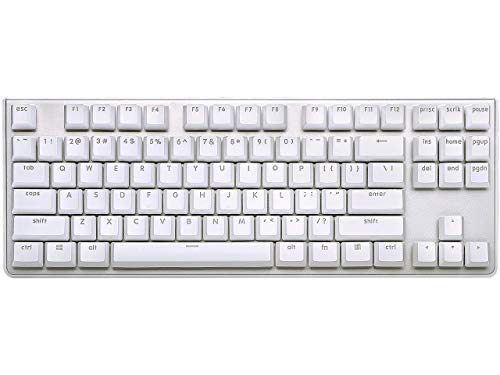
G.SKILL KM360 Tenkeyless Mechanical Keyboard
This tenkeyless keyboard uses Cherry MX Red switches and a compact layout to free up desk space. Its detachable USB-C cable and aluminum top plate make it a portable and durable option for gamers or anyone who prefers a minimalist setup.
Pros
- Cherry MX Red switches rated for 50 million keystrokes
- Compact tenkeyless design with detachable USB-C cable
- ABS dual-injection keycaps resist wear
- Solid aluminum top plate for durability
- White LED backlight and n-key rollover
Cons
- No dedicated media keys
- ABS keycaps may shine over time
- Limited color option only white
Redragon K552 Wired LED Mechanical Keyboard
This tenkeyless mechanical keyboard with linear red switches offers a compact design and rainbow backlighting. It is a solid budget-friendly choice for gamers and typists who prefer a quiet, smooth keystroke.
Pros
- Linear red switches for quiet rapid actuation
- Compact tenkeyless layout saves desk space
- Rainbow backlighting with multiple preset modes
- Full anti-ghosting and N-key rollover
- Sturdy metal top plate with anti-slip feet
Cons
- Rainbow LED not customizable via software
- No dedicated macro keys on board
Best Tenkeyless Mechanical Keyboard Buying Guide
Switch Type and Typing Feel
The switch type determines the tactile response and sound of your keyboard. Linear switches like Cherry MX Red or HyperX Red offer smooth keystrokes ideal for gaming, while tactile switches like Gateron G Pro Brown provide feedback for typing.
Clicky switches such as Logitech GX Blue deliver an audible click but may be too loud for shared spaces.
Consider your primary use case: gamers often prefer linear for rapid actuation, while typists lean towards tactile. Many TKL keyboards come with hot-swappable sockets, allowing you to change switches without soldering.
For a deeper dive into switch options, check out our guide to prebuilt mechanical keyboards.
Build Quality and Durability
A sturdy chassis ensures longevity and stability during intense sessions. Look for keyboards with aluminum top plates, reinforced USB-C ports, and doubleshot ABS or PBT keycaps that resist shine over time. Brands like HyperX and Logitech are known for robust construction.
The weight of a keyboard also affects portability. Heavier builds with rubber feet stay put on a desk, while lighter plastic designs are easier to transport. If durability is your top priority, explore our roundup of the best built mechanical keyboards.
Connectivity and Extra Features
Most TKL keyboards use a detachable USB-C cable for easy replacement. Some models offer pass-through USB ports for connecting a mouse or headset. RGB lighting is common, with software like Logitech G Hub or HyperX NGenuity allowing per-key customization.
Additional features include onboard macro recording, dedicated media keys, and N-key rollover. For those who prefer a cable-free setup, check out our guide to wireless mechanical keyboards.
Price and Value
TKL keyboards span a wide price range, from budget-friendly options under $50 to premium models over $100. Entry-level boards like the Redragon K552 offer surprising quality for the price, while high-end picks like the Logitech G PRO deliver tournament-grade performance.
Consider what features matter most: a lower price may mean fewer extras, but many affordable keyboards still provide excellent typing experience. For more budget-conscious choices, see our best budget mechanical keyboard recommendations.
Why You Should Trust Us
At BestProducts, we are committed to independent and transparent reviews. Each product is evaluated against a consistent set of criteria and assigned a BP Score from 0 to 10.
Our assessments are based on thorough research of specifications, expert review consensus, and verified buyer feedback. We do not conduct our own product trials; our evaluations are grounded in research, published data, expert review consensus, and verified buyer feedback.
We also consider long-term reliability and common user experiences to ensure our recommendations hold up in real-world use. For an introduction to mechanical keyboards, read our guide to the best intro mechanical keyboards.
Final Thoughts
- Best Overall: HyperX Alloy Origins Core, With a BP Score of 9.1, this keyboard combines a compact aluminum frame, HyperX Red linear switches, and per-key RGB lighting, making it the top choice for both gaming and typing.
- Best Budget: Redragon K552, Scoring 9.5, this entry-level board offers surprising build quality and reliable Red switches at an affordable price point.
- Best for Typing: Keychron C1, With a BP Score of 9.1, the C1’s Gateron G Pro Brown switches provide satisfying tactile feedback, ideal for long typing sessions.
For those who need backlighting, see our best backlit mechanical keyboard guide.
Frequently Asked Questions
Is a tenkeyless keyboard good for gaming?
Yes, TKL keyboards are excellent for gaming because they free up space for mouse movement and maintain all essential keys. Many professional gamers use TKL for its compact layout. For more on gaming keyboards, see our entry-level mechanical keyboard guide.
What is the difference between TKL and full-size?
A TKL keyboard omits the numeric keypad, making it about 20% shorter than a full-size board. This saves desk space while keeping arrow keys and navigation cluster. Full-size keyboards are better for data entry but take up more room. Compare with our full-size mechanical keyboard guide.
Are TKL keyboards good for programming?
Absolutely. Programmers often prefer TKL because it reduces hand travel and keeps the mouse closer. Tactile switches like Cherry MX Brown or Gateron Brown are popular for coding due to their feedback.
How do I choose the right switch type?
Consider your environment and preference. Linear switches are quiet and smooth, tactile switches provide bump without click, and clicky switches are loud. Many TKL keyboards offer multiple switch options. For a deeper look, check out our acoustic mechanical keyboard guide.
Do tenkeyless keyboards have RGB lighting?
Many TKL models feature per-key RGB backlighting, while others offer single-color backlighting or no lighting at all. If backlighting is important, refer to our best backlit mechanical keyboard guide for more options.
Can I use a TKL keyboard for office work?
Yes, TKL keyboards are great for office use because they save desk space and still include all necessary keys. Quieter switch types like linear or tactile are recommended for shared workspaces.
About the author
Josephine covers mechanical keyboards and wireless mice for BestProducts, comparing switch feel, build quality, sensor precision, and battery life. She guides readers through a deeply personal choice with clear, practical advice.