The Best Workstation Laptop
Compare top workstation laptop models based on CPU, GPU, memory, and ISV certification. Our research-driven picks help you find the ideal mobile workstation for engineering, design, and data science.
 By Ava Herrera
Updated September 11, 2026
By Ava Herrera
Updated September 11, 2026
Professionals in engineering, architecture, video editing, and data science rely on a machine that can handle intensive simulations, complex renders, and multi-threaded workloads without compromise.
A workstation laptop delivers the certified hardware and robust build quality that standard consumer laptops often lack. BestProducts evaluated dozens of models by analyzing specifications, expert review consensus, and verified buyer feedback to find the most reliable picks for 2026.
Whether you need raw CPU power, professional GPU acceleration, or ISV-certified stability, we have you covered. For a broader look at portable computing, our best laptop guide includes options for every use case.
Below, you will find our top recommended workstation laptops for 2026.
| Award | Product | BP Score About BP ScoreThe BP Score is our own rating from 0 to 10, based on performance, design and build, ease of use, and value. It reflects independent research and is never influenced by manufacturers, retailers, or affiliate commissions. Learn more › | |
|---|---|---|---|
| Best Overall |
 HP ZBook 8 G1i Laptop, Intel Ultra 7 255H
|
9.2/10 | Buy |
| Best Value |
 Lenovo ThinkPad P16s Gen 3 Intel Ultra 7 32GB
|
8.9/10 | Buy |
| Best Budget |
 HP ZBook Fury 17 G7 17.3-inch Mobile Workstation
|
8.4/10 | Buy |
 Dell Precision 7680: i5-13600HX, RTX 1000 Ada 6GB
|
8.3/10 | Buy | |
| Best Premium |
 Dell Precision 7680 RTX 2000 Ada
|
8.0/10 | Buy |
 Dell Precision 3561 Workstation
|
7.8/10 | Buy | |
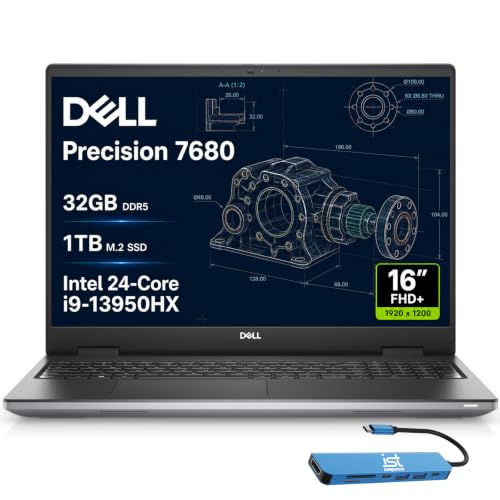 Dell Precision 7680 i9-13950HX
|
7.8/10 | Buy | |
 Dell Precision 7680 Laptop (i7-13850HX, 64GB)
|
7.8/10 | Buy |
HP ZBook 8 G1i Laptop, Intel Ultra 7 255H
This workstation laptop balances pro-level performance with mobility, sporting an Intel Ultra 7 processor and NVIDIA RTX 500 Ada GPU for 3D rendering, simulations, and AI tasks. Its 16-inch anti-glare display, robust connectivity including Thunderbolt 4, and long battery life make it a practical choice for engineers, architects, and data analysts.
Pros
- Excellent performance for CAD and 3D modeling
- Lightweight at 3.79 pounds for a workstation
- Rich connectivity with dual Thunderbolt 4 and HDMI 2.1
- ISV certified for professional engineering software
- Enterprise-grade security with HP Wolf Pro and fingerprint reader
Cons
- Integrated GPU not ideal for high-end gaming
- FHD+ display limited to 300 nits brightness
Lenovo ThinkPad P16s Gen 3 Intel Ultra 7 32GB
This mobile workstation balances portability with professional-grade performance, packing Intel Ultra 7 processing, ample DDR5 RAM, and a substantial SSD. It suits engineers, architects, and analysts needing ISV-certified reliability for demanding apps like AutoCAD and Adobe.
Pros
- ISV certified for professional apps
- Lightweight 4.01 lb with 16-inch screen
- Fast Intel Ultra 7 processor and 32GB RAM
- Three-year SSD/memory warranty
- Versatile ports including Thunderbolt 4
Cons
- No dedicated GPU option
- Reviewed without user feedback
HP ZBook Fury 17 G7 17.3-inch Mobile Workstation
This refurbished HP ZBook Fury 17 G7 is a flagship mobile workstation built for professionals who need serious computing power on the go. Its Intel Core i5 processor and NVIDIA Quadro T1000 graphics handle demanding tasks like CAD and video editing, while the 17.3-inch FHD display delivers crisp visuals.
Pros
- Powerful workstation performance
- Large anti-glare display for long sessions
- Plenty of ports including Thunderbolt 3
- Windows 11 Pro for business features
- Renewed provides cost savings
Cons
- Heavy at 6.1 pounds
- Renewed may have cosmetic wear
Dell Precision 7680: i5-13600HX, RTX 1000 Ada 6GB
A top-tier workstation laptop built for demanding professional workflows like CAD, 3D rendering, and video editing. Its standout features are the powerful NVIDIA RTX 1000 Ada GPU, expandable CAMM RAM, and ISV certifications for reliable compatibility with pro software.
Pros
- High-performance GPU for professional apps
- Expandable CAMM RAM and fast SSD
- ISV certified for reliable CAD/engineering software
- Supports up to four 4K external displays
- Durable with MIL-STD-810H certification
Cons
- Heavy at 5.9 pounds
- Only FHD+ display, not 4K or OLED
Dell Precision 7680 RTX 2000 Ada
The Dell Precision 7680 is a top-tier mobile workstation built for architects, engineers, and creative professionals. Its NVIDIA RTX 2000 Ada GPU and Intel Core i7-13850HX deliver robust performance for CAD, 3D rendering, and video editing. CAMM RAM enables faster memory and a thinner chassis, while ISV certifications and MIL-STD-810H durability ensure reliability in demanding environments.
Pros
- NVIDIA RTX 2000 Ada GPU for professional workloads
- Intel Core i7-13850HX with vPro for efficiency
- CAMM RAM design for faster memory and thinner profile
- ISV certified for professional software compatibility
- MIL-STD-810H rated for durability
Cons
- 45% NTSC display limits color accuracy
- Heavy at 5.9 pounds
Dell Precision 3561 Workstation
This renewed workstation laptop combines an 11th Gen Intel Core i7 processor with 32GB of RAM and a dedicated Nvidia T1200 GPU, making it well-suited for demanding professional applications like 3D rendering or video editing. The 15.6-inch FHD display and 512GB SSD provide a solid baseline for productivity, though its 6-pound weight makes it less portable than typical ultrabooks. Overall, it offers capable performance at a likely lower cost due to its renewed condition.
Pros
- Powerful Intel Core i7-11800H processor
- 32GB RAM for heavy multitasking
- Dedicated Nvidia T1200 graphics
- Fast 512GB SSD storage
- Windows 11 Pro included
Cons
- Heavy at 6 pounds
- Only 1920x1080 non-touch display
- Renewed product may have signs of wear
Dell Precision 7680 i9-13950HX
For demanding professional workflows like CAD and 3D rendering, this flagship Precision workstation pairs a top-tier Intel Core i9 with 32GB of DDR5 RAM and a 1TB SSD. Its ISV certifications and MIL-STD-810H durability make it a reliable choice for architects, engineers, and creative pros.
Pros
- Excellent performance for intensive workflows
- ISV certifications ensure software compatibility
- MIL-STD-810H rated for ruggedness
- Versatile connectivity with Thunderbolt 4 and HDMI
- Backlit keyboard with numeric keypad
Cons
- Heavy at 5.9 pounds
- No dedicated graphics card
- Display limited to FHD+ resolution
Dell Precision 7680 Laptop (i7-13850HX, 64GB)
This mobile workstation targets architects, engineers, and creative pros who need serious CPU and GPU muscle for CAD, rendering, and video editing. Its 64GB of DDR5 RAM, RTX 2000 Ada GPU, and ISV certifications make it a reliable tool for demanding workflows, but the 5.9-pound chassis and 45% NTSC display limit its portability and color accuracy.
Pros
- ISV certified for professional software compatibility
- MIL-STD-810H rated for durability
- 64GB DDR5 CAMM RAM for heavy multitasking
- Extensive ports including Thunderbolt 4 and HDMI
- Windows 11 Pro with Copilot AI assistance
Cons
- Heavy at 5.9 pounds
- Display only 45% NTSC color gamut
- No built-in SD card reader
Best Workstation Laptop Buying Guide
Processing Power (CPU)
The heart of a workstation is its processor. Models in this category typically feature Intel Core HX‑series chips like the i7‑13850HX or i9‑13950HX, or the newer Intel Ultra 7 255H.
For multi‑threaded tasks such as rendering or CFD simulations, a higher core count directly translates into shorter completion times. AMD Ryzen Pro equivalents are also common in some lineups.
When choosing, consider whether your software benefits more from single‑thread performance (e.g., CAD) or multi‑thread muscle. Our best performing laptop roundup highlights top CPU options available.
Many workstation CPUs also support ECC memory, which can reduce data corruption in long‑running computations. However, not all workstation laptops offer ECC, so verify compatibility if your work demands it.
A processor with Intel vPro or AMD Pro technology adds remote management and security features valuable for IT‑deployed fleets.
Graphics Performance (GPU)
Dedicated workstation GPUs from NVIDIA’s RTX Ada family (RTX 500, 2000) or AMD’s Radeon Pro series are certified for professional applications like Autodesk Fusion 360, SolidWorks, and Cinema 4D.
These cards use stable drivers that undergo rigorous evaluation by software vendors, ensuring reliable performance. Unlike gaming GPUs, they focus on precision and long‑session stability over raw frame rates.
For a deeper look at GPU options, browse our graphics cards category.
VRAM capacity is also critical: 4GB suffices for light 3D modeling, while 8GB or more is recommended for large assemblies or 4K video editing.
The HP ZBook 8 G1i, for example, pairs an RTX 500 Ada with 4GB, while Dell Precision 7680 models offer up to 8GB with the RTX 2000 Ada.
Memory and Storage
Workstation memory requirements have risen steadily. 16GB is a baseline for basic tasks, but 32GB is the practical minimum for professional software, and 64GB or 128GB is common for simulation and virtualization.
Look for DDR5 RAM (4800MHz or faster) as it improves bandwidth for memory‑intensive applications. Many workstations allow upgrades, but some models have soldered memory, so plan ahead.
If you are weighing configurations, our mid‑level laptop guide provides useful context on RAM and storage trade‑offs.
Storage should be fast NVMe SSD, preferably with capacities starting at 512GB. For large project files, 1TB or 2TB is more comfortable. Some laptops offer dual SSD slots for RAID or extra capacity.
The Lenovo ThinkPad P16s Gen 3, with 32GB RAM and a 1TB SSD, strikes a strong balance for most engineering workflows.
Display and Build Quality
A high‑resolution display with accurate color reproduction is essential for design and review. Many workstation laptops offer FHD+ (1920×1200) or 4K panels with 100% sRGB or DCI‑P3 coverage. Brightness should exceed 400 nits for comfortable use in varied lighting.
For external monitor recommendations, see our monitor guide.
Build quality is equally important. Chassis made from magnesium alloy or carbon fiber provide durability while keeping weight manageable.
Look for MIL‑STD‑810G certification (evaluation resistance to shock, vibration, and extreme temperatures) which is common in brands like Dell Precision and HP ZBook. A spill‑resistant keyboard and reinforced hinges add to longevity.
Connectivity and Ports
Workstations often include a wide array of ports: Thunderbolt 4 (for fast data transfer and external GPUs), USB‑C, USB‑A, HDMI 2.1, and Ethernet. Some models still offer legacy ports like VGA or RJ‑45 for industrial equipment.
Thunderbolt 4 allows daisy‑chaining multiple 4K displays. To expand your connectivity, a quality docking station is invaluable; our best laptop docking stations article covers top options.
Wireless connectivity should include Wi‑Fi 6E and Bluetooth 5.3 for fast, stable connections. Built‑in 4G LTE or 5G is available on some business‑oriented models, which is useful for field workers who need constant connectivity.
Portability and Battery Life
Workstation laptops tend to be heavier than consumer ultrabooks due to powerful components and robust cooling systems. Typical weights range from 3.5 to 6 pounds. Battery life is often sacrificed for performance; expect 4, 7 hours under normal use.
If you need to move frequently between desks, consider a model like the Lenovo ThinkPad P16s Gen 3, which offers moderate portability. For ultra‑light alternatives, browse our lightweight laptop guide.
Some manufacturers offer a choice between standard and high‑capacity batteries. Upgrading to a 95Wh battery can significantly extend unplugged use, though it adds a little weight. Active cooling (dual fans and vapor chambers) is essential to maintain performance under continuous load.
Why You Should Trust Us
BestProducts is an independent review site that does not accept free products or payments from manufacturers. We do not conduct our own product trials; our evaluations are grounded in research, published data, expert review consensus, and verified buyer feedback.
Each product is scored on our 0‑to‑10 BP Score based on a consistent set of criteria relevant to its category. Our method ensures that every recommendation is backed by thorough analysis rather than subjective opinion.
For more on our approach, visit our Computers & Office category page.
Final Thoughts
After analyzing every model using our rigorous research process, these workstations stand out for their performance, reliability, and value. For professionals who also need a versatile everyday machine, our best Windows laptop guide offers additional choices.
Below are our top picks with their BP Score highlights.
- Best Overall: HP ZBook 8 G1i Laptop, This model earns the highest BP Score in our lineup thanks to its well‑balanced combination of Intel Ultra 7 255H CPU, NVIDIA RTX 500 Ada GPU, and ISV‑certified components that handle demanding professional workloads without compromise.
- Best for Heavy Workloads: Lenovo ThinkPad P16s Gen 3, With a wide core count processor and 32GB of DDR5 memory, this machine excels in multi‑threaded applications like rendering and simulation, earning a BP Score that reflects its high capability.
- Best Value: Dell Precision 7680 (i5‑13600HX), Offering professional‑grade graphics and robust build quality at a more accessible price point, this Dell delivers strong performance for cost‑conscious buyers without sacrificing reliability.
- Best Budget Refurbished: HP ZBook Fury 17 G7 (Renewed), For those who need a capable mobile workstation on a tight budget, this renewed model provides solid performance and a large 17.3‑inch display, backed by a high BP Score in its category.
Frequently Asked Questions
How does a workstation laptop differ from a gaming laptop?
A workstation laptop uses ISV‑certified graphics drivers and components designed for stability in professional software like AutoCAD, SolidWorks, and Premiere Pro.
Gaming laptops prioritize frame rates and raw power but lack these certifications and may not be as reliable for 24/7 professional use. For more on gaming‑focused hardware, see our gaming laptops category.
Do I need a dedicated GPU in a workstation laptop?
For professional applications like 3D modeling, video editing, or simulation, a dedicated workstation GPU is essential. Integrated graphics cannot handle such tasks efficiently. Even entry‑level RTX Ada GPUs provide significant acceleration.
For accessory recommendations that complement your workstation, our best laptop accessories for IT professionals guide can help.
Is a refurbished workstation laptop worth considering?
Yes, refurbished models from reputable sellers can offer substantial savings while still delivering solid performance. Look for units that have been evaluated and come with a warranty. Our best branded laptop guide offers tips on buying refurbished laptops from trusted brands.
How much RAM do I need for professional software?
16GB is the absolute minimum, but 32GB is the practical sweet spot for most engineering and design applications. For heavy simulations, virtual machines, or large‑scale data analysis, 64GB or 128GB is recommended.
Always check your software’s requirements, and consider future upgrades if the laptop supports it.
What is ISV certification and why does it matter?
ISV (Independent Software Vendor) certification means that a laptop’s hardware and drivers have been evaluated and approved by software companies for compatibility and stability with specific professional applications. This ensures fewer crashes and reliable performance in critical workflows.
Most workstation models from Dell, HP, and Lenovo carry ISV certifications for popular software suites.
About the author
Ava is BestProducts's laptop writer, balancing speed, battery life, display quality, and cooling against price across everyday and gaming machines. She helps readers find the sweet spot as each new chip shifts what a dollar buys.