The Best Portable Webcam
We researched the top portable webcams, analyzing specs, expert reviews, and buyer feedback. Our picks include models for travel, classrooms, and budget buyers, each scored on our 0-10 BP Score.
 By Armando Washington
Updated September 12, 2026
By Armando Washington
Updated September 12, 2026
Whether you’re working remotely, attending virtual classes, or streaming on the go, a portable webcam can make a world of difference compared to a built-in laptop camera.
Compact models now pack high-resolution sensors, noise-canceling microphones, and flexible mounting options into a package that slips into a bag.
In this guide, we’ve researched the top contenders, analyzing specifications, expert review consensus, and verified buyer feedback to help you find the right fit for your needs. Below are our top picks, each scored on our 0-10 BP Score.
| Award | Product | BP Score About BP ScoreThe BP Score is our own rating from 0 to 10, based on performance, design and build, ease of use, and value. It reflects independent research and is never influenced by manufacturers, retailers, or affiliate commissions. Learn more › | |
|---|---|---|---|
| Best Overall |
 EMEET C960 1080P Webcam with Dual Mics
|
9.1/10 | Buy |
| Best Premium |
 OKIOLABS OKIOCAM S-4K 8MP Document Camera
|
9.1/10 | Buy |
| Best Budget |
 GOWENIC 480P USB Webcam
|
8.8/10 | Buy |
| Best Value |
 HUE HD Portable USB Camera
|
8.6/10 | Buy |
 NUROUM C10 1080P Conference Webcam
|
8.6/10 | Buy | |
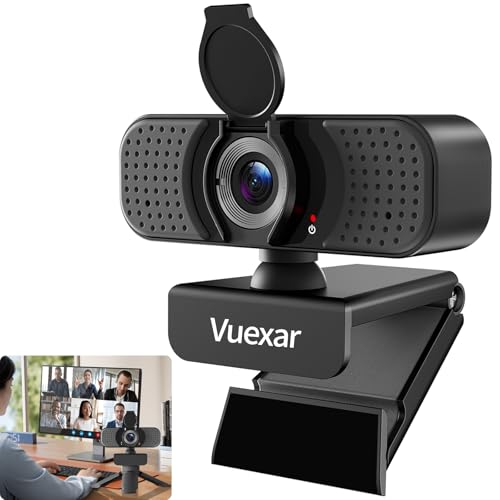 Vuexar Pro Series 1080P Webcam with Dual Mics
|
8.1/10 | Buy | |
 Evershop 5-Inch Clip-On Ring Light
|
8.1/10 | Buy | |
 IPEVO DO-CAM Creator's Edition 8MP USB Camera
|
8.1/10 | Buy |
EMEET C960 1080P Webcam with Dual Mics
EMEET's C960 webcam delivers sharp 1080P video and clear audio with dual noise-reducing microphones. Its automatic low-light correction and built-in privacy cover make it a practical choice for remote work and video conferencing.
Pros
- Full HD 1080P video output
- Dual noise-canceling microphones
- Automatic low-light correction
- Plug-and-play USB connection
- Integrated privacy cover
Cons
- No autofocus (fixed focus only)
- Incompatible with Windows Hello
OKIOLABS OKIOCAM S-4K 8MP Document Camera
This portable USB document camera uses an 8MP Sony Exmor R sensor to capture ultra high definition images up to 3264 x 2448p. It includes OKIOPoint AI tracking and a suite of software for live annotation and recording, making it a solid choice for teachers doing distance learning or live demos.
Pros
- Sharp 8MP Sony Exmor R sensor
- Lag-free streaming up to 30fps at full HD
- Captures letter-size documents in landscape
- Includes OKIOPoint AI visual pointer
- Plug and play with Windows, Mac, Chromebook
Cons
- Max resolution limited to 15fps
- No built-in storage or wireless connectivity
- Optional carrying pouch sold separately
GOWENIC 480P USB Webcam
This GOWENIC webcam offers 480P video and 5MP still image capture with automatic white balance for clear color. Its compact size and plug-and-play USB design make it a convenient choice for basic video calls and conferences.
Pros
- Automatic white balance for natural colors
- Compact and portable design
- Plug-and-play USB2.0 setup
- Good for basic video calls and conferencing
Cons
- Only 480P video resolution
- No built-in microphone
- Limited features for advanced users
HUE HD Portable USB Camera
This versatile camera doubles as a webcam and document visualizer, with a flexible gooseneck and manual focus lens for clear close-ups. It's plug-and-play with no drivers, making it a solid choice for educators, remote workers, and streamers who need a durable, portable setup.
Pros
- Manual focus lens avoids autofocus hunting
- Flexible gooseneck for easy positioning
- Plug and play, no drivers needed
- Includes durable shockproof carry case
- 3-year manufacturer warranty
Cons
- Heavier than typical webcams at 1.28 lbs
- Requires manual focusing, no autofocus
NUROUM C10 1080P Conference Webcam
A compact all-in-one device that combines a 1080p webcam with a 90-degree field of view, four noise-canceling microphones, and a speaker. Designed for huddle rooms and home offices, it offers easy USB plug-and-play setup and works with major conferencing platforms.
Pros
- Compact and portable all-in-one design
- Clear 1080p video with wide-angle lens
- Effective noise-canceling microphones
- Full duplex for natural conversation
- Simple USB setup without drivers
Cons
- Short USB cable (0.7 meters) may limit placement
- No built-in privacy shutter for the lens
- Firmware updates require separate software
Vuexar Pro Series 1080P Webcam with Dual Mics
This affordable 1080P webcam offers clear video at 30fps and dual noise-canceling microphones for better audio in online meetings or classes. Its wide-angle lens and privacy cover add practicality for group calls or solo use.
Pros
- Built-in privacy cover
- Dual noise-canceling mics for clear audio
- Wide 90 degree field of view
- Easy plug and play setup
- Works with tripod for flexible positioning
Cons
- Resolution limited to 1080P 30fps no 60fps
- No specs on low light performance
- Limited color options available
Evershop 5-Inch Clip-On Ring Light
This compact ring light clips onto laptop or monitor screens to improve lighting for video calls and recordings. It offers three color temperatures and adjustable brightness, with a foldable stand that can also hold a phone for selfies or streaming.
Pros
- Adjustable stand fits curved and flat screens
- Lightweight and portable for travel
- Three lighting modes with high CRI 98+
- Foldable design saves storage space
Cons
- Small 5-inch light head for limited coverage
- No built-in battery, requires USB power
IPEVO DO-CAM Creator's Edition 8MP USB Camera
The IPEVO DO-CAM Creator's Edition is a lightweight, portable USB camera that doubles as a document camera and webcam. Its 8MP Sony CMOS sensor delivers Ultra HD resolution for detailed presentations, making it ideal for remote work and distance learning.
Pros
- Exceptional image quality with noise reduction
- Compact and lightweight design
- Versatile flip head for document or face views
- Stable and adjustable arm
- Easy USB plug-and-play setup
Cons
- USB 2.0 connectivity may limit data transfer speed
- Utility yellow color may not suit all setups
Best Portable Webcam Buying Guide
Resolution and Image Quality
Resolution determines how sharp your video appears. Most portable webcams offer 1080p Full HD, which is sufficient for video calls and streaming. Some models step up to 4K, providing extra detail for presentations or recording.
Look for cameras with good low-light performance and auto light correction to avoid grainy images in dim rooms. A wide-angle lens (typically 70 to 110 degrees) lets you show more of your surroundings, useful for group calls or demonstrations.
When comparing models, check the sensor size and pixel count. Larger sensors generally capture more light, reducing noise. Many portable webcams also include built-in ring lights or clip-on LEDs to improve lighting.
For consistent color, automatic white balance and exposure adjustment are important features, especially if you move between different environments.
Portability and Design
Portable webcams are designed to be lightweight and easy to pack. Look for a compact form factor that fits in a laptop bag or even a pocket. Some models fold flat or include a protective case.
The mounting mechanism matters: a flexible clip works on laptops, monitors, and even tripods. A universal clip with a standard tripod mount (1/4-inch thread) adds versatility for desktop setups or on-location use.
Consider the cable length and whether the camera is USB-A or USB-C. Shorter cables reduce clutter but may limit placement. Some portable webcams are bus-powered, drawing power from the USB port, so no extra adapter is needed.
For travel, a detachable cable or built-in storage for the cable is a plus.
Microphone and Audio Quality
Clear audio is as important as good video. Many portable webcams include built-in microphones, but quality varies widely. Look for models with multiple microphones for better noise cancellation and pickup patterns.
Some cameras feature stereo mics or directional arrays that focus on the speaker’s voice while reducing background noise. For conference calls or virtual meetings, a webcam with a decent mic can eliminate the need for a separate headset.
If you often present or record in noisy environments, consider a webcam with dedicated noise-canceling technology. Some models also include a built-in speaker, though most portable units rely on external speakers.
Check user feedback on mic clarity and volume levels to ensure your voice comes through loud and clear.
Connectivity and Compatibility
Most portable webcams plug directly into a USB port and are recognized instantly by Windows, macOS, and Chrome OS. Some require driver installation for advanced features, but many are plug-and-play.
USB-A is the most common, but USB-C models are becoming more popular for modern laptops. If your device only has USB-C ports, you may need an adapter for a USB-A webcam.
Check compatibility with your preferred software: Zoom, Microsoft Teams, Skype, Google Meet, and streaming apps like OBS. Most webcams work with all major platforms, but some proprietary software may offer extra controls (e.g., zoom, pan, or image adjustments).
For flexibility, a model that works without additional software is ideal for quick setups.
Additional Features
Extra features can enhance your experience. A built-in privacy cover is a simple way to block the lens when not in use. Some portable webcams include a ring light or clip-on LED for better illumination, especially useful in low-light conditions.
For document scanning or overhead demos, a flexible arm or 360-degree rotation allows you to point the camera at objects on your desk. Auto-focus and face tracking keep you in the frame during movement.
If you need a webcam for both video calls and content creation, look for models that support high frame rates (60 fps) for smooth motion.
Some portable webcams also offer built-in storage for recording directly to the device, though this is rare.
Consider your specific use case: a teacher might prioritize a document camera mode, while a remote worker might value a wide-angle lens and good mic.
Why You Should Trust Us
At BestProducts, we are committed to providing independent, data-driven recommendations.
Each product in this guide is scored using our proprietary BP Score (0 to 10), based on a consistent set of criteria: specifications, expert review consensus, verified buyer feedback, and published data from reliable sources.
We do not conduct our own product trials; our evaluations are grounded in research, published data, expert review consensus, and verified buyer feedback. Our team analyzes hundreds of user reviews and expert opinions to ensure our picks reflect real-world performance.
We are transparent about our affiliate relationships: we may earn a commission if you purchase through our links, but this does not influence our ratings or recommendations.
Final Thoughts
After thorough research, here are our top awards for portable webcams:
- Best Overall: EMEET 1080P Webcam with Microphone, C960, Its combination of solid 1080p video, dual microphones, and a reasonable price makes it the top choice for most users, earning the highest BP Score in our lineup.
- Best for Classrooms and Demos: OKIOCAM S-4K 8MP USB Document Camera, With ultra HD resolution and AI-powered pointer, it’s ideal for teachers and presenters who need to show documents or objects clearly.
- Best Budget Pick: GOWENIC Webcam 480P, For under $15, this basic webcam provides acceptable video for casual calls, making it a great entry-level choice.
- Best Portable for Professionals: HUE HD Portable USB Camera, Its compact design and flexible stand make it easy to carry, while still delivering good image quality for video conferencing.
For more options, check out our guides on USB webcams and webcams with built-in microphones and speakers.
Frequently Asked Questions
What resolution should I look for in a portable webcam?
For most video calls and streaming, 1080p Full HD is the sweet spot, offering sharp images without excessive bandwidth. If you need extra detail for recording or presentations, 4K models are available but often at a higher price.
Lower resolutions like 720p or 480p are acceptable for casual use but may appear grainy.
Can I use a portable webcam with a desktop computer?
Yes, most portable webcams work with desktop PCs via USB. They are plug-and-play on Windows and macOS. For optimal placement, you can use a monitor mount or a tripod. If your desktop lacks a USB port on the front, use a USB extension cable.
Do portable webcams have good microphones?
Many portable webcams include built-in microphones, but quality varies. Models with dual or stereo mics generally offer better noise cancellation and clearer audio. Check user reviews for real-world microphone performance. If you need professional-level audio, consider a separate USB microphone.
How do I mount a portable webcam on a laptop?
Most portable webcams come with a clip that attaches to the top edge of a laptop screen or monitor. Some also have a standard tripod mount for desktop use. When using on a laptop, ensure the clip is padded to avoid scratching the screen.
What is the difference between a webcam and a document camera?
A document camera is designed to capture flat surfaces like documents, books, or objects from above, often with a flexible arm or adjustable stand. A standard webcam is meant for face-to-face video calls.
Some portable webcams, like the OKIOCAM S-4K, combine both functions, making them versatile for teachers and remote workers.
Are portable webcams compatible with Chromebooks?
Yes, most USB webcams work with Chromebooks out of the box. They are recognized as standard UVC (USB Video Class) devices. Some advanced features may require Chrome apps or extensions, but basic video and audio functions should work immediately.
About the author
Armando covers Wi-Fi routers and webcams for BestProducts, balancing speed, whole-home range, image quality, and low-light performance. He helps readers get reliable coverage and look sharp on every call.