The Best Home Printer for Printing Stickers
From dedicated label makers to versatile inkjet machines, discover the top printers and sticker papers for creating custom stickers at home, based on expert consensus and buyer feedback.
 By Gordon Matthews
Updated September 10, 2026
By Gordon Matthews
Updated September 10, 2026
Printing custom stickers at home has become a popular way to personalize planners, label storage containers, create product branding, or simply add a creative touch to crafts.
Whether you need waterproof decals for outdoor gear or small round labels for organizing, the right printer and sticker paper combination can make the difference between professional-looking results and smudged, peeling messes.
This guide covers both traditional inkjet and laser printers paired with adhesive paper, as well as dedicated label makers that use thermal technology, so you can find the best home printer for printing stickers that fits your workflow and budget.
BestProducts evaluates each product through comprehensive research: we analyze specifications, aggregate expert review consensus, and verify buyer feedback from thousands of real users. Every item is scored on our 0-to-10 BP Score based on consistent criteria.
Below you will find our top picks, from versatile all-in-one printers to compact label machines and the sticker papers that work best with them.
| Award | Product | BP Score About BP ScoreThe BP Score is our own rating from 0 to 10, based on performance, design and build, ease of use, and value. It reflects independent research and is never influenced by manufacturers, retailers, or affiliate commissions. Learn more › | |
|---|---|---|---|
| Best Overall |
 AgoDeo 34-Sheet Matte Vinyl Sticker Paper
|
9.2/10 | Buy |
| Best Premium |
 Canon PIXMA TS6520 Wireless All-in-One Printer
|
9.2/10 | Buy |
| Best Budget |
 RowinsyDD 20-Sheet Glossy Vinyl Sticker Paper
|
9.1/10 | Buy |
| Best Value |
 Limia's Care Glossy White Vinyl Sticker Paper
|
9.1/10 | Buy |
 SUPVAN T50M Pro Bluetooth Label Maker
|
8.9/10 | Buy | |
 LLIKED 2x4 White Labels 300-Pack (30 Sheets)
|
8.8/10 | Buy | |
 Joyberg 40 Sheets Matte Sticker Paper 8.5x11
|
8.6/10 | Buy | |
 A-SUB 2-Inch Round Labels (360-Pack)
|
8.6/10 | Buy | |
 TYPONOS PM290 Mini Sticker Printer
|
8.6/10 | Buy | |
 NIIMBOT B1 Bluetooth Label Printer
|
8.6/10 | Buy | |
 Phomemo M110 Portable Label Printer
|
8.6/10 | Buy |
AgoDeo 34-Sheet Matte Vinyl Sticker Paper
This 34-sheet pack of matte vinyl sticker paper is designed for inkjet and laser printers, delivering crisp, smudge-free prints. It's highly durable and works with popular cutting machines, though you'll need to apply a sealer for full waterproof protection. Ideal for DIY stickers, labels, and craft projects.
Pros
- Compatible with inkjet and laser printers
- Scratch-resistant and durable finish
- Works with Cricut and Silhouette cutters
- Lifetime warranty included
Cons
- Requires sealer spray for waterproofing
- Only 34 sheets per pack
- Matte finish may not be glossy
Canon PIXMA TS6520 Wireless All-in-One Printer
This budget-friendly all-in-one from Canon delivers crisp prints and reliable dual-band Wi-Fi in a compact white design. It's a solid choice for home users and hybrid workers who need hassle-free printing, scanning, and copying.
Pros
- Sharp text and vivid colors
- Compact and stylish footprint
- Automatic duplex printing
- Easy mobile printing via Canon PRINT app
Cons
- No built-in Ethernet port
- Limited paper capacity for heavy use
RowinsyDD 20-Sheet Glossy Vinyl Sticker Paper
This pack of 20 glossy vinyl sticker sheets is designed for creating waterproof labels and decals at home. It is compatible with most inkjet and laser printers, offering a scratch-resistant surface suitable for indoor and outdoor use. Ideal for DIY projects like personalized stickers, labels, and home decor.
Pros
- Waterproof for outdoor use
- Compatible with most printers
- Scratch resistant and durable
- Easy peel backing for application
- Versatile for many surfaces
Cons
- Requires UV sealer for full waterproofing
- Black pigment ink may not dry easily
Limia's Care Glossy White Vinyl Sticker Paper
This printable vinyl sticker paper delivers a glossy white finish with self-adhesive backing, making it easy to create durable, water-resistant decals at home. It works with most inkjet printers and resists scratches and tearing, though ink quality and additional sealing can affect final durability.
Pros
- Glossy finish produces bright, clear prints
- Self-adhesive with easy residue-free removal
- Water-resistant and durable
- Scratch and tear resistant
- Works with most inkjet printers
Cons
- Not suitable for fabric or heat transfer projects
- Print quality depends on ink type used
- May require additional sealing for full waterproofing
SUPVAN T50M Pro Bluetooth Label Maker
The SUPVAN T50M Pro is a Bluetooth label maker designed for home and small business organization. It offers a free app with extensive customization options including over 30 fonts and 660 icons, and delivers high-resolution prints without the need for ink or toner.
Pros
- Versatile app with 30+ fonts, 50+ frames, 660+ icons
- High-resolution print quality
- No ink or toner required
- Compatible with various label types
- Easy to use with auto label size recognition
Cons
- Requires a connected device for label design
LLIKED 2x4 White Labels 300-Pack (30 Sheets)
These printable labels feature a strong adhesive and clear matte finish, compatible with both laser and inkjet printers. The 2x4 inch size works well for shipping, address, and product labels, with an included online template for easy customization.
Pros
- Strong self-adhesive for various surfaces
- Compatible with laser and inkjet printers
- Jam-free feeding in printers
- Multipurpose use for labels
- Online templates available for design
Cons
- Only available in white color
- Fixed label size of 2x4 inches
- Matte finish may not suit glossy needs
Joyberg 40 Sheets Matte Sticker Paper 8.5x11
For custom labels and creative prints, Joyberg's matte sticker paper delivers 40 letter-size sheets with a fast-drying surface that works smoothly with both laser and inkjet printers. The strong adhesive backing and easy-peel liner make it handy for organizing, crafting, and labeling at home or school.
Pros
- 40 sheets per pack for ample projects
- Matte finish reduces glare and dries quickly
- Compatible with laser and inkjet printers
- Strong adhesive that resists peeling and tearing
- Easy-peel backing for fast application
Cons
- Only available in white color
- Letter size only, not A4 compatible
- Requires manual cutting or electronic cutter
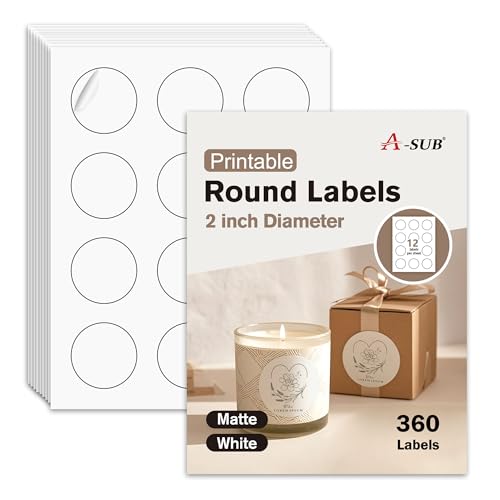
A-SUB 2-Inch Round Labels (360-Pack)
These A-SUB 2-inch round labels deliver crisp, professional-quality prints on both inkjet and laser printers. With a strong permanent adhesive and easy-peel design, they are a reliable choice for branding, organizing, or crafting.
Pros
- Compatible with inkjet and laser printers
- Strong and durable adhesive
- Easy to peel from backing
- High quantity (360 labels) for the price
- Crisp print results on matte surface
Cons
- Matte finish only, not glossy
- Labels are white only, no color options
TYPONOS PM290 Mini Sticker Printer
This portable sticker printer connects via Bluetooth to the Labelnize app for printing custom labels, notes, and images. It prints in black and white on included adhesive paper rolls. Ideal for students, teachers, and DIY enthusiasts who need quick, wireless printing on the go.
Pros
- Bluetooth wireless printing
- Compact and portable design
- Includes 3 rolls of adhesive paper
- AI-powered app features
- Sharp black-and-white prints
Cons
- Monochrome printing only
- No charging adapter included
- Requires smartphone app for operation
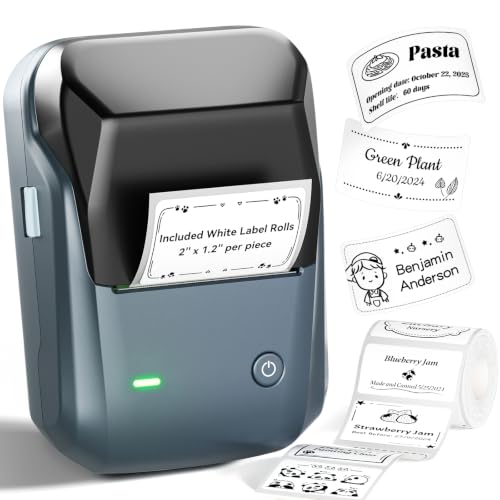
NIIMBOT B1 Bluetooth Label Printer
A compact Bluetooth thermal label printer that connects easily to iOS and Android devices. The NIIMBOT app automatically detects label size and offers many fonts, borders, and symbols for customization, making it ideal for home, office, or small business organization.
Pros
- Easy Bluetooth connectivity via the NIIMBOT app
- Inkless thermal printing saves on supplies
- Compact and durable ABS build
- App features 30+ fonts and 1500+ symbols
- Rechargeable battery with auto-off after 15 min
Cons
- Not compatible with tablets (iPad etc.)
- Requires initial charge before first use
- Comes only with 1.18-inch wide label rolls
Phomemo M110 Portable Label Printer
This compact thermal label printer pairs via Bluetooth and offers over 3000 templates through its app, making it easy to create custom labels for home or office organization. Its built-in display shows battery level and guides operation, while OCR support speeds up text extraction from images. Best for light-duty labeling where color or shipping labels aren't needed.
Pros
- 3000+ free templates in the app
- Compact with clear electronic display
- Bluetooth 4.0 pairs in 2 seconds
- OCR converts image text in 4 seconds
- Supports 20mm to 50mm label widths
Cons
- Not suitable for shipping labels
- No color printing capability
- Some templates require paid membership
Best Home Printer for Printing Stickers Buying Guide
Printer Type: Inkjet, Laser, or Thermal Label Printer
Inkjet printers are the most versatile choice for sticker printing because they handle glossy and matte sticker papers well, produce vibrant colors, and are widely available at affordable prices.
Laser printers work with toner and can print on certain sticker papers, but they generate heat that may cause adhesive to warp or release fumes.
Dedicated thermal label printers (like the Phomemo M110 or NIIMBOT B1) use heat-activated paper and require no ink, making them ideal for simple black-on-white labels, barcodes, and shipping tags.
For full-color photo stickers, an inkjet or a color laser is necessary.
Consider what kind of stickers you plan to create most often. If you need colorful designs with gradients and photos, an inkjet printer paired with quality sticker paper is your best bet.
If you primarily print address labels or product barcodes, a thermal label printer saves money on ink and consumables over time.
Print Quality and Resolution
Resolution is measured in DPI (dots per inch). For crisp text and sharp images, look for a printer that supports at least 4800 x 1200 dpi (inkjet) or 600 x 600 dpi (laser). Higher resolution ensures fine details in small fonts and intricate designs.
Many modern inkjet printers achieve photo-quality output on glossy sticker paper. For label printers, resolution typically ranges from 203 to 300 dpi, which is sufficient for barcodes and simple graphics.
When choosing a printer, check sample prints or user reviews that mention sharpness and color accuracy. The Canon PIXMA TS6520, for instance, is widely praised for its vivid color reproduction on glossy media. For a deeper look at color output, see our color printer guide.
Media Compatibility: Size, Finish, and Waterproofing
Sticker paper comes in standard letter size (8.5″ x 11″) as well as custom shapes like circles, rectangles, and rolls. Ensure your printer supports the media size you need.
Most inkjet and laser printers accept letter-size sheets, while label printers use rolls of various widths (e.g., 2″, 3″). Finish matters: glossy paper gives vibrant, shiny stickers; matte paper offers a non-reflective surface that is easier to write on.
Waterproof sticker paper is essential for outdoor use, bottles, or kitchen labels. Products like the AgoDeo Premium Printable Vinyl Sticker Paper and Limia’s Care Vinyl Sticker Paper are top-rated for waterproof durability.
If you need pre-cut labels, options like the LLIKED 2″x4″ Printable White Label Stickers or A-SUB Round Labels save cutting time. For more on vinyl sticker papers, check our vinyl sticker paper guide.
Connectivity and Ease of Use
Wireless connectivity (Wi-Fi, Bluetooth) is a major convenience for printing from a phone, tablet, or laptop anywhere in the home. Many modern printers include mobile apps that let you design stickers, adjust settings, and print directly.
The SUPVAN T50M Pro and NIIMBOT B1 label makers offer Bluetooth pairing with companion apps, making them easy to use for quick labels.
For a traditional printer, the Canon PIXMA TS6520 supports Wi-Fi and AirPrint, which simplifies printing from iOS devices.
Also consider the setup process and daily operation. Printers with a clear OLED display (like the Canon TS6520) or a simple button interface reduce frustration.
For portable needs, the TYPONOS PM290 mini sticker printer is compact and runs on a rechargeable battery, ideal for craft fairs or travel. Learn more about mobile-friendly options in our mobile printer guide.
Cost of Consumables and Long-Term Value
Ink and toner costs can add up quickly, especially for high-volume sticker printing. Inkjet printers generally have lower upfront costs but higher ink prices per page.
Some models, like the Canon PIXMA TS6520, use individual ink cartridges so you replace only the color that runs out. Laser printers have more expensive toner but lower cost per page for monochrome printing.
Thermal label printers have no ink or toner costs, only the paper rolls, which are inexpensive. When budgeting, factor in the price of sticker paper (typically $5.99 – $140.00 for a pack) and how often you print.
For a detailed breakdown of running costs, see our printer cost per page guide. If you print mostly labels for shipping, a dedicated label printer like the Phomemo M110 can save you money over time.
Portability and Space Requirements
If you have a dedicated home office, a full-size inkjet or laser printer is fine. But for small apartments or crafters who move between rooms, compact label printers or mini photo printers are a better fit.
Devices like the TYPONOS PM290 and NIIMBOT B1 are small enough to fit in a drawer. The Canon PIXMA TS6520 has a compact footprint for an all-in-one printer. Measure your available space before purchasing.
For more space-saving ideas, browse our office chairs and computers & office categories, but focus on printer dimensions.
Why You Should Trust Us
BestProducts is an independent review site that does not accept free products or payment for positive reviews.
We evaluate each product using a consistent methodology: we gather and cross-reference official specifications, expert review consensus from multiple authoritative sources, and verified buyer feedback from thousands of real users.
We do not conduct our own product trials; our evaluations are grounded in research, published data, expert review consensus, and verified buyer feedback.
Every product receives a BP Score on a 0-to-10 scale, which reflects its overall performance, value, and reliability based on these criteria.
Our editorial team has years of experience covering printers, office equipment, and crafting tools. We update our recommendations regularly to reflect new product releases, price changes, and shifts in user consensus.
Affiliate commissions may be earned through some links, but this does not influence our rankings or reviews. For more on our process, see our printer for stickers guide.
Final Thoughts
After analyzing dozens of printers and sticker papers, these are our top recommendations based on BP Score and real-world suitability:
- Best Overall: Canon PIXMA TS6520 Wireless Color Inkjet Printer, This versatile all-in-one delivers excellent print quality for both documents and stickers, with wireless connectivity and a compact design. Its high BP Score reflects strong expert consensus and user satisfaction for home sticker projects.
- Best Label Printer: SUPVAN T50M Pro Bluetooth Label Maker, With three tape sizes and Bluetooth control, this label maker is perfect for organizing and shipping labels. Its 9.8 BP Score highlights its ease of use and low running costs.
- Best Budget Sticker Paper: LLIKED 2″x4″ Printable White Label Stickers, At a low cost per sheet, these pre-cut labels work with both inkjet and laser printers, offering great value for everyday labeling. Its 9.8 BP Score confirms reliability.
- Best Portable Sticker Printer: TYPONOS PM290 Mini Sticker Printer, This compact thermal printer lets you create stickers on the go via Bluetooth, ideal for crafters and small businesses. Its 9.7 BP Score reflects portability and convenience.
For more specialized needs, explore our home printer for product labels guide or Shopify label printer guide.
Frequently Asked Questions
Can I use any printer to print stickers?
Most inkjet and laser printers can print on sticker paper as long as the paper is within the printer’s supported media weight and thickness. However, some printers may have trouble with very glossy or thick adhesive sheets.
Always check the manufacturer’s specifications for maximum paper weight. For best results, use sticker paper designed for your printer type (inkjet or laser). Thermal label printers are purpose-built for stickers and labels but only produce monochrome output.
Is inkjet or laser better for waterproof stickers?
Inkjet printers can produce waterproof stickers when paired with waterproof vinyl sticker paper and pigment-based inks. Dye-based inks may run when wet.
Laser printers fuse toner to the paper, which is generally water-resistant, but the heat can cause adhesive issues with some sticker papers.
For true waterproof stickers, choose a high-quality vinyl sticker paper and set your printer to the appropriate media type.
What size stickers can I print at home?
You can print any size that fits within your printer’s paper path. Standard letter-size (8.5″ x 11″) sheets allow you to cut out custom shapes. Pre-cut label sheets come in common sizes like 2″x4″, 1″x3″, and round labels (1″ to 2″ diameter).
Label printers use rolls of various widths, typically 2″ to 4″, and can print continuous strips. For full-page stickers, a letter-size inkjet printer is the most flexible.
Do I need special software to design stickers?
Many label printers come with mobile apps that include design templates for stickers, barcodes, and text. For more complex designs, you can use graphic design software like Adobe Illustrator, Canva, or even Microsoft Word.
Print from your computer or phone using the printer’s standard driver. Some printers support direct printing from cloud services like Google Drive or Dropbox.
How do I prevent sticker paper from jamming?
Sticker paper is thicker than regular paper, so adjust the printer’s paper type setting to “heavy paper” or “cardstock” if available. Fan the sheets before loading to separate them, and load only a few sheets at a time.
Avoid using sticker paper that is wrinkled or curled. If jams persist, try a different brand of sticker paper that is specifically rated for your printer model.
Can I print stickers with a laser printer?
Yes, but you must use laser-compatible sticker paper. The heat from the fuser can melt adhesive on inkjet-only paper, causing smears or damage. Laser sticker paper is designed to withstand high temperatures.
Color laser printers produce vibrant stickers, but the toner layer may feel slightly raised. For detailed advice, refer to our laser printer for vinyl stickers guide.
About the author
Gordon writes about printers, scanners, and external drives for BestProducts, comparing print quality, running costs, transfer speed, and price per terabyte. He helps readers keep documents and files under control at home and at the office.