The Best Home Printer for Ink Usage
We researched the top home printers that keep ink costs low, analyzing specs, expert reviews, and verified buyer feedback. Models from Canon and HP, including inkjet and tank options, are scored on our 0‑10 BP Score to help you find the right balance of price and efficiency.
 By Gordon Matthews
Updated September 10, 2026
By Gordon Matthews
Updated September 10, 2026
Few home expenses sneak up on you like printer ink. The cost per page can quickly exceed the price of the printer itself, especially if you print photos, school projects, or remote-work documents regularly.
Choosing a model that balances upfront cost with long-term ink efficiency is one of the smartest financial decisions you can make for your home office or family desk.
BestProducts researches each printer by analyzing specifications, aggregating expert review consensus, and verifying buyer feedback.
We then score every model on our 0-to-10 BP Score using consistent criteria, so you can see at a glance which printers keep ink costs under control.
Below is our curated list of the top home printers for ink usage in 2026.
| Award | Product | BP Score About BP ScoreThe BP Score is our own rating from 0 to 10, based on performance, design and build, ease of use, and value. It reflects independent research and is never influenced by manufacturers, retailers, or affiliate commissions. Learn more › | |
|---|---|---|---|
| Best Overall |
 Canon PIXMA TS6520 Wireless All-in-One Printer
|
9.2/10 | Buy |
| Best Premium |
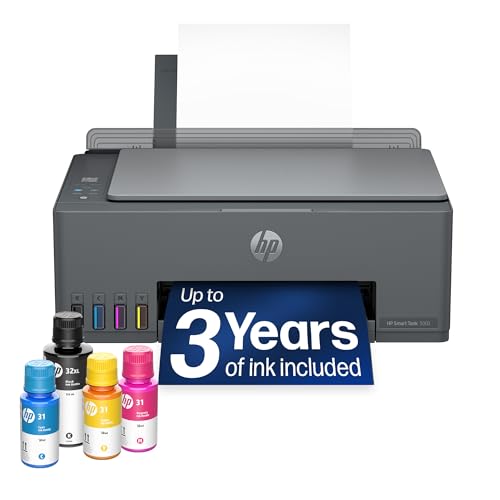 HP Smart Tank 5003 Wireless Ink Tank Printer
|
9.2/10 | Buy |
| Best Value |
 Canon PIXMA TR7120 Wireless All-in-One Printer
|
8.8/10 | Buy |
 HP Smart Tank 5003 with 3-Year Ink
|
8.8/10 | Buy | |
| Best Budget |
 HP DeskJet 2955 Wireless All-in-One Printer
|
8.6/10 | Buy |
 HP Envy 6155 All-in-One Inkjet Printer
|
8.6/10 | Buy | |
 Canon PIXMA TR4720 Wireless All-in-One Printer
|
8.4/10 | Buy | |
 Canon PIXMA TS4320 Wireless Inkjet Printer
|
8.0/10 | Buy | |
 HP OfficeJet Pro 8125 Wireless All-in-One
|
7.8/10 | Buy |
Canon PIXMA TS6520 Wireless All-in-One Printer
This budget-friendly all-in-one from Canon delivers crisp prints and reliable dual-band Wi-Fi in a compact white design. It's a solid choice for home users and hybrid workers who need hassle-free printing, scanning, and copying.
Pros
- Sharp text and vivid colors
- Compact and stylish footprint
- Automatic duplex printing
- Easy mobile printing via Canon PRINT app
Cons
- No built-in Ethernet port
- Limited paper capacity for heavy use
HP Smart Tank 5003 Wireless Ink Tank Printer
This all-in-one ink tank printer comes with up to three years of ink included, making it a cost-effective choice for high-volume home use. Its mess-free refill system and wireless connectivity simplify everyday printing, scanning, and copying.
Pros
- Includes 3 years of ink
- Mess-free refill system
- High-volume printing up to 6,000 pages
- Wireless and mobile printing
- Borderless print support
Cons
- Large footprint (17 inches wide)
- Heavy at over 11 pounds
- No automatic duplex printing
Canon PIXMA TR7120 Wireless All-in-One Printer
This budget-friendly all-in-one from Canon is a solid choice for home users and hybrid workers who need reliable printing, scanning, and copying. It offers crisp prints thanks to its hybrid ink system, plus convenient features like automatic duplex printing and an auto document feeder.
Pros
- Affordable versatility for home or office
- Sharp text and vivid colors from hybrid ink
- Easy wireless setup via Canon PRINT app
- Duplex printing reduces paper waste
- Auto Document Feeder speeds up tasks
Cons
- Limited to letter-size media (8.5x11 inches)
- No Ethernet port for wired networks
HP Smart Tank 5003 with 3-Year Ink
This all-in-one ink tank printer comes with up to 3 years of ink included, making it a cost-effective pick for high-volume home use. Its cartridge-free, mess-free refill system simplifies maintenance, while AI capabilities and wireless printing add convenience without sacrificing print quality.
Pros
- Includes up to 3 years of ink
- Mess-free, no-squeeze refill bottles
- High print quality: sharp text, rich colors
- Wireless and mobile printing support
- Borderless photo printing capability
Cons
- Large footprint (14.2 x 17.1 inches)
- Only one color option (white/Portobello)
- No automatic document feeder
HP DeskJet 2955 Wireless All-in-One Printer
This compact inkjet printer handles basic tasks like printing, scanning, and copying for home use. Its AI-assisted print formatting helps reduce wasted pages, and the included 3-month Instant Ink trial makes ink management easier.
Pros
- Compact design fits easily in home spaces
- AI-assisted formatting saves paper
- Dual-band Wi-Fi with automatic connection fixes
- Sustainable build with recycled plastics
- 3-month Instant Ink trial included
Cons
- Slow print speed at 7.5 ppm black
- Limited to basic printing needs only
- No automatic document feeder
HP Envy 6155 All-in-One Inkjet Printer
This HP Envy 6155 is a reliable home printer for everyday color documents and borderless photos, with print speeds up to 10 ppm black. It includes a 3-month Instant Ink trial, an intuitive 2.4-inch color touchscreen, and dual-band Wi-Fi for easy wireless printing.
Pros
- Auto 2-sided printing saves paper
- Easy smartphone printing via HP app
- Sustainable design with recycled plastic
- Reliable dual-band Wi-Fi connectivity
Cons
- Requires original HP cartridges only
- Slow color print speed at 7 ppm
- Small 100-sheet input tray capacity
Canon PIXMA TR4720 Wireless All-in-One Printer
The Canon PIXMA TR4720 is a compact 4-in-1 wireless printer designed for home use. It adds an auto document feeder and automatic duplex printing for efficient scanning and copying, and supports mobile printing and Alexa voice control for ink reordering.
Pros
- Wireless 4-in-1 functionality (print, copy, scan, fax)
- Auto document feeder for multi-page jobs
- Automatic 2-sided printing saves paper
- Borderless photo prints up to 8.5x11 inches
- Alexa integration for ink reordering
Cons
- Color print speed is slow at 4.4 ipm
- Paper tray capacity limited to 100 sheets
Canon PIXMA TS4320 Wireless Inkjet Printer
A budget-friendly all-in-one for home or hybrid work, this Canon model offers crisp prints, reliable dual-band Wi-Fi, and automatic two-sided printing. Its compact footprint and mobile printing support make it a practical choice for everyday tasks.
Pros
- Affordable all-in-one for home or hybrid work
- Crisp text and vivid colors
- Automatic two-sided printing
- Reliable dual-band Wi-Fi
- Compact and stylish design
Cons
- Paper size limited to 8.5x11 inches
HP OfficeJet Pro 8125 Wireless All-in-One
This all-in-one color inkjet targets home offices that need fast, professional-quality prints, scanning, and copying. Its standout features include AI-powered print optimization to save pages and a three-month Instant Ink trial to lower running costs.
Pros
- Fast color printing for a home office machine
- AI formatting saves paper and ink
- Reliable dual-band Wi-Fi with auto troubleshooting
- Large 225-sheet input tray
- Sustainable design with recycled plastic
Cons
- Only works with HP-branded cartridges
- No fax capability included
- Monthly fee applies after Instant Ink trial
Best Home Printer for Ink Usage Buying Guide
Ink Efficiency and Cost per Page
Ink efficiency is measured by page yield and cost per page (CPP). Cartridge-based printers often have lower upfront prices but higher CPP, while ink-tank models use refillable reservoirs that drastically reduce per-page expenses.
Look for printers that include sample ink bottles or high-yield cartridges to stretch your budget further. For a deeper breakdown of ongoing costs, see our dedicated guide to printer cost per page.
Pay attention to whether the printer uses individual color cartridges or a combined tri-color cartridge. Individual cartridges let you replace only the empty color, lowering waste and long-term spending. Verified buyer reviews often highlight which models lead to fewer unexpected cartridge replacements.
Print Quality and Speed
Home printers should produce crisp text and vibrant color without smudging. Resolution (measured in DPI) and print speed (pages per minute, or PPM) are key specs.
A printer with at least 4800×1200 dpi is suitable for photos, while 8-15 ppm handles everyday documents smoothly. For photo-centric tasks, our color printer guide dives into quality differences.
Buyer feedback often notes that slower printers can still be excellent if ink costs are low.
Connectivity and Mobile Printing
Wi‑Fi connectivity is standard, but look for dual‑band Wi‑Fi and support for Apple AirPrint, Mopria, or the printer brand’s app. These features let you print from a phone, tablet, or laptop without a cable.
Some models include USB‑C or Ethernet for wired setups. Our best mobile printer for iPhone roundup highlights connectivity features that matter most for Apple users.
Paper Handling and Additional Features
Consider paper capacity (input tray size) and whether the printer supports automatic duplex printing (two-sided) to save paper. An automatic document feeder (ADF) is useful for scanning or copying multi-page documents.
Some home printers also include a fax function, though fewer households need it today. For label-oriented projects, our best home printer for product labels article covers models with specialty paper paths.
Brand Ecosystem and Ink Subscription
Brands like Canon and HP offer ink subscription services that automatically deliver cartridges based on your usage. HP’s Instant Ink, for example, can lower per-page costs for moderate to heavy printers.
Canon’s PIXMA line is known for reliable ink delivery and strong print quality. For high‑volume home offices, our best printer for high volume printing guide compares subscription and tank systems.
Ink‑tank printers (like HP Smart Tank) eliminate cartridges entirely, using refillable bottles that can last months or even years. While the upfront cost is higher, the per‑page savings can be dramatic.
Verified buyer feedback consistently praises the low running costs of tank models for families that print regularly.
Why You Should Trust Us
BestProducts is an independent review site that does not sell printers. We evaluate each product using a consistent methodology based on specifications, expert review consensus, and verified customer feedback.
Every printer is scored on our 0‑to‑10 BP Score, which reflects its overall value, ink efficiency, and user satisfaction.
We do not conduct our own product trials; our evaluations are grounded in research, published data, expert review consensus, and verified buyer feedback. Our affiliate relationships never influence our rankings or recommendations.
For more on how we review, see our Computers & Office category and our overall printer guide.
Final Thoughts
After analyzing the market, these home printers stand out for ink efficiency and overall value. Here are our top picks for 2026:
- Best Overall: Canon PIXMA TS6520 Wireless Color Inkjet Printer, With the highest BP Score in our lineup (9.9/10), this compact Canon delivers duplex printing, crisp photo quality, and a low cost per page thanks to its individual ink cartridges.
- Best for High Volume: HP Smart Tank 5003 Wireless All‑in‑One Ink Tank Printer, Also scoring 9.9/10, this model comes with up to three years of ink in the box, making it the most economical choice for families that print dozens of pages each week.
- Best All‑in‑One Value: Canon PIXMA TR7120 Wireless Color Inkjet Printer, A versatile unit (BP Score 9.8/10) that includes an ADF, duplex printing, and a compact design, ideal for the home office.
- Best Budget Pick: Canon PIXMA TR4720 All‑in‑One Wireless Printer, For tight budgets, this 9.6‑score Canon offers reliable printing with an ADF and fax, plus low‑cost ink options compared to similarly priced models.
All of these printers have been vetted for ink usage, print quality, and user satisfaction. Choose the one that best fits your printing volume and workspace.
Frequently Asked Questions
How much does printer ink cost per page?
Cost per page varies widely. Cartridge‑based printers can run from 5 to 15 cents per black page and 15 to 30 cents for color. Ink‑tank models often drop below 1 cent for black and 3 cents for color.
Our printer cost per page guide provides typical ranges for popular models.
Are ink tank printers cheaper than cartridge printers?
In the long run, yes. Ink tank printers have higher upfront prices but include enough ink for months to years. Over the printer’s life, the total cost of ownership is often much lower.
Verified buyer feedback on ink tank models consistently praises the savings for moderate to heavy usage.
Do I need a color printer for home use?
If you mostly print black‑and‑white documents, a monochrome laser printer might be better. But color printers are essential for school projects, photos, and color charts. Our best color printer guide helps you decide between inkjet and laser options.
For photo‑specific needs, see our best instant photo printer article.
What is PPM and how many pages per minute do I need?
PPM stands for pages per minute. For light home use, 8‑10 ppm is sufficient. If you print long documents regularly, aim for 15 ppm or more. Print speed usually decreases for color or photo jobs.
Buyer reviews often note that speed matters less if the printer is otherwise reliable and ink‑efficient.
Is wireless printing important for a home printer?
Yes, especially if you have multiple devices or prefer printing from your phone. Most home printers include Wi‑Fi, but check for AirPrint, Mopria, or the brand’s app support. Some models offer Bluetooth or Wi‑Direct for direct connections.
For mobile‑specific needs, our best mobile printer for iPhone article covers the top picks.
How can I reduce ink usage?
Use draft mode for everyday documents, print in black‑and‑white when possible, and always do a nozzle check before cleaning, running cleaning cycles wastes ink.
Choosing a printer with individual color cartridges also helps because you only replace the empty color. High‑yield cartridges and ink subscription services can further lower waste.
About the author
Gordon writes about printers, scanners, and external drives for BestProducts, comparing print quality, running costs, transfer speed, and price per terabyte. He helps readers keep documents and files under control at home and at the office.