The Best Desktop Soundbar
Upgrade your desktop audio with our top picks from Sony, Razer, Bose, and more. We evaluated sound quality, connectivity, and value to find the best soundbars for your setup.
 By Donald Fields
Updated September 11, 2026
By Donald Fields
Updated September 11, 2026
Your desktop’s built-in speakers often fall short when it comes to clarity, bass, and overall immersion.
Whether you’re gaming, video editing, listening to music, or taking video calls, a dedicated soundbar can dramatically improve your audio experience while keeping your desk clutter-free.
Unlike traditional bookshelf speakers, a desktop soundbar sits neatly under your monitor or beside your laptop, delivering crisp dialogue, punchy effects, and a wider soundstage without taking up too much space.
In this guide, we’ve researched and evaluated the top desktop soundbars on the market, analyzing specifications, expert reviews, and verified user feedback to score each model on our 0, 10 BP Score.
We focused on key factors such as sound quality, connectivity, size, and value to help you find the perfect match for your workspace and budget. Below, you’ll find our top recommendations.
| Award | Product | BP Score About BP ScoreThe BP Score is our own rating from 0 to 10, based on performance, design and build, ease of use, and value. It reflects independent research and is never influenced by manufacturers, retailers, or affiliate commissions. Learn more › | |
|---|---|---|---|
| Best Overall |
 Tylubio Under-Monitor Soundbar with LED
|
8.9/10 | Buy |
| Best Value |
 Nylavee 2.1 PC Soundbar with Subwoofer
|
8.9/10 | Buy |
| Best Premium |
 Razer Leviathan V2 X USB-C Soundbar
|
8.9/10 | Buy |
 Sony HTS100F 2ch Compact Soundbar with Bluetooth
|
8.8/10 | Buy | |
 Bose TV Speaker Compact Soundbar
|
8.3/10 | Buy | |
| Best Budget |
 XKX USB Clip-On Computer Soundbar
|
8.0/10 | Buy |
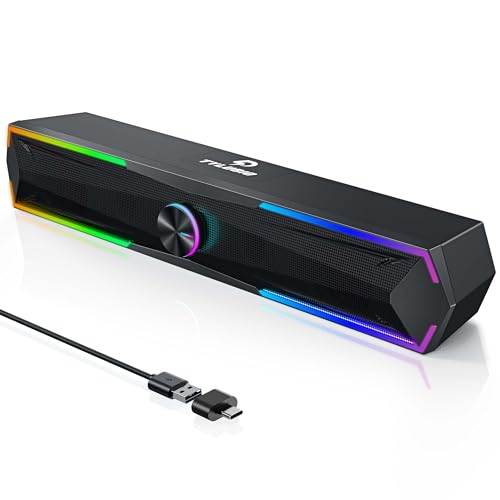
Tylubio Under-Monitor Soundbar with LED
If you're looking to add clear desktop audio and RGB flair without taking up desk space, this Tylubio soundbar fits neatly under your monitor. Its dual 5W drivers deliver solid stereo sound, while the control knob and LED modes are easy to use.
Pros
- Clear stereo sound from dual 5W drivers
- Customizable RGB LED lighting with 4 modes
- Smart multi-function knob for easy control
- Space-saving under-monitor design
- Plug-and-play USB and Type-C connection
Nylavee 2.1 PC Soundbar with Subwoofer
This 2.1 soundbar pairs silk dome tweeters with a dedicated 5.25-inch subwoofer for fuller desktop audio. Bluetooth 5.4 and AUX input cover PCs, consoles, and phones, while the side knob manages all controls.
Pros
- Dedicated 5.25-inch subwoofer adds deep bass
- Dual silk dome tweeters for clear highs
- Bluetooth 5.4 and AUX easily connect devices
- Plug-and-play, no driver installation required
- Side knob controls all functions
Cons
- Requires AC power, no battery option
- No USB or optical audio inputs
- Not portable, large desk footprint
Razer Leviathan V2 X USB-C Soundbar
This compact PC soundbar delivers clear audio with full-range drivers and passive radiators, plus Bluetooth 5.0 and Chroma RGB. Ideal for gamers seeking a clutter-free desktop setup with customizable lighting.
Pros
- Rich, dynamic audio from small footprint
- Easy single-cable USB-C setup
- Customizable RGB lighting with 14 zones
- Low-latency Bluetooth 5.0
- Sleek design saves desk space
Cons
- No waterproofing
- Limited to PC and mobile use
- Requires USB-C for power and audio
Sony HTS100F 2ch Compact Soundbar with Bluetooth
This Sony soundbar brings a slim profile and easy setup to small living spaces. Its bass reflex speaker boosts low-end impact while S-Force Pro Front Surround creates an immersive audio experience.
Pros
- Compact and slim design fits any room
- Bass reflex speaker for deeper sound
- Voice enhancement improves dialogue clarity
- Easy TV connection via HDMI ARC
- Wall-mountable for flexible placement
Cons
- Only 2 channels, no dedicated subwoofer
- No Dolby Atmos support
Bose TV Speaker Compact Soundbar
This compact soundbar prioritizes TV dialogue clarity over booming bass, making it ideal for viewers who struggle to hear speech. At just over 2 inches tall, it fits discreetly in front of most TVs or on a wall, and connects via a single optical or HDMI cable for straightforward setup.
Pros
- Enhanced dialogue mode specifically designed to clarify vocals and speech, addressing a common TV audio complaint
- Extremely compact form factor (2.21 inches tall) fits easily under most TVs without obstructing the screen
- Multiple connectivity options: HDMI-ARC, optical, aux input, and Bluetooth for streaming music from up to 3 devices
- Includes remote control with dialogue boost and bass enhancement modes
- Expandable with Bose Bass Module 500 or 700 for added low-end depth if needed later
Cons
- Limited bass performance out of the box, requiring a separate subwoofer purchase for deeper sound
- Small soundbar means limited driver count (two full-range drivers) compared to larger multi-driver systems
- Wall mounting brackets sold separately, adding extra cost for installation beyond the included optical cable
XKX USB Clip-On Computer Soundbar
This USB soundbar from XKX clips onto your monitor to save desk space while delivering stereo sound with deep bass from dual drivers and passive radiators. Built-in adaptive channel switching keeps left and right channels correct regardless of mounting position, and touch controls on the front make muting and volume adjustments easy.
Pros
- Space-saving clip-on mount for monitors
- Adaptive channel switching (G-sensor) for correct L/R
- Intuitive touch controls for mute and volume
- Loud, deep bass from dual drivers and radiators
- Includes USB-C adapter for modern devices
Cons
- Requires USB connection for power and audio
- Not compatible with monitors, TVs, or projectors
- May require audio driver updates on some computers
Desktop Soundbar Buying Guide
Sound Quality and Drivers
The heart of any soundbar is its driver configuration. Most desktop soundbars use full-range drivers, but some models add a separate subwoofer for deeper bass.
When evaluating sound quality, look for clarity in the midrange (important for voices and vocals), treble detail, and bass extension.
For gaming and movies, a soundbar with a dedicated subwoofer or a simulated surround mode can create a more immersive experience. Home theater speakers often share similar design principles, but desktop soundbars are optimized for near-field listening.
Pay attention to the frequency response range, wider ranges typically indicate better bass and treble reproduction. However, don’t ignore the power rating; higher wattage generally means louder, cleaner sound without distortion.
Many top-rated options, like those from Electronics brands such as Razer and Sony, excel in this area.
Connectivity Options
How you connect your soundbar to your computer or monitor is crucial. Most modern desktop soundbars offer USB-C or USB-A connections for both power and audio, while others provide a 3.5mm aux input for older devices.
Bluetooth connectivity is a popular feature, allowing wireless streaming from your phone or laptop. For the lowest latency and best audio quality, a wired USB connection is often preferred for gaming.
Some models also include HDMI ARC, which is more common on TV soundbars but can be useful if you use a monitor with HDMI output. Bluetooth speakers offer similar wireless flexibility, but soundbars generally provide better dialogue clarity.
Consider whether you need extra inputs for multiple devices.
Some soundbars double as a hub, with an extra USB port for charging peripherals. AV receivers handle multiple inputs for a full home theater, but for a desktop, a simple soundbar with one or two connections is usually sufficient.
Size and Desk Fit
Desktop real estate is valuable, so the soundbar’s dimensions matter. Look for a soundbar that matches your monitor’s width, too wide and it may overhang; too narrow and it might look unbalanced.
Under-monitor soundbars, like the Tylubio, are designed to clip onto the bottom of your monitor, saving space. Others sit on the desk in front of the monitor. Measure the available space before buying.
Also consider the height: if the soundbar is too tall, it may block the bottom of your screen. 27-inch 1440p gaming monitors often have a small bezel, so a slim soundbar works best.
Extra Features and Aesthetics
Many desktop soundbars now include RGB lighting, which can sync with your gaming setup for a cohesive look. Others offer physical controls for volume and EQ presets, or a remote control for convenience.
Some models, like the Razer Leviathan V2 X, feature THX Spatial Audio for virtual surround sound. If you listen to music frequently, consider a soundbar with a built-in equalizer or companion app.
For a truly immersive experience, a 2.1 system with a separate subwoofer, such as the Nylavee, provides deeper bass without sacrificing desk space. Surround soundbars for home theater are larger, but desktop versions are scaled down.
Budget Considerations
Desktop soundbars range from budget-friendly options under $30 to premium models around $200. Even at lower price points, you can find surprisingly good sound quality, just adjust your expectations for bass depth and build quality.
Mid-range options ($70, $100) often offer the best balance of features and performance, with reliable connectivity and decent audio.
High-end soundbars deliver richer sound, more inputs, and advanced audio processing. Wireless soundbars tend to cost more, but for a desktop, wired options are often more reliable.
Determine your budget and prioritize the features that matter most: sound quality, connectivity, or extra features.
Why You Should Trust Us
At BestProducts, we are committed to providing independent, research-backed recommendations.
Each product in this guide is scored using our proprietary BP Score (0, 10), which is based on a thorough analysis of specifications, expert review consensus, verified buyer feedback, and published data from reputable sources.
We do not conduct our own product trials; our evaluations are grounded in research, published data, expert review consensus, and verified buyer feedback. This methodology ensures that our picks are objective and reflect real-world performance and user satisfaction.
Our team monitors the market continuously, updating scores and recommendations as new products launch and prices change.
We also take into account the diversity of user needs, from budget-conscious buyers to audiophiles, to recommend options that suit a wide range of preferences. For more on how we evaluate products, see our Electronics coverage and other buying guides.
Final Thoughts
After extensive research and evaluation, we’ve identified the following standout desktop soundbars for 2026. Each has earned a high BP Score for its category and offers unique strengths.
- Best Overall: Razer Leviathan V2 X, With full-range drivers, THX Spatial Audio, and a sleek design, this PC soundbar delivers exceptional clarity and immersion for gaming and media, earning top marks in our evaluation.
- Best for Versatile Use: Sony S100F, A compact 2.0-channel soundbar that works equally well with a TV or desktop monitor, offering clear dialogue and easy Bluetooth connectivity.
- Best Budget Pick: XKX Computer Speakers, At an incredibly affordable price, this under-monitor soundbar provides surprisingly good sound and a simple USB plug-and-play setup, ideal for tight budgets.
- Best 2.1 System: Nylavee Computer Speakers with Subwoofer, For those who want deeper bass without a bulky setup, this 2.1 PC soundbar delivers powerful audio with Bluetooth 5.4 and a compact subwoofer.
Frequently Asked Questions
Can I use a TV soundbar for my desktop?
Yes, many TV soundbars like the Sony S100F or Bose TV Speaker can work with a desktop computer, especially if they have a 3.5mm aux input or Bluetooth.
However, they may be wider and less optimized for near-field listening compared to dedicated PC soundbars. Music soundbars designed for TV often prioritize dialogue and can still be a good choice if you have the desk space.
Do desktop soundbars need a subwoofer?
Not necessarily. Many desktop soundbars with full-range drivers provide adequate bass for casual listening and gaming.
However, if you enjoy deep bass for movies or music, a 2.1 system with a separate subwoofer (like the Nylavee) will deliver a more impactful experience. For small desks, a soundbar without a subwoofer is often sufficient and saves space.
What is the best placement for a desktop soundbar?
Ideally, place the soundbar directly under your monitor, centered, with the speakers pointing towards you. If your monitor has a stand that elevates it, the soundbar can sit in front. Some under-monitor models clip onto the monitor’s bottom edge.
Ensure the soundbar is at ear level when seated for optimal sound staging. 24-inch 144Hz monitors often have smaller stands, so a compact soundbar is recommended.
How do I connect a soundbar to my PC?
The most common methods are USB (which carries both power and audio), a 3.5mm aux cable, or Bluetooth. For gaming, a wired USB connection offers the lowest latency.
If your soundbar has HDMI ARC, you’ll need a monitor that supports HDMI ARC or a separate adapter. Many modern soundbars also support USB-C. PS5 monitors often include HDMI ARC, but for desktop use, USB is simplest.
Are Bluetooth soundbars good for gaming?
Bluetooth can introduce audio latency, which may be noticeable in fast-paced games. For competitive gaming, a wired connection is recommended. However, for casual gaming, music, and video calls, Bluetooth is convenient and sounds fine.
Some soundbars, like the Razer Leviathan V2 X, offer both wired and wireless options. Gaming headsets are another option for low-latency audio, but soundbars provide a more open soundstage.
About the author
Donald covers Bluetooth speakers, soundbars, and turntables for BestProducts, judging clarity, bass, build quality, and Atmos support. He helps readers fix thin TV audio and find a record player that treats vinyl kindly.