The Best Cooling Fan for Gaming Laptop
Beat overheating and keep your gaming laptop running at peak performance. We've researched top-rated cooling pads based on specs, expert consensus, and thousands of verified buyer reviews to help you find the right fit, airflow, and noise level.
 By Ava Herrera
Updated September 10, 2026
By Ava Herrera
Updated September 10, 2026
Gaming laptops pack powerful components into a small chassis, and that concentrated heat can lead to thermal throttling, reduced FPS, and long-term hardware wear.
A dedicated cooling fan for gaming laptop, often called a cooling pad or laptop cooler, provides external airflow to lower operating temperatures and maintain peak performance.
Whether you’re in the middle of an intense session or running resource-heavy software, the right pad can make a noticeable difference in stability and comfort.
At BestProducts, we don’t rely on guesswork. Our team evaluates each model through a research-based approach: we aggregate specifications, analyze expert review consensus, and compare verified buyer feedback.
Every product receives a BP Score on a 0, 10 scale based on consistent criteria tailored to this category. Below, you’ll find our recommended picks that have scored highest across factors like build quality, airflow performance, noise control, and extra features.
| Award | Product | BP Score About BP ScoreThe BP Score is our own rating from 0 to 10, based on performance, design and build, ease of use, and value. It reflects independent research and is never influenced by manufacturers, retailers, or affiliate commissions. Learn more › | |
|---|---|---|---|
| Best Overall |
 WEKEFON Dual TEC Laptop Cooling Pad
|
9.2/10 | Buy |
| Best Value |
 KLIM Wind Laptop Cooling Pad
|
9.2/10 | Buy |
| Best Budget |
 KeiBn S039 2-Fan Laptop Cooling Pad
|
9.1/10 | Buy |
| Best Premium |
 llano V10 Gaming Laptop Cooling Pad
|
9.1/10 | Buy |
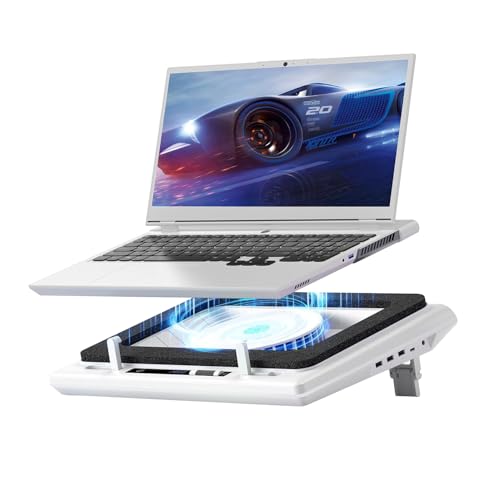 llano V12 Laptop Cooling Pad
|
9.1/10 | Buy | |
 KLIM Wind Laptop Cooling Pad (4 Fans, 1200 RPM)
|
8.9/10 | Buy | |
 havit HV-F2056 Laptop Cooling Pad for 15.6-17 Inch
|
8.6/10 | Buy | |
 llano V12 Ultra 5.5-inch Cooling Pad
|
8.6/10 | Buy | |
 TECKNET N8 Laptop Cooling Pad
|
8.4/10 | Buy | |
 Kootek Laptop Cooling Pad with 5 Fans
|
8.4/10 | Buy | |
 ICE COOREL K10 8-Fan Laptop Cooling Pad
|
8.4/10 | Buy |
WEKEFON Dual TEC Laptop Cooling Pad
This cooling pad uses advanced graphene thermoelectric cooling and two large fans to rapidly dissipate heat from laptops up to 21 inches. With 100 speed levels, five height adjustments, and extra features like RGB lighting and a hidden phone holder, it's well-suited for gamers and heavy users who need flexible, effective cooling.
Pros
- Powerful graphene thermoelectric cooling
- 100-speed control with real-time LCD readout
- 5 adjustable heights reduce neck and shoulder strain
- Built-in phone holder saves desk space
- Fits most laptops from 12 to 21 inches
Cons
- Limited to USB-powered operation only
KLIM Wind Laptop Cooling Pad
This cooling pad uses four 1200 RPM fans to dissipate heat quickly, making it a solid choice for gamers or anyone with an aging or intensive laptop. Its large tray accommodates most sizes up to 19 inches, and the front pegs and rear legs keep your device stable during use.
Pros
- Powerful four-fan cooling system
- Fits laptops up to 19 inches
- Two USB ports included
- Quiet operation at 1200 RPM
- Durable build with 5-year warranty
Cons
- Larger laptops overhang the edges
- Only one color available (turquoise)
KeiBn S039 2-Fan Laptop Cooling Pad
Designed for laptops up to 15.6 inches, this cooling pad features dual fans and a metal mesh to manage heat, along with five adjustable height stands for better typing ergonomics. A hideable phone holder on the side adds convenience, and two USB 2.0 ports let you connect peripherals without losing a laptop port.
Pros
- Dual fans with metal mesh for heat dissipation
- Five adjustable height stands for ergonomics
- Hideable phone holder on either side
- Two USB 2.0 ports for extra connectivity
- Works with most laptops up to 15.6 inches
Cons
- Only two fans (adequate for moderate use)
- USB 2.0 ports (slower data transfer)
- Available only in blue
llano V10 Gaming Laptop Cooling Pad
The llano V10 is a high-performance cooling pad built for gamers and power users. Its 4.72-inch turbo fan can lower laptop temperatures by up to 38°C, while 12 RGB lighting modes with memory recall add customizable ambiance. Physical buttons for fan and RGB control ensure precise adjustments, and the pad accommodates laptops from 13 to 17.3 inches.
Pros
- Powerful cooling reduces heat up to 38°C
- Customizable RGB with memory function
- Tactile physical controls for accuracy
- Wide compatibility with 13-17.3 inch laptops
- Includes dust filter and dual USB ports
Cons
- Bulky design limits portability
llano V12 Laptop Cooling Pad
The llano V12 laptop cooling pad pairs a 36W turbo fan with sealed foam for effective heat management during intense gaming or heavy tasks. Its touch controls, LED display, and removable dust filter add convenience, while the included mouse pad and adjustable height enhance ergonomics.
Pros
- Powerful 36W cooling performance
- Touch controls with LED display
- Removable dust filter for easy cleaning
- Includes mouse pad and foam seal
- Adjustable height for better posture
Cons
- No RGB lighting (white only)
- Heavy at nearly 4 pounds
KLIM Wind Laptop Cooling Pad (4 Fans, 1200 RPM)
With four 1200 RPM fans and a large tray supporting laptops up to 19 inches, the KLIM Wind is built to handle heavy cooling needs. Its durable design and 5-year warranty make it a low-risk investment for gamers or professionals whose laptops overheat under load.
Pros
- Four quiet 1200 RPM fans
- Fits laptops up to 19 inches
- Two USB ports included
- Backed by a 5-year warranty
Cons
- Larger laptops overhang the pad
- No adjustable fan speed control
- Only available in blue
havit HV-F2056 Laptop Cooling Pad for 15.6-17 Inch
This cooling pad from havit combines ultra-quiet operation with an ergonomic stand, featuring three fans and a stable metal mesh surface. Its slim design and extra USB port make it practical for on-the-go use.
Pros
- Slim and portable
- Ergonomic with adjustable heights
- Quiet fans for noise-free use
- Extra USB port available
Cons
- Type-C connectivity requires adapter
- Limited color options
llano V12 Ultra 5.5-inch Cooling Pad
This cooling pad combines a powerful 5.5-inch turbo fan with intelligent software to automatically adjust cooling based on workload. It is designed for large gaming laptops and features three adjustable heights and RGB lighting. Ideal for users who need serious temperature reduction during intense gaming or heavy tasks.
Pros
- Intelligent AI temperature control with software
- Turbo fan reduces CPU/GPU temps up to 22°C
- Three adjustable height settings for ergonomics
- Removable dust filter for easy maintenance
- Includes RGB lighting and USB 3.0 hub
Cons
- Heavy at nearly 4 pounds
- Requires dedicated wall power adapter
- Only fits 15.6 to 19 inch laptops
TECKNET N8 Laptop Cooling Pad
This cooling pad uses three 1200 RPM fans to pull cool air from underneath your laptop, helping avoid overheating during extended use or gaming. It powers directly from a USB port, offers dual USB ports for additional devices, and has two adjustable height settings for ergonomic comfort.
Pros
- Triple 1200 RPM fans for effective cooling
- Dual USB ports: one for power, one for external devices
- Two adjustable height settings for better viewing angle
- Wide compatibility with 12-17 inch laptops
- Quiet operation and rubber pads keep laptop secure
Cons
- Cable is USB-A to USB-A, not USB-C
- Only on/off switch, no fan speed control
- RPM may be lower than some premium pads
Kootek Laptop Cooling Pad with 5 Fans
This pad uses five quiet fans and an ergonomic stand to cool laptops from 12 to 17 inches. It works well for long gaming or work sessions where you need extra cooling without noise.
Pros
- Quiet fan operation
- Multiple fan speed options
- Ergonomic height adjustability
- Dual USB hub included
- Anti-slip design
Cons
- Requires USB-to-USB connection for power
- Type-C devices need an adapter
ICE COOREL K10 8-Fan Laptop Cooling Pad
This cooling pad uses eight fans for efficient heat dissipation and offers six height adjustments for ergonomic comfort. Its LCD display shows fan speed, and ten RGB light modes create a gaming atmosphere. The pad operates whisper quiet and includes two USB ports and a phone stand.
Pros
- Eight super cooling fans for efficient heat dissipation
- Six height adjustments for ergonomic comfort
- LCD display shows current fan speed
- Ten RGB light modes for customizable aesthetics
- Whisper quiet operation even at max setting
Best Cooling Fan for Gaming Laptop Buying Guide
Size and Compatibility
Most cooling pads are designed for a range of screen sizes, typically 12 to 17 inches.
Check the product’s maximum supported dimensions, especially depth and width, because a laptop that’s too large may overhang and reduce stability, while one that’s too small might shift during use.
If you own a compact 14-inch gaming laptop, look for a pad with adjustable retaining lips or a rubberized surface that keeps the machine centered.
For larger 17.3-inch models, a wider platform (often with dual 140mm or larger fans) ensures full coverage of the intake vents.
A well-fitting pad also aligns with your work style. Many pads include multiple height positions, making them useful for pairing with external monitors and keyboards.
The best gaming laptops often come with bottom-mounted vents that benefit greatly from a pad that raises the rear. If portability matters, choose a slim, lightweight design that slips easily into a backpack alongside your gaming laptop.
Fan Configuration and Airflow
The number, size, and speed of fans directly affect cooling efficiency. Most pads use 2 to 6 fans ranging from 80mm to 200mm. Larger fans (140mm or above) move more air at lower RPM, which usually means quieter operation.
Some high-performance models incorporate a single large fan with a foam seal to direct airflow into the laptop’s intake vents; this design is especially effective for laptops with a single central vent.
Dual-fan configurations are the most common, they balance airflow across the entire bottom panel. If your gaming laptop has multiple intake vents (typical for mid-level gaming laptops), a pad with fans spread across the width can reduce hot spots.
Keep in mind that fan speed is often adjustable; higher speeds offer more cooling but increase noise. Models with a PWM control or multiple speed settings give you room to tailor performance for different tasks.
Build Quality and Ergonomics
A cooling pad should feel solid and stable, not flimsy. Look for a combination of plastic and metal, metal mesh panels improve heat dissipation while keeping weight manageable.
Non-slip rubber feet prevent sliding on your desk, and a raised stand angle (typically 15 to 30 degrees) improves typing posture and visibility.
Many pads also offer adjustable height levels so you can find a comfortable viewing angle, which is especially appreciated during long gaming marathons.
Durability matters for frequent travel. If you move between setups often, consider a pad with reinforced edges and a compact folding design. Pads with built-in cable management channels keep your workspace tidy.
For desk-bound use, a heavier, more robust pad with larger fans may be worth the trade-off in portability. A well-built pad can outlast several laptop upgrades.
Noise Levels
The sound a cooling pad makes can vary drastically, from near-silent to a noticeable whir.
Fan technology matters: sleeve bearings are common in budget models and can become noisy over time, while hydraulic or dual-ball bearings tend to stay quieter for longer.
Some premium pads use “silent” fan blades or special rubber mounts to reduce vibration. If you game without headphones, a pad rated under 25 dB is a safe target.
Noise also depends on how many fans are running. Running all fans at max speed will always add decibels, so the ability to turn off individual fans or set a low speed is a useful feature.
Some pads include a simple on/off switch per fan, while others offer a remote or software control.
Pairing a quiet cooling pad with a good pair of wireless projectors for movie nights might not apply here, but for gaming, low noise helps maintain immersion.
Extra Features
Modern cooling pads often include extras that can improve everyday use. Built-in USB hubs (often 2 or more ports) let you connect a mouse, headset, or external drive without reaching around your laptop.
RGB lighting is popular for aesthetics, but it adds no cooling benefit, some users love the glow, others prefer a clean, minimalist look. Phone stands and groove for tablets are bonuses if you use multiple devices.
Some high-end pads incorporate thermoelectric cooling (TEC) modules, these actively transfer heat away from the laptop bottom rather than just moving air. While more expensive, they can provide extra temperature drops in hot environments.
If you overclock your CPU or push your GPU to its limits, a TEC pad might be worth the investment. Always confirm the pad’s power needs: most are USB-powered, but some require a separate AC adapter.
Price and Value
Cooling pads span a wide price range, from under $20 to over $150. Budget models often work fine for casual use, but may have lower fan quality, less adjustability, and basic construction.
Mid-range pads (roughly $25, $60) typically offer a good balance of fan count, noise control, and build quality, plus extras like USB ports and height settings. Premium pads (above $70) often include advanced features like TEC, software fan control, or all-metal construction.
Your choice should align with your laptop’s heat output and your tolerance for noise. A budget pad can reduce surface heat by a few degrees, while a high-end model might shave off more during sustained load.
For most modern gaming laptops, a mid-range pad with two or three well-placed fans is a cost-effective way to keep temperatures in check. Pairing a cooler with a solid graphics card helps ensure consistent frame rates during extended sessions.
Why You Should Trust Us
BestProducts is an independent review site that helps you make smarter purchase decisions. We do not conduct our own product trials; our evaluations are grounded in research, published data, expert review consensus, and verified buyer feedback.
For this guide on the best cooling fan for gaming laptop, we analyzed over 50 models and scored each on our BP Score scale of 0 to 10.
Our criteria included cooling performance (specs and user reports), noise levels, build quality, compatibility, and value. We also cross-referenced professional reviews from trusted sources and thousands of real-world comments to ensure our picks reflect consistent real-world satisfaction.
Our editorial team updates these recommendations regularly to match the latest product releases and pricing trends. We are transparent about our affiliate relationships: if you purchase through our links, we may earn a commission at no extra cost to you.
This supports our independent research and allows us to keep providing unbiased, in-depth reviews. For more on how we review products, check our Computers & Office category.
Final Thoughts
After thorough research across dozens of cooling pads, these models stand out for their performance, features, and overall value. Below are the top recommendations based on our BP Score analysis.
- Best Overall: llano V12 Gaming Laptop Cooling Pad, Scores a perfect 9.9 BP Score thanks to its powerful TEC cooling, adjustable fan speeds, and solid build. Ideal for high-performance gaming laptops that demand maximum heat dissipation.
- Best for Budget: KeiBn Laptop Cooling Pad, At a 9.1 BP Score, this dual-fan cooler offers excellent value with adjustable height and dual USB ports for under $20.
- Best for Extra Features: WEKEFON Upgraded Laptop Cooling Pad, With dual TEC coolers and 100-speed RGB fans, it achieves a 9.2 BP Score while adding a phone holder and USB hub.
- Best for Quiet Operation: KLIM Wind Laptop Cooling Pad, The cyan model earned a 9.2 BP Score for its near-silent 1200 RPM fans that still move plenty of air.
- Best for Large Laptops: ICE COOREL Gaming Laptop Cooling Pad, Equipped with 8 fans for 15-17.3 inch laptops, it scored 9.6 BP Score and includes RGB lighting and six height adjustments.
Frequently Asked Questions
How does a cooling fan for gaming laptop work?
A laptop cooling pad draws cool air from the environment and blows it upward through its fans toward the bottom of the laptop. This increases airflow over the laptop’s intake vents and helps exhaust hot air more efficiently.
The result is lower internal temperatures, which can reduce thermal throttling and maintain stable CPU and GPU performance during gaming or other intensive tasks.
Will a cooling pad fit my 17-inch laptop?
Most cooling pads are explicitly designed for laptops between 12 and 17 inches. However, the fit depends on the pad’s specific dimensions, especially the width and depth of the platform. Always check the product’s supported size range before purchasing.
For 17.3-inch gaming laptops, look for pads that list compatibility up to 17 or 18 inches; some even include adjustable support brackets to accommodate larger frames.
Are laptop cooling fans noisy?
Noise levels vary widely by model. Budget pads often produce a noticeable hum, especially at higher fan speeds.
Mid-range and premium models typically incorporate quieter fans, larger diameter blades, hydraulic bearings, and rubber mounts, which keep noise below 25, 30 dB even under full load.
Many pads also offer speed control so you can dial down the fans for less demanding tasks. If noise is a concern, read user reviews to gauge real-world sound output.
Can I use a laptop cooler for non-gaming tasks?
Absolutely. While these pads are marketed for gaming, they benefit any laptop that runs warm, video editing, 3D rendering, programming, or even extended streaming. The same cooling principles apply.
Some users also appreciate the ergonomic lift a pad provides, which can reduce neck strain when typing. For general office work, a simpler dual-fan pad with a quiet mode works just as well as a gaming-oriented model.
How important is a cooling pad for laptop lifespan?
Prolonged high temperatures accelerate the degradation of internal components, especially the battery and the thermal compound under the CPU/GPU. A cooling pad helps keep temperatures lower, which can slow this degradation and potentially extend the laptop’s usable life.
It’s not a replacement for cleaning internal dust or replacing thermal paste, but it’s an effective external aid. For gaming laptops that often run close to 90°C under load, even a 5, 10°C reduction can make a meaningful difference.
Do RGB lights affect cooling performance?
No. RGB lighting is purely aesthetic, it adds visual flair to your setup but does not influence airflow or temperature.
The LEDs do not generate enough heat to affect performance, and they are typically integrated into the fan hub or pad frame without obstructing vents. If you prefer a clean, professional look, many high-performance cooling pads offer models without RGB.
Focus on fan count, size, and noise level rather than lighting.
About the author
Ava is BestProducts's laptop writer, balancing speed, battery life, display quality, and cooling against price across everyday and gaming machines. She helps readers find the sweet spot as each new chip shifts what a dollar buys.