The Best Alienware Monitor
We evaluated top Alienware gaming monitors based on panel tech, refresh rates, and real-world feedback to find the perfect display for competitive and immersive play.
 By Irene Hopkins
Updated September 11, 2026
By Irene Hopkins
Updated September 11, 2026
Alienware has built a strong reputation among gamers for delivering high-performance monitors that blend cutting-edge display technology with aggressive styling.
Whether you prioritize lightning-fast refresh rates for competitive play or immersive ultrawide panels for single-player epics, the Alienware lineup offers something for every gaming setup.
In this guide, we evaluate the top Alienware monitors based on specifications, expert review consensus, and verified buyer feedback to help you find the best alienware monitor for your needs.
Our editors have analyzed each model against consistent criteria including panel type, resolution, refresh rate, color accuracy, connectivity, and ergonomics. Every product receives a BP Score on a 0, 10 scale, allowing you to compare performance at a glance.
Below you’ll find our curated list of top-rated Alienware displays, followed by a detailed buying guide and expert answers to common questions.
| Award | Product | BP Score About BP ScoreThe BP Score is our own rating from 0 to 10, based on performance, design and build, ease of use, and value. It reflects independent research and is never influenced by manufacturers, retailers, or affiliate commissions. Learn more › | |
|---|---|---|---|
| Best Overall |
 Alienware AW2725DF QD-OLED 27in 360Hz
|
9.1/10 | Buy |
| Best Premium |
 Alienware AW3423DWF 34-inch QD-OLED Gaming Monitor
|
9.1/10 | Buy |
 Alienware AW3425DW 34-inch QD-OLED 240Hz Monitor
|
9.1/10 | Buy | |
| Best Value |
 Alienware AW3425DWM 34-inch WQHD Gaming Monitor
|
8.9/10 | Buy |
| Best Budget |
 Alienware AW2723DF 27-inch QHD 240Hz Monitor
|
8.8/10 | Buy |
 Alienware AW2726DL 27" WQHD 280Hz Monitor
|
8.6/10 | Buy | |
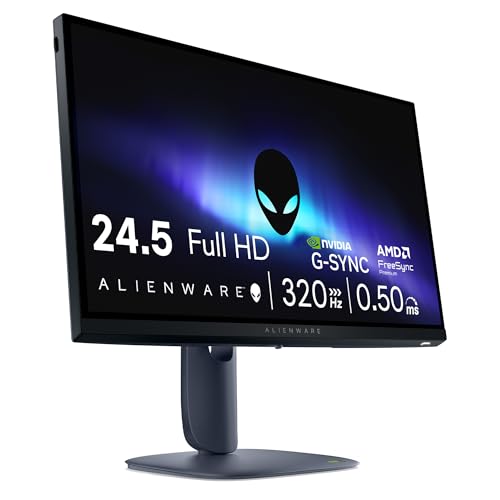 Alienware AW2525HM 24" FHD 320Hz Monitor
|
8.3/10 | Buy | |
 Alienware AW2725DM 27" QHD 180Hz Monitor
|
8.1/10 | Buy | |
 Alienware AW2725QF 4K Dual-Resolution Monitor
|
8.0/10 | Buy | |
 Alienware AW3426DW 34" QD-OLED 280Hz
|
7.8/10 | Buy |
Alienware AW2725DF QD-OLED 27in 360Hz
This 27-inch QD-OLED gaming monitor from Alienware combines vibrant colors with a 360Hz refresh rate and 0.03ms response time, making it an excellent choice for competitive gamers seeking smooth, tear-free visuals and deep blacks via VESA DisplayHDR True Black 400.
Pros
- Stunning QD-OLED color with 99.3% DCI-P3
- Extremely fast 0.03ms response time
- 360Hz refresh rate for smooth motion
- Deep blacks and high contrast with HDR True Black 400
- AMD FreeSync Premium Pro and AdaptiveSync support
Cons
- No USB-C port for modern devices
- No built-in speakers
Alienware AW3423DWF 34-inch QD-OLED Gaming Monitor
The Alienware AW3423DWF is a 34-inch curved QD-OLED gaming monitor that combines true blacks with vibrant quantum dot color for immersive play. It offers ultra-smooth 165Hz performance with AMD FreeSync Premium Pro, making it a premium choice for gamers and color-critical creators alike.
Pros
- Quantum Dot OLED delivers deep blacks and wide color gamut
- 165Hz refresh rate with FreeSync Premium Pro for tear-free gaming
- 3-year warranty covers OLED burn-in
- Creator Mode for precise sRGB or DCI-P3 color spaces
- Adjustable stand with tilt, swivel, and height markers
Cons
- No built-in speakers
- Requires careful OLED burn-in management over time
- Premium price point for professional buyers
Alienware AW3425DW 34-inch QD-OLED 240Hz Monitor
This ultrawide gaming monitor combines a 34-inch QD-OLED panel with 240Hz refresh and sub-millisecond response, delivering vivid colors and buttery smooth motion for competitive and immersive gameplay. Its 1800R curve and HDR400 TrueBlack support make it a premium pick for gamers who demand both speed and picture quality.
Pros
- Incredible color accuracy and vibrancy
- Ultra-fast 240Hz for smooth motion
- Deep blacks and high contrast with QD-OLED
- Supports multiple adaptive sync technologies
Cons
- Premium pricing tier
- No built-in speakers
- Requires ample desk space due to size
Alienware AW3425DWM 34-inch WQHD Gaming Monitor
This ultrawide monitor delivers smooth 180Hz performance with WQHD resolution and a 1500R curve for immersive gaming. It supports AMD FreeSync Premium and VESA AdaptiveSync to minimize screen tearing. The hardware-based low blue light solution helps reduce eye strain during long sessions.
Pros
- Excellent color accuracy with DCI-P3 95% coverage
- Smooth 180Hz refresh rate with 1ms response
- Immersive 1500R curve for ultrawide gaming
- AMD FreeSync Premium and VESA AdaptiveSync support
- Hardware-based low blue light reduces eye strain
Cons
- No built-in speakers
Alienware AW2723DF 27-inch QHD 240Hz Monitor
For smooth competitive gaming, the Alienware AW2723DF pairs a 240Hz IPS panel with a 1ms response for lag-free action. G-Sync compatibility ensures tear-free visuals, while 95% DCI-P3 coverage and HDR600 deliver vibrant colors. Its fully adjustable stand adds comfort for long sessions.
Pros
- Up to 280Hz overclocked refresh rate
- 1ms GtG response for lag-free play
- NVIDIA G-SYNC and Adaptive Sync support
- Vibrant 95% DCI-P3 color with HDR600
- Ergonomic stand with full adjustability
Cons
- Heavy and bulky at over 19 pounds
Alienware AW2726DL 27" WQHD 280Hz Monitor
The Alienware AW2726DL is a 27-inch gaming monitor built around a WQHD IPS panel with a 280Hz refresh rate and 1ms response time. It delivers smooth motion and sharp visuals, making it a strong option for competitive gamers who value speed and image quality.
Pros
- 280Hz refresh rate for fluid gameplay
- 1ms response time reduces ghosting
- WQHD resolution offers crisp detail
- IPS panel provides wide viewing angles
Alienware AW2525HM 24" FHD 320Hz Monitor
Competitive gamers will appreciate the Alienware AW2525HM's 320Hz refresh rate and 0.5ms response time, delivering buttery-smooth motion clarity. Its FHD IPS panel with G-SYNC compatibility ensures tear-free gameplay, while ComfortView Plus reduces eye fatigue during long sessions.
Pros
- 320Hz refresh rate for ultra-smooth motion
- 0.5ms response time minimizes blur
- G-SYNC and FreeSync support
- ComfortView Plus reduces eye strain
- Accurate 99% sRGB color
Cons
- FHD 1080p resolution only
- 24-inch size may be small for some
- Response time extreme mode may have tradeoffs
Alienware AW2725DM 27" QHD 180Hz Monitor
This 27-inch QHD monitor from Alienware combines a smooth 180Hz refresh rate with fast 1ms response for fluid gaming. Its DCI-P3 95% coverage and VESA DisplayHDR 400 deliver vibrant visuals, while the hardware low blue light solution helps reduce strain during long sessions.
Pros
- QHD resolution for detailed gaming
- Smooth 180Hz refresh rate
- Fast 1ms GTG response time
- Wide DCI-P3 95% color coverage
- VESA DisplayHDR 400 for vibrant highlights
- Hardware low blue light reduces eye strain
Alienware AW2725QF 4K Dual-Resolution Monitor
The Alienware AW2725QF is a 27-inch gaming monitor with a unique dual-resolution feature, letting you switch between native 4K at 180Hz for detailed visuals and native FHD at 360Hz for ultra-smooth motion. It supports Dolby Vision and VESA DisplayHDR 600, along with 95% DCI-P3 color coverage and Delta E<2 accuracy, making it suitable for both competitive and visually rich games.
Pros
- Dual-resolution: 4K 180Hz or FHD 360Hz
- Dolby Vision and HDR600 support
- 95% DCI-P3 color gamut with Delta E<2
- G-SYNC Compatible and AdaptiveSync certified
- Fast 0.5ms GTG response time
Alienware AW3426DW 34" QD-OLED 280Hz
This 34-inch curved gaming monitor from Alienware pairs a QD-OLED panel with a 280Hz refresh rate and 0.03ms response time. It's a top-tier choice for competitive gamers seeking fluid motion and vivid colors.
Pros
- Excellent image quality with OLED contrast
- High refresh rate and fast response time
- G-SYNC compatible for tear-free gaming
- Immersive ultrawide curved display
Cons
- No built-in speakers
- Premium price point
Best Alienware Monitor Buying Guide
Panel Technology: OLED vs IPS vs QD-OLED
Alienware offers three main panel types: fast IPS for high refresh rates, OLED for deep blacks and vibrant colors, and quantum-dot OLED (QD-OLED) for extended brightness and wider color gamuts.
QD-OLED models like the AW3423DWF deliver exceptional HDR performance with true blacks and vivid highlights, making them ideal for both gaming and content consumption.
IPS panels remain a solid choice for competitive gamers who prioritize motion clarity and minimal input lag.
When choosing a panel, consider your primary use. For fast-paced shooters, a high-refresh-rate IPS monitor with low response time is often preferable. For immersive single-player games and media, an OLED or QD-OLED panel provides superior contrast and color reproduction.
Our dedicated guide to 1440p gaming monitors explores how resolution interacts with panel technology.
Refresh Rate and Resolution
Alienware monitors range from 240Hz to 360Hz on 1440p panels, and up to 320Hz on 1080p displays. Higher refresh rates reduce motion blur and improve responsiveness, particularly beneficial in competitive gaming. Resolution choices include Full HD (1920×1080), WQHD (2560×1440), and ultrawide 3440×1440.
4K options like the AW2725QF offer dual-resolution modes, switching between 4K at 180Hz and Full HD at 360Hz for flexibility.
Balance refresh rate and resolution based on your GPU. A 360Hz 1440p display demands a powerful graphics card to hit high frame rates.
For less demanding hardware, a 240Hz 1080p monitor such as the AW2525HM provides smooth performance without breaking the bank. Pairing with a capable graphics card ensures you maximize the monitor’s potential.
Connectivity and Ergonomics
Modern Alienware monitors include HDMI 2.1, DisplayPort 1.4, USB-C (with data and power delivery on some models), and USB 3.2 hubs. Ensure your chosen monitor supports the refresh rate and resolution you need over the available ports.
For example, DisplayPort 1.4 is required for 1440p at 240Hz or 4K at 144Hz. USB-C is a convenient addition for laptops, enabling single-cable video, data, and charging.
Ergonomics matter for long gaming sessions. Most Alienware monitors offer height, tilt, swivel, and pivot adjustments, along with VESA mount compatibility. A fully adjustable stand reduces neck strain and helps create a comfortable viewing angle.
For multi-monitor setups, consider a dual monitor docking station to simplify cable management.
Size and Curve
Alienware offers 24-inch, 27-inch, and 34-inch models, with curved options available on ultrawide screens. The 27-inch form factor is a sweet spot for 1440p gaming, providing ample screen real estate without overwhelming a desk.
Curved ultrawide monitors like the AW3423DWF wrap around your peripheral vision, enhancing immersion in racing and flight sims. If you prefer a flat screen, the AW2725DF OLED delivers excellent image quality in a traditional design.
Consider your desk depth and viewing distance. A 34-inch ultrawide requires more space and may need a deeper desk. For tighter setups, a 27-inch monitor with a 1440p gaming monitor guide can help you compare options.
Also check out our roundup of curved monitors for more ergonomic insights.
Why You Should Trust Us
BestProducts is an independent review site dedicated to helping you make informed purchasing decisions. We evaluate every product using a consistent methodology, scoring each on our 0, 10 BP Scale.
Our assessments are based on thorough research: we analyze official specifications, aggregate expert review consensus from trusted sources, collect verified buyer feedback, and reference published data with proper citations.
We do not conduct our own product trials; our evaluations are grounded in research, published data, expert review consensus, and verified buyer feedback.
Our editorial team includes experienced tech reviewers who understand the nuances of display technology. We continuously update our recommendations to reflect new releases and pricing changes.
For more on how we review monitors, see our comprehensive guide to IPS monitors and HDR monitors. Transparency is at our core: we earn a commission when you purchase through affiliate links, but this never influences our rankings or scores.
Final Thoughts
After evaluating the top Alienware monitors, we’ve identified several standouts that excel in different scenarios. Each pick reflects our rigorous analysis and earns a top BP Score in its category.
- Best Overall: Alienware AW3423DWF Curved QD-OLED Gaming Monitor, This 34-inch ultrawide delivers stunning QD-OLED picture quality, 165Hz refresh rate, and near-instant response times, making it the most versatile Alienware monitor for immersive gaming and content creation.
- Best for Competitive Gaming: Alienware AW2725DF OLED Gaming Monitor, With a 360Hz refresh rate and 0.03ms response time on a 27-inch QD-OLED panel, this monitor offers the fastest pixel response for esports titles while maintaining vibrant colors.
- Best Budget Pick: Alienware 24 Gaming Monitor AW2525HM, At a competitive price, this 24-inch 1080p display provides 320Hz refresh rate and G-SYNC compatibility, ideal for competitive gamers on a tighter budget.
- Best Curved Ultrawide Value: Alienware 34 Curved Gaming Monitor, AW3425DWM, This 180Hz WQHD curved monitor offers a great balance of immersion, smooth motion, and affordability, with strong color accuracy and FreeSync Premium support.
For additional monitor recommendations, explore our guides on ultrawide gaming monitors and 144Hz 1ms monitors. Whichever model you choose, Alienware’s lineup offers a high-quality display that will elevate your gaming experience.
Frequently Asked Questions
Is Alienware good for gaming monitors?
Yes, Alienware consistently produces high-performance gaming monitors with fast refresh rates, low input lag, and excellent color reproduction. Their QD-OLED and IPS panels receive strong expert reviews and positive user feedback. For a deeper dive into performance, see our roundup of 27-inch curved gaming monitors.
What is the difference between the AW3423DWF and AW3425DW?
The AW3423DWF is a 34-inch QD-OLED with 165Hz refresh rate and AMD FreeSync Premium Pro, while the AW3425DW is a newer model with 240Hz QD-OLED, higher brightness, and G-SYNC compatibility.
The AW3425DW is better for competitive gaming, but the AW3423DWF remains a superb value for immersive single-player experiences. Check our guide on 34-inch gaming monitors for more comparisons.
Should I get a 4K or 1440p Alienware monitor for gaming?
For most gamers, 1440p offers the best balance of visual fidelity and performance. It provides a sharp image without demanding as much GPU power as 4K.
If you have a high-end graphics card and prioritize clarity, the AW2725QF’s dual-resolution mode lets you switch between 4K and 1080p. For pure competitive play, 1080p high-refresh models are still viable.
Our 2K 144Hz monitor guide covers this topic in detail.
Are Alienware monitors worth the price?
Alienware monitors command a premium, but they justify it with robust build quality, advanced panel technology, and comprehensive warranties (often including burn-in coverage for OLED models).
If you value top-tier performance and are willing to invest, they are a solid choice. For budget-conscious buyers, models like the AW2525HM deliver excellent value. Consider also our list of best cheapest monitors for alternatives.
Does Alienware offer a 240Hz monitor under $300?
Yes, the Alienware AW2525HM often falls under $749.99 and features a 320Hz refresh rate at 1080p. However, prices fluctuate, so check current deals. For more affordable high-refresh options, see our 24-inch 144Hz monitor guide.
What is the best Alienware monitor for HDR gaming?
The AW3423DWF and AW3425DW both feature QD-OLED panels with VESA DisplayHDR TrueBlack 400, delivering exceptional contrast and peak brightness for HDR content. The AW2725DF OLED also offers strong HDR performance. For a broader look, read our best HDR monitors guide.
About the author
Irene reviews desktop PCs and monitors for BestProducts, weighing performance, upgradability, and panel quality for work and home. She helps readers build a desk setup that stays fast and comfortable for years.