The Best Color Printer and Scanner
From ink tanks to compact inkjets, these top-rated all-in-one color printers combine scanning and copying with reliable print quality for home and office.
 By Gordon Matthews
Updated September 10, 2026
By Gordon Matthews
Updated September 10, 2026
Whether you’re setting up a home office, managing a small business, or handling school projects, a color printer and scanner combo is one of the most versatile devices you can own.
The best models deliver sharp text, vibrant graphics, reliable scanning, and easy copying without taking up half your desk. But with inkjet, laser, and tank options at every price point, finding the right one can feel overwhelming.
We at BestProducts have evaluated dozens of all-in-one color printers by analyzing specifications, expert review consensus, and verified buyer feedback. Every model in this roundup scores on our consistent 0, 10 BP Score, so you can compare them with confidence.
Below are our top picks for a best color printer and scanner in 2026.

Canon PIXMA TS6520 Wireless All-in-One Printer
This budget-friendly all-in-one from Canon delivers crisp prints and reliable dual-band Wi-Fi in a compact white design. It's a solid choice for home users and hybrid workers who need hassle-free printing, scanning, and copying.
Pros
- Sharp text and vivid colors
- Compact and stylish footprint
- Automatic duplex printing
- Easy mobile printing via Canon PRINT app
Cons
- No built-in Ethernet port
- Limited paper capacity for heavy use
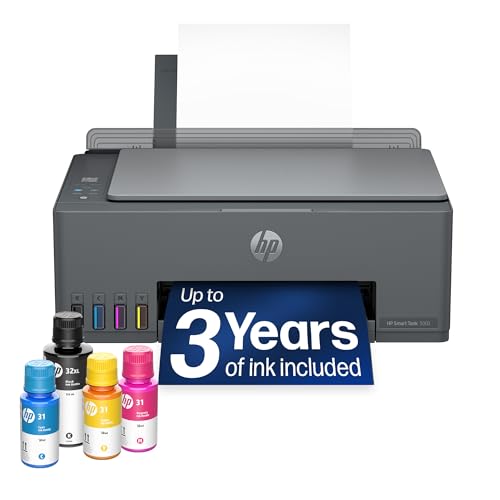
HP Smart Tank 5003 Wireless Ink Tank Printer
This all-in-one ink tank printer comes with up to three years of ink included, making it a cost-effective choice for high-volume home use. Its mess-free refill system and wireless connectivity simplify everyday printing, scanning, and copying.
Pros
- Includes 3 years of ink
- Mess-free refill system
- High-volume printing up to 6,000 pages
- Wireless and mobile printing
- Borderless print support
Cons
- Large footprint (17 inches wide)
- Heavy at over 11 pounds
- No automatic duplex printing

HP Smart Tank 5000 Wireless All-in-One Printer
This cartridge-free ink tank printer includes up to two years of ink, making it a low-hassle choice for high-volume home printing. Its AI-assisted formatting and mess-free refill system further reduce maintenance.
Pros
- Includes up to 2 years of ink
- Mess-free, easy refill process
- AI formatting reduces wasted pages
- Reliable cartridge-free design
- Strong print quality for text and color
Cons
- Larger footprint than cartridge printers
- No automatic duplex printing mentioned

Epson EcoTank ET-2800 All-in-One Supertank Printer
This wireless all-in-one printer uses refillable ink bottles instead of cartridges, reducing waste and lowering long-term costs. Each bottle set yields up to 4,500 black pages or 7,500 color pages, and the included ink lasts up to two years. It's a smart choice for home or small office users who print frequently.
Pros
- Cartridge-free design cuts waste and hassle
- High page yield: 4,500 black/7,500 color
- Up to 2 years of ink included in box
- Micro Piezo Heat-Free Technology for reliability
- Wireless printing from multiple devices
Cons
- Print speed is moderate at 10 pages per minute

HP DeskJet 2923 Wireless All-in-One
This compact all-in-one printer handles everyday home tasks like printing documents, scanning, and copying. It features dual-band Wi-Fi for reliable wireless connections and includes a six-month trial of HP's Instant Ink service to reduce ink costs. The AI-assisted print formatting helps eliminate wasted pages when printing web content.
Pros
- Compact and eco-friendly design (70% recycled plastics)
- Reliable dual-band Wi-Fi with auto connection fixing
- AI-powered web print formatting reduces waste
- Includes 6-month trial of Instant Ink delivery
- Easy printing from smartphone with HP app
Cons
- Slow print speed (7.5 ppm black)
- Small 60-sheet input tray
- No automatic document feeder for multi-page scans

Canon PIXMA TR7120 Wireless All-in-One Printer
This budget-friendly all-in-one from Canon is a solid choice for home users and hybrid workers who need reliable printing, scanning, and copying. It offers crisp prints thanks to its hybrid ink system, plus convenient features like automatic duplex printing and an auto document feeder.
Pros
- Affordable versatility for home or office
- Sharp text and vivid colors from hybrid ink
- Easy wireless setup via Canon PRINT app
- Duplex printing reduces paper waste
- Auto Document Feeder speeds up tasks
Cons
- Limited to letter-size media (8.5x11 inches)
- No Ethernet port for wired networks

HP Envy 6555 Wireless All-in-One
The HP Envy 6555 is a wireless all-in-one inkjet printer built for home use, with automatic duplex printing and a 35-sheet document feeder. It includes a 3-month Instant Ink trial and uses HP's AI to optimize page layouts, reducing waste. Its P3 technology aims to deliver vibrant colors in documents and photos.
Pros
- Reliable dual-band Wi-Fi with auto connection fixes
- Auto 2-sided printing saves paper
- 35-sheet auto document feeder
- Intuitive 2.4-inch color touchscreen
- Instant Ink trial cuts ink costs by up to 50%
Cons
- Only works with original HP ink cartridges
- Print speeds are slow (10 ppm black, 7 ppm color)
- Small 100-sheet input tray

Epson XP-7100 Wireless All-in-One Inkjet Printer
This compact Epson all-in-one handles printing, scanning, and copying with ease, featuring a 4.3-inch touchscreen, automatic duplexing, and borderless photo printing up to 8x10 inches. It also prints directly onto DVDs and specialty media, making it a versatile home printer for creative projects.
Pros
- Prints on DVDs and specialty media
- Intuitive 4.3-inch touchscreen
- Auto-duplex printing and scanning
- Wi-Fi Direct for network-free printing
- Compact footprint
Cons
- Uses only Epson Genuine ink cartridges
- Heavy at 21.5 pounds
- Small paper capacity may require frequent refills

HP Smart Tank 5003 with 3-Year Ink
This all-in-one ink tank printer comes with up to 3 years of ink included, making it a cost-effective pick for high-volume home use. Its cartridge-free, mess-free refill system simplifies maintenance, while AI capabilities and wireless printing add convenience without sacrificing print quality.
Pros
- Includes up to 3 years of ink
- Mess-free, no-squeeze refill bottles
- High print quality: sharp text, rich colors
- Wireless and mobile printing support
- Borderless photo printing capability
Cons
- Large footprint (14.2 x 17.1 inches)
- Only one color option (white/Portobello)
- No automatic document feeder

Canon G3270 MegaTank All-in-One Printer
For home offices or budget-conscious households, the Canon G3270 MegaTank offers wireless printing, copying, and scanning with an exceptionally low cost per page. Its included ink supply can last up to two years, making it a set-and-forget solution for high-volume printing.
Pros
- Wireless print, copy, and scan capabilities
- Up to 6,000 black-and-white pages per ink set
- Includes enough ink for up to two years
- Saves up to $1,000 on ink compared to standard cartridges
- Compact all-in-one design with LCD display
Cons
- Single-sided printing only (no automatic duplex)

HP DeskJet 2955 Wireless All-in-One Printer
This compact inkjet printer handles basic tasks like printing, scanning, and copying for home use. Its AI-assisted print formatting helps reduce wasted pages, and the included 3-month Instant Ink trial makes ink management easier.
Pros
- Compact design fits easily in home spaces
- AI-assisted formatting saves paper
- Dual-band Wi-Fi with automatic connection fixes
- Sustainable build with recycled plastics
- 3-month Instant Ink trial included
Cons
- Slow print speed at 7.5 ppm black
- Limited to basic printing needs only
- No automatic document feeder
Best Color Printer and Scanner Buying Guide
Print Quality and Resolution
A good color printer and scanner should produce crisp text and accurate color reproductions. Inkjet printers using multiple color cartridges or refillable ink tanks often deliver better photo quality, while laser models excel at high-speed text documents.
Look for a maximum resolution of at least 4800×1200 dpi (inkjet) or 600×600 dpi (laser) for sharp output.
Scanning resolution matters too: a flatbed scanner with 1200 dpi or higher ensures detailed scans of photos and documents. If you regularly scan multi-page documents, an automatic document feeder (ADF) is a huge time-saver. Our guide to high-speed scanners dives deeper into these features.
Speed and Connectivity
Print speed is measured in pages per minute (ppm) for both monochrome and color. For occasional home use, 8, 12 ppm color is fine; a busy home office may want 15+ ppm.
Wireless connectivity (Wi-Fi, Wi‑Fi Direct) lets you print from laptops, tablets, and phones, while Ethernet is handy for wired networks. Many modern printers also support Apple AirPrint and Android Mopria for easy mobile printing.
Consider whether the printer includes a USB‑C port or SD card slot for direct printing. The best multifunction color printers we recommend offer robust wireless features and fast first-page-out times.
Paper Handling and Duty Cycle
Paper capacity directly affects how often you need to reload. Entry-level models typically hold 60, 100 sheets, while larger all-in-ones offer 250+ sheets plus a rear manual feed for envelopes or cardstock. A duplex (automatic two-sided) printing unit is common and saves paper.
Duty cycle (monthly recommended volume) indicates durability: for light home use, 500, 2,000 pages per month is sufficient; for a busy office, look for 5,000 or more.
Don’t overlook the scanner’s paper path. Some ADFs can handle double-sided scanning, which dramatically speeds up paperwork. If you need a heavy-duty scanner, our high‑speed scanner guide offers dedicated picks.
Cost per Page and Ink System
Ink costs can exceed the printer’s price within a year. Cartridge-based printers often have higher per-page costs, while ink tank (supertank) and laser models offer dramatically lower operating expenses. Before buying, compare the yield (number of pages) of starter cartridges and standard replacements.
Supertank printers like the Epson EcoTank and Canon MegaTank come with enough ink for thousands of pages out of the box, making them ideal for high-volume users. For very occasional printing, a low-cost cartridge model may be more economical.
Our complete printer guide breaks down long-term costs for every type.
Scanner Features
A good color printer and scanner should also digitize documents efficiently. Key scanner specs include optical resolution (1200 dpi or higher), scan speed (ppm), and document feeder capacity. A flatbed with a lid that lifts for books and thick items is essential.
Many all-in-ones offer scan‑to‑email, scan‑to‑cloud, and OCR (optical character recognition) to make scanned text editable. If you frequently digitize old photos, look for a model with advanced color restoration. For pure scanning needs, check our best high‑speed scanner roundup.
Why You Should Trust Us
BestProducts is an independent review site that evaluates products through comprehensive research. We do not conduct our own product trials; our evaluations are grounded in research, published data, expert review consensus, and verified buyer feedback.
Each product receives a BP Score on a 0, 10 scale based on a consistent set of criteria tailored to its category.
Our team scours technical specifications, professional reviews from multiple industry sources, and thousands of real user reviews to identify what makes a product truly outstanding.
We then score each model, highlight strengths and weaknesses, and select only the best options to recommend. This approach ensures that every pick in this roundup has been thoroughly vetted for quality, reliability, and value.
BestProducts is reader-supported; when you buy through our links, we may earn a commission. This does not influence our scoring or editorial selections.
Final Thoughts
After evaluating the market, here are our top recommendations for a best color printer and scanner across different needs.
- Best Overall: Canon PIXMA TS6520, Compact, feature-rich, and reliable, this Canon all-in-one earned the highest BP Score in our analysis thanks to excellent print quality, duplex printing, and an intuitive OLED display.
- Best for High‑Volume Printing: Epson EcoTank ET‑2800, With a supertank that delivers thousands of pages, this model combines low running costs with solid color output, making it ideal for busy households or micro‑offices.
- Best Budget Pick: Canon PIXMA TR7120, This affordable inkjet offers a full feature set including an ADF and duplex printing, punching well above its price class and scoring a strong BP Score.
- Best for Home Office: HP Smart Tank 5003, HP’s tank model provides up to three years of ink right out of the box, fast wireless printing, and AI‑capable features that streamline workflows.
No matter which you choose, each of these best color printer and scanner picks has been vetted for performance, ease of use, and value.
Frequently Asked Questions
What is the best color printer and scanner for home use?
The best model depends on your print volume and budget. For occasional use, a compact inkjet like the Canon PIXMA TS6520 strikes a great balance of quality and features.
For frequent printing, an ink tank model such as the Epson EcoTank ET‑2800 offers much lower per‑page costs.
Should I buy an inkjet or laser color printer and scanner?
Inkjet printers typically produce richer color and better photo prints, while laser printers are faster and have lower ongoing costs for monochrome text.
For most home and small‑office users who need both scanning and occasional color, an inkjet all‑in‑one is the more practical choice.
What is a supretank printer and how does it save money?
A supretank (or ink tank) printer uses large, refillable ink reservoirs instead of small cartridges. It comes with enough ink to print thousands of pages right away.
Over the long term, ink costs drop dramatically, often to fractions of a cent per page. Both Epson EcoTank and Canon MegaTank are leading systems.
Can a color printer and scanner also print photos?
Yes, many all‑in‑one color printers can print borderless photos up to 4×6 or 5×7 inches. For best results, look for a model with at least five ink colors (including photo black) or dedicated photo inks.
The Canon PIXMA TS6520 and Epson Expression Premium XP‑7100 are great for photo tasks.
How do I maintain a color printer and scanner to avoid clogs?
Use your printer at least once a week to keep ink flowing. Modern printers run automatic cleaning cycles, but you can also manually clean the printhead from the driver. For tank printers, keep the ink levels above the minimum line.
Storing the printer in a dust‑free, temperature‑controlled environment helps prevent issues.
What scanner features matter most in an all‑in‑one?
Prioritize optical resolution (1200 dpi or higher), an automatic document feeder for multi‑page scanning, and duplex scanning if you need two‑sided documents. Scan‑to‑email and scan‑to‑cloud capabilities add convenience. For dedicated scanning tasks, our high‑speed scanner guide has you covered.
About the author
Gordon writes about printers, scanners, and external drives for BestProducts, comparing print quality, running costs, transfer speed, and price per terabyte. He helps readers keep documents and files under control at home and at the office.