The Best Webcam with Microphone and Speaker
We compared the best webcams with built-in microphones and speakers for clear video and audio. Our top picks include saylas, ROCWARE, and EMEET models for every need.
 By Armando Washington
Updated September 10, 2026
By Armando Washington
Updated September 10, 2026
Whether you’re working from home, attending virtual classes, or hosting team meetings, a webcam with a built-in microphone and speaker simplifies your setup.
Instead of juggling separate peripherals, an all-in-one device delivers crisp video and clear audio from a single USB connection.
With so many options on the market, finding the right balance of video quality, audio performance, and ease of use can be overwhelming. That’s where we come in.
At BestProducts, we evaluate each model against consistent criteria and score it on our 0 to 10 BP Score. Our research combines official specifications, expert review consensus, and verified buyer feedback to identify the most reliable all-in-one webcams.
After analyzing the top contenders, we’ve selected the best webcam with microphone and speaker for every need and budget. Below, you’ll find our top picks, followed by a detailed buying guide and answers to common questions.
For a broader look at webcam options, check out our best webcam guide.
| Award | Product | BP Score About BP ScoreThe BP Score is our own rating from 0 to 10, based on performance, design and build, ease of use, and value. It reflects independent research and is never influenced by manufacturers, retailers, or affiliate commissions. Learn more › | Price | |
|---|---|---|---|---|
| Best Value |
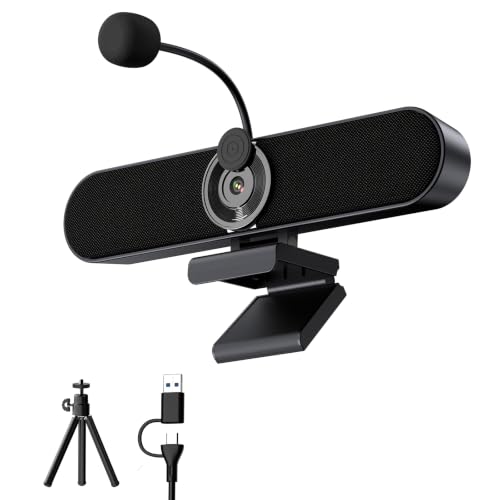 Inwa 2K Webcam Speaker with Privacy Shutter
|
9.8/10 | $45.99 | Buy |
| Best Overall |
 saylas 4K Webcam 120° FOV
|
9.8/10 | $41.99 | Buy |
| Best Budget |
 ROCWARE RC08 2K Webcam
|
9.7/10 | $37.99 | Buy |
| Best Premium |
 EMEET C980 PRO 3-in-1 4K Webcam
|
9.7/10 | $89.99 | Buy |
 EMEET C980 PRO 3-in-1 1080P Webcam
|
9.6/10 | $79.99 | Buy | |
 EMEET C960 1080P Webcam
|
9.6/10 | $27.07 | Buy | |
 Shcngqio TWC29 1080P Webcam with Privacy Cover
|
9.5/10 | $17.99 | Buy | |
 TONGVEO 4K AI Auto-Tracking Webcam
|
9.5/10 | $109.65 | Buy |
Inwa 2K Webcam Speaker with Privacy Shutter
This all-in-one desktop speaker combines a 2K webcam, detachable AEC microphone, and dual 5W speakers for clear video calls and media playback. Its clip-on design with included tripod offers flexible placement, making it a practical choice for remote workers who want to upgrade their computer's audio and video in one device.
Pros
- 2K video quality for sharp calls
- Privacy shutter covers lens when not in use
- Detachable microphone with echo cancellation
- Dual 5W speakers improve audio clarity
- Clip-on and tripod mounting options
Cons
- Not compatible with TVs or projectors
- Only one color option (black)
saylas 4K Webcam 120° FOV
This webcam combines 4K video, autofocus, and a built-in speaker with four noise-canceling microphones for clear two-way audio. Its remote control allows PTZ adjustments and digital zoom, making it suitable for conferences, streaming, and online classes.
Pros
- 4K resolution with autofocus
- Built-in noise-canceling microphones and speaker
- Remote control with PTZ and zoom
- Privacy cover included
- Plug-and-play USB connection
Cons
- 4K video limited to 25fps
ROCWARE RC08 2K Webcam
An all-in-one webcam for professionals, the ROCWARE RC08 combines a 2K camera with a Harman-tuned speaker and 3A noise-canceling mic, eliminating the need for separate peripherals. Its fast 0.2-second autofocus and low-light correction keep video clear in varied conditions, while the built-in privacy cover adds security. Best suited for Zoom, Teams, and other meeting platforms where streamlined setup matters.
Pros
- Built-in Harman speaker delivers clear audio without external speakers
- 3A noise-canceling mic reduces background noise effectively
- Fast 0.2-second autofocus for sharp video
- Low-light correction improves image in dim environments
- Physical privacy cover integrated into the design
Cons
- Resolution advertised as 2K but features specify 1080p
- Digital zoom only (EPTZ) may degrade quality at 4x
EMEET C980 PRO 3-in-1 4K Webcam
This all-in-one 4K webcam combines a high-resolution lens, a four-microphone array, and dual speakers to simplify video call setups. With an adjustable 60 to 98 degree field of view and fixed focus, it suits group meetings and private conversations, while the magnetic privacy cover and local-only data handling enhance security.
Pros
- 4K UHD resolution for sharp video
- Built-in microphone array and speakers
- Adjustable wide-angle view (60-98 degrees)
- Magnetic privacy cover included
- Broad compatibility with major platforms
Cons
- Fixed focus, no autofocus
- Requires direct USB connection, not via hubs
- Limited to 30 fps at 4K resolution
EMEET C980 PRO 3-in-1 1080P Webcam
This all-in-one webcam combines a 1080p camera with four omnidirectional microphones and dual speakers, making it a self-contained solution for video calls. Its active noise cancellation and adjustable 60-98 degree field of view suit both individual work and group meetings, while low-light correction maintains clarity in dim environments.
Pros
- All-in-one design (camera, mics, speakers)
- Active noise cancellation for clearer audio
- Adjustable field of view (60-98 degrees)
- Low-light correction for dim conditions
- Plug-and-play compatibility with major platforms
Cons
- Fixed focus lacks autoflexibility
- Requires direct USB port (no hub)
- Bulky dimensions may obstruct screen edges
EMEET C960 1080P Webcam
This plug-and-play webcam delivers 1080p video with a 90-degree field of view, dual omnidirectional mics, and a privacy cover. It's a solid choice for video calls on Zoom, Teams, or Google Meet, though it lacks a built-in speaker and fixed focus limits close-up detail.
Pros
- Sharp 1080p video with privacy cover
- Dual omnidirectional microphones
- Automatic exposure adjustment
- Easy plug-and-play setup
- Wide 90-degree field of view
Cons
- Fixed focus (not adjustable)
- No built-in speaker
- Not compatible with Windows Hello or game consoles
Shcngqio TWC29 1080P Webcam with Privacy Cover
This webcam offers solid 1080p video with automatic light correction and a noise-canceling microphone, ideal for remote work or online classes. Its privacy cover and plug-and-play design add convenience, making it a practical choice for budget-conscious users.
Pros
- Automatic light correction works in various environments
- Privacy cover helps protect your lens
- Easy plug-and-play setup with no extra drivers
- Noise reduction improves call clarity in noisy rooms
- Eco-friendly materials and energy efficiency
Cons
- No adjustable field of view (fixed wide-angle)
- Limited to 30fps, not ideal for high-frame-rate streaming
- No external microphone input for higher audio quality
TONGVEO 4K AI Auto-Tracking Webcam
This 3-in-1 webcam combines a 4K lens, dual microphones, and a speaker for all-in-one video conferencing. Its AI auto-framing and voice tracking keep you centered and clear, while the remote-controlled 5x digital zoom and adjustable field of view add flexibility. Ideal for professional meetings and live streaming.
Pros
- 4K resolution delivers crisp, detailed video
- AI auto-framing and voice tracking for dynamic meetings
- Adjustable FOV and 5x digital zoom with remote control
- Built-in dual mics and speaker for clear audio without extra gear
- Plug-and-play USB with privacy cover for security
Cons
- 4K video limited to 30fps
- Digital zoom reduces image quality at high zoom
- No optical zoom option
Webcam with Microphone and Speaker Buying Guide
Video Resolution and Quality
The resolution of your webcam determines how sharp and detailed your video appears. Most modern webcams offer at least 1080p Full HD, which is sufficient for professional video calls.
For higher clarity, 4K models provide more detail and allow you to crop or zoom without losing quality. However, 4K requires more bandwidth and processing power.
If you frequently present detailed content or want the best image, a 4K webcam is worth considering. For those who need zoom capabilities, optical zoom webcams offer superior clarity compared to digital zoom.
Sensor quality also matters. A larger sensor typically performs better in low light, reducing grain and improving exposure. Look for webcams with auto light correction or HDR to handle varied lighting conditions. Our top picks include both 1080p and 4K options to suit different priorities.
Field of View
Field of view (FOV) determines how much of your surroundings the camera captures. A narrow FOV (around 60, 70°) is best for individual calls where you want to minimize background distractions.
A wider FOV (90° or more) is ideal for group meetings or if you need to show your environment. Some webcams offer adjustable FOV, either manually or via software, allowing you to switch between angles.
For dynamic meetings, face tracking webcams can automatically keep you centered as you move.
Consider your typical use case. If you often present to a group or share a whiteboard, a wide FOV is essential. For one-on-one calls, a narrower FOV reduces distortion and keeps the focus on you.
Microphone Performance
Built-in microphones vary widely in quality. Look for webcams with dual or omnidirectional microphones that pick up sound from multiple directions. Noise cancellation technology filters out background hums, keyboard clicks, and ambient noise, ensuring your voice comes through clearly.
Some models even feature AI-powered noise reduction for professional-grade audio. If audio is a top priority, consider pairing your webcam with dedicated computer speakers for better sound output, but many all-in-one webcams now include capable speakers as well.
In our research, models with dual microphones consistently received higher user ratings for voice clarity. The ROCWARE RC08 and EMEET C960 are examples that excel in microphone performance.
Speaker Quality
The integrated speaker in a webcam should deliver clear, loud enough audio for small to medium rooms. While they can’t replace a dedicated speaker system, they are convenient for casual calls and reduce desk clutter.
Look for webcams with speakers that have good volume and minimal distortion. Some models, like the ROCWARE RC08, feature Harman-tuned speakers for richer sound. For more options, browse our webcams category to compare features.
If you frequently participate in group calls or need to hear multiple participants clearly, a webcam with a higher-quality speaker makes a noticeable difference. The saylas and Inwa models both incorporate speakers that satisfy most users.
Additional Features
Modern webcams come with extras that enhance usability. Autofocus keeps your image sharp even as you move closer or farther from the camera. A privacy shutter physically blocks the lens when not in use, providing peace of mind.
Plug-and-play USB connectivity ensures compatibility with Windows, macOS, and Chrome OS without driver installation. Some webcams include a remote control for adjusting zoom and pan, ideal for conference rooms.
AI auto-tracking is another advanced feature that follows your movements, available on models like the TONGVEO.
Consider which features matter most for your workflow. For secure logins, some webcams support Windows Hello, which we cover in our Windows Hello webcams guide.
Design and Build
A webcam should be easy to mount on your monitor, laptop lid, or tripod. Look for a sturdy clip that fits various screen thicknesses and a flexible neck for angle adjustments.
Cable length is also important, longer cables offer more placement flexibility. Build quality affects longevity; metal construction is more durable than plastic. Compact designs are ideal for travel.
Most of our picks have a universal clip and a sleek, professional appearance that fits any workspace.
If you plan to use the webcam with a laptop, ensure it’s lightweight and portable. For desktop setups, a webcam with a longer USB cable or detachable cable can be more convenient.
Why You Should Trust Us
BestProducts is an independent review site dedicated to helping you find the best products. We score each item using our proprietary BP Score, which ranges from 0 to 10.
Our evaluation process is based on thorough research: we analyze official specifications, aggregate expert review consensus, and incorporate verified buyer feedback from multiple sources.
We do not conduct our own product trials; our evaluations are grounded in research, published data, expert review consensus, and verified buyer feedback.
Our team of editors has years of experience covering consumer electronics. We update our recommendations regularly to reflect new releases and changes in user feedback.
Every product in this roundup earned its place through consistent high scores across our criteria, including video quality, audio performance, ease of use, and value. We are committed to transparency and editorial independence.
Final Thoughts
After extensive research, here are our top recommendations for the best webcam with microphone and speaker:
- Best Overall: saylas 4K Webcam with Microphone and Speaker, With its 4K resolution, wide 120° FOV, noise-cancelling mics, and privacy cover, the saylas delivers exceptional video and audio quality. Its high BP Score of 9.8/10 reflects its all-around excellence for both professional and personal use.
- Best for Professional Conferencing: ROCWARE RC08 2K Webcam, Featuring a Harman-tuned speaker, 4X ePTZ, and 0.2s autofocus, the RC08 is tailored for business meetings. Its 9.7 BP Score highlights its reliable performance and superior audio.
- Best Value: EMEET C960 1080P Webcam, At an affordable price point, the C960 offers dual microphones, 90° FOV, and solid 1080p video. It earned a 9.6 BP Score for its outstanding price-to-performance ratio.
- Best 4K Option: EMEET C980 PRO 4K Webcam, For those who want 4K clarity, this model provides adjustable FOV (60°, 98°) and a 3-in-1 design. Its 9.7 BP Score makes it a top contender for high-resolution streaming and recording.
- Best for Smart Features: TONGVEO 4K Webcam with AI Auto-Tracking, With AI auto-tracking, 5X digital zoom, and a remote control, this webcam is ideal for dynamic presentations. Its 9.5 BP Score reflects its advanced capabilities.
Frequently Asked Questions
What resolution do I need for a webcam?
For most video calls, 1080p Full HD is the standard and provides a sharp image. If you stream or record content, 4K offers more detail and flexibility for cropping.
However, 4K requires a faster internet connection and more processing power from your computer. For business meetings, 1080p is usually sufficient, but 4K is a nice upgrade for clarity.
Do I need a separate microphone and speaker?
Not necessarily. Many modern webcams include decent built-in microphones and speakers that work well for small to medium rooms.
However, if you require professional audio quality for podcasting or large conference rooms, a dedicated USB microphone and separate speakers will outperform integrated ones. For everyday use, an all-in-one webcam simplifies your setup.
What is the best field of view for group calls?
For group calls, a wide field of view (90° or more) is recommended to capture everyone in the frame. Some webcams offer adjustable FOV, allowing you to switch between narrow and wide angles.
If your group is small (2, 3 people), a 78°, 90° FOV works well. For larger groups, look for 110° or wider.
How important is autofocus?
Autofocus is very useful if you move around during calls or need to show objects close to the camera. It keeps you sharp without manual adjustment. For fixed-position calls, fixed-focus webcams can still be clear if they are set correctly.
Most of our top picks include reliable autofocus.
Can I use these webcams with any video conferencing software?
Yes, all the webcams we recommend are plug-and-play and work with major platforms like Zoom, Microsoft Teams, Google Meet, Skype, and others. They are recognized as standard USB cameras, so no special drivers are needed.
Some models have additional software for adjusting settings like FOV and zoom.
How do I set up a webcam with built-in speaker?
Setting up an all-in-one webcam is straightforward. Simply plug the USB cable into your computer, and the webcam should be automatically detected.
In your video conferencing software, select the webcam as your camera and the built-in speaker as your audio output device. You may need to adjust volume levels in your system settings.
Most webcams have a mute button or privacy shutter for convenience.
About the author
Armando covers Wi-Fi routers and webcams for BestProducts, balancing speed, whole-home range, image quality, and low-light performance. He helps readers get reliable coverage and look sharp on every call.