The Best Webcam for Face Tracking
Looking for a webcam that follows you naturally? Compare top AI tracking models, from 4K PTZ options to budget-friendly picks, and find the right fit for streaming, meetings, and video calls.
 By Armando Washington
Updated September 10, 2026
By Armando Washington
Updated September 10, 2026
Whether you are a streamer, a remote worker on camera for hours, or someone who wants to look composed on a video call, a webcam with reliable face tracking changes how you are seen.
Instead of staying locked in one wide shot or awkwardly leaning toward the lens, you simply move around the frame and the camera follows.
Equation makes this category more interesting than ordinary fixed webcams, especially as more people invest in clean desk setups and better video quality.
We researched the best webcam for face tracking by comparing specifications, expert review consensus, and verified buyer feedback, then scored each model on our 0 to 10 BP Score.
The picks below cover everything from budget-friendly 1080p options to 4K PTZ cameras with gesture control and spatial audio. Keep reading for the top choices, followed by a practical buying guide, our research methodology, and answers to commonly asked questions.
| Award | Product | BP Score About BP ScoreThe BP Score is our own rating from 0 to 10, based on performance, design and build, ease of use, and value. It reflects independent research and is never influenced by manufacturers, retailers, or affiliate commissions. Learn more › | Price | |
|---|---|---|---|---|
| Best Overall |
 OBSBOT Tiny 2 Lite 4K Webcam
|
9.9/10 | $159.00 | Buy |
| Best Budget |
 EMEET PIXY Dual-Camera 4K PTZ Webcam
|
9.6/10 | $108.29 | Buy |
 Insta360 Link 2C 4K Webcam (AI Tracking)
|
9.6/10 | $149.99 | Buy | |
| Best Premium |
 Insta360 Link 2 PTZ 4K Webcam
|
9.6/10 | $199.99 | Buy |
| Best Value |
 OBSBOT Tiny 3 Lite 4K Webcam
|
9.6/10 | $179.00 | Buy |
 OBSBOT Tiny 2 4K PTZ Webcam
|
9.4/10 | $299.00 | Buy | |
 Insta360 Link 2 Pro 4K PTZ Webcam
|
9.5/10 | $249.99 | Buy | |
 OBSBOT Tiny SE 1080P 100FPS Webcam
|
9.4/10 | $89.00 | Buy |
OBSBOT Tiny 2 Lite 4K Webcam
The OBSBOT Tiny 2 Lite is a 4K webcam with AI-powered PTZ tracking and gesture control, streamlined for business meetings and teaching. It offers multiple tracking modes, customizable presets, and versatile shooting orientations. This is a capable plug-and-play option for professionals who need reliable AI camera tech without extra frills.
Pros
- 4K resolution with 1/2'' CMOS sensor
- AI tracking for upper body and hands
- Dynamic gesture control for zoom and lock
- Customizable preset positions with separate settings
- Plug-and-play with optional SDK support
Cons
- Lacks whiteboard mode and voice control
- No built-in microphone
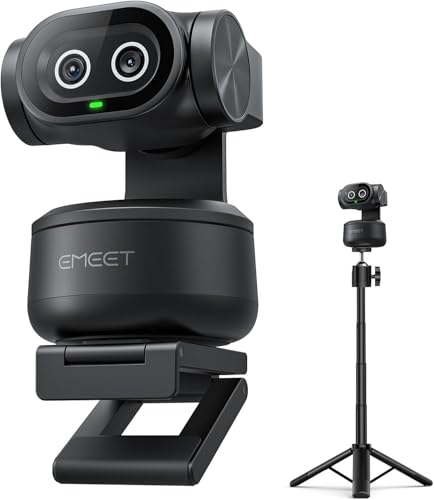
EMEET PIXY Dual-Camera 4K PTZ Webcam
The EMEET PIXY is a feature-packed PTZ webcam with dual cameras for sharp 4K video and AI-powered tracking. Its included tripod, gesture control, and versatile audio modes make it a strong option for streamers, educators, and remote workers.
Pros
- Fast 0.2s autofocus
- Smooth AI tracking with 3-chip system
- Versatile tripod included
- Gesture control works reliably
- Multiple audio modes for different scenes
Cons
- Remote control sold separately
- FOV locked in 4K and 1080p60 modes
- No onboard privacy shutter
Insta360 Link 2C 4K Webcam (AI Tracking)
The Insta360 Link 2C is a premium 4K webcam that streams in crisp HDR and picks up clear audio with AI noise cancellation. Its auto framing and gesture controls make it ideal for content creators and remote workers who want professional video quality without manual adjustment.
Pros
- 4K HDR with 1/2-inch sensor
- Phase detection auto focus for sharp video
- AI noise-canceling mic for clear audio
- Auto framing keeps you centered
- Gesture and remote control via smartphone
Cons
- Not compatible with ARM-based Windows or Windows Hello
Insta360 Link 2 PTZ 4K Webcam
If you need a webcam that actively follows you around the room, the Insta360 Link 2 delivers with smooth PTZ tracking and gesture controls. Its 1/2-inch sensor and HDR ensure sharp, well-exposed video even in tricky lighting, while the AI noise canceling keeps your audio clear.
Pros
- True AI tracking that pans and tilts to follow you
- Sharp 4K video with HDR for varied lighting
- Gesture control allows hands-free zoom and mode switching
- DSLR-like bokeh effect for professional look
Cons
- Not compatible with ARM-based Windows or Windows Hello
OBSBOT Tiny 3 Lite 4K Webcam
The OBSBOT Tiny 3 Lite is a compact 4K webcam with AI tracking and spatial audio. It offers smooth 1080p at 120fps and a triple-mic array for professional audio. Ideal for streamers and remote workers who want hands-free control and high-quality video.
Pros
- Compact and lightweight design
- 4K video with PDAF autofocus
- Professional spatial audio with triple-mic array
- Advanced AI tracking for people and objects
- Voice and gesture control for hands-free operation
Cons
- Voice and gesture control may be erratic in some conditions
OBSBOT Tiny 2 4K PTZ Webcam
The OBSBOT Tiny 2 stands out with its large 1/1.5-inch sensor, delivering sharp 4K video even in dim lighting. Its AI tracking and voice/gesture controls make it a versatile choice for streamers and professionals. However, intensive use may cause noticeable heating, and it demands a fairly powerful computer.
Pros
- Exceptional low-light sensitivity
- Versatile AI tracking modes
- Innovative voice and gesture control
- Fast and accurate autofocus
- Customizable with SDK and hotkeys
Cons
- Heats up under heavy use
- High system requirements
Insta360 Link 2 Pro 4K PTZ Webcam
The Insta360 Link 2 Pro is a 4K PTZ webcam with a large 1/1.3-inch sensor that delivers sharp video and excellent low-light performance. Its AI-powered physical tracking keeps you centered, and the dual-mic beamforming reduces background noise for clearer audio. Specialized modes like DeskView and Whiteboard make it versatile for streamers and professionals alike.
Pros
- Excellent 4K image quality in low light
- Smooth AI tracking with physical movement
- Effective directional noise-canceling mics
- Versatile modes for different scenarios
- Stream Deck and gesture control support
Cons
- Not compatible with ARM-based Windows systems
- No Windows Hello Face Recognition support
OBSBOT Tiny SE 1080P 100FPS Webcam
The OBSBOT Tiny SE delivers smooth 1080p video at 100fps with advanced AI tracking that can follow your upper body or hands. Its stacked CMOS sensor and Dual Native ISO ensure clear footage in low light, while gesture control and customizable presets add convenience. This webcam is a strong choice for streamers and content creators who want intelligent, automated camera control without breaking the bank.
Pros
- Smart AI tracking with zone and body part options
- 1080p at 100fps for ultra-smooth video
- Excellent low-light performance with stacked CMOS
- Dynamic gesture control for hands-free operation
- Customizable presets with separate AI modes
Cons
- Lacks 4K resolution
Best Webcam for Face Tracking Buying Guide
Tracking Modes and Automation
Not all face tracking works the same way. Some cameras lock onto a face and keep it centered no matter how much you move, while others use gimbal-style motors to physically pan and tilt toward you.
If you present while standing or like to gesture during a stream, a motorized PTZ webcam keeps you framed far better than a fixed lens that only crops the image.
A few models also add multi-mode tracking that can recognize a single person or reframe around a group.
Gesture controls are another layer of automation to consider. Raising a hand to center the frame, zooming in, or switching tracking modes feels futuristic, but it only works well when the software responds quickly and accurately.
Before buying, check whether gesture recognition works in the apps you actually use, such as Zoom, Teams, or OBS. Cameras that rely on a desktop app for tracking can behave differently when the app closes.
A camera with good automation should also get out of your way. Look for a privacy shutter and a physical mute option so you can cover the lens when you step away.
If the face tracking requires manual recalibration after you stand up or move to another seat, the feature becomes more hassle than help.
Sensor Size and Low-Light Performance
The sensor size directly affects how the webcam handles less-than-perfect lighting. A larger sensor captures more light and preserves detail in dim home offices, while a small sensor often produces grainy video as soon as the sun goes down.
Many modern webcams use a 1/2″ or 1/1.5″ sensor to balance physical size with image quality, and some premium models move up to a 1/1.3″ sensor for noticeably better low-light performance.
HDR processing matters just as much as sensor size. A webcam with good HDR evens out blown-out windows and harsh shadows, which is important if your desk faces natural light.
When combined with an AI-powered tracking system, the camera can expose your face properly while still keeping the background readable.
If you record video during the day and take calls at night, look for a model that adjusts exposure smoothly rather than flickering between brightness levels.
Keep in mind that resolution does not make up for poor light handling. A 4K sensor shot in a dark room often looks worse than a solid 1080p sensor with strong dynamic range.
That is why our included options balance resolution, sensor quality, and HDR rather than just chasing a high pixel count.
Resolution, Frame Rate, and Output Flexibility
Resolution and frame rate determine how sharp and smooth your video looks. Most face tracking webcams output up to 4K, which gives you extra detail for cropping and zooming during editing.
However, the advantages of 4K only matter if your computer and streaming software can handle the signal.
Many video conferencing services compress video anyway, so a camera that shoots clean, stable 1080p at 60 fps can be more useful than a 4K sensor that struggles to keep up with motion.
Look for webcams that support both 4K and 1080p at several frame rates. Some models can output 4K at 30 fps while still allowing 1080p at 60 fps, which is ideal for movement-heavy content.
A capable GPU also helps when using AI tracking and background effects.
If your computer is older, we suggest reading our desktop PC guide before moving to a high-resolution camera so you know whether the rest of your setup can keep pace.
Check the connection standard as well. USB-C is the most common modern interface, but not every webcam includes a cable long enough for a tall monitor.
Also, confirm that the camera offers a tripod mount, because face tracking looks much better when the lens sits at eye level rather than below your chin.
Microphone and Audio Quality
Face tracking keeps your image centered, but a conference call also depends on how well others can hear you.
Many webcams include built-in microphones with noise reduction, and some of the newest models add AI noise canceling that filters out keyboard clicks and ambient room sounds.
Directional microphones are usually better than omnidirectional ones because they focus on your voice instead of everything around you.
That said, no webcam microphone will fully replace a dedicated USB or XLR microphone for serious streaming and podcasting.
If audio quality is critical, plan to pair your face tracking webcam with a separate microphone and treat the camera mic as a backup.
For ordinary meetings, a webcam with solid noise-canceling microphones can be enough to sound professional without extra gear.
Software Compatibility and Ecosystem
A face tracking webcam is only as good as its control software. Some brands offer mature desktop apps that remember your framing, let you program gesture shortcuts, and update firmware regularly.
Others provide a bare-bones utility that barely works outside one video app. Before you buy, search for recent verified buyer feedback about the software, because unstable apps can break tracking mid-call even when the hardware is excellent.
Think about the tools you already use. Streamers who rely on OBS or Stream Deck can benefit from a camera that integrates directly with those platforms.
Remote workers often need a webcam that behaves well with Zoom, Teams, and Google Meet. Check the manufacturer product page for compatibility lists and any known limitations.
A versatile webcam should act like a normal UVC camera for basic calls while offering advanced tracking controls when you need them.
Also consider whether you want to use the webcam with an external laptop. A camera that works flawlessly on a desktop PC might need a different driver level on a Mac, so verify support for your operating system.
If you move between devices, a plug-and-play model with minimal setup saves time. Installing a webcam is quick, but updating three different drivers at a bad moment is not fun.
Field of View, Gimbal Range, and Overall Build
Field of view determines how much of the room appears on camera.
A narrower field of view around 70 degrees works best for a single person at a desk, while a wider 90 degree view can show more of your environment or frame two people sitting close together.
The field of view also interacts with tracking. A camera with a wide field of view may not need to pan as much, while a narrow lens depends on a smooth gimbal to keep you centered.
Gimbal range is just as important as field of view. A good PTZ webcam should give you enough pan and tilt range to follow you comfortably without constantly hitting a mechanical stop. Pay attention to motion smoothness.
Cheap motors produce jerky, robotic pans that are distracting on camera, while higher-end gimbals glide quietly.
Since the entire value of a face tracking webcam is its ability to keep you framed, the mechanical quality of the gimbal deserves as much scrutiny as the sensor.
Build quality also matters if you travel with your webcam or move it between desks. A sturdy metal mount holds the camera steady on a monitor, while a plastic clip can wobble when you type.
Light weight is convenient for travel, but not at the cost of a cheap hinge that loosens after a few weeks.
A reliable webcam should feel solid whether it is sitting at eye level on a monitor mount or perched on a tripod.
If you want a stable base for your productivity setup, our monitor buying guide can help you choose a display with a clean stand and enough clearance for a webcam.
Why You Should Trust Us
BestProducts is an independent review publisher, which means we do not sell webcams and we do not accept payment for positive coverage.
To build this list, we analyzed each webcam against consistent criteria: image sensor size, resolution and frame rate, tracking accuracy, microphone quality, software stability, and verified buyer feedback.
We also looked at expert review consensus from published sources and compared public data across the category.
We do not conduct our own product trials; our evaluations are grounded in research, published data, expert review consensus, and verified buyer feedback.
Every product in this article receives a BP Score on a 0 to 10 scale, which reflects how well it meets the needs of the average buyer in this category.
We regularly revisit our scoring criteria and review consensus to keep recommendations current.
Affiliate links in our articles may earn us a commission when you buy through them, but that never influences our ratings. Our editorial team evaluates each product before we score it, and our rankings are driven by the research, not by the seller.
Final Thoughts
After comparing the strongest face tracking webcams in this category, a few picks stand out for different reasons.
The OBSBOT Tiny 2 Lite takes the Best Overall spot because it combines the core AI tracking features of the pricier Tiny series with a comfortable balance of performance and value.
Its high BP Score reflects strong consensus across expert reviews and verified buyer feedback, making it the safest choice for most people.
- Best Overall: OBSBOT Tiny 2 Lite earns the top spot with an outstanding BP Score, offering smooth AI tracking, 4K output, and a dependable gimbal without pushing into premium pricing.
- Best for Dual-Camera Creators: EMEET PIXY pairs a 4K primary camera with a second sensor and AI tracking, giving creators more framing flexibility than a typical single-lens webcam.
- Best for Streamers: Insta360 Link 2C is a feature-packed 4K webcam with reliable auto framing, HDR, and noise-canceling mics, and its strong BP Score makes it a favorite for Twitch and other live platforms.
- Best for Showcasing Your Desk Setup: OBSBOT Tiny 3 Lite keeps your face centered while preserving a wider view of your workspace, and its spatial audio support adds another layer of polish for presentations.
If you are in the market for a new webcam, start by deciding whether you need motorized tracking, gesture control, or a particular sensor size.
The best webcam for face tracking for you is the one that fits the spaces where you usually appear on camera, whether that is a bright home office, a dim streaming setup, or a room you share with other people.
Frequently Asked Questions
Does face tracking work in every video app?
Most face tracking webcams work as a standard camera for any app, but the tracking itself usually depends on the manufacturer software.
If you want AI tracking inside Zoom or Teams, the camera software often needs to be running in the background.
Some apps like OBS allow you to use the camera feed with tracking enabled, while others may only show a static image if the tracking utility is not active.
Do I need a 4K webcam for face tracking?
Not necessarily. A 4K webcam gives you more detail and room to crop, but face tracking works just as well at 1080p on many models.
If your computer struggles with high-resolution video or your video calls compress the stream anyway, a good 1080p tracking webcam can look better than a poorly handled 4K signal.
How much should I spend on a face tracking webcam?
You can find capable 1080p face tracking webcams at an entry-level price, while 4K models with motorized gimbals and gesture control sit in the premium range. Think about how often you appear on camera and what software you use.
If you join meetings occasionally, a compact budget-friendly model is enough. If you stream professionally or record video content, the extra cost of a higher-resolution camera with smoother AI tracking is easier to justify.
Can a face tracking webcam work with a laptop?
Yes, most face tracking webcams connect over USB and work with laptops as long as the laptop has enough processing power. However, a laptop placed on a desk often positions the camera below eye level, which flatters no one.
A compact tripod or a monitor arm can lift the camera to eye level and let the gimbal track you with more natural framing.
Is gesture control useful or just a gimmick?
Gesture control can be useful when you are mid-presentation and want to zoom or reset the frame without touching the keyboard. It is also handy for solo streamers who do not have a second person behind the camera.
The feature becomes a gimmick only when the camera has unreliable software or the gesture commands are hard to perform.
What if a webcam with face tracking needs a return or warranty claim?
BestProducts is a review site, so we cannot process returns or warranty claims. Instead, contact the retailer where you bought the camera or reach out directly to the manufacturer.
Many webcam brands offer a limited warranty, and a defective unit should be covered under typical consumer policies. Before buying, read the product listing to confirm the warranty terms and return window.
About the author
Armando covers Wi-Fi routers and webcams for BestProducts, balancing speed, whole-home range, image quality, and low-light performance. He helps readers get reliable coverage and look sharp on every call.