The Best Full Size Mechanical Keyboard
We researched the top full size mechanical keyboards for gaming and productivity, evaluating switch options, build quality, and extra features. Find your perfect match today.
 By Josephine Mason
Updated September 10, 2026
By Josephine Mason
Updated September 10, 2026
Full-sized mechanical keyboards bring the complete desktop experience back to your fingertips. Whether you’re crunching numbers in a spreadsheet, composing code, or engaging in competitive gaming, the dedicated number pad and full-function row offer undeniable convenience.
Unlike compact layouts, a full-size keyboard places every key within easy reach, no layers, no Fn combos. This design is ideal for users who need rapid numeric input without sacrificing comfort.
At BestProducts, we independently research the most popular full-size mechanical keyboards by analyzing technical specifications, reviewing expert consensus, and assessing verified buyer feedback.
Our goal is to help you find a model that matches your typing style, workspace, and budget, whether you’re building a new desktop PC or upgrading an existing one.
Below are our top picks for the best full size mechanical keyboard.
| Award | Product | BP Score About BP ScoreThe BP Score is our own rating from 0 to 10, based on performance, design and build, ease of use, and value. It reflects independent research and is never influenced by manufacturers, retailers, or affiliate commissions. Learn more › | |
|---|---|---|---|
| Best Overall |
 AULA F108 Full-Size Mechanical Keyboard
|
9.2/10 | Buy |
| Best Premium |
 AULA S98 Pro Wireless Mechanical Keyboard
|
9.2/10 | Buy |
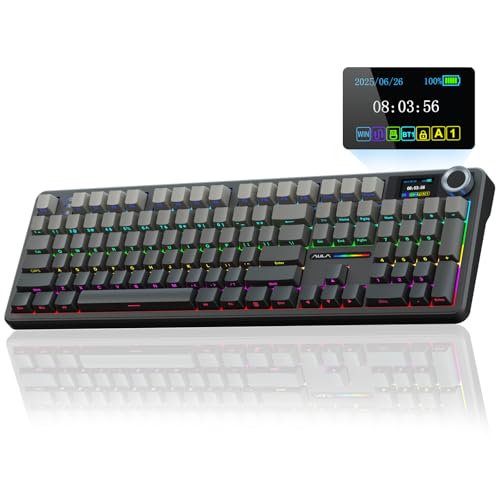 AULA F108 Pro Full-Size Mechanical Keyboard
|
9.1/10 | Buy | |
| Best Budget |
 Redragon K580 Wired Mechanical Keyboard
|
8.9/10 | Buy |
 Lenovo Legion K500 RGB Mechanical Keyboard
|
8.9/10 | Buy | |
| Best Value |
 RK Royal Kludge R98 Pro 96% Keyboard
|
8.9/10 | Buy |
 EPOMAKER TH108 PRO Full-Size Mechanical Keyboard
|
8.9/10 | Buy | |
 Logitech Alto Keys K98M Wireless Mechanical
|
8.9/10 | Buy | |
 Redragon K671 Mechanical Keyboard
|
8.8/10 | Buy | |
 Keychron C2 Wired Mechanical Keyboard
|
8.8/10 | Buy | |
 EPOMAKER Aula F108 Full Size Mechanical Keyboard
|
8.8/10 | Buy | |
 AULA F106 Pro Full-Size Wireless Keyboard
|
8.8/10 | Buy |
AULA F108 Full-Size Mechanical Keyboard
This full-size gaming keyboard from AULA offers tri-mode connectivity and a hot-swappable design for easy customization. It is built with five layers of sound-dampening material for a creamy, quiet typing experience, ideal for both gamers and office users.
Pros
- Versatile tri-mode connectivity
- Hot-swappable for switch changes
- Creamy, quiet typing sound
- Full-size layout with numpad
- Durable PBT keycaps
Cons
- Driver only works in wired mode
- Linux F-zone compatibility issue
- Knobless design may disappoint some
AULA S98 Pro Wireless Mechanical Keyboard
The AULA S98 Pro packs a smart LCD screen and multifunction knob into a compact 96-key layout. It offers tri-mode connectivity, hot-swappable switches, and five-layer sound dampening for a creamy typing feel, plus a large 5000mAh battery for extended use. This keyboard appeals to gamers and typists seeking customization and a clean design.
Pros
- Tri-mode connectivity (BT, 2.4GHz, USB-C)
- Hot-swappable switch support
- Five-layer sound dampening for quiet typing
- Large 5000mAh battery for long sessions
- Full RGB lighting with programmable software
Cons
- Screen customization requires wired mode and Windows
- Driver software only works in wired Windows mode
AULA F108 Pro Full-Size Mechanical Keyboard
A feature-packed full-size mechanical keyboard with a smart TFT display and multifunction knob, offering tri-mode connectivity and a massive 8000mAh battery for extended gaming or work sessions. The hot-swappable switches and five-layer dampening design deliver a quiet, creamy typing feel.
Pros
- Massive 8000mAh battery life
- Tri-mode connectivity with 1000Hz polling
- Hot-swappable switches for easy customization
- Quiet, creamy typing feel
- Customizable TFT screen and knob
Cons
- Driver and screen setup limited to Windows wired mode
- F-zone may behave abnormally on Linux
Redragon K580 Wired Mechanical Keyboard
This wired mechanical gaming keyboard delivers tactile Blue switches and dedicated macro keys for recording combos on-the-fly without software. Its built-in media wheel and hot-swappable socket make it a versatile pick for budget-conscious gamers who want customizability and durability.
Pros
- Hot-swappable switch socket
- Dedicated macro keys without software
- Full anti-ghosting for gaming
- Media wheel and controls onboard
- Durable 50 million keystroke rating
Cons
- Blue switches are loud for shared spaces
- No wireless connectivity option
Lenovo Legion K500 RGB Mechanical Keyboard
The Lenovo Legion K500 is a full-size mechanical gaming keyboard that prioritizes simplicity and durability. It features red mechanical switches rated for 50 million keystrokes, per-key RGB lighting, and a detachable palm rest, making it a reliable choice for gamers who want essential features without excess.
Pros
- Durable mechanical switches
- Full anti-ghosting and key rollover
- Per-key RGB customization
- Detachable palm rest included
- Game mode for distraction-free play
Cons
- Full-size layout takes ample desk space
- Wired-only connection
RK Royal Kludge R98 Pro 96% Keyboard
For typists and gamers who love a creamy sound, this gasket-mounted 96% keyboard offers a thocky feel with pre-lubed linear switches. The hot-swappable board, MDA profile PBT keycaps, and volume knob add customization and convenience.
Pros
- Gasket mount with five-layer foam for deep, creamy sound
- Pre-lubed linear cream switches for smooth keystrokes
- Hot-swappable for 3/5-pin switches
- MDA profile PBT keycaps with double-shot legends
- Detachable aluminum volume knob and indicator lights
Cons
- Wired connection only, no wireless option
- No dedicated media keys beyond volume knob
EPOMAKER TH108 PRO Full-Size Mechanical Keyboard
This full-size mechanical keyboard stands out with an integrated smart screen that shows time, battery, and customizable GIFs, plus a volume knob for quick control. It features a 10000mAh battery for up to 200 hours of wireless use, low-latency 2.4GHz and Bluetooth connectivity, and a gasket-mounted 5-layer dampening design for a smooth, thocky typing experience. Ideal for gamers and professionals who want a feature-packed board with long battery life and tactile comfort.
Pros
- Smart screen with GIF customization
- 10000mAh battery lasts up to 200 hours
- Low latency wireless (2ms cable, 1kHz polling)
- Hot-swappable 5-pin switch compatibility
- Gasket mount with 5-layer sound dampening
Cons
- Very heavy at over 1.1 kg
- Software requires Chrome browser
- No dedicated media keys
Logitech Alto Keys K98M Wireless Mechanical
The Logitech Alto Keys K98M is a compact mechanical keyboard with a gasket mount that absorbs vibrations for a cushioned, clicky typing feel. Its 98-key layout includes a numpad while saving desk space, and white backlighting keeps it functional in low light. With up to 12 months of battery life and Bluetooth or Logi Bolt connectivity, it is a versatile option for productivity and gaming.
Pros
- Gasket mount for comfortable, quiet typing
- Hot-swappable Marble Switches for customization
- Compact 98-key layout with numpad
- Up to 12 months battery life
- Multi-device Bluetooth and Logi Bolt support
Cons
- Non-RGB white backlighting only
- Clicky switches may be noisy for shared spaces
Redragon K671 Mechanical Keyboard
This wired keyboard from Redragon packs 11 backlight modes and macro support into a durable frame with double-shot PBT keycaps. The hot-swappable red switches and full anti-ghosting make it a solid choice for RPG and MMO gamers who want customization without a premium price.
Pros
- 11 programmable backlight modes with 5 brightness levels
- Hot-swappable red switches with 4 spare switches included
- Full keys anti-ghosting for simultaneous key presses
- Double-shot PBT keycaps for durability and clear backlight
- Macro editing via software for remapping and shortcuts
Cons
- Backlight color is not customizable (fixed per mode)
- No wireless connectivity option
- Limited to linear red switch feel only
Keychron C2 Wired Mechanical Keyboard
A reliable choice for productivity and light gaming, this full-size wired keyboard from Keychron pairs a tactile brown switch with a retro color scheme. Its optimized Mac layout and included extra keycaps make it versatile across operating systems.
Pros
- Full-size layout with dedicated numpad
- Tactile brown switches offer responsive feedback
- Durable construction rated for 50 million keystrokes
- Compatible with both Mac and Windows out of the box
- Adjustable two-level feet for ergonomic typing
Cons
- Non-backlight version limits use in low light
- Wired connection only (no Bluetooth option)
- Num Lock function works solely on Windows
EPOMAKER Aula F108 Full Size Mechanical Keyboard
This full-size upgrade of the popular F75 brings creamy acoustics and a 4000mAh battery to gamers and office workers who need a quieter, customizable typing experience.
Pros
- Long battery life (4000mAh)
- Quiet creamy switch sound
- Hot-swappable for customization
- PBT keycaps resist wear
- Multiple connection modes
Cons
- No dedicated software mentioned
- Available only in White&Blue color
AULA F106 Pro Full-Size Wireless Keyboard
The AULA F106 Pro is a full-size mechanical keyboard built for people who want wireless flexibility without sacrificing layout. It pairs tri-mode connectivity with a hot-swappable PCB and a handy TFT display and knob, so customization and device switching stay convenient. The long-lasting 8000mAh battery and durable PBT keycaps make it a practical pick for gamers and office users alike.
Pros
- Tri-mode Bluetooth, 2.4GHz, and USB-C connectivity
- Hot-swappable PCB supports 3 or 5-pin switches
- Large 8000mAh battery lasts 30+ hours with RGB on
- Oil-resistant double-shot PBT keycaps with matte texture
Cons
- Bulky full-size frame weighs 3.52 pounds
- Customization software requires Windows and wired mode
Best Full Size Mechanical Keyboard Buying Guide
Switch Selection: Linear, Tactile, or Clicky
The switch type defines the feel and sound of your keyboard. Linear switches (such as Cherry MX Red or Gateron Red) provide a smooth keystroke without a tactile bump, making them popular among gamers who need quick, consecutive presses.
Tactile switches (like Cherry MX Brown or Gateron Brown) offer a noticeable bump at the actuation point, giving clear feedback for typing without being overly loud.
Clicky switches (e.g., Cherry MX Blue) add an audible click along with the tactile bump, which can be satisfying but may be too noisy for shared workspaces.
Many modern full-size keyboards come with hot-swappable sockets, allowing you to change switches without soldering. This flexibility is valuable if you’re unsure which switch you prefer or if you want to experiment with different feels.
Consider your primary use, gaming, typing, or a mix, to decide which switch type suits you best.
Build Quality and Keycaps
A keyboard’s chassis material and keycaps directly affect its durability and typing experience. Full-size keyboards with metal or reinforced plastic frames tend to be more stable and less prone to flex during heavy use.
Look for double-shot PBT keycaps, which resist shine and wear better than ABS keycaps. PBT keycaps also provide a slightly textured grip that many typists prefer.
Keycap profiles, such as OEM, Cherry, or MDA, influence the feel while typing. MDA and XDA profiles offer a uniform height that can reduce finger travel, while OEM and Cherry profiles are sculpted for a more traditional ergonomic curve.
Some keyboards include a detachable palm rest, which improves comfort during long sessions. For more on ergonomic setups for your desktop, see our guide to office chairs.
Connectivity Options: Wired vs. Wireless
Wired full-size keyboards typically offer the lowest latency and do not require charging, making them reliable for competitive gaming and busy desks. USB-C connectivity is now standard, providing easy cable management.
Wireless models, on the other hand, reduce cable clutter and allow you to place the keyboard wherever you like.
Most wireless full-size keyboards use a 2.4 GHz dongle or Bluetooth, with latencies that are now nearly indistinguishable from wired for the average user.
Battery life varies significantly, some wireless keyboards can last weeks on a single charge, while others may need weekly charging depending on backlighting usage. Models with a screen or knob for volume and media control add convenience.
If you frequently switch between devices, consider a keyboard with multi-device Bluetooth pairing. For a deeper look at wireless keyboards without a number pad, check out the best wireless tenkeyless mechanical keyboard.
Extra Features: RGB, Macro Keys, and Software
RGB backlighting has become almost standard on mechanical keyboards, but the quality and customization vary. Some keyboards offer per-key RGB with extensive lighting effects, while others have zone-based lighting. For productivity, per-key lighting can be programmed to highlight specific keys.
Macro keys are useful for assigning complex commands or in-game actions. Many full-size keyboards include dedicated macro rows or allow you to remap keys via software.
Software support ranges from robust (allowing custom profiles, remapping, and lighting control) to basic (only simple effects). Consider whether the keyboard offers onboard memory to store profiles, so you can use your settings on any computer without installing software.
For a comprehensive view of what features matter most in gaming peripherals, read our guide on gaming laptops for the best overall setup.
Why You Should Trust Us
BestProducts is an independent review site that evaluates products through comprehensive research. We do not conduct our own product trials; our evaluations are grounded in research, published data, expert review consensus, and verified buyer feedback.
Each product in this guide is assigned a BP Score on a 0, 10 scale based on a consistent set of criteria: switch performance, build quality, feature set, value, and user satisfaction.
Our team spends hundreds of hours comparing specifications, analyzing professional and user reviews, and monitoring long-term reliability reports. This method ensures our recommendations are unbiased and reliable.
We also clearly disclose that we may earn a commission through affiliate links at no extra cost to you.
Final Thoughts
After evaluating the market, these are our top recommendations across different needs and budgets:
- Best Overall: AULA F108 Wireless Mechanical Keyboard. With a BP Score of 9.2, this full-size keyboard combines a sleek side-printed PBT keycap set, pre-lubed switches, and vibrant RGB lighting. Its wireless performance is rock-solid, and the creamy sound and hot-swappable design make it a versatile choice for both work and play.
- Best Premium Pick: AULA F108 PRO. Also scoring 9.9, the PRO version adds a dedicated screen and a multifunctional knob for media control. The 8000 mAh battery ensures days of use, making it a top-tier option for those who want every feature.
- Best Budget Choice: Redragon Mechanical Gaming Keyboard. With a BP Score of 8.8, this wired model offers hot-swappable red switches, double-shot PBT keycaps, and 11 backlight modes at a very accessible price point. It’s ideal for gamers or typists on a tight budget who don’t want to compromise on quality.
- Best for Typing Professionals: Keychron C2 Full Size Wired Mechanical Keyboard. This retro-styled board with brown switches provides a comfortable typing experience and is widely praised by the writing community. Its BP Score of 8.8 reflects its excellent build and reliable performance.
We hope this guide helps you find the best full size mechanical keyboard for your setup. For more peripheral recommendations, explore our graphics cards guide to complete your workstation.
Frequently Asked Questions
What is a full size mechanical keyboard?
A full size mechanical keyboard includes all standard keys: alphanumeric, function row, navigation cluster, and a dedicated number pad. This layout is preferred by users who frequently input numbers or need every key immediately accessible without switching layers.
Mechanical switches provide tactile feedback and durability compared to membrane keyboards.
What switch type is best for gaming?
For gaming, many prefer linear switches because they offer a smooth press without extra resistance, allowing faster double-taps. However, tactile switches can also work well for games that require precise timing. It ultimately comes down to personal preference.
Many hot-swappable keyboards let you experiment with different switch types.
Are wireless full size keyboards reliable for gaming?
Modern wireless keyboards using 2.4 GHz technology have latency low enough for competitive gaming. Bluetooth may introduce slight delay, but is fine for casual play.
Battery life and charging convenience are important considerations, look for models with at least 4000 mAh or more, and check whether the keyboard can be used while charging.
What does hot-swappable mean?
A hot-swappable keyboard allows you to remove and replace switches without soldering. This lets you customize the feel of your keyboard with different switch types or replace worn switches easily.
It’s a valuable feature for anyone who wants to tailor their typing experience or extend the keyboard’s lifespan.
How do I clean a mechanical keyboard?
Use a keycap puller to remove the keycaps and clean them in warm soapy water (or a gentle cleaner). For the keyboard frame, a soft brush or compressed air helps remove dust. Avoid using liquids directly on the switches.
For more on maintaining your desk peripherals, see our guide on computers and office equipment.
Can I use a full size mechanical keyboard with a Mac?
Many full size mechanical keyboards support both Windows and Mac layouts. Some models include dip switches or keycaps with macOS legends. Check the product specifications for macOS compatibility, especially for shortcut keys like Command and Option.
Bluetooth models often pair seamlessly with Macs. For a list of compatible laptops, see our best laptop guide.
About the author
Josephine covers mechanical keyboards and wireless mice for BestProducts, comparing switch feel, build quality, sensor precision, and battery life. She guides readers through a deeply personal choice with clear, practical advice.