The Best Smart Monitor
A smart monitor combines a quality display with built-in streaming, replacing a separate TV stick or PC. We evaluated top models using specs, expert consensus, and buyer feedback to help you choose the best smart monitor for your home office or entertainment setup.
 By Irene Hopkins
Updated September 10, 2026
By Irene Hopkins
Updated September 10, 2026
A smart monitor combines a high-quality display with a built-in streaming platform, eliminating the need to connect a separate TV stick or PC for casual entertainment.
Whether you want to watch Netflix, check email, or mirror your phone’s screen, a smart monitor acts as a standalone hub for work and play.
With options ranging from compact 24-inch screens to immersive 34-inch ultrawide curved panels, the category now offers something for every desk. For more on choosing the right display, explore our roundup of the best LED monitor for every setup.
We evaluated the top smart monitors on the market by analyzing their specifications, expert review consensus, and verified buyer feedback.
Each model was scored against consistent criteria on our 0, 10 BP Score to help you find the best smart monitor in 2026. Below are our top recommendations.
| Award | Product | BP Score About BP ScoreThe BP Score is our own rating from 0 to 10, based on performance, design and build, ease of use, and value. It reflects independent research and is never influenced by manufacturers, retailers, or affiliate commissions. Learn more › | |
|---|---|---|---|
| Best Overall |
 LG 34SR60QC-W 34" QHD Curved Smart Monitor
|
9.1/10 | Buy |
| Best Budget |
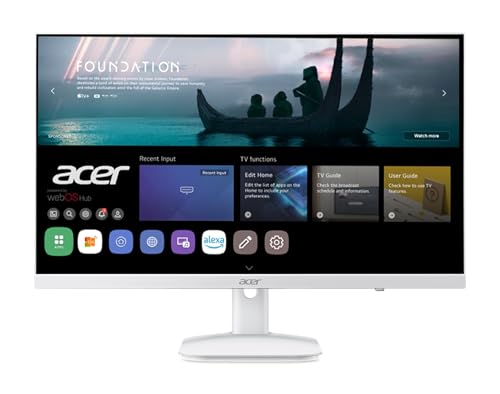 Acer KS242Y 23.8" Smart Monitor WebOS
|
8.4/10 | Buy |
 Samsung M50F 27-Inch Smart Monitor
|
8.4/10 | Buy | |
| Best Value |
 LG 32U701SB-B 32-Inch 4K Smart Monitor
|
8.4/10 | Buy |
 Samsung M50F 27-Inch FHD Smart Monitor
|
8.3/10 | Buy | |
| Best Premium |
 LG 34SR63QA-W 34-Inch Curved Smart Monitor
|
7.8/10 | Buy |
LG 34SR60QC-W 34" QHD Curved Smart Monitor
This 34-inch ultrawide QHD curved monitor doubles as a smart TV with built-in webOS streaming apps. It supports AirPlay 2 mirroring and includes a 100Hz refresh rate, making it suitable for both productivity and casual entertainment.
Pros
- Built-in webOS with streaming apps and free LG Channels
- Ultrawide 21:9 curved display with 99% sRGB color gamut
- Supports Apple AirPlay 2 and HomeKit wireless casting
- Cloud PC access without a computer via webOS
- Two HDMI and three USB ports for versatile connectivity
Cons
- Limited to 100Hz refresh rate
- No ergonomic stand adjustments (height, pivot)
- Magic Remote sold separately
Acer KS242Y 23.8" Smart Monitor WebOS
This Acer monitor combines a 23.8-inch IPS display with WebOS, making it a smart hub for streaming Netflix, YouTube, and more without a PC. Wireless projection via Airplay or Miracast and built-in IoT control add convenience, though the 14ms response time is better suited for casual use than competitive gaming.
Pros
- WebOS for native streaming apps
- Wireless projection via Airplay and Miracast
- Remote PC and IoT hub capabilities
- USB webcam support for video conferencing
- 120Hz refresh rate with sRGB 99% color
Cons
- 14ms response time not ideal for fast gaming
- Limited ergonomic tilt adjustment only
- External webcam required for video calls
Samsung M50F 27-Inch Smart Monitor
This 27-inch smart monitor from Samsung integrates streaming apps, free TV channels, and a gaming hub directly into the display, so you don't need a PC or console for entertainment. It's a versatile option for cord-cutters and casual gamers who want a simple all-in-one screen.
Pros
- Built-in streaming apps and free TV channels
- Samsung Gaming Hub for cloud gaming without PC
- Adaptive Sound optimizes audio by content type
- Easy mobile screen mirroring for videos and photos
- Sleek white design fits modern setups
Cons
- Only Full HD resolution, not 4K
- Limited ergonomics with basic stand
- No built-in USB-C or higher refresh rate
LG 32U701SB-B 32-Inch 4K Smart Monitor
This LG smart monitor combines a 4K UHD display with webOS, letting you stream content and run office apps without a PC. Its AI-powered processor enhances picture and sound, while the built-in gaming portal offers access to cloud gaming services. Ideal for home offices and casual entertainment.
Pros
- Vivid 4K UHD with HDR10 and wide color gamut
- Built-in webOS for streaming and office apps
- AI Picture Pro upscales content to near 4K
- Auto brightness adjusts to ambient light
- Access to cloud gaming without a console
Cons
- 60Hz refresh rate limits gaming smoothness
- No adjustable stand for ergonomic setup
Samsung M50F 27-Inch FHD Smart Monitor
This 27-inch FHD monitor doubles as a smart TV with built-in streaming apps and Samsung TV Plus for free channels. It's ideal for users who want a single screen for work and entertainment without connecting a PC or console.
Pros
- All-in-one smart monitor with streaming
- Gaming Hub plays titles without console
- Adaptive Sound adjusts audio in real time
- Lightweight at 7.71 pounds
Cons
- Only FHD resolution, no 4K
- No built-in webcam for video calls
LG 34SR63QA-W 34-Inch Curved Smart Monitor
This 34-inch ultra-wide QHD monitor combines a versatile workstation with a smart TV, featuring webOS23 for streaming apps and USB-C with 65W power delivery. Ideal for multitaskers who want a single screen for productivity and entertainment.
Pros
- Integrated streaming without a PC
- Ultra-wide curved QHD display
- USB-C with 65W power delivery
- Magic Remote voice control compatible
Cons
- Stand only offers tilt adjustment
- Magic Remote sold separately
Best Smart Monitor Buying Guide
Operating System and App Ecosystem
The primary advantage of a smart monitor is its integrated OS.
LG’s webOS and Samsung’s Tizen offer access to Netflix, YouTube, Disney+, and other streaming services without a separate device. webOS is known for its intuitive Launcher bar and support for AirPlay 2, making it easy to share content from Apple devices.
Tizen includes Samsung Gaming Hub and Workspace for cloud gaming and remote desktop connections. Some monitors also run on custom Android-based systems or Google TV, but the core experience remains centered on streaming and productivity.
For a broader overview of computer hardware, visit our Computers & Office category.
When choosing a smart monitor, consider which streaming platforms you use most and whether the interface supports quick input switching and screen mirroring. A robust app library also extends the monitor’s lifespan as a media center.
Screen Size, Resolution, and Panel Type
Smart monitors range from 24-inch Full HD to 34-inch QHD ultrawide and even 32-inch 4K UHD panels. Higher resolution provides sharper text and more screen real estate for productivity, while a curved design reduces eye strain during long sessions.
For many users, a 27-inch QHD or 4K display hits a sweet spot. If you prioritize crisp details for photo editing or data analysis, look for a model with at least QHD (2560×1440) resolution.
Our guide to the best 2560×1440 monitor for every desk can help you compare options.
Panel type affects viewing angles and color accuracy. IPS panels (common on LG and Acer models) offer wide viewing angles and vibrant colors, while VA panels on some Samsung monitors provide deeper blacks for better contrast in dimly lit rooms.
Connectivity and Ports
Connectivity determines how easily you can pair the monitor with other devices. Look for USB-C with Power Delivery (PD) to charge a laptop while displaying video, as well as HDMI and DisplayPort inputs.
Built-in Bluetooth and Wi-Fi enable wireless screen mirroring from smartphones and tablets. Many smart monitors also include a USB hub for peripherals.
To pair your monitor with a suitable laptop, check our recommendations for the best laptop for every need in 2026.
Some models offer additional ports like a headphone jack or Ethernet for wired network stability. Consider your expected devices and cable management preferences when evaluating.
Built-in Audio and Extra Features
Most smart monitors include built-in speakers, though audio quality varies. Higher-end models may offer richer sound or Dolby Atmos support, while budget options typically provide adequate volume for casual viewing.
Features like HDR10 support, a remote control, and voice assistant integration enhance the experience. For a complete desk setup, consider pairing your monitor with a quality desk configuration; explore our Desktop PCs category for powerful workstations.
Additional extras such as a sleep timer, blue light filter, and picture-in-picture mode add flexibility. Evaluate which features matter most for your daily use, whether streaming, light productivity, or occasional gaming.
Price and Value
Smart monitors span a wide price range, from budget-friendly 24-inch models to premium 4K ultrawide panels.
The extra cost of a smart monitor over a standard monitor is often justified by the built-in streaming OS, which eliminates the need for a separate smart TV box or dongle.
Consider your primary use case, if you mainly stream and do light office work, a mid-range model with a solid smart platform offers the best value.
If you need high resolution for professional tasks, investing in a 4K or QHD model is worthwhile.
Always balance features against your budget and future needs. A slightly larger screen or higher refresh rate can improve longevity without a major price jump.
Why You Should Trust Us
BestProducts is an independent product review site committed to transparency. We evaluate each product using a consistent methodology based on research, published data, expert review consensus, and verified buyer feedback. Every product receives a BP Score from 0 to 10.
We do not conduct our own product trials; our evaluations are grounded in research, published data, expert review consensus, and verified buyer feedback.
Our team of editors and researchers analyzes hundreds of data points to ensure our recommendations are unbiased and reliable. We may earn a commission when you purchase through links on our site, but this does not influence our ratings.
Final Thoughts
- Best Overall: LG 34SR60QC-W 34-inch QHD Curved Smart Monitor, With a top-tier BP Score, this ultrawide QHD panel delivers immersive streaming and productivity in one package, thanks to its webOS platform, 100Hz refresh rate, and built-in speakers.
- Best Budget Pick: Acer 23.8-inch IPS FHD Smart Monitor, At a more accessible price point, this compact monitor offers excellent picture quality and webOS functionality without a large investment.
- Best for Mixed Use: Samsung 27-Inch M5 (M50F) FHD Smart Monitor (White), Combining Samsung’s Tizen smart platform with a 27-inch FHD display, this model is versatile for both office tasks and evening entertainment.
- Best 4K Smart Monitor: LG 32U701SB-B 32-inch Smart 4K UHD Monitor, For users who want crisp 4K resolution for photo editing or streaming, this LG monitor delivers sharp detail and webOS convenience.
Frequently Asked Questions
Can I use a smart monitor as a regular computer monitor?
Yes. Smart monitors function identically to standard monitors when connected to a computer via HDMI or USB-C.
The smart platform acts as an additional input source, so you can switch between your PC and built-in streaming apps with a button press.
Many users find this dual functionality eliminates the need for a separate TV in a small room. For related setups, see our Laptops category for portable companion devices.
What is the difference between webOS and Tizen?
Both are proprietary operating systems built into smart monitors. LG’s webOS features a simple launcher bar and strong support for AirPlay 2 and screen sharing. Samsung’s Tizen includes Gaming Hub, Samsung Workspace, and Workspace for remote access.
The choice often comes down to which interface you prefer and which streaming services you use most. Both are regularly updated.
Do smart monitors have built-in speakers?
Most smart monitors include built-in speakers, though audio quality varies. Higher-end models often have more powerful sound with support for Dolby Atmos, while budget models provide adequate volume for casual viewing.
For a better audio experience, you can always connect external speakers via the headphone jack or Bluetooth.
Can I connect a smart monitor to a gaming console?
Yes. Most smart monitors feature HDMI ports that work with gaming consoles like PlayStation or Xbox. However, check the monitor’s refresh rate, models with 100Hz or 120Hz offer smoother gameplay if your console supports higher frame rates.
For a dedicated gaming setup, explore our Gaming Laptops category for portable alternatives.
Are smart monitors good for photo editing?
They can be, but it depends on the panel. IPS panels on many smart monitors offer good color accuracy and wide viewing angles suitable for photo editing. Higher-resolution models (QHD or 4K) provide the detail needed for precise work.
However, if professional-grade color reproduction is critical, a dedicated professional monitor with hardware calibration may be better.
How does screen mirroring work on smart monitors?
Screen mirroring is supported via AirPlay 2 (for Apple devices) and Miracast or built-in casting (for Android and Windows devices).
Simply ensure the monitor and device are on the same Wi-Fi network, then select the monitor from the device’s sharing menu. Some monitors also support Bluetooth streaming for audio.
About the author
Irene reviews desktop PCs and monitors for BestProducts, weighing performance, upgradability, and panel quality for work and home. She helps readers build a desk setup that stays fast and comfortable for years.