The Best Ergonomic Wireless Mouse
Find the perfect ergonomic wireless mouse to reduce wrist strain and boost productivity. Our research-based picks range from budget vertical mice to premium trackball and multi-device models, each scored on our 0-to-10 BP Score.
 By Josephine Mason
Updated September 10, 2026
By Josephine Mason
Updated September 10, 2026
If you spend hours at a computer, the right mouse can make a significant difference in comfort and productivity.
An ergonomic wireless mouse reduces strain on your wrist and forearm, helping to prevent repetitive stress injuries while keeping your desk clutter-free.
In this guide, we’ve evaluated the top models on the market using our research-based methodology, combining specifications, expert review consensus, and verified buyer feedback to score each product on our 0-to-10 BP Score.
Our picks range from budget-friendly vertical mice to premium trackball and multi-device options, ensuring there’s a fit for every hand size and workflow. Below you’ll find our curated list of the best ergonomic wireless mouse options available today.
| Award | Product | BP Score About BP ScoreThe BP Score is our own rating from 0 to 10, based on performance, design and build, ease of use, and value. It reflects independent research and is never influenced by manufacturers, retailers, or affiliate commissions. Learn more › | |
|---|---|---|---|
| Best Overall |
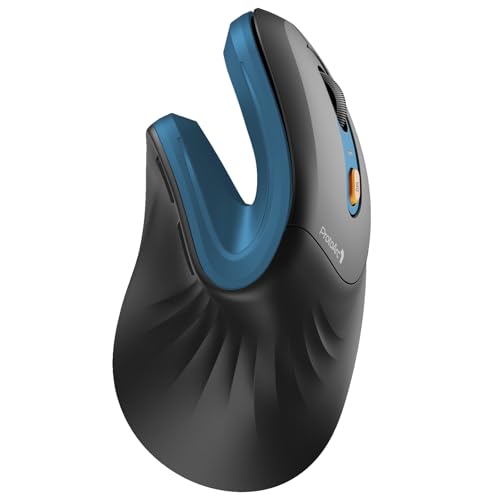 ProtoArc EM11 NL Vertical Mouse
|
9.1/10 | Buy |
| Best Value |
 TECKNET 16° Vertical Trackball Mouse
|
9.1/10 | Buy |
| Best Premium |
 Logitech Lift Vertical Ergonomic Mouse
|
9.1/10 | Buy |
 Logitech MX Master 4 Wireless Mouse with Haptics
|
9.1/10 | Buy | |
| Best Budget |
 Logitech M185 Compact Wireless Mouse
|
8.9/10 | Buy |
 TECKNET Vertical Ergonomic Mouse
|
8.9/10 | Buy | |
 Logitech M720 Triathlon Multi-Device
|
8.9/10 | Buy | |
 PHILIPS SPK7858B Ergonomic Wireless Mouse
|
8.9/10 | Buy | |
 Logitech MX Ergo S Wireless Trackball Mouse
|
8.9/10 | Buy | |
 Anker 2.4G Wireless Vertical Ergonomic Mouse
|
8.8/10 | Buy | |
 Lekvey Vertical Wireless Ergonomic Mouse
|
8.8/10 | Buy |
ProtoArc EM11 NL Vertical Mouse
This vertical mouse is built for small to medium hands and features a 58-degree angle to reduce wrist strain. It connects to three devices via Bluetooth or USB-A, with a rechargeable battery that lasts up to 100 hours.
Pros
- Comfortable for small to medium hands
- Reduces wrist pressure with vertical design
- Long battery life and USB-C charging
- Quiet clicks for shared spaces
- Multi-device switching is convenient
Cons
- Scroll wheel and side buttons not silent
- Only one size available
- No adjustable palm rest
TECKNET 16° Vertical Trackball Mouse
This wireless trackball mouse uses a thumb-controlled ball and a 16-degree vertical angle to reduce wrist strain by up to 50%. It connects to three devices via Bluetooth or 2.4G, charges quickly, and offers silent clicks with adjustable DPI, making it a comfortable choice for productivity in tight spaces.
Pros
- Precise thumb-controlled trackball for efficient navigation
- 16° vertical angle reduces wrist strain by 50%
- Connects to up to 3 devices via Bluetooth and 2.4G
- Quick 15-minute charge powers a full day
- Silent clicks and adjustable DPI (100-1200)
- Designed for medium to large hands
Cons
- Trackball requires 1-2 week adjustment period
- Maximum DPI of 1200 may be low for some users
- Thumb design is right-hand only
Logitech Lift Vertical Ergonomic Mouse
Designed for small to medium right hands, the Logitech Lift's 57-degree vertical shape encourages a natural forearm posture to reduce wrist strain. Its soft textured grip, thumb rest, and whisper-quiet clicks make long workdays more comfortable, while the SmartWheel ensures smooth scrolling. Certified by ergonomists and available in multiple colors with recycled plastic content.
Pros
- Promotes natural forearm posture
- Soft textured grip with thumb rest
- Whisper-quiet clicks
- SmartWheel for smooth scrolling
- Up to two years battery life
Cons
- Only for right-handed users
- Not suitable for large hands
- Uses disposable batteries (not rechargeable)
Logitech MX Master 4 Wireless Mouse with Haptics
The Logitech MX Master 4 is an ergonomic wireless mouse aimed at productivity professionals. It offers haptic feedback for customizable shortcuts, a fast MagSpeed scroll wheel, and quiet clicks, all in a comfortable design that reduces hand strain.
Pros
- Customizable haptic feedback for actions
- Dynamic Actions Ring for app shortcuts
- Fast and precise MagSpeed scroll wheel
- Ergonomic shape with thumb scroll wheel
- 90% quieter clicks than standard mice
Logitech M185 Compact Wireless Mouse
A budget-friendly ambidextrous wireless mouse that prioritizes comfort and simplicity. Its compact shape and long battery life make it a practical upgrade for laptop users who want to boost productivity over a touchpad.
Pros
- Comfortable for both left and right hands
- Up to 1 year battery life with smart sleep mode
- Plug-and-play with Windows and Mac
- Reliable wireless connection up to 33 feet
- Compact and portable for small hands or tight spaces
Cons
- No rechargeable battery, uses disposable AA
- Basic scroll wheel without horizontal scroll
- No Bluetooth, requires USB receiver
TECKNET Vertical Ergonomic Mouse
A wireless vertical mouse with Bluetooth 5.0/3.0 and USB-A connectivity, featuring a 52° ergonomic design to reduce wrist strain. It offers a rechargeable battery lasting up to 2 months, silent clicks, and six adjustable DPI levels up to 4800, making it suitable for office work, gaming, or everyday browsing.
Pros
- Versatile Bluetooth and USB-A connectivity
- Long battery life with quick recharge
- Ergonomic design reduces wrist fatigue
- Silent operation for quiet environments
- Adjustable sensitivity for various tasks
Cons
- Forward/back buttons not compatible with Mac
- May not fit larger hands (S/M size only)
- No software customization options
Logitech M720 Triathlon Multi-Device
The Logitech M720 Triathlon is a full-size wireless mouse built for productivity across up to three devices. Its hyper-fast scrolling wheel and 24-month battery life make it a reliable office companion, while the comfortable rubberized grip suits prolonged use. Dual connectivity via Bluetooth or Unifying receiver adds flexibility.
Pros
- 24-month battery life for low maintenance
- Hyper-fast scrolling with instant-stop
- Comfortable rubberized palm grip for right-hand use
- Multi-device switching via button or Logitech Flow
- Dual connectivity Bluetooth and Unifying receiver
Cons
- Right-hand only design limits left-handed users
- Full-size shape may feel bulky for smaller hands
PHILIPS SPK7858B Ergonomic Wireless Mouse
This multi-device mouse combines ergonomic comfort with productivity features like dual scroll wheels and silent clicks. It pairs via Bluetooth or included USB-A/C receiver, switches between three devices, and offers 5-level DPI for precise tracking. Ideal for office workers who need wrist relief and quiet operation.
Pros
- Ergonomic shape with anti-slip thumb rest
- Library-quiet clicks
- Dual scroll wheels for efficient navigation
- Versatile connectivity (Bluetooth + USB-A/C)
- Long battery life with fast emergency charge
Cons
- Right-handed only
- No physical on/off switch (auto-sleep only)
- Only available in black
Logitech MX Ergo S Wireless Trackball Mouse
This trackball mouse uses a fixed 20-degree tilt to improve forearm posture and reduce muscle strain, with quieter clicks than earlier models. It offers customizable buttons through Logi Options+ and dual wireless connectivity, making it a solid ergonomic choice for medium to large hands.
Pros
- 20-degree tilt reduces muscle strain by 27%
- 80% quieter than standard mice
- Customizable buttons and Smart Actions via Logi Options+
- Dual wireless: Bluetooth or Logi Bolt receiver
- Quick charge gives 24 hours from 1 minute
Cons
- Fixed tilt may not suit all postures
- Thumb-operated trackball has a learning curve
- Charging cable not included
Anker 2.4G Wireless Vertical Ergonomic Mouse
For right-handed users who spend long stretches at a desk, this Anker vertical mouse is designed around a handshake-style grip that may reduce wrist strain. It connects through a 2.4G USB receiver rather than Bluetooth, offers 800, 1200, or 1600 DPI optical tracking, and automatically enters power-saving mode after eight minutes of inactivity.
Pros
- Reduces wrist strain with vertical ergonomic shape
- Adjustable 800, 1200, and 1600 DPI sensitivity
- Forward and back buttons for convenient navigation
- Auto sleep helps extend battery life
- Includes 18-month warranty
Cons
- No Bluetooth, requires USB receiver
- Two AAA batteries not included
- Right-hand design only
Lekvey Vertical Wireless Ergonomic Mouse
The Lekvey vertical wireless mouse promotes a natural handshake position to reduce wrist strain. It features a rechargeable battery, quiet clicks, and adjustable DPI levels. Best for users with medium to large hands looking for an ergonomic upgrade.
Pros
- Encourages natural hand position
- Rechargeable battery lasts up to 150 hours
- Quiet click buttons
- Adjustable DPI (800/1200/1600)
- Convenient page forward/back buttons
Cons
- Not suitable for small hands
- Requires USB-A adapter for USB-C Macs
Best Ergonomic Wireless Mouse Buying Guide
Grip Style and Hand Size
Your grip style, whether palm, claw, or fingertip, determines the ideal shape and size. A vertical mouse, for instance, positions your hand in a natural handshake posture, reducing forearm rotation.
Full-size models suit larger hands, while compact options are better for smaller hands or travel. Many ergonomic wireless mice come in multiple sizes; check the product dimensions and user feedback to ensure a comfortable fit.
For those with hand or wrist issues, a vertical or trackball design can alleviate pressure points. If you frequently switch between devices, a multi-device mouse with easy switching may be more convenient.
Consider your typical usage environment, a quiet office may benefit from silent click technology, while a gaming setup might prioritize responsiveness.
Connectivity and Compatibility
Wireless ergonomic mice typically offer 2.4 GHz via a USB receiver, Bluetooth, or both. Dual-mode options provide flexibility: Bluetooth connects directly to laptops, tablets, or smartphones without occupying a USB port, while the 2.4 GHz receiver ensures low latency for desktop use.
Some models support up to three devices with a button to switch between them, ideal for multi-monitor setups or working across a PC and a tablet.
Compatibility with operating systems is also key. Most mice work with Windows, macOS, Chrome OS, and Linux, but advanced features (like custom button mapping) may require software that’s not available on all platforms.
Check that the mouse supports your OS and that any companion software is compatible. If you use a modern laptop with only USB-C ports, a mouse with a USB-C receiver or Bluetooth 5.0 will avoid dongle hassles.
Battery Life and Charging
Battery life varies widely among ergonomic wireless mice. Some use a single AA or AAA battery that can last months, while others feature built-in rechargeable batteries with USB-C charging.
Rechargeable models eliminate the need for disposable batteries but require periodic charging. Look for models with quick-charge capabilities or that can be used while charging.
If you prefer not to worry about charging, a battery-powered mouse with long life may be more convenient.
For heavy users, a mouse with a battery indicator or software that shows charge level is helpful. Some premium models offer wireless charging via a mouse pad, adding convenience.
Consider your workflow: if you often forget to charge devices, a model with a long battery life (e.g., one year) might be better than one needing weekly charging.
Sensor and DPI
The sensor determines tracking accuracy and smoothness. Most modern ergonomic wireless mice use optical or laser sensors. For general office work, a DPI (dots per inch) range of 800 to 1600 is sufficient.
Higher DPI (up to 4000 or more) benefits users with large high-resolution monitors or those who prefer fast cursor movement. Adjustable DPI buttons let you switch sensitivity on the fly, useful when moving from detailed editing to broad navigation.
Sensor quality is often reflected in price. Budget mice may have basic optical sensors that work well on most surfaces, while premium models feature high-end sensors (like Logitech’s Darkfield or PixArt) that track on glass.
If you use your mouse on varied surfaces, a high-quality sensor ensures consistent performance. Reading expert reviews and user feedback can help you gauge real-world tracking.
Buttons and Customization
Extra buttons, such as forward/back, side scroll wheel, or programmable buttons, can boost productivity. For example, assigning copy/paste, switching virtual desktops, or launching apps saves time. Some mice offer software (like Logitech Options, TECKNET software) for remapping buttons.
However, not all brands provide robust customization; check if the mouse supports your desired shortcuts. For left-handed users, ambidextrous designs or models with mirrored button layouts are available, though less common.
Silent click switches are a popular feature for shared workspaces or late-night use. Many ergonomic wireless mice now include quiet buttons that reduce noise without sacrificing tactile feedback. If you value a quiet environment, prioritize models that advertise silent operation.
Build Quality and Ergonomics
A well-built mouse feels solid and withstands daily use. Look for models with textured grips, rubber side panels, or contoured shapes that support your hand’s natural curve.
Weight is also a factor; some prefer a heavier mouse for stability, while others like a lighter one for easy movement. The materials, soft-touch plastic, matte finish, or glossy, affect comfort and sweat resistance.
Ergonomic design isn’t just about shape; it’s about how the mouse encourages a neutral wrist position. Vertical mice reduce pronation, trackball mice keep your hand stationary, and traditional ergonomic mice often have an angled design.
User feedback and expert consensus consistently highlight that a good ergonomic mouse should feel natural from the first use, without requiring adjustment. Reading verified buyer reviews can reveal long-term comfort insights.
Why You Should Trust Us
BestProducts is an independent review site dedicated to helping you make informed purchasing decisions. We do not conduct our own product trials; our evaluations are grounded in research, published data, expert review consensus, and verified buyer feedback.
Each product is scored on our 0-to-10 BP Score based on a consistent set of criteria tailored to the category.
We analyze specifications, aggregate expert opinions, and synthesize customer experiences to provide a balanced view of each product’s strengths and weaknesses.
Our team of editors has years of experience covering consumer electronics and office gear. We continuously update our reviews to reflect new releases and changes in the market.
We disclose that we may earn a commission through affiliate links, but this does not influence our rankings or recommendations. Our goal is to provide transparent, trustworthy guidance so you can find the best ergonomic wireless mouse for your needs.
Final Thoughts
After evaluating the top contenders, we’ve highlighted several standouts that excel in different areas:
- Best Overall: Logitech Lift Vertical Ergonomic Wireless Mouse, With its refined vertical shape, excellent sensor, and multi-device support, this model earned the highest BP Score in our analysis. It balances comfort, performance, and build quality for most users.
- Best Budget Vertical: Anker 2.4G Wireless Ergonomic Mouse, A reliable vertical mouse at an accessible price point, offering solid ergonomics and long battery life without breaking the bank.
- Best for Multi-Device Users: Logitech M720 Triathlon, This full-size mouse connects to three devices and features a side scroll wheel, making it ideal for those who switch between computers frequently.
- Best Trackball: Logitech MX Ergo S Advanced Wireless Trackball Mouse, For users who prefer a stationary hand position, this trackball offers precise control and adjustable tilt, backed by Logitech’s premium build.
Each of these picks has been vetted through our research process. Consider your primary needs, whether it’s budget, connectivity, or specific ergonomic design, and choose the model that best fits your daily workflow.
For more guidance on setting up a comfortable workspace, check out our office chairs guide.
Frequently Asked Questions
What is the best ergonomic wireless mouse for large hands?
For larger hands, a full-size vertical mouse like the Logitech Lift (which comes in a large size) or the Logitech M720 Triathlon offers ample palm support. The ProtoArc EM11 NL also has a generous shape.
Check user feedback specifically mentioning hand size to ensure a good fit.
Are vertical mice better for carpal tunnel syndrome?
Many users with carpal tunnel or wrist pain find vertical mice helpful because they keep the hand in a neutral handshake position, reducing pressure on the median nerve. However, individual results vary.
It’s best to try a model with a good return policy or consult with a healthcare professional.
Can I use an ergonomic wireless mouse with a Mac?
Most ergonomic wireless mice are compatible with macOS. Models that support Bluetooth (like the Logitech MX Master 4 or TECKNET vertical mice) connect easily without a dongle. Some advanced features may require Logitech Options or similar software, which is available for Mac. Verify compatibility before purchasing.
How long does a rechargeable ergonomic mouse last on a charge?
Battery life varies: some rechargeable models last up to 70 days on a full charge (e.g., Logitech MX Master 4), while others may need charging every few weeks.
Many support quick charging, a few minutes of charge can provide hours of use. Check the product specifications for estimated battery life.
What is the difference between optical and laser sensors in mice?
Optical sensors use an LED to track movement and work well on most surfaces except glossy or glass. Laser sensors use a laser and can track on more surfaces, including glass, but may be more sensitive to dust.
For typical office use, optical sensors are sufficient; for varied surfaces, a laser sensor may be better.
Do ergonomic wireless mice work with gaming?
While some ergonomic mice are designed for gaming (e.g., Logitech G series), most ergonomic wireless mice prioritize comfort over high polling rates and low latency.
For casual gaming, many models work fine, but competitive gamers may prefer a dedicated gaming mouse. The Logitech MX Master 4 offers decent performance for light gaming, but it’s not optimized for fast-paced titles.
About the author
Josephine covers mechanical keyboards and wireless mice for BestProducts, comparing switch feel, build quality, sensor precision, and battery life. She guides readers through a deeply personal choice with clear, practical advice.