The Best Business Projector
Find the best business projector for your office, classroom, or boardroom. Our research-based guide compares brightness, resolution, connectivity, and value to help you present with confidence.
 By Maxine Hansen
Updated September 12, 2026
By Maxine Hansen
Updated September 12, 2026
Choosing the right business projector can transform your presentations, whether you’re pitching to clients, leading team meetings, or teaching a class.
The ideal model delivers crisp text, vibrant colors, and enough brightness to combat ambient light, all while fitting your room size and budget.
Our team at BestProducts has analyzed specifications, expert review consensus, and verified buyer feedback to bring you a curated selection of top-rated options for 2026.
In this guide, we break down the key factors that matter most for a business projector, brightness, resolution, connectivity, and lamp longevity, and highlight the models that excel in each area.
Whether you need a portable companion for frequent travel or a permanent installation in a conference room, you’ll find a pick that suits your needs. Dive into our list below to see the top performers.
| Award | Product | BP Score About BP ScoreThe BP Score is our own rating from 0 to 10, based on performance, design and build, ease of use, and value. It reflects independent research and is never influenced by manufacturers, retailers, or affiliate commissions. Learn more › | |
|---|---|---|---|
| Best Overall |
 ViewSonic PA503HD 1080p Projector
|
9.2/10 | Buy |
| Best Premium |
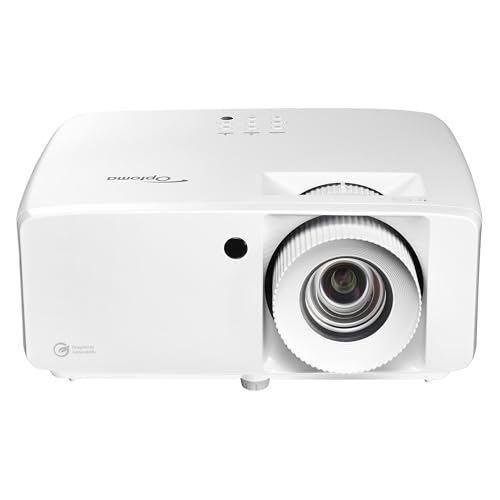 Optoma ZH451 Full HD 1080p Laser Projector
|
9.2/10 | Buy |
| Best Budget |
 ViewSonic PA503X 4000-Lumen XGA Projector
|
9.1/10 | Buy |
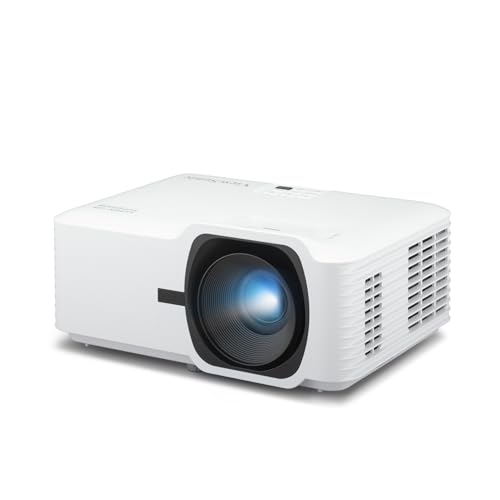 ViewSonic LSD400W WXGA 4000 Lumen Laser Projector
|
9.1/10 | Buy | |
 BenQ LH750 1080p Business Laser Projector
|
9.1/10 | Buy | |
 Optoma W405LVe WXGA Projector
|
8.9/10 | Buy | |
| Best Value |
 BenQ MW560C WXGA Business Projector 4000 Lumens
|
8.9/10 | Buy |
 ViewSonic PS502W Short Throw 4000 Lumens
|
8.9/10 | Buy | |
 Epson EX3290 3LCD WXGA Projector
|
8.9/10 | Buy | |
 XuanPad White Mini Projector 1080p Native
|
8.8/10 | Buy | |
 Exingxiu 3300 Lumen DLP Business Projector
|
8.4/10 | Buy |
ViewSonic PA503HD 1080p Projector
With 4,000 ANSI lumens and native Full HD resolution, this DLP projector delivers bright, sharp images even in rooms with moderate ambient light. Its low 16ms input lag and 120Hz refresh rate make it suitable for smooth multimedia presentations, while the 1.1x zoom and auto-keystone simplify setup.
Pros
- High 4,000 ANSI lumen brightness
- Native 1080p resolution for sharp detail
- Low 16ms input lag for smooth playback
- Flexible installation with ceiling mount support
- Easy image alignment with auto-keystone
Optoma ZH451 Full HD 1080p Laser Projector
This Optoma laser projector delivers 4,600 lumens of brightness with native 1080p resolution, making it a solid choice for well-lit meeting rooms and classrooms. Its 30,000-hour DuraCore laser eliminates lamp changes, and the compact design supports flexible 360-degree and portrait installation.
Pros
- High brightness works well with ambient light
- Long-life laser eliminates lamp replacement
- Flexible installation options (360-degree, portrait)
- Easy integration via LAN, RS232, dual HDMI
- Compact and energy-efficient design
Cons
- No included speakers for built-in audio
- Regular throw may require longer distance for large images
ViewSonic PA503X 4000-Lumen XGA Projector
This DLP projector delivers bright, clear XGA resolution and 4,000 lumens for professional presentations. It is a solid choice for business and classroom settings where ambient light is a concern.
Pros
- High brightness for well-lit rooms
- Low input lag minimizes delay
- Vibrant colors via SuperColor
- Flexible mounting options
Cons
- XGA resolution not full HD
- Relies on DLP lamp
- No smart features
ViewSonic LSD400W WXGA 4000 Lumen Laser Projector
This laser projector delivers crisp WXGA images and 4000 ANSI lumens for use in bright classrooms or conference rooms. Its compact, dust-sealed design enables flexible 360-degree mounting and up to 30,000 hours of maintenance-free operation.
Pros
- High brightness for moderate ambient light
- Low maintenance with no lamp or filter changes
- Compact and flexible installation options
- Instant on/off with no warm-up
- Energy efficient uses up to 49% less power
Cons
- Only WXGA not full HD 1080p
- No built-in speaker audio
- Limited connectivity with dual HDMI only
BenQ LH750 1080p Business Laser Projector
The BenQ LH750 delivers 5000 lumens of brightness and Full HD resolution, making presentations easy to read even in well-lit conference rooms. Its laser light source lasts up to 30,000 hours, lowering maintenance needs, while the 1.6x zoom and vertical lens shift simplify installation in different room layouts. This is a dependable option for businesses that want strong performance and lower long-term operating costs.
Pros
- High brightness suits lit meeting rooms
- Long-lasting laser light source
- Flexible zoom and lens shift
- Good connectivity for AV and IT
- Low maintenance and energy expenses
Cons
- Heavy at 13.23 pounds
Optoma W405LVe WXGA Projector
This portable business and classroom projector delivers 4200 ANSI lumens for bright presentations even with ambient light. Its WXGA resolution and built-in 10W speaker make it a practical choice for meetings and lessons, while USB power supports streaming sticks for added flexibility.
Pros
- High brightness at 4200 lumens
- Clear WXGA resolution for text
- Easy setup with zoom and keystone
- Versatile connectivity including USB power
- Useful built-in 10W speaker
Cons
- Only WXGA, not full HD
- Limited 1.1x zoom range
- No wireless connectivity built-in
BenQ MW560C WXGA Business Projector 4000 Lumens
This business projector delivers bright 4000-lumen images and clear text for meeting rooms. Its easy setup features like auto keystone and a retractable foot make it convenient for quick presentations.
Pros
- High 4000 ANSI lumens brightness
- Sharp text with Data Review Mode
- Easy setup with auto keystone
- SmartEco saves up to 70% lamp power
Cons
- WXGA resolution, not full HD
- No built-in speaker mentioned
ViewSonic PS502W Short Throw 4000 Lumens
This ViewSonic projector is designed for tight spaces, projecting a 100-inch image from just 4.5 feet away. Its 4000 ANSI lumens keep presentations visible even with ambient light, and SuperColor technology delivers vibrant colors. It's a solid choice for classrooms or small meeting rooms where space is limited.
Pros
- Short throw for small spaces
- 4000 lumens bright enough for ambient light
- SuperColor technology for vibrant colors
- Auto keystone correction for easy setup
- Instant power on/off
Cons
- Only WXGA resolution (1280x800)
- No built-in speaker
- Relatively heavy at 6.3 pounds
Epson EX3290 3LCD WXGA Projector
This Epson projector delivers 4,000 lumens of brightness and a 300-inch image, making it a solid choice for well-lit conference rooms or home theater setups. Its 3-chip 3LCD technology ensures accurate color without the rainbow artifacts common in single-chip DLP projectors.
Pros
- High brightness for well-lit rooms
- Accurate color with 3-chip 3LCD
- Large image up to 300 inches
- Dual HDMI inputs
- Built-in speaker
Cons
- Native WXGA resolution not 1080p
- No wireless connectivity built in
XuanPad White Mini Projector 1080p Native
This XuanPad mini projector delivers native 1080p resolution with support for 4K input, built-in streaming apps like Netflix and YouTube, and an auto-focus system for quick setup. Its compact 1.96-pound design with a detachable 360-degree stand makes it a strong choice for portable indoor or outdoor movie nights.
Pros
- Compact and lightweight at 1.96 pounds
- Built-in streaming apps for easy setup
- Auto focus and keystone correction for convenience
- 360-degree detachable stand for flexible placement
- Good connectivity with dual-band WiFi and Bluetooth
Cons
- Dimensions not detailed beyond approximate 6.93-inch size
- Brightness specs not stated in provided data
Exingxiu 3300 Lumen DLP Business Projector
This Exingxiu projector delivers 3300 lumens for clear daytime display in offices and classrooms. It uses DLP technology for natural colors and contrast, and its quick-start design gets presentations going fast.
Pros
- Bright 3300 lumens for daytime rooms
- DLP produces clean, detailed images
- Quick startup for busy schedules
- Easy wired setup with no extra steps
- Wide projection suits group viewing
Cons
- No built-in smart features or apps
- Limited to wired connections only
Best Business Projector Buying Guide
Brightness and Lumens
Brightness is arguably the most critical spec for a business projector. Measured in ANSI lumens, a higher number means the image stays visible even in rooms with windows or overhead lights.
For small to medium conference rooms, 3,000 to 4,000 lumens is a solid baseline; larger spaces or rooms with abundant ambient light benefit from 4,500 lumens or more.
If you often present in daylight conditions, check out our dedicated guide to daytime projectors for models that handle bright environments.
Keep in mind that lumen ratings from different brands aren’t always directly comparable due to varying measurement standards. Look for ANSI-certified ratings and read verified buyer feedback to gauge real-world performance.
A projector with 4,000 lumens is usually sufficient for most business settings, but if you’re setting up in a large auditorium, consider stepping up to 5,000 lumens or a laser model that maintains consistent brightness over time.
Resolution and Image Quality
Resolution directly affects how sharp text and detailed charts appear. For most business presentations, WXGA (1280×800) or 1080p Full HD (1920×1080) offers excellent clarity for spreadsheets, slides, and video clips.
XGA (1024×768) can still work for basic presentations but may look dated on larger screens. If you often display fine text or high-resolution images, a 1080p projector is a wise investment.
For more on panel technologies, see our roundup of the best DLP projectors for home and business.
Beyond resolution, consider contrast ratio and color accuracy. Business projectors with DLP or 3LCD technology typically offer vibrant colors and deep blacks, making graphs and images pop.
Some models also include HDR support for video playback, which can be a bonus for product demos or training sessions.
Connectivity and Compatibility
Modern business projectors need to connect to a variety of devices: laptops, streaming sticks, tablets, and sometimes smartphones.
Look for at least one HDMI port (preferably two), a VGA input for older laptops, and USB-A ports for powering a streaming stick or playing media from a flash drive.
Wireless connectivity via Miracast, Wi-Fi, or Bluetooth adds flexibility, especially for ad‑hoc meetings. Our guide to Wi‑Fi projectors covers models that make cable-free presentations easy.
Also check for built-in speakers, most business projectors include a modest 10W to 16W speaker, which is fine for small rooms. For larger spaces, you may want an audio output to connect external speakers.
Some models offer USB‑C connectivity for direct connection to modern laptops, eliminating the need for dongles.
Lamp Type and Longevity
The light source affects both running costs and maintenance. Traditional UHP lamps last 3,000 to 5,000 hours and are inexpensive to replace, but they gradually dim over time.
LED and laser light sources can last 20,000 hours or more, maintaining consistent brightness throughout their lifespan. Laser projectors are especially appealing for high‑use environments like classrooms or large corporations.
For a deeper look at long‑lasting options, explore our selection of quality projectors that emphasize durability.
If you plan to run the projector for several hours daily, a laser model may save you money in the long run despite the higher upfront cost.
Some projectors also feature eco modes that extend lamp life while reducing fan noise, a nice perk in quiet meeting rooms.
Portability and Setup
For professionals who present at multiple locations, weight and size matter. Compact business projectors under 5 pounds are easy to slip into a laptop bag. Features like auto keystone correction, 1.2x zoom, and quick startup make setup a breeze.
Short‑throw projectors can be placed close to the screen, reducing shadows and allowing you to stand in front of the image, ideal for interactive presentations. Check out compact projectors for travel‑friendly recommendations.
If the projector will be mounted on a ceiling or shelf, consider its lens shift and throw ratio. Some models offer interchangeable lenses for flexibility. For permanent installations, also factor in noise levels, most modern projectors are quiet enough not to distract during presentations.
Budget and Value
Business projectors range from under $200 for basic models to over $1,500 for feature‑rich laser units. Your budget should align with usage frequency, required brightness, and desired features.
For occasional use in a small office, a projector in the $199.99 to $1,599.00 range can deliver excellent value.
For daily use in a large boardroom, investing in a higher‑end model with laser light source and wireless connectivity pays off over time. Our guide to inexpensive projectors highlights budget picks that still perform well.
Remember that accessories like a screen, ceiling mount, or extended warranty can add to the total cost. Factor those into your decision, and always check verified buyer feedback for real‑world reliability insights.
Why You Should Trust Us
At BestProducts, we understand that choosing the right business projector is an investment in your professional image.
Our team evaluates each product using a consistent methodology: we analyze official specifications, aggregate expert review consensus from trusted industry sources, compile verified buyer feedback from multiple retailers, and cross‑reference published data.
Every model is then assigned a BP Score on a 0‑to‑10 scale that reflects its overall performance, value, and user satisfaction.
We do not conduct our own product trials; our evaluations are grounded in research, published data, expert review consensus, and verified buyer feedback. This approach allows us to deliver unbiased, data‑driven recommendations without the influence of manufacturer relationships.
Our affiliate model helps support our research, but we never allow commercial considerations to affect our ratings or editorial content.
Final Thoughts
After evaluating the top business projectors on the market, we’ve selected several standouts that excel in specific areas. Here are our top picks based on BP Score and real‑world performance:
- Best Overall: ViewSonic PA503HD, With 1080p Full HD resolution, 4,000 lumens of brightness, and a strong BP Score in its class, this projector strikes the perfect balance between image quality, brightness, and affordability for most business environments.
- Best for Bright Rooms: BenQ LH750, Its 5,000‑lumen LED light source ensures vivid presentations even in sunlit conference rooms, backed by a 9.1 BP Score that highlights its exceptional brightness and color accuracy.
- Best Budget Pick: ViewSonic PA503X, Offering 4,000 lumens and XGA resolution at an accessible price, this model delivers dependable performance for cost‑conscious buyers without sacrificing brightness.
- Best Laser Model: Optoma ZH451, With a laser light source, 4,600 lumens, and built‑in Miracast wireless display, this projector is built for longevity and hassle‑free connectivity, earning a top‑tier BP Score.
- Best Short‑Throw: ViewSonic PS502W, Its short‑throw lens allows placement close to the screen, reducing shadows and making it ideal for small rooms or interactive presentations, all while delivering 4,000 lumens and WXGA resolution.
Each of these projectors has been thoroughly vetted through our research process. For more tailored recommendations, browse our office projector guide or classroom projector guide to find the perfect fit for your specific setting.
Frequently Asked Questions
What brightness do I need for a business projector?
For most conference rooms with some ambient light, 3,000 to 4,000 ANSI lumens is recommended. If your room has large windows or you present with lights on, look for 4,500 lumens or more. For small, dark rooms, 2,500 lumens may suffice.
Our daytime projector guide offers more specific advice for bright environments.
Is 1080p necessary for business presentations?
1080p Full HD is ideal for displaying detailed spreadsheets, fine text, and high‑resolution images. If your presentations are mostly text‑based or you’re on a tight budget, WXGA (1280×800) or XGA (1024×768) can still be clear for slides and basic content.
For video or graphics‑heavy content, 1080p is strongly recommended.
Can I connect my laptop wirelessly to a business projector?
Many modern business projectors offer built‑in Wi‑Fi, Miracast, or Bluetooth for wireless mirroring. Some models also support screen sharing via apps.
Check the specifications for wireless standards; if your projector lacks built‑in Wi‑Fi, you can often add a streaming stick via HDMI. For more options, see our Wi‑Fi projector roundup.
How long do business projector lamps last?
Traditional UHP lamps typically last 3,000 to 5,000 hours in normal mode, and up to 8,000 hours in eco mode. Laser and LED light sources can last 20,000 to 30,000 hours, making them a better choice for heavy daily use.
Replacement lamps usually cost $50, $200, while laser projectors require no lamp replacements over their lifespan.
What is the difference between DLP and 3LCD projectors?
DLP (Digital Light Processing) projectors typically offer higher contrast and sharper images, and are often more compact. 3LCD projectors deliver brighter, more saturated colors and are less prone to the “rainbow effect” that some viewers notice on DLP models.
Both technologies are well‑suited for business use. For a detailed comparison, explore our DLP projector guide.
Do I need a special screen for a business projector?
While a white wall can work in a pinch, a dedicated projection screen improves brightness, contrast, and viewing angles. For most business settings, a matte white or gray screen with a gain of 1.0 to 1.2 is sufficient.
If you often present in bright rooms, an ambient‑light‑rejecting screen can help. Check our 120‑inch projector screen guide for recommendations.
About the author
Maxine is BestProducts's big screen writer, comparing TVs and projectors on brightness, contrast, motion handling, and room fit. She helps readers match a display to their space, their lighting, and their budget.