The Best Brown Mechanical Keyboard
Looking for a tactile, quiet mechanical keyboard? Our roundup of the best brown switch models includes top picks from AULA, Redragon, Keychron, and more, evaluated for build, connectivity, and value.
 By Josephine Mason
Updated September 12, 2026
By Josephine Mason
Updated September 12, 2026
If you’re shopping for a mechanical keyboard that delivers a satisfying tactile feel without the noise of clicky switches, brown switches are the perfect middle ground.
They offer a noticeable bump at the point of actuation, giving you confident feedback during both typing and gaming. In 2026, the market is filled with excellent brown-switch keyboards, from budget-friendly options to premium wireless models.
At BestProducts, we research and evaluate each model based on specifications, expert review consensus, and verified buyer feedback, so you can make an informed choice. To explore more form factors, check out our roundup of the best compact mechanical keyboards.
Below, we’ve curated our top picks for the best brown mechanical keyboard in 2026. Whether you need a full-size keyboard for the office, a wireless low-profile board for travel, or a gaming-focused model with RGB, our list has you covered.
Scroll down for detailed buying advice and answers to common questions about brown switches.
| Award | Product | BP Score About BP ScoreThe BP Score is our own rating from 0 to 10, based on performance, design and build, ease of use, and value. It reflects independent research and is never influenced by manufacturers, retailers, or affiliate commissions. Learn more › | Price | |
|---|---|---|---|---|
| Best Premium |
 AULA F75 75% Wireless Mechanical Keyboard
|
9.9/10 | $73.98 | Buy |
| Best Overall |
 Redragon K556 Wired RGB Mechanical Keyboard
|
9.9/10 | $53.99 | Buy |
| Best Budget |
 Merdia Wireless Mechanical Keyboard 100 Keys
|
9.8/10 | $39.98 | Buy |
 Keychron C2 Wired Mechanical Keyboard
|
9.8/10 | $43.30 | Buy | |
| Best Value |
 Keychron K3 V2 QMK 75% Wireless Low-Profile
|
9.8/10 | $59.63 | Buy |
 Cherry KC 200 MX Wired Keyboard MX2A Brown
|
9.8/10 | $79.07 | Buy | |
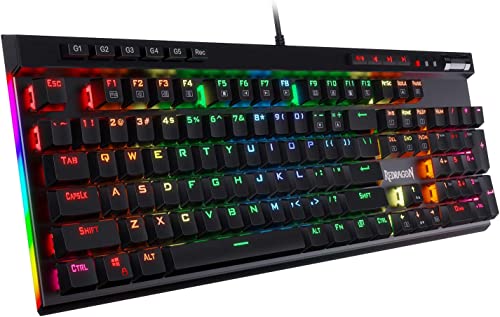 Redragon K580 Wired Hot-Swappable Gaming Keyboard
|
9.6/10 | $49.62 | Buy | |
 SOLAKAKA A99 Pro LCD Mechanical Keyboard
|
9.5/10 | $73.99 | Buy |
AULA F75 75% Wireless Mechanical Keyboard
This 81-key mechanical keyboard features pre-lubed linear switches and a five-layer silicone dampening structure for a creamy, thocky feel. Tri-mode connectivity (Bluetooth 5.0, 2.4GHz, USB-C) and a 4000mAh battery make it suitable for gaming and everyday work.
Pros
- Hot-swappable PCB supports 3- or 5-pin switches
- Tri-mode connection with up to 5 devices
- Large 4000mAh battery for extended use
- 16.8 million RGB backlit with 16 lighting effects
- Multi-function knob for volume and lighting control
Cons
- Only available in White&Brown color option
Redragon K556 Wired RGB Mechanical Keyboard
This full-size mechanical keyboard features a sturdy aluminum frame that resists flex during fast-paced gaming. Its hot-swappable switch sockets let you change switches without soldering, and the included Brown switches offer a comfortable tactile bump for typing and gaming. With 20 RGB presets and anti-ghosting for all 104 keys, it's a solid wired option for gamers who want durability and customization without breaking the bank.
Pros
- Sturdy aluminum construction
- Hot-swappable switch sockets
- Vibrant RGB with 20 presets
- Full anti-ghosting for 104 keys
- Plug-and-play with Windows and Mac
Cons
- Weighs over 2.2 pounds, not very portable
- Full customization requires companion software
Merdia Wireless Mechanical Keyboard 100 Keys
This full-size wireless mechanical keyboard offers three connection modes and hot-swappable brown switches, making it a versatile option for both productivity and gaming setups. Its RGB backlighting and rechargeable design add extra convenience for everyday use.
Pros
- Versatile wireless connectivity options
- Responsive brown switches suit typing and gaming
- Full-size layout includes a numeric keypad
- Hot-swappable design allows easy customization
Keychron C2 Wired Mechanical Keyboard
A reliable choice for productivity and light gaming, this full-size wired keyboard from Keychron pairs a tactile brown switch with a retro color scheme. Its optimized Mac layout and included extra keycaps make it versatile across operating systems.
Pros
- Full-size layout with dedicated numpad
- Tactile brown switches offer responsive feedback
- Durable construction rated for 50 million keystrokes
- Compatible with both Mac and Windows out of the box
- Adjustable two-level feet for ergonomic typing
Cons
- Non-backlight version limits use in low light
- Wired connection only (no Bluetooth option)
- Num Lock function works solely on Windows
Keychron K3 V2 QMK 75% Wireless Low-Profile
This ultra-slim mechanical keyboard packs a 75% layout with low-profile switches for speed and portability. Bluetooth 5.1 lets you pair up to three devices, while the QMK firmware and AI assistant make customization simple.
Pros
- Ultra-slim and lightweight aluminum body
- Connects with up to 3 devices via Bluetooth 5.1
- Open-source QMK firmware for full key remapping
- Built-in AI assistant for easy customization
- Includes Mac layout and extra Windows keycaps
Cons
- Signal interference may occur at longer distances
- Plastic bottom frame feels less premium
- White backlight only, no per-key RGB
Cherry KC 200 MX Wired Keyboard MX2A Brown
This wired mechanical office keyboard uses Cherry's latest MX2A Brown switches for a precise tactile feel without a click. It features a durable anodized metal plate, laser-etched keycaps, and dedicated media keys for practical daily use.
Pros
- Improved CHERRY MX2A Brown switches for tactile feedback
- Durable anodized metal plate and robust build
- Laser-etched abrasion-resistant keycaps
- Full N-key rollover and anti-ghosting
- Dedicated calculator and volume control keys
Cons
- Wired only, no wireless connectivity
- Limited color options available
Redragon K580 Wired Hot-Swappable Gaming Keyboard
For gamers seeking customization without soldering, the Redragon K580 brings hot-swappable switches, dedicated macro keys, and a media wheel in a durable wired design. Its Brown switches deliver a quiet tactile bump, while full anti-ghosting ensures accurate inputs during intense play.
Pros
- Hot-swappable switch sockets for easy customization
- 5 dedicated macro keys for on-the-fly combos
- Durable double-shot keycaps rated for 50M keystrokes
- Full anti-ghosting on all 104 keys
- Optional software for advanced RGB effects
SOLAKAKA A99 Pro LCD Mechanical Keyboard
The SOLAKAKA A99 Pro is a feature-packed mechanical keyboard with a built-in LCD screen and metal knob for easy control. It offers tri-mode connectivity, hot-swappable switches, and a gasket structure for a creamy typing feel, making it a versatile option for both gaming and work.
Pros
- LCD screen provides useful info at a glance
- Metal knob offers intuitive volume and lighting control
- Hot-swappable switches allow easy customization without soldering
- Long battery life with 8000mAh capacity
- Tri-mode connectivity works with up to 5 devices simultaneously
Cons
- Software customization requires a wired connection
- Keycaps are OEM profile, which may not suit all preferences
Best Brown Mechanical Keyboard Buying Guide
Switch Type and Tactile Feel
Brown switches are defined by their tactile bump, which occurs right at the actuation point. This feedback helps typists know exactly when a keypress registers without needing to bottom out.
Compared to linear switches (like Cherry MX Red), browns provide more precision, while being quieter than clicky switches (like Cherry MX Blue).
When evaluating a brown mechanical keyboard, look for the specific switch brand and version, Cherry MX Brown is the gold standard, but many clones like Gateron Brown or Kailh Brown offer excellent feel at lower prices.
For a closer look at switch types, see our guide to non-mechanical keyboards if you’re still weighing options.
Some keyboards come with hot-swappable sockets, allowing you to easily change switches later. This is a huge advantage if you want to experiment with different tactile or linear switches without soldering.
Hot-swappable boards like the AULA F75 and SOLAKAKA A99 Pro give you the flexibility to customize your typing feel over time.
Build Quality and Materials
A keyboard’s build determines its longevity and stability. Look for models with an aluminum or steel top plate, which adds weight and prevents flex. Full plastic bodies are lighter but may feel less premium.
Features like a gasket mount (found on the AULA F75) improve sound and cushioning, while double-shot PBT keycaps resist shine and wear.
If durability is your priority, consider a board with a metal frame; our best aluminum mechanical keyboard guide highlights top choices.
Also check the stabilizers for larger keys like spacebar and shift. Pre-lubed stabilizers reduce rattle and provide a smoother feel. Verified buyer feedback often mentions stabilizer quality, so it’s worth reading through reviews.
Connectivity and Wireless Options
Modern mechanical keyboards offer wired (USB‑C), Bluetooth, and 2.4GHz wireless connections. Wireless models like the Keychron K3 and Merdia let you reduce cable clutter, but be aware of latency and battery life.
For gaming, a 2.4GHz dongle or wired mode is often preferred for the lowest latency. Bluetooth 5.0+ provides reliable connections for office work or casual use.
If you move between devices, triple-mode keyboards (USB‑C, BT, 2.4GHz) like the Merdia and SOLAKAKA are ideal. For a broader look at wireless options, browse our best wireless mechanical keyboard guide.
Battery life varies widely; some keyboards last weeks on a single charge, while others need weekly charging. Look for USB‑C charging for faster recharge times.
Size and Layout
Keyboards come in several sizes: full‑size (100%), tenkeyless (TKL, 80%), 75%, 65%, and 60%. Full‑size boards like the Keychron C2 and Cherry KC 200 include a numpad, essential for data entry. TKL models save desk space while retaining arrow keys and function row.
Compact 75% boards (e.g., AULA F75) drop the numpad but keep navigation keys in a condensed layout. For a minimalist setup, a 65% or 60% board is great, but you’ll lose dedicated arrow keys.
Our best tenkeyless mechanical keyboard guide can help you decide if TKL suits your needs.
Consider your desk space and primary use. Gamers often prefer compact layouts to keep the mouse closer. Typists who rely on a numpad should look at full‑size options.
Additional Features: RGB, Macros, and Media Controls
RGB backlighting is common, but not all implementations are equal. Look for per‑key RGB and software‑based customization.
Boards like the Redragon K580 and SOLAKAKA A99 Pro offer dedicated media wheels and macro keys, which are handy for productivity and gaming.
If you need custom keymaps, hot‑swappable switches and QMK/VIA support (like on Keychron boards) give you deep control. For a look at feature‑rich options, see our best prebuilt mechanical keyboard guide.
Some keyboards include a built‑in LCD screen (like the SOLAKAKA A99 Pro) for displaying system stats or animations. It’s a nice touch but not essential for most users. Ensure the software is compatible with your operating system.
Price and Value
Brown switch keyboards range from budget to premium. Entry‑level models around $40‑50 (like the Redragon K556 and Merdia) offer great value with solid build and basic features.
Mid‑range options ($60‑80) often include wireless connectivity, hot‑swappable switches, and better build materials. High‑end boards (over $100) may have premium switches, aluminum cases, and advanced software. There’s no need to overspend, many affordable keyboards deliver excellent performance.
Our best budget mechanical keyboard guide highlights top picks under $60.
Consider the total cost of ownership: some keyboards come with extra keycaps or switch pullers, adding value. Also check warranty and return policies.
Why You Should Trust Us
BestProducts is an independent review site, and we do not conduct our own product trials; our evaluations are grounded in research, published data, expert review consensus, and verified buyer feedback.
Each product is scored on our 0, 10 BP Score using a consistent set of criteria tailored to the product category.
For mechanical keyboards, we assess switch quality, build materials, connectivity, size options, additional features, and overall value based on what real users and professional reviewers report.
We update our picks regularly as new models are released and prices change, ensuring our recommendations stay current for 2026.
Our team includes tech enthusiasts who have been reviewing keyboards for years. We do not accept free samples or payment from manufacturers in exchange for favorable reviews.
When you buy through links on our site, we may earn an affiliate commission, but that never influences our scores or rankings. For more on how we work, see our computers & office category for related guides.
Final Thoughts
After thorough analysis, here are our top picks for the best brown mechanical keyboard in 2026.
- Best Overall: AULA F75 75% Wireless Mechanical Keyboard, With a top BP Score in our evaluation, the AULA F75 offers a perfect blend of wireless connectivity, hot‑swappable pre‑lubed linear switches, a gasket mount for a creamy feel, and RGB backlighting. Its compact 75% layout saves desk space while retaining essential keys, making it suitable for both work and play.
- Best Budget Pick: Merdia Wireless Mechanical Keyboard, Priced affordably, the Merdia delivers triple‑mode connectivity, a 100‑key layout, and hot‑swappable brown switches. It’s an excellent entry point for anyone wanting wireless flexibility without breaking the bank. It achieved a very high BP Score for its feature set.
- Best for Typing: Keychron C2 Full Size Wired Mechanical Keyboard, This full‑size board with Cherry‑style brown switches offers a classic typing feel and a retro design. It’s wired for zero latency and comes with excellent build quality. Its BP Score reflects its strong performance in office and writing environments.
- Best for Gaming: Redragon K556 Wired RGB Mechanical Gaming Keyboard, Featuring an aluminum frame, per‑key RGB, and dedicated macro keys, the K556 is built for gaming. It uses Outemu brown switches that deliver satisfying tactile feedback. It earned one of the highest BP Scores in the gaming keyboard category.
- Best for Office: Cherry KC 200 MX Wired Mechanical Office Keyboard, Built with genuine Cherry MX2A brown switches, this keyboard provides a premium typing experience with a quiet, refined sound. Its full‑size layout and durable construction make it ideal for professional workspaces. It scored among the top in our office keyboard assessments.
Frequently Asked Questions
What are brown switches best for?
Brown switches are ideal for users who want tactile feedback without the loud click of blue switches. They’re great for both typing and gaming, offering a noticeable bump that confirms keypresses while remaining quiet enough for shared offices.
Many users switch to browns when they want a versatile balance between speed and precision.
How do brown switches compare to red and blue switches?
Brown switches are tactile but not clicky (unlike blue switches), and unlike linear red switches, they have a bump mid‑stroke.
Reds are smoother and often preferred for fast gaming, while blues are best for pure typing but can be noisy. Browns offer a middle ground, making them popular all‑around switches.
If you’re deciding between switch types, our best feel mechanical keyboard guide can help you understand the differences.
Are wireless brown switch keyboards good for gaming?
Yes, modern wireless keyboards with 2.4GHz dongles offer latency comparable to wired connections. Bluetooth may have slight lag for competitive gaming, but casual gamers will be fine. Look for models with low‑latency modes and a long battery life.
The AULA F75 and SOLAKAKA A99 Pro are excellent wireless options that support gaming.
Can I replace brown switches with other switch types?
If your keyboard is hot‑swappable, you can easily swap brown switches for reds, blues, or any compatible switch. This is a great way to customize your typing feel without buying a new keyboard.
Many of our recommended keyboards, like the AULA F75 and SOLAKAKA A99 Pro, support hot swapping. For more on customizable boards, see our best buildable mechanical keyboard guide.
Do I need a full‑size keyboard or a smaller layout?
It depends on your desk space and workflow. Full‑size (100%) keyboards include a numpad, ideal for spreadsheet work. Tenkeyless (80%) removes the numpad, saving space while keeping arrow keys and function row. Compact 75% and 65% layouts are great for minimalist setups.
If you’re unsure, try a TKL or 75% for a good compromise. Our best small mechanical keyboard guide can help you choose.
How important is RGB backlighting on a brown switch keyboard?
RGB is a personal preference and not essential for performance. It can enhance your setup’s aesthetics and help you find keys in the dark. Most gaming keyboards include per‑key RGB with software customization.
For office use, a simple white backlight may be sufficient. If you value customizable lighting, look for boards with dedicated software. For more lighting options, see our best backlight mechanical keyboard guide.
About the author
Josephine covers mechanical keyboards and wireless mice for BestProducts, comparing switch feel, build quality, sensor precision, and battery life. She guides readers through a deeply personal choice with clear, practical advice.