The Best Chrome Tablet
We researched top Chrome tablets and Chromebooks, from budget renewed models to powerful 2-in-1s. Find your ideal device with our expert consensus and verified buyer reviews.
 By Clyde Spencer
Updated September 11, 2026
By Clyde Spencer
Updated September 11, 2026
Chrome tablets have become a versatile option for users who want a lightweight device for browsing, streaming, and productivity on the go.
Whether you prefer a dedicated tablet running Chrome OS or an Android tablet that supports the Chrome browser, the market offers a wide range of choices to fit different budgets and use cases.
At BestProducts, we evaluate each model through comprehensive research, expert review consensus, and verified buyer feedback to help you find the best Chrome tablet for your needs.
Our team has analyzed specifications, compared performance data, and gathered real-world insights from thousands of verified buyers to bring you a curated selection of top-performing devices.
Below, you will find our top picks, each scored on our 0-to-10 BP Score based on consistent criteria. Let us help you choose the perfect Chrome tablet in 2026.
| Award | Product | BP Score About BP ScoreThe BP Score is our own rating from 0 to 10, based on performance, design and build, ease of use, and value. It reflects independent research and is never influenced by manufacturers, retailers, or affiliate commissions. Learn more › | |
|---|---|---|---|
| Best Overall |
 Lenovo Tab One 8.7 inch HD Tablet
|
9.2/10 | Buy |
| Best Budget |
 Lenovo 10E Chromebook Tablet 10.1
|
9.1/10 | Buy |
 Jeazans X7 11-Inch Android Tablet
|
9.1/10 | Buy | |
| Best Premium |
 Acer Chromebook Plus Spin 514 (i5/8GB/512GB)
|
8.8/10 | Buy |
 Suicoey Android 16 Tablet (26GB+256GB)
|
8.6/10 | Buy | |
| Best Value |
 Lenovo Idea Tab 11" 2.5K Tablet with Pen
|
8.4/10 | Buy |
 Lenovo Idea Tab 11-inch 2.5K 8GB/256GB
|
8.1/10 | Buy | |
 Acer Chromebook Plus Spin 514 (i5-1334U)
|
8.0/10 | Buy |
Lenovo Tab One 8.7 inch HD Tablet
With a compact 8.7-inch HD display and a lightweight design under a pound, the Lenovo Tab One focuses on portability and long battery life. It offers up to 12.5 hours of YouTube streaming, making it a solid choice for casual entertainment on the go.
Pros
- Long battery life for streaming
- Lightweight and portable design
- Included folio case protects tablet
- Vibrant HD display with good brightness
Cons
- 60Hz refresh rate not for high-end gaming
- Only 4GB memory may limit multitasking
- No high-resolution display (HD only)
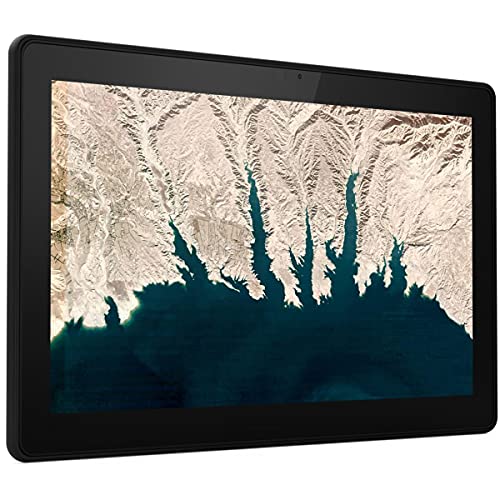
Lenovo 10E Chromebook Tablet 10.1
Built for young students, this 10.1-inch Chromebook tablet features a durable design and FHD display with Dragontrail Pro glass. It integrates seamlessly into Chrome ecosystems, making it a practical tool for early education.
Pros
- Durable build with Dragontrail Pro glass
- FHD display for clear visuals
- Classroom-ready Chrome integration
- Easy for young children to use
- Boosts learning and creativity
Cons
- Heavier than typical tablets at 2.1 pounds
- Only available in black
- Renewed (refurbished) condition
Jeazans X7 11-Inch Android Tablet
The Jeazans X7 is an 11-inch Android tablet that balances productivity and entertainment with a large 7800mAh battery, an octa-core processor with Gemini AI, and Widevine L1 certification for HD streaming. It offers 128GB of storage expandable to 1TB, making it suitable for students and professionals on a budget.
Pros
- Large 7800mAh battery for extended use
- Widevine L1 certification for HD streaming
- Expandable storage up to 1TB
- Octa-core processor with Gemini AI
- Runs latest Android 16 OS
Cons
- Low-resolution 800x1280 display
- Mediocre camera specs (5MP front, 8MP rear)
- No cellular connectivity, WiFi only
Acer Chromebook Plus Spin 514 (i5/8GB/512GB)
This 2-in-1 Chromebook features a 360-degree hinge, 14-inch FHD touchscreen, and an Intel Core i5-1334U processor for smooth multitasking. With 8GB RAM and 512GB SSD, it handles schoolwork and streaming well, plus a backlit keyboard and up to 13 hours of battery life.
Pros
- Touchscreen with 360-degree hinge
- Fast Intel Core i5 processor
- Backlit keyboard
- 13-hour battery life
- Lightweight at 3.31 pounds
Cons
- Integrated graphics limit gaming performance
Suicoey Android 16 Tablet (26GB+256GB)
This 10-inch Android 16 tablet offers an enormous 26GB of RAM and 256GB of storage (expandable to 2TB), making it a multitasking powerhouse. It includes a keyboard, mouse, stylus, and case for laptop-like productivity, plus a 8000mAh battery and Widevine L1 screen for all-day streaming.
Pros
- Massive 26GB RAM for heavy multitasking
- Large 8000mAh battery for all-day use
- Expandable storage up to 2TB
- Includes keyboard, mouse, stylus, and case
- Android 16 with built-in Gemini AI assistant
Cons
- Screen resolution only 1280x800 (HD)
Lenovo Idea Tab 11" 2.5K Tablet with Pen
The Lenovo Idea Tab is a capable tablet for college students, pairing a sharp 11-inch 2.5K IPS display with AI-enhanced multitasking from the MediaTek Dimensity 6300 processor. Its included pen and learning apps make note-taking and studying efficient, while the all-day battery ensures you stay productive.
Pros
- Sharp 2.5K display with 90Hz smoothness
- All-day battery with fast 20W charging
- Includes pen and case out of the box
- AI-powered study apps built in
- Harmful blue light reduction for eye comfort
Cons
- Only 4GB memory may limit heavy multitasking
- Integrated GPU is not for gaming
Lenovo Idea Tab 11-inch 2.5K 8GB/256GB
This college-focused tablet combines a crisp 11-inch 2.5K 90Hz display with a MediaTek Dimensity 6300 processor and 8GB of RAM for smooth multitasking. It comes with a Tab Pen, folio case, and preloaded AI study apps, while quad Dolby Atmos speakers and all-day battery life keep you entertained. Based on specs, it is a solid mid-range option for students seeking a versatile device for both productivity and media consumption.
Pros
- Sharp 11-inch 2.5K 90Hz IPS display with low blue light
- MediaTek Dimensity 6300 with AI-enhanced performance
- Includes Tab Pen and Folio Case with learning apps
- Quad Dolby Atmos speakers for immersive audio
- All-day battery life with fast 20W charging
Cons
- Integrated Mali-G57 GPU may limit gaming performance
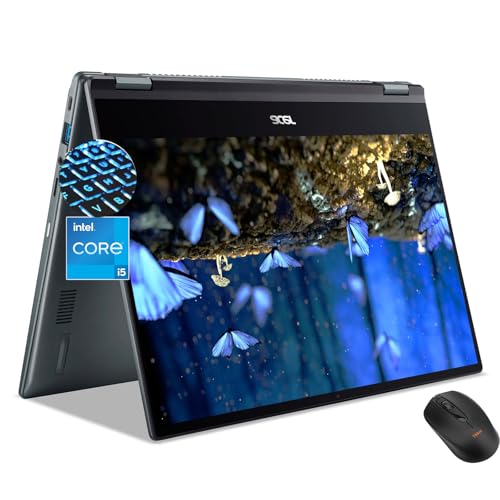
Acer Chromebook Plus Spin 514 (i5-1334U)
The Acer Chromebook Plus Spin 514 is a 2-in-1 Chromebook with a 14-inch FHD touchscreen and an Intel Core i5-1334U processor. It offers fast boot times and smooth multitasking for school or light gaming, plus a backlit keyboard and up to 13 hours of battery life.
Pros
- 2-in-1 convertible touchscreen design
- Intel Core i5 processor for snappy performance
- 512GB SSD provides fast storage
- Backlit keyboard for typing in low light
- All-day battery life up to 13 hours
Cons
- 8GB RAM may limit heavy multitasking
- Chrome OS limits app selection
Best Chrome Tablet Buying Guide
Performance and Processor
The processor determines how smoothly a tablet runs multiple apps, streams video, or handles light work. Many modern Chrome tablets use MediaTek or Intel chips.
MediaTek Helio G85 and Dimensity 6300 offer strong everyday performance, while Intel Core i5 provides extra power for multitasking on 2-in-1 devices. If you plan to use demanding web apps or run Linux apps, consider a higher-end CPU.
For basic browsing and media, a mid-range chip is sufficient.
When evaluating performance, we look at benchmark scores, expert reviews, and user reports on real-world responsiveness. A reliable Chrome tablet should handle 10+ tabs and YouTube streaming without lag.
For more demanding tasks, such as photo editing or coding, a Chrome tablet with at least 8GB of RAM and a fast processor is recommended. Always check for recent models with updated chipsets for better efficiency.
If you prioritize multitasking, a device with a newer processor and ample RAM will serve you better. However, for casual use, even an entry-level Chromebook tablet can deliver a smooth experience.
Compare our picks in the list above to see which one matches your performance needs.
Display Quality
A crisp, bright display enhances everything from reading to watching movies. Look for resolutions of at least Full HD (1920×1080) on 10-inch and larger screens.
Higher resolution panels like 2.5K provide sharper text and images, which is especially useful for creative work or note-taking with a stylus. Refresh rates of 90Hz or higher make scrolling feel fluid.
IPS technology is common in this category, offering good viewing angles and color accuracy. Some Chrome tablets, such as those from Lenovo, include 2.5K IPS displays with 90Hz refresh rates, which are excellent for both productivity and entertainment.
For outdoor use, aim for a brightness of 400 nits or more. Always check user feedback about screen clarity and glare.
If you plan to use the tablet for drawing or note-taking, a high-resolution display with stylus support is a must. Many models include a pen or folio case, adding value. Refer to our dedicated guide on the best display tablets for more insights.
Battery Life
Battery longevity is crucial for a portable device. Most Chrome tablets offer between 8 and 12 hours of mixed use, depending on the processor, display size, and battery capacity.
Larger batteries, such as 7,800 mAh in some Android tablets, can extend usage to two days of light work. Verified buyer reports often highlight real-world battery life, which can differ from manufacturer claims.
We consider both the battery capacity (mAh) and energy efficiency of the processor. Models with 10+ hours of streaming or browsing are ideal for students and travelers. Fast charging support is another useful feature.
For example, some tablets can charge from 0 to 50% in under 45 minutes. Always read user reviews to confirm battery performance under typical workloads.
Operating System: Chrome OS vs. Android
Chrome OS tablets offer a desktop-like experience with support for keyboard and mouse, Linux apps, and Android app compatibility through Google Play. They are best for users who need a laptop replacement or prefer a full web browser with extensions.
Android tablets, on the other hand, provide a more extensive app ecosystem and are generally lighter and more media-focused.
Both platforms support the Chrome browser, but Chrome OS has better multitasking and file management. If you need a Chromebook that converts to a tablet, consider 2-in-1 models like the Acer Chromebook Spin 514.
For a pure tablet experience with Android flexibility, an Android tablet like the Lenovo Tab One is a solid choice. Think about your primary tasks before deciding.
Connectivity and Storage
Reliable connectivity options, including dual-band WiFi, Bluetooth 5.0 or higher, and optional LTE, ensure you stay connected anywhere. Many modern tablets support WiFi 6 for faster speeds.
Storage is another key factor: 64GB is enough for light users, but 128GB or 256GB is better for offline media and apps. Some tablets offer expandable storage via microSD, which is a budget-friendly way to add space.
For work or study, a tablet with at least 4GB of RAM and 64GB of storage is recommended. If you plan to install many apps or download videos, opt for 8GB RAM and 128GB storage.
Check user feedback about storage speed and whether the device supports fast memory. For a deeper dive, see our roundup of the best tablets for every need.
Build and Portability
A lightweight, durable build is essential for daily carry. Tablets weighing under 1.5 pounds (700g) are easy to hold for extended periods. Metal chassis offer better durability than plastic, but plastic designs are often lighter and cheaper.
A folio case or keyboard attachment adds protection and functionality. Many Lenovo models include a folio case in the box, which increases convenience.
Screen size affects portability: 8 to 10 inches is pocketable and great for reading, while 11 to 14 inches provides a larger workspace for tasks like split-screen browsing. Consider where you will use the device most.
For travel and commuting, a smaller tablet is preferable. For use at a desk with a keyboard, a larger 2-in-1 might be better. Check our guide on the best small tablets for portable alternatives.
Why You Should Trust Us
BestProducts is an independent review site that evaluates products through a strict methodology. Each product receives a BP Score from 0 to 10 based on consistent criteria, including detailed specifications, expert review consensus, verified buyer feedback, and published data from reputable sources.
We do not conduct our own product trials; our evaluations are grounded in research, published data, expert review consensus, and verified buyer feedback.
Our team of editors analyzes hundreds of user reviews from verified purchasers to identify common praises and complaints. We also monitor professional reviews from multiple publications to ensure balanced assessments. By combining these sources, we provide recommendations you can trust.
For more context on how we rate, see our Electronics category page.
We are transparent about our affiliate relationships: we may earn a commission if you purchase through our links, but this does not influence our ratings or rankings.
Our goal is to help you find the best Chrome tablet for your needs, whether you are a student, professional, or casual user.
Final Thoughts
- Best Overall: Lenovo Tab One, With a balanced MediaTek processor, 12.5 hours of streaming, and a compact 8.7-inch HD display, this tablet offers the best combination of performance, battery life, and value, earning a top BP Score in our analysis.
- Best Budget: Lenovo 10E Chromebook Tablet (Renewed), For under $70, this renewed Chrome OS tablet provides a full desktop-like experience with a 10.1-inch screen, making it an unbeatable choice for budget-conscious users who need a functional Chrome tablet.
- Best 2-in-1 Chromebook: Acer Chromebook Plus Spin 514, Featuring an Intel Core i5 processor, 8GB RAM, and a 14-inch FHD touchscreen, this convertible excels as both a laptop and a Chrome tablet, perfect for students and professionals needing versatility.
Frequently Asked Questions
What is a Chrome tablet?
A Chrome tablet is a device that runs Chrome OS, Google’s operating system designed for the web. It functions like a laptop but with a touchscreen and often a removable keyboard.
Chrome tables support Android apps from Google Play, Linux apps, and full desktop browsers. They are known for speed, security, and simplicity.
Some Android tablets are also referred to as Chrome tablets because they come with the Chrome browser pre-installed, though they do not run Chrome OS. For this guide, we include both Chrome OS tablets and Android tablets that excel with the Chrome browser.
Can Android tablets run Chrome OS?
No, Android tablets cannot run Chrome OS natively. However, they can run the Chrome browser and use many of the same Google services.
For a full Chrome OS experience with desktop capabilities, you need a Chromebook or a Chrome OS tablet. Android tablets are better suited for media consumption and casual web browsing.
How much storage do I need?
For light use (browsing, email, video streaming), 64GB is sufficient. If you plan to download many apps, store media offline, or work with large files, consider 128GB or 256GB.
Many tablets support microSD cards for expandable storage, which is a cost-effective option. Check user reviews to verify the storage speed and reliability.
Is a Chrome tablet good for students?
Yes, Chrome tablets are excellent for students because they are lightweight, affordable, and secure. They offer long battery life, seamless integration with Google Classroom and Docs, and support for stylus for note-taking.
Models like the Lenovo Idea Tab with included pen and folio case are particularly suited for education. For more options, see our roundup of the best cheapest tablets.
What is the difference between Chrome OS and Android?
Chrome OS is a desktop-oriented operating system focused on web apps, productivity, and multitasking with windowed apps. It supports Android apps via Google Play but is not a phone OS.
Android is a mobile OS designed for phones and tablets, with a larger app library but less desktop functionality. Chrome OS is better for typing and complex workflows, while Android is better for touch-first media and games.
Are all Chrome tablets touchscreen?
Yes, by definition, Chrome tablets have touchscreen displays. Some 2-in-1 Chromebooks also have touchscreens that work in tablet mode. However, not all Chromebooks are tablets; only those with 2-in-1 hinges or detachable keyboards qualify.
For a pure touch experience, dedicated tablets like the Lenovo Tab One are the best choice. Check our guide to the best touchscreen tablets for more recommendations.
About the author
Clyde covers smartphones and tablets for BestProducts, balancing cameras, battery life, and display quality against price and how long each maker ships updates. He helps readers find the best value as the field shifts with every release.