The Best Tablet for Watching TV
We evaluated the top tablets for TV viewing based on screen quality, performance, and value to help you find the perfect companion for your shows.
 By Maxine Hansen
Updated September 11, 2026
By Maxine Hansen
Updated September 11, 2026
If you love catching up on shows, movies, or live sports but don’t want to be tied to a living-room couch, a tablet is the perfect companion.
The best tablet for watching TV combines a vibrant display, long battery life, and enough processing power to handle streaming apps without stuttering.
Whether you’re in bed, on a plane, or relaxing on the patio, the right tablet can replace a second television and give you a personal cinema experience.
This guide will walk you through the top picks based on screen quality, performance, and value, so you can find the ideal fit for your viewing habits.
At BestProducts, our editors evaluate each model through comprehensive research, analyzing technical specifications, aggregating expert review consensus, and verifying buyer feedback from thousands of real users.
We score every product on a 0, 10 BP Score to highlight the ones that truly excel for TV streaming. Below you’ll find our top-rated tablets for watching TV, ranked by overall performance and screen experience.
| Award | Product | BP Score About BP ScoreThe BP Score is our own rating from 0 to 10, based on performance, design and build, ease of use, and value. It reflects independent research and is never influenced by manufacturers, retailers, or affiliate commissions. Learn more › | |
|---|---|---|---|
| Best Overall |
 Lenovo Tab One 8.7 inch HD Tablet
|
9.2/10 | Buy |
| Best Budget |
 Amazon Fire HD 10 10.1" Full HD Tablet, 32GB
|
9.1/10 | Buy |
| Best Value |
 URAO 14-inch Android 16 Tablet 30GB RAM
|
8.9/10 | Buy |
| Best Premium |
 Samsung Galaxy Tab A11+ 128GB
|
8.9/10 | Buy |
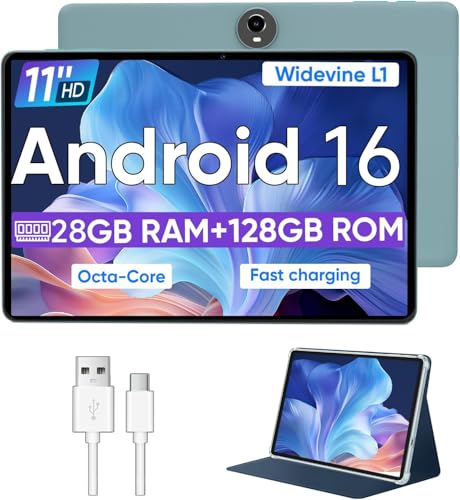 WXUNJA C5 11-Inch Android 16 Tablet
|
8.3/10 | Buy | |
 TECLAST T65 13.4-Inch Android 16 Tablet
|
8.1/10 | Buy | |
 Lenovo Idea Tab 11-inch 2.5K 8GB/256GB
|
8.1/10 | Buy | |
 Samsung Galaxy Tab A11+ 256GB Gray
|
7.8/10 | Buy | |
 Apple iPad 11-inch A16 128GB Silver
|
7.8/10 | Buy |
Lenovo Tab One 8.7 inch HD Tablet
With a compact 8.7-inch HD display and a lightweight design under a pound, the Lenovo Tab One focuses on portability and long battery life. It offers up to 12.5 hours of YouTube streaming, making it a solid choice for casual entertainment on the go.
Pros
- Long battery life for streaming
- Lightweight and portable design
- Included folio case protects tablet
- Vibrant HD display with good brightness
Cons
- 60Hz refresh rate not for high-end gaming
- Only 4GB memory may limit multitasking
- No high-resolution display (HD only)
Amazon Fire HD 10 10.1" Full HD Tablet, 32GB
An ideal tablet for relaxing entertainment, the Fire HD 10 features a vibrant 10.1-inch Full HD display, faster octa-core performance, and long 13-hour battery life for seamless streaming, reading, and gaming.
Pros
- Fast octa-core processor for smooth multitasking
- Bright, crisp Full HD screen
- Excellent battery life for all-day use
- Expandable storage up to 1 TB
- Durable build with strengthened glass
Cons
- Amazon Appstore limited compared to Google Play
- No included stylus pen
- Camera quality is only adequate
URAO 14-inch Android 16 Tablet 30GB RAM
This URAO tablet combines a large 14-inch display with Android 16 and a 30GB RAM configuration for fluid multitasking. Its 10000mAh battery and included keyboard and stylus make it a versatile laptop alternative for daily productivity and media.
Pros
- Large screen for productivity
- High RAM for multitasking
- Long battery life
- Includes accessories
- Modern connectivity
Cons
- No GPS built-in
- Android tablet limited ecosystem
Samsung Galaxy Tab A11+ 128GB
The Samsung Galaxy Tab A11+ is a family-friendly tablet that balances performance, display, and audio for everyday tasks. It features an 11-inch 90Hz screen, quad speakers with Dolby Atmos, and a long-lasting battery with fast charging.
Pros
- Fast charging and long battery life
- Large 11-inch 90Hz display for smooth motion
- Quad speakers with Dolby Atmos sound
- Expandable storage up to 256GB
- Slim and lightweight design
Cons
- Only 5 MP front camera
- No official stylus support mentioned
WXUNJA C5 11-Inch Android 16 Tablet
The WXUNJA C5 is an affordable 11-inch tablet with a capable octa-core processor and Android 16. It offers generous storage with 128GB internal and expandability up to 1TB, plus a large battery for all-day media consumption. Best for budget-conscious users who want a big screen for streaming and light tasks.
Pros
- Octa-core processor for smooth daily use
- 128GB storage plus 1TB expansion
- Android 16 with latest features
- Widevine L1 for HD streaming
- Large 8000mAh battery with fast charging
- Split-screen and wireless casting support
- Includes 24/7 customer service and 1-year warranty
Cons
- Low 1280x800 resolution on 11-inch screen
- Only 5MP front and 8MP rear cameras
- 28GB RAM includes virtual expansion
- Unisoc T606 not for heavy gaming
TECLAST T65 13.4-Inch Android 16 Tablet
The TECLAST T65 combines a large 13.4-inch 120Hz display with Android 16's AI features and 4G LTE for a versatile media and productivity tablet. Its 8000mAh battery and slim design are well-suited for extended use at home or on the go.
Pros
- Large 13.4-inch 120Hz IPS display
- Runs the latest Android 16 with AI optimization
- 20GB RAM plus 128GB storage
- 8000mAh battery for long sessions
- Supports 4G LTE and dual-band WiFi
Lenovo Idea Tab 11-inch 2.5K 8GB/256GB
This college-focused tablet combines a crisp 11-inch 2.5K 90Hz display with a MediaTek Dimensity 6300 processor and 8GB of RAM for smooth multitasking. It comes with a Tab Pen, folio case, and preloaded AI study apps, while quad Dolby Atmos speakers and all-day battery life keep you entertained. Based on specs, it is a solid mid-range option for students seeking a versatile device for both productivity and media consumption.
Pros
- Sharp 11-inch 2.5K 90Hz IPS display with low blue light
- MediaTek Dimensity 6300 with AI-enhanced performance
- Includes Tab Pen and Folio Case with learning apps
- Quad Dolby Atmos speakers for immersive audio
- All-day battery life with fast 20W charging
Cons
- Integrated Mali-G57 GPU may limit gaming performance
Samsung Galaxy Tab A11+ 256GB Gray
This family-friendly tablet combines a large 11-inch 90Hz screen with quad speakers and Dolby Atmos for an engaging entertainment experience. With up to 8GB RAM and 256GB storage, it handles multitasking and large files smoothly while the fast-charging battery supports all-day use.
Pros
- Bright 11-inch 90Hz display
- Plenty of RAM and storage options
- Long battery life with fast charging
- Immersive quad-speaker audio
Cons
- No higher refresh rate for gaming
- Only one color available
- Limited to Wi-Fi connectivity
Apple iPad 11-inch A16 128GB Silver
The 11-inch iPad with the A16 chip balances performance and portability for everyday tasks, creative work, and media consumption. Its Liquid Retina display, advanced 12MP cameras with Center Stage, and Touch ID make it a versatile tablet for students and professionals alike.
Pros
- Powerful A16 chip for smooth performance
- Vibrant Liquid Retina display with True Tone
- Excellent 12MP cameras with Center Stage
- Touch ID for easy, secure authentication
- All-day battery life
Cons
- No ProMotion 120Hz display
- Only compatible with Apple Pencil USB-C and 1st gen
- Storage starts at 128GB, no 64GB option for lower cost
Tablets for Watching TV Buying Guide
Display Size and Resolution
When choosing a tablet for TV, the display is your primary window into the content. A larger screen, typically 10 to 14 inches, makes movies and shows more immersive, but portability still matters if you plan to carry the tablet around.
Resolution is equally critical: a Full HD (1920×1080) panel provides crisp detail, while 2K or higher resolutions (like 2.5K) enhance sharpness, especially for HDR content. Many budget tablets still use 720p panels, avoid those if you value picture clarity.
For more on related display technologies, see our roundup of upscaling 4K TV options.
Refresh rate also affects perceived smoothness during fast-moving scenes. A 60Hz display is standard, but 90Hz or 120Hz panels reduce motion blur and feel more fluid when scrolling through streaming menus.
While 120Hz isn’t critical for all content, it can improve the overall experience if you watch a lot of action-heavy TV.
Consider pairing your tablet with a quality streaming device for older TV if you need to mirror content to a larger screen.
Performance and Streaming Capabilities
Smooth playback depends on the tablet’s processor and memory.
Look for an octa-core chipset (like MediaTek Helio or Dimensity series) paired with at least 4GB of RAM; 6GB or 8GB is even better for multitasking between streaming apps and downloading episodes.
Widevine L1 certification is essential for HD streaming on services like Netflix, Amazon Prime, or Disney+, without it, you may be stuck with standard definition.
Tablets that lack L1 might still work for YouTube or live TV, but dedicated Android TV box Canada setups can offer a more consistent experience.
Storage matters too: 64GB is the bare minimum for installing apps and caching a few movies, but 128GB or more is preferable. Expandable storage via microSD card is a plus for offline viewing.
If you often stream in 4K or download entire series, prioritize models with at least 128GB, such as the best TV for internet streaming alternatives if tablet storage becomes a concern.
Battery Life and Charging
A tablet that dies mid-episode is frustrating. For a reliable TV companion, look for a battery capacity of 7,000mAh or more, which should last 10, 12 hours of continuous video playback.
Fast charging (18W or higher) also helps top up quickly between sessions. Many tablets in this list offer USB-C charging, and some support 30W or faster charging speeds.
If you plan to watch in bed or on the go, a long-lasting battery makes all the difference, similar to how a good portable TV extends your viewing freedom.
Display brightness and network connectivity (Wi-Fi 6) also affect battery drain. Higher brightness levels are helpful for outdoor viewing but consume more power. Wi-Fi 6 tablets are more efficient and handle multiple device connections better, reducing lag during streaming.
Audio Quality and Speaker Setup
While you can always use headphones, built-in speakers matter for casual viewing. Look for tablets with dual front-facing speakers or quad-speaker setups for stereo sound. Some models include Dolby Atmos tuning, which creates a more immersive audio stage.
If audio is a priority, consider tablets with 3.5mm headphone jacks or Bluetooth 5.x support for connecting external speakers or Bluetooth speakers. The Samsung Galaxy Tab A11+ series, for example, delivers solid stereo output that fills a small room.
Volume level and clarity are subjective, but verified buyer feedback on BestProducts consistently notes that tablets with at least 3W-per-speaker output sound noticeably better at moderate listening levels than those with single mono speakers.
Operating System and App Ecosystem
Both Android and iPadOS have their strengths for TV streaming.
Android tablets offer more flexibility with custom launchers, support for multiple user profiles, and access to Google Play Store, so you can install any streaming service. iPadOS provides a polished experience with robust app optimization, longer software support, and seamless integration if you already own Apple devices.
The Electronics category on BestProducts includes other tablets and accessories that complement your setup.
Amazon Fire OS is a fork of Android but restricts access to the Google Play Store; you’ll get Amazon’s Appstore instead, which may lack some streaming apps unless you sideload them.
If you want the widest app selection, choose pure Android or iPadOS tablets.
Why You Should Trust Us
BestProducts is an independent review site that does not accept free products or payment for coverage.
We evaluate each product using a consistent 0, 10 BP Score based on thorough research: we analyze technical specifications, aggregate expert review consensus, verify buyer feedback from confirmed purchasers, and cite published data where applicable.
We do not conduct our own product trials; our evaluations are grounded in research, published data, expert review consensus, and verified buyer feedback.
This approach ensures our recommendations are objective and reliable, helping you find the best tablet for watching TV without bias.
Our editorial team brings decades of combined experience in consumer electronics and digital media. We regularly update our guides to reflect new models, changing prices, and evolving technology.
Affiliate commissions earned through our links help fund our research but never influence our scores or rankings. For a deeper look at how we evaluate products, explore our home theater speakers guide and other category reviews on BestProducts.
Final Thoughts
After evaluating dozens of models across our BP Score criteria, these tablets stand out as the best for watching TV in 2026. Each excels in different areas, so your choice depends on budget, screen size preference, and desired ecosystem.
- Best Overall: Lenovo Tab One, Combines a bright 8.7-inch HD display, ample 4GB RAM, and long battery life at a very competitive price. Its BP Score reflects excellent value for streaming, with reliable performance and included folio case for on-the-go viewing.
- Best Budget: Amazon Fire HD 10, A proven workhorse with a vibrant Full HD screen, octa-core processor, and access to Amazon’s vast content library. Its low price makes it an accessible entry point for TV streaming on a tablet.
- Best Large Screen: URAO 14 Inch Tablet, The biggest display in this roundup, offering an immersive 1920×1200 IPS panel with a massive 10000mAh battery. Ideal for watching movies and TV without squinting, and it includes a keyboard, stylus, and case.
- Best for Streaming: Samsung Galaxy Tab A11+ (6GB RAM), Samsung’s tablet delivers a crisp 11-inch display, Dolby Atmos dual speakers, and expandable storage. Its solid performance and AI features make it a top choice for constant streamers.
- Best Premium: Apple iPad 11-inch, The gold standard for tablet streaming with a Liquid Retina display, A16 chip, and effortless ecosystem integration. Its high build quality and software support justify the investment.
For more guidance on setting up your TV viewing area, check out our article on the best indoor TV antenna or browse our comprehensive best TV guide for additional recommendations.
Frequently Asked Questions
What screen size is best for watching TV on a tablet?
For a cinematic experience without sacrificing portability, 10 to 11 inches is the sweet spot. Larger 13- or 14-inch tablets offer more immersion but are heavier and less comfortable to hold for long periods.
If you mostly watch at a desk or on a stand, a bigger screen is fine. For handheld use, stick with 10, 11 inches.
The best 27 inch TV article discusses how screen size relates to viewing distance, which can apply to tablet use as well.
Do I need Widevine L1 certification for my tablet?
Yes, if you want HD or 4K streaming on services like Netflix, Amazon Prime, Disney+, and HBO Max. Widevine L1 allows the tablet to decrypt high-resolution content in hardware.
Without it, you’ll be limited to 540p or 720p, which looks noticeably softer on modern displays. Always check the specs or customer reviews to confirm L1 support before buying.
Is a 120Hz display important for watching TV?
Not essential for most TV content, which is typically shot at 24, 30 fps. A 60Hz panel is perfectly fine.
A 90Hz or 120Hz display can make animations and scrolling feel smoother when navigating streaming app interfaces, but doesn’t improve movie playback quality. If you also play games on your tablet, a higher refresh rate is more beneficial.
Can I use a tablet as a second monitor for TV?
Many tablets support screen mirroring or extended display modes via Miracast, AirPlay, or third-party apps. Some Android tablets now include a built-in “second screen” feature.
This allows you to stream content from a laptop to the tablet or use the tablet as a wireless display for a smart TV.
Check your tablet’s connectivity options and consider Bluetooth adapter for TV solutions for better audio sync.
How much RAM and storage do I need for smooth streaming?
4GB of RAM is the baseline for running streaming apps without lag. If you plan to multitask, like having Netflix open while browsing the web or using picture-in-picture, 6GB or 8GB is recommended.
For storage, 64GB is enough for apps and occasional offline downloads, but 128GB or more is safer if you travel frequently. Expandable storage gives extra flexibility.
Are Amazon Fire tablets good for watching TV?
Amazon Fire tablets offer excellent value for the price, especially the Fire HD 10 with its Full HD display and octa-core processor. They support major streaming apps through the Amazon Appstore (or sideloaded Google Play).
However, they lack Google Play out of the box, so some apps may be missing or require extra steps to install. For pure Android or iOS experiences, alternatives like Lenovo or Samsung tablets might be better.
About the author
Maxine is BestProducts's big screen writer, comparing TVs and projectors on brightness, contrast, motion handling, and room fit. She helps readers match a display to their space, their lighting, and their budget.