The Best Wireless Mouse for Laptops
We reviewed the top wireless mice for laptops, focusing on ergonomics, connectivity, battery life, and value. Our expert picks suit every budget and need, from budget-friendly to feature-rich.
 By Josephine Mason
Updated September 11, 2026
By Josephine Mason
Updated September 11, 2026
Finding the best wireless mouse for your laptop can make a significant difference in your daily productivity and comfort. With so many options on the market, from compact and portable models to ergonomic designs, it’s easy to feel overwhelmed.
That’s why we’ve researched the top wireless mice for laptops, analyzing specifications, expert reviews, and user feedback to bring you our top picks. For a broader look at the category, check out our guide to the best wireless mouse.
Our team at BestProducts evaluated each model against consistent criteria and scored it on our 0 to 10 BP Score. We focused on factors like connectivity, battery life, ergonomics, sensor performance, and overall value.
Whether you need a budget-friendly mouse for occasional use or a premium option for all-day work, our list has you covered. Below, you’ll find our top recommendations, with detailed information to help you make the right choice.
| Award | Product | BP Score About BP ScoreThe BP Score is our own rating from 0 to 10, based on performance, design and build, ease of use, and value. It reflects independent research and is never influenced by manufacturers, retailers, or affiliate commissions. Learn more › | |
|---|---|---|---|
| Best Overall |
 Logitech M185 Compact Wireless Mouse
|
8.9/10 | Buy |
| Best Value |
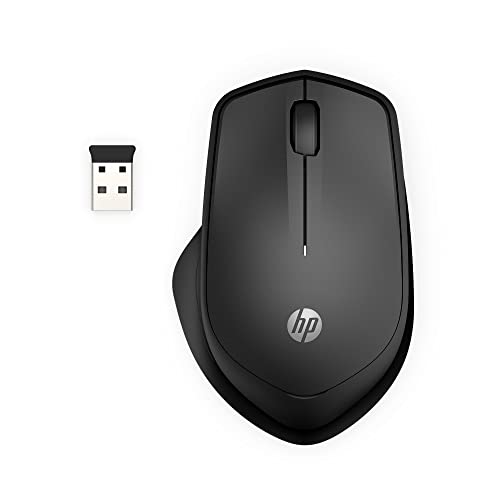 HP 280 Silent Wireless Mouse, 1600 DPI
|
8.9/10 | Buy |
 Logitech M240 Compact Silent Bluetooth Mouse
|
8.6/10 | Buy | |
| Best Premium |
 Logitech M510 Wireless Mouse
|
8.6/10 | Buy |
| Best Budget |
 VssoPlor 2.4G Slim Wireless Mouse
|
8.4/10 | Buy |
 TECKNET 2.4G Ergonomic Mouse 2600 DPI
|
8.3/10 | Buy | |
 Acer 2.4GHz Wireless Mouse 1600 DPI
|
8.3/10 | Buy | |
 Acer Wireless Mouse 2.4GHz 4000 DPI
|
8.1/10 | Buy | |
 Logitech M317 Compact Wireless Mouse
|
8.0/10 | Buy | |
 Logitech G305 Lightspeed Wireless Mouse
|
7.8/10 | Buy |
Logitech M185 Compact Wireless Mouse
A budget-friendly ambidextrous wireless mouse that prioritizes comfort and simplicity. Its compact shape and long battery life make it a practical upgrade for laptop users who want to boost productivity over a touchpad.
Pros
- Comfortable for both left and right hands
- Up to 1 year battery life with smart sleep mode
- Plug-and-play with Windows and Mac
- Reliable wireless connection up to 33 feet
- Compact and portable for small hands or tight spaces
Cons
- No rechargeable battery, uses disposable AA
- Basic scroll wheel without horizontal scroll
- No Bluetooth, requires USB receiver
HP 280 Silent Wireless Mouse, 1600 DPI
The HP 280 is a right-handed wireless mouse built for quiet productivity. Its 90% noise reduction on clicks and multi-surface tracking make it a solid choice for shared workspaces or late-night use.
Pros
- Very quiet left and right buttons
- Long 18-month battery life
- Works on many surfaces without a pad
- Compact and portable with stored receiver
Cons
- Right-handed only, not for lefties
- No rechargeable battery
Logitech M240 Compact Silent Bluetooth Mouse
This compact wireless mouse pairs instantly via Bluetooth without a dongle and delivers nearly silent clicks. Its ambidextrous design and long 18-month battery life make it a practical travel companion for both left- and right-handed users.
Pros
- Nearly silent clicking
- Long battery life
- Easy Bluetooth setup
- Ambidextrous and portable
- Works across multiple platforms
Cons
- No USB receiver included
- Small size may not suit large hands
- Uses disposable batteries
Logitech M510 Wireless Mouse
This full-sized wireless mouse is designed for all-day comfort with its contoured shape, soft rubber grips, and broad palm area. It offers programmable back/forward buttons and side-to-side scrolling, plus a two-year battery life.
Pros
- Comfortable for extended use
- Long 2-year battery life
- Programmable navigation buttons
- Unifying receiver stays in laptop
Cons
- Side scrolling and zoom require software installation
- No rechargeable battery
- Lower DPI than gaming mice
VssoPlor 2.4G Slim Wireless Mouse
This slim wireless mouse from VssoPlor provides a stable 2.4GHz connection and whisper-quiet clicks, making it suitable for quiet office environments. Its compact design and auto sleep mode help extend battery life, while the included USB receiver stores inside the mouse for portability.
Pros
- Stable 2.4GHz wireless connection
- Whisper-quiet clicking
- Auto sleep mode saves battery
- Compact and lightweight design
- Wide compatibility with Windows and Mac
Cons
- Small size may not suit larger hands
- Uses disposable batteries (not rechargeable)
TECKNET 2.4G Ergonomic Mouse 2600 DPI
This compact wireless mouse offers ergonomic comfort with rubber side grips and adjustable DPI up to 2600 for precise tracking. Its long 24-month battery life and plug-and-play simplicity make it a practical choice for travel or daily use on most devices.
Pros
- Compact and travel-friendly
- Ergonomic with rubber side grips
- Adjustable DPI up to 2600
- Long 24-month battery life
- Easy plug-and-play setup
Cons
- AAA batteries not included
- Side button not compatible with Mac
- USB-A only, no USB-C support
Acer 2.4GHz Wireless Mouse 1600 DPI
A compact wireless mouse for laptops with 2.4GHz connectivity up to 32 feet and three DPI levels for adjustable sensitivity. It includes forward/backward buttons for easier navigation and a smart sleep mode to extend battery life.
Pros
- Stable wireless connection up to 32 feet
- Customizable DPI for different tasks
- Convenient forward/backward buttons
- Energy-saving sleep mode
- Durable build with 10 million clicks
Cons
- Side buttons do not work on Mac
- AAA batteries not included
- No Bluetooth connectivity
Acer Wireless Mouse 2.4GHz 4000 DPI
This Acer wireless mouse uses a reliable 2.4GHz connection for interference-free use up to 33 feet. Its five adjustable DPI levels (800 to 4000) let you fine-tune cursor speed for tasks from browsing to detailed work, and the ambidextrous shape suits medium to large hands comfortably.
Pros
- Reliable 2.4GHz connection
- Adjustable DPI for varied tasks
- Convenient forward/back buttons
- Power-saving click-to-wake feature
- Durable 10 million click rating
Cons
- Requires AA battery (not included)
- No Bluetooth option
- DPI indicator flashes can be distracting
Logitech M317 Compact Wireless Mouse
This ambidextrous wireless mouse packs smooth optical tracking, a year-long battery life, and comfortable rubber grips into a compact, portable design. It is a reliable choice for Chromebook, PC, or Mac users who need a simple, no-frills pointer for work or travel.
Pros
- Long battery life (up to a year)
- Comfortable for right or left hand
- Compact and portable
- Works with Chromebook
- Easy plug-and-play setup
Cons
- Line-by-line scrolling only
- No rechargeable battery included
- Basic feature set
Logitech G305 Lightspeed Wireless Mouse
With the HERO sensor, the G305 delivers up to 12,000 DPI and 400 IPS tracking. It offers 250 hours of gameplay on a single AA battery and weighs only 3.4 ounces. The compact design with built-in receiver storage makes it a great travel companion for gamers on the go.
Pros
- Excellent battery life of 250 hours on one AA
- Ultra-lightweight at 3.4 oz for maneuverability
- Lag-free LIGHTSPEED wireless with 1ms report rate
- HERO sensor up to 12,000 DPI
- Compact and portable with receiver storage
Cons
- Requires AA battery (not rechargeable)
Best Wireless Mouse for Laptops Buying Guide
Connectivity and Compatibility
The best wireless mouse for your laptop needs to connect seamlessly with your device. Most mice offer either a 2.4GHz wireless connection via a USB receiver or Bluetooth.
2.4GHz mice provide a stable, low-latency connection, while Bluetooth mice eliminate the need for a USB port, which is useful for ultrabooks with limited ports.
Compatibility is also important; ensure the mouse supports your operating system, whether Windows, macOS, Chrome OS, or Linux. Many models, like the Logitech M240, support multiple operating systems and can pair with up to three devices.
Ergonomics and Design
Ergonomics plays a crucial role in preventing hand fatigue during long work sessions. Consider the size and shape of the mouse: ambidextrous designs suit both left and right-handed users, while right-handed ergonomic mice offer contoured grips.
For travel, a compact and lightweight mouse is ideal. Some mice, like the TECKNET wireless mouse, feature a curved shape that supports natural hand positioning. If ergonomics is your top priority, see our list of the best ergonomic wireless mice.
Battery Life and Power Options
Battery life varies widely among wireless mice. Some models, like the HP 280 Silent Wireless Mouse, boast up to 18 months of battery life on a single AA or AAA battery. Others use built-in rechargeable batteries that can be charged via USB-C.
If you dislike changing batteries frequently, look for a mouse with a long battery life or rechargeable option. Many mice also feature auto-sleep modes to conserve power when not in use.
Sensor and Performance
The sensor determines how accurately the mouse tracks on different surfaces. Most modern optical sensors work on a variety of surfaces, including wood, fabric, and glass. DPI (dots per inch) settings allow you to adjust cursor speed.
For everyday tasks, a DPI range of 800 to 1600 is sufficient, but gamers may prefer higher settings up to 4000 or more. The Acer Wireless Mouse with 5 adjustable DPI levels up to 4000 offers versatility for different tasks.
Additional Features
Extra features can enhance your experience: silent clicks for quiet environments, programmable buttons for shortcuts, and multi-device pairing for toggling between laptop, tablet, and phone. Some mice also include a scroll wheel with side-to-side tilt for horizontal scrolling.
Consider which features matter most to your workflow.
Why You Should Trust Us
At BestProducts, we are dedicated to providing independent and thorough evaluations. We do not conduct our own product trials; our evaluations are grounded in research, published data, expert review consensus, and verified buyer feedback.
Each product is assessed against a consistent set of criteria and given a BP Score on a scale of 0 to 10. Our team stays up-to-date with the latest releases and market trends to ensure our recommendations are relevant.
We also disclose our affiliate relationships: we may earn a commission when you purchase through our links, but this does not affect our ratings or editorial decisions. For more information, visit our Computers & Office category page.
Final Thoughts
- Best Overall: Logitech M185 Compact Wireless Mouse – With its ambidextrous design, reliable 2.4GHz connection, and long battery life, this mouse offers the best combination of performance and value, earning a top BP Score in our evaluation.
- Best for Silent Operation: HP 280 Silent Wireless Mouse – Its quiet clicks and ergonomic right-handed design make it ideal for shared workspaces and late-night use. It also boasts an outstanding 18-month battery life.
- Best Budget Pick: TECKNET Wireless Mouse – At an accessible price point, this mouse offers adjustable DPI and a comfortable shape without sacrificing essential features.
- Best for Portability: Logitech M240 Silent Bluetooth Mouse – Compact, wireless, and Bluetooth-enabled, it pairs easily with laptops and tablets, making it a perfect travel companion.
Frequently Asked Questions
Is a wireless mouse suitable for gaming on a laptop?
Yes, many wireless mice now offer low latency that rivals wired gaming mice. The Logitech G305 Lightspeed Wireless Gaming Mouse, for example, provides a 1000Hz polling rate and DPI settings up to 12,000, making it a great choice for casual and competitive gaming.
Can I use a wireless mouse with a tablet or smartphone?
Many wireless mice with Bluetooth connectivity can pair with tablets and smartphones running Android or iOS. Check the compatibility details before purchasing. The Logitech M240 and HP 280 both support Bluetooth pairing with multiple devices.
How long does the battery of a wireless mouse typically last?
Battery life varies by model and usage. Standard wireless mice with AA or AAA batteries can last from several months to 18 months. Rechargeable models usually need charging every few weeks. Look for a mouse with an auto-sleep feature to extend battery life.
What is the difference between 2.4GHz and Bluetooth wireless mice?
2.4GHz mice require a USB receiver that plugs into your laptop, providing a dedicated connection with low interference. Bluetooth mice connect directly without a receiver, freeing up a USB port, but may have slightly higher latency.
Both technologies are reliable, but 2.4GHz is often preferred for gaming.
Are silent wireless mice worth the extra cost?
Silent mice use dampened switches to reduce click noise, which is beneficial for quiet environments like libraries or shared offices. They typically cost slightly more but can improve comfort and reduce distractions.
The HP 280 Silent Wireless Mouse is an excellent example that won’t break the bank.
About the author
Josephine covers mechanical keyboards and wireless mice for BestProducts, comparing switch feel, build quality, sensor precision, and battery life. She guides readers through a deeply personal choice with clear, practical advice.