The Best Label Printer
We analyzed expert ratings and user reviews to find the best label printers for small businesses. Our picks balance speed, connectivity, print quality, and build for any workspace.
 By Gordon Matthews
Updated September 11, 2026
By Gordon Matthews
Updated September 11, 2026
Running a small business, an e-commerce store, or a busy home office means dealing with shipping labels, address labels, and product barcodes every day.
A dedicated label printer saves you from cutting, peeling, and aligning sticky sheets, and it eliminates the cost of ink or toner cartridges. Thermal label printers are fast, quiet, and produce sharp, smudge‑free labels that last.
In this guide, we evaluated the most popular models on the market using expert review consensus, verified buyer feedback, and published specifications.
Whether you need a compact Bluetooth model for a mobile workflow or a high‑volume workhorse for a warehouse, our top picks will help you find the best label printer for your setup.
| Award | Product | BP Score About BP ScoreThe BP Score is our own rating from 0 to 10, based on performance, design and build, ease of use, and value. It reflects independent research and is never influenced by manufacturers, retailers, or affiliate commissions. Learn more › | |
|---|---|---|---|
| Best Overall |
 Nelko PL70E Bluetooth Thermal Label Printer
|
9.1/10 | Buy |
| Best Budget |
 Phomemo 241BT Bluetooth Thermal Label Printer
|
8.4/10 | Buy |
 MUNBYN Bluetooth 4x6 Label Printer
|
8.4/10 | Buy | |
 NULLTONEX Bluetooth 4x6 Thermal Label Printer
|
8.3/10 | Buy | |
| Best Premium |
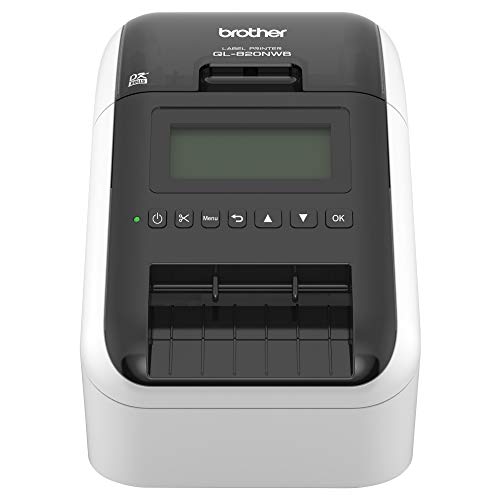 Brother QL-820NWB Network Label Printer
|
8.1/10 | Buy |
| Best Value |
 JADENS Bluetooth Thermal 4x6 Shipping Label
|
7.8/10 | Buy |
 Rollo USB Thermal Label Printer 4x6
|
7.8/10 | Buy |
Nelko PL70E Bluetooth Thermal Label Printer
The Nelko PL70E is a compact Bluetooth thermal label printer designed for shipping and small business needs. It prints up to 72 labels per minute with 203 DPI clarity, works with major platforms like Amazon and Shopify, and uses only thermal labels, so no ink or toner is required.
Pros
- Fast printing at 150 mm/s
- Wireless Bluetooth for iOS and Android
- Compatible with major shipping platforms
- No ink or toner needed
- Supports multiple label sizes
Cons
- Mac users must use USB for printing
- Requires app for Bluetooth connection
- Limited to thermal labels only
Phomemo 241BT Bluetooth Thermal Label Printer
The Phomemo 241BT is a Bluetooth thermal label printer ideal for shipping labels, offering wireless printing via Bluetooth or USB. It supports labels up to 4.6 inches wide and works with major carriers like UPS, FedEx, and USPS, making it a practical choice for small businesses.
Pros
- Wireless Bluetooth and USB connectivity
- No ink or toner needed
- Fast printing speed up to 150 mm/s
- Supports labels from 1 to 4.6 inches
- Compatible with eBay, Shopify, Amazon, etc.
Cons
- Black-and-white only without special color paper
- Requires Labelife app or driver setup
- Genuine Phomemo labels recommended for best results
MUNBYN Bluetooth 4x6 Label Printer
This compact thermal label printer works with multiple label sizes from 1.57 to 4.25 inches, making it suitable for shipping, organization, and inventory tasks. Its DAC auto-calibration technology and near-zero jam rate ensure reliable output, while the low 60 dB noise level keeps the workspace quiet.
Pros
- Wide range of label size support
- Thermal printing saves on ink costs
- DAC tech reduces misalignment
- Quiet operation at 60 dB
- High durability up to 970,000 labels
Cons
- Monochrome output only
- Relies solely on Bluetooth connectivity
NULLTONEX Bluetooth 4x6 Thermal Label Printer
This direct thermal printer from NULLTONEX eliminates ink or toner costs and connects via Bluetooth or USB. It prints crisp 203 DPI labels at up to 150mm/s and works with major shipping platforms like Amazon and Shopify, making it a practical choice for small businesses needing high-volume label printing.
Pros
- No ink or toner needed
- Bluetooth and USB connectivity
- Fast printing up to 150mm/s
- Works with Amazon, Shopify, USPS, etc.
- Comes with 25 thermal labels
Cons
- Prints in black and white only
Brother QL-820NWB Network Label Printer
This monochrome label printer offers flexible connectivity via Bluetooth, Ethernet, WiFi, and USB host, making it easy to integrate into any office setup. It prints up to 110 standard address labels per minute at 300 dpi and includes a monochrome LCD for standalone operation. The ability to print black and red labels using DK 2251 tape adds versatility for highlighting important information.
Pros
- Flexible connectivity: Bluetooth, Ethernet, WiFi, USB host
- Ultra fast printing: up to 110 labels per minute
- Standalone use with monochrome LCD screen
- Prints black and red labels using DK 2251
- Maximum label length of 3 feet
Cons
- Only two-color printing (black and red)
- Bulky size: 9.2 x 5 x 5.7 inches
- No color printing beyond red
JADENS Bluetooth Thermal 4x6 Shipping Label
This wireless thermal label printer from JADENS delivers crisp 203 DPI output without ink or toner, making it a clean and economical choice for small businesses. It supports both Bluetooth and USB connections, works with popular shipping platforms like Shopify and eBay, and sets up in under a minute.
Pros
- High-quality Japanese thermal print head
- No ink or toner needed
- Wireless printing via Bluetooth on Windows/Mac
- Works with major shipping platforms
- Easy one-minute setup with one-year warranty
Cons
- Mobile printing requires separate app for Android/iOS
- Only available in blue color
Rollo USB Thermal Label Printer 4x6
This compact thermal label printer is a solid choice for small businesses and home offices that need fast, no-ink shipping label printing. It connects via USB for a simple setup and works with all major shipping platforms and marketplaces.
Pros
- No ink or toner needed
- Prints one 4x6 label per second
- Compatible with FedEx, UPS, USPS, and more
- Supports custom label sizes from 1.57 to 4.1 inches wide
- Easy USB setup with Windows and Mac
Cons
- USB-only, no Wi-Fi or Bluetooth
- 203 DPI resolution is adequate but not high-end
- No standalone operation or display
Best Label Printer Buying Guide
Print Quality and Resolution
Most thermal label printers use direct thermal technology, which produces crisp black text and simple graphics without toner. Resolution typically ranges from 203 dpi (standard) to 300 dpi (high‑definition).
For shipping labels with barcodes, 203 dpi is sufficient; for small product labels or detailed logos, a 300‑dpi model delivers sharper results expert. For carrier-specific compliance, see our best USPS shipping label printer guide.
Verified buyer feedback often praises models that produce consistent black density without fading, especially when labels are exposed to sunlight or heat during transit. Check dot pitch and variable‑size dot support to ensure scannable barcodes.
Connectivity and Mobility
Modern label printers offer USB, Bluetooth, and Wi‑Fi connectivity. USB is reliable for dedicated setups, while Bluetooth and Wi‑Fi enable wireless printing from smartphones and multiple computers.
For businesses that depend on mobile shipping platforms, wireless printers for shipping labels provide robust range and app stability.
Some models include an Ethernet port for wired networking in high‑volume settings. Check OS compatibility (Windows, macOS, iOS, Android) and look for plug‑and‑play drivers that simplify setup.
Label Size and Material Compatibility
The most common size for shipping labels is 4×6 inches, but you may need smaller widths for address labels, file folders, or product tags.
A printer that supports multiple roll widths (e.g., 1.5 to 4.1 inches) and adjustable label lengths provides flexibility. If you frequently switch sizes, easy‑load guides and a built‑in cutter speed up workflow.
For variable projects, check our best mini sticker printer guide.
Speed and Build Durability
Print speed is measured in inches per second (ips). For a small business printing a few dozen labels a day, 4 ips is adequate. High‑volume operations benefit from speeds of 6 ips or more, but faster printers can be louder.
A strong feed mechanism and sturdy chassis prevent jamming after thousands of labels. Printers for high volume printing are built to run continuously without overheating.
If you run a Shopify store, a printer that integrates directly with order management systems speeds batch printing. The best Shopify label printer offers seamless integration and reliable through&use.
Software and Ease of Use
A good label printer works out of the box. Look for included design software or compatibility with popular shipping platforms like ShipStation, Etsy, and eBay. Many printers now support mobile apps for direct phone printing.
Verified buyers appreciate clear setup instructions and automatic driver installation. For a tool that combines printing, scanning, and copying, see our best multifunction printer for small business roundup.
Warranty and software updates also matter. Pirate Ship users should consider the best label printer for Pirate Ship, which works directly with the platform without extra setup.
Cost and Long‑Term Value
Thermal label printers have no ink or toner costs, but you need thermal rolls. Printer upfront prices range from budget models to commercial‑grade units.
Cheaper printers may use lower‑quality components, while a slightly higher initial expense can pay off over time. Consider cost per label, print head lifespan (usually rated for millions of inches), and replacement print head pricing, often around $20, $40.
Users who occasionally need color labels may benefit from a best home printer for product labels. Also, explore the printer cost per page calculator to gauge long‑term costs.
Why You Should Trust Us
BestProducts is an independent review site that does not accept payment for positive reviews. We evaluate each product using a consistent methodology and assign a BP Score on a 0‑to‑10 scale.
Our assessments are based on research, published data, expert review consensus, and verified buyer feedback. We do not conduct our own product trials; our evaluations are grounded in the collective experience of thousands of real users.
Every product in this guide has been scored against the same criteria: print quality, connectivity, software ease, build durability, and overall value. We update regularly to reflect new models and market changes.
For more details on how we score, visit our Computers & Office category page.
Our affiliate partnerships help us keep our content free, but they never influence our ratings or editorial choices.
Final Thoughts
After analyzing dozens of label printers, these models stand out for their performance, reliability, and value. Here are our top picks:
- Best Overall: Nelko Bluetooth Thermal Shipping Label Printer, With a near‑perfect BP Score, this model combines excellent print quality, reliable Bluetooth connectivity, and a user‑friendly app at a very competitive price. It’s the top choice for most small businesses and home offices.
- Best for High‑Volume Shipping: Brother QL‑1010NWB Professional Label Printer, This Brother model offers versatile connectivity (USB, Ethernet, Wi‑Fi, Bluetooth) and fast print speeds, making it ideal for busy shipping desks. Its durable build and professional software earn it a top BP Score.
- Best Budget Pick: Phomemo Bluetooth Thermal Label Printer 241BT, For under $70, this printer delivers solid performance with included labels and a compact design. It’s a great entry‑level option for occasional label printing without sacrificing quality.
- Best for Mobile Workflows: MUNBYN Bluetooth Thermal Label Printer, This wireless printer pairs easily with smartphones and tablets, and its 4×6 capacity covers standard shipping labels. Verified buyers praise its quick setup and consistent output.
No matter which model you choose, a dedicated thermal label printer will save you time and money compared to using a standard printer. For specialized needs, explore our guides to the best FedEx label printer and the best label printer for Pirate Ship.
Frequently Asked Questions
Do I need a thermal label printer if I already have a regular printer?
A thermal label printer is faster, cheaper to run (no ink or toner), and produces smudge‑free labels that adhere better. If you print more than a few labels per week, the investment pays for itself quickly.
For occasional use, a regular printer with label sheets may suffice.
Can I use a label printer with my phone?
Yes, many modern label printers support Bluetooth and come with a mobile app that lets you design and print labels directly from your smartphone. Models from Nelko, Phomemo, and MUNBYN all offer reliable mobile printing.
Make sure the app is compatible with your phone’s operating system.
What size labels can I print with these printers?
Most 4×6 thermal printers can handle rolls from about 1.5 inches to 4.1 inches wide, with adjustable length. Some models also support continuous labels for custom lengths. Check the product specifications for the minimum and maximum label width.
Are thermal labels waterproof?
Direct thermal labels are water‑resistant but not fully waterproof. Prolonged exposure to moisture can cause the print to fade. For labels that must withstand rain or submersion, consider using synthetic paper labels or a thermal transfer printer.
Most shipping labels are fine in normal conditions.
How long do thermal print heads last?
Print heads are rated for millions of inches of printing. Under normal use, they can last several years. Dust and debris can shorten their life, so keep the printer clean. Many manufacturers offer replacement heads for around $20, $40.
Can I print barcodes and QR codes?
Yes, all the printers in this guide can print barcodes and QR codes. Most include software that generates them automatically. For shipping, barcodes are essential for carrier scanning.
For further reading, our guide to the best printer for stickers can help with point‑of‑sale labels.
If you need specialized FedEx labels, the best FedEx label printer covers model that integrate with FedEx systems.
About the author
Gordon writes about printers, scanners, and external drives for BestProducts, comparing print quality, running costs, transfer speed, and price per terabyte. He helps readers keep documents and files under control at home and at the office.