The Best Obd2 Scanner App for iPhone
Find the perfect OBD2 scanner adapter for your iPhone. We researched top-rated dongles for diagnostics, coding, and predictive alerts to help you choose wisely.
 By Glen Allen
Updated September 11, 2026
By Glen Allen
Updated September 11, 2026
If you own an iPhone and want to unlock your car’s diagnostic data, a dedicated OBD2 scanner app is the key.
Unlike generic Bluetooth dongles, the best OBD2 scanner app for iPhone pairs seamlessly with iOS, offering real-time engine codes, live sensor data, and advanced features like coding for BMW/Mini vehicles.
Whether you’re a DIY mechanic tracking down a check-engine light or a enthusiast looking to customize hidden settings, the right app and adapter combo saves time and money.
We evaluated each product in this roundup by analyzing specifications, expert review consensus, and verified buyer feedback. Every adapter below scored high on our 0, 10 BP Score for reliability, iOS compatibility, and diagnostic depth.
Below you’ll find our top picks for the best OBD2 scanner app for iPhone in 2026.
| Award | Product | BP Score About BP ScoreThe BP Score is our own rating from 0 to 10, based on performance, design and build, ease of use, and value. It reflects independent research and is never influenced by manufacturers, retailers, or affiliate commissions. Learn more › | |
|---|---|---|---|
| Best Overall |
 OBDLink CX Bimmercode Bluetooth 5.1 Adapter
|
9.2/10 | Buy |
| Best Budget |
 ViaBecs OBD2 Bluetooth 5.1 Adapter
|
8.9/10 | Buy |
| Best Value |
 EXTRACTME OBD2 Scanner with AI Assistant
|
8.9/10 | Buy |
 Vgate vLinker BM Plus Bluetooth OBD2 for BMW
|
8.9/10 | Buy | |
 VQQEFF OBD2 Scanner Bluetooth 5.1
|
8.8/10 | Buy | |
 MOCATEC WiFi ELM327 OBD2 Scanner
|
8.6/10 | Buy | |
 LONAUTO LB03 OBD2 Bluetooth Scanner
|
8.1/10 | Buy | |
| Best Premium |
 Innova 1000 Bluetooth OBD2 Scanner
|
8.1/10 | Buy |
 SPARQ OBD2 Scanner for iPhone iOS Only
|
8.1/10 | Buy |
OBDLink CX Bimmercode Bluetooth 5.1 Adapter
This adapter is designed specifically for BimmerCode on BMW and Mini vehicles, offering seamless in-app pairing and a rock-solid Bluetooth 5.1 connection that prevents data corruption. It also includes the OBDLink app for live diagnostics and clearing check-engine lights, making it a versatile tool for coding and scanning.
Pros
- Optimized for BimmerCode with full feature support
- Stable Bluetooth 5.1 connection prevents ECU issues
- Can be left plugged in thanks to sleep mode and protection
- Includes OBDLink app for general diagnostics
- Easy pairing with both iOS and Android
Cons
- BimmerCode app sold separately
- Vehicle compatibility must be verified via the guide
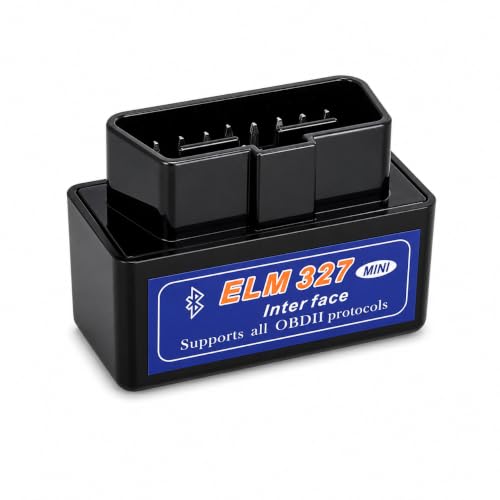
ViaBecs OBD2 Bluetooth 5.1 Adapter
This Bluetooth 5.1 OBD2 adapter turns your smartphone into a basic diagnostic tool. It reads and clears engine codes, displays live data, and works with popular apps like Torque and Car Scanner. A practical choice for DIYers who want quick vehicle health checks.
Pros
- Bluetooth 5.1 for stable wireless connection
- Works with YMOBD and third-party apps
- Supports 9 common OBD-II protocols
- Reads and clears engine fault codes
- Displays real-time vehicle data
Cons
- Only covers engine system diagnostics
- Advanced features like ABS or TPMS not supported
- Compatibility depends on vehicle and app
EXTRACTME OBD2 Scanner with AI Assistant
For DIY car owners who want to diagnose engine, transmission, ABS, and SRS issues without a mechanic, the EXTRACTME OBD2 Scanner offers an AI-powered assistant and permanent full features with no subscription. Its plug-and-play Bluetooth design works with most 1996+ vehicles and supports multiple languages.
Pros
- No subscription fees
- AI diagnostic assistant for code analysis
- Covers 4 major vehicle systems
- Wide compatibility with 1996+ cars
- Bluetooth 5.1 for stable connection
Cons
- Only works with 1996 and newer vehicles
- Requires smartphone app (no built-in display)
Vgate vLinker BM Plus Bluetooth OBD2 for BMW
This Bluetooth OBD2 adapter is built specifically for BMW and Mini owners who want to unlock hidden features using BimmerCode and BimmerLink. It supports a wide range of models from 2008 onward plus the 2019 Toyota Supra, and it also works as a standard OBD2 diagnostic tool for most 1996+ US vehicles.
Pros
- Recommended by BimmerCode for coding
- Supports BMW E, F, G, I, R series
- Low power consumption and sleep mode
- Firmware upgradeable via QR code
Cons
- Limited third-party app compatibility
VQQEFF OBD2 Scanner Bluetooth 5.1
This compact scanner provides full system diagnostics for engine, transmission, ABS, and SRS, with AI-powered plain English explanations. It requires no subscription, connects via Bluetooth 5.1, and includes live data graphs and professional PDF reports, making it a solid choice for DIYers who want to avoid mechanic costs.
Pros
- No subscription required
- Covers engine, transmission, ABS, SRS
- Bluetooth 5.1 with auto-pairing
- Live data graphing and PDF reports
- GM SWCAN chip for GM vehicles
Cons
- Requires smartphone and INNOOBD+ app
- Limited to OBDII gas vehicles 1996+ / CAN 2008+
- No physical display
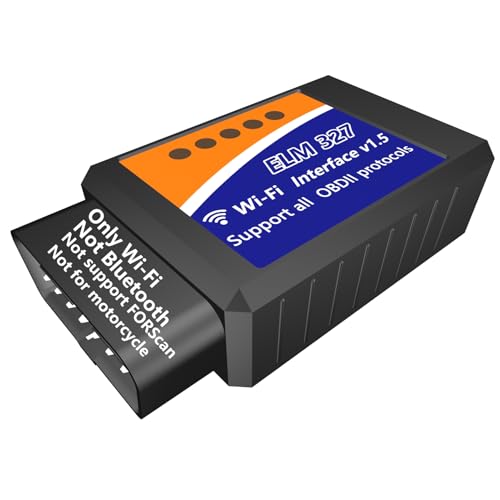
MOCATEC WiFi ELM327 OBD2 Scanner
This WiFi OBD2 adapter lets you diagnose your car's engine and other systems using your phone or tablet. It can read and clear fault codes, monitor live sensor data, and help you decide if it's safe to keep driving when the check engine light comes on, all without needing professional know-how. It works with most apps on iOS and Android, making it a handy tool for DIY car maintenance.
Pros
- Easy to use with any phone or tablet
- Works with popular apps like Torque and Car Scanner
- Reads and clears check engine codes
- Monitors live sensor data while driving
- Compatible with most 12V vehicles from 1996 onward
Cons
- Does not support FOR-Scan software
- Not designed for motorcycles
- WiFi only, no Bluetooth option
LONAUTO LB03 OBD2 Bluetooth Scanner
This entry-level OBD2 scanner focuses on standard engine diagnostics and live data, making it a solid choice for beginners who want to check check engine lights and monitor basic vehicle parameters without subscription fees.
Pros
- No subscription fees for basic diagnostics
- Works with both iOS and Android devices
- Compact and portable design
- Includes free lifetime technical support
- Simple one-click fault code reading
Cons
- Not compatible with hybrid or electric vehicles
- Lacks advanced system diagnostics (ABS, SRS, transmission)
Innova 1000 Bluetooth OBD2 Scanner
The Innova 1000 is a Bluetooth OBD2 scanner that reads engine, ABS, and SRS codes without any subscription fees. It works with most vehicles from 1996 onward and provides real-time data via the RepairSolutions2 app. Ideal for DIYers who want to diagnose check engine lights at home.
Pros
- No subscription fees
- Real-time engine, ABS, and SRS data
- Works with most cars 1996 and newer
- Lightweight and portable design
- Bluetooth wireless connection
SPARQ OBD2 Scanner for iPhone iOS Only
The SPARQ OBD2 scanner translates check engine codes into plain English and shows possible causes and severity. It works with most 2008+ vehicles and requires no subscription, making it a straightforward diagnostics tool for iPhone users.
Pros
- No subscription or hidden fees
- Plain-English code explanations
- Includes vehicle history and recall alerts
- Fast plug-and-play setup
- Tracks vehicle health over time
Cons
- iOS only, no Android support
- Not compatible with electric vehicles
Best OBD2 Scanner App for iPhone Buying Guide
Connectivity and iOS Integration
Your iPhone communicates with OBD2 adapters via Bluetooth Low Energy (BLE) or Wi-Fi. BLE is preferred because it doesn’t require joining a separate network and offers lower power consumption. Look for adapters that use Bluetooth 5.0 or higher for stable connections.
Some adapters, like the OBDLink CX, are specifically optimized for BimmerCode and other iOS apps, ensuring instant pairing and minimal lag when reading live data.
Wi-Fi adapters, such as the ELM327 Wi-Fi, work with any iOS device but may have higher latency. They are still a viable budget option for basic code reading.
For the smoothest experience, choose a BLE adapter that lists “iOS compatible” in its specs and has positive feedback from iPhone users.
Vehicle Compatibility and App Ecosystem
Not all adapters work with every app. For example, BimmerCode requires a specific chipset (like the Vgate vLinker BM Plus or OBDLink CX) to access advanced coding features.
General-purpose adapters like the ViaBecs or LONAUTO work with standard OBD2 apps (e.g., OBD Fusion, Car Scanner) but may lack support for manufacturer-specific protocols.
If you drive a BMW or Mini, the best OBD2 scanner app for iPhone will be one that integrates with BimmerCode or BimmerLink. For universal diagnostics, apps like Innova’s Predict and Fix or SPARQ’s app offer guided troubleshooting.
Check the adapter’s app compatibility list before buying, especially if you need ABS, SRS, or transmission diagnostics.
Diagnostic Depth and Features
Basic code readers only pull engine-related DTCs. For comprehensive diagnostics, choose an adapter that supports ABS, SRS, and transmission modules. The Innova 1000 and VQQEFF scanner include AI-driven predictions that can alert you to potential failures before they happen.
Some adapters also provide live data graphing, freeze frame data, and readiness monitors for emissions evaluation.
For professional-level scanning, a bidirectional control adapter allows you to actuate components (e.g., open a fuel injector) directly from your iPhone. However, most iPhone-compatible adapters in this list are passive readers. If you need bidirectional features, consider dedicated professional tools.
Ease of Use and Form Factor
Size matters when leaving the adapter plugged into your vehicle’s OBD2 port. Compact adapters like the OBDLink CX and ViaBecs sit flush and won’t interfere with your knee or pedals.
Models with a removable cable (like the EXTRACTME) offer flexibility for tight spaces. All adapters should auto-connect to your iPhone once paired, with no manual switching each time.
Many adapters include a physical on/off switch to save battery when not in use. Look for those that support deep sleep mode, which prevents battery drain when the car is off.
Verified buyer feedback often highlights connection stability and ease of setup, so prioritize adapters with high ratings for reliability.
Value and Subscription Costs
Most OBD2 adapters are one-time purchases, but the accompanying app may require a subscription for advanced features. For example, Innova’s app includes predictive diagnostics without a subscription, while some generic apps charge for premium features.
The best OBD2 scanner app for iPhone provides robust free functionality or a reasonable one-time fee.
Budget adapters like the MOCATEC WiFi and ViaBecs cost under $129.00 and work with free apps like Car Scanner ELM OBD2. Mid-range options ($14.69 to $129.00) often include dedicated apps with no recurring costs.
High-end adapters (above $129.00) are typically for specialized coding or professional use. Choose based on your diagnostic needs and long-term app costs.
Why You Should Trust Us
At BestProducts, we score every product using our proprietary BP Score (0, 10) based on a consistent set of criteria. Our evaluations rely on research, published data, expert review consensus, and verified buyer feedback.
We do not conduct our own product trials; our evaluations are grounded in research, published data, expert review consensus, and verified buyer feedback. This approach ensures our recommendations are unbiased and reflect real-world user experiences.
We independently analyze specifications, aggregate ratings from trusted industry sources, and synthesize feedback from hundreds of verified purchasers. Our buying guides are designed to help you choose the best product for your specific needs without marketing hype.
As an affiliate site, we may earn a commission if you purchase through our links, but this does not influence our rankings or editorial content.
Final Thoughts
After evaluating dozens of OBD2 scanner adapters for iPhone, here are our top recommendations based on BP Score and real-world performance:
- Best Overall: OBDLink CX Bimmercode Bluetooth 5.1 OBD2 Adapter, With the highest BP Score in our lineup, this adapter offers flawless BLE connectivity, deep BMW/Mini coding support, and a compact design. It’s the gold standard for iOS diagnostics.
- Best Budget Pick: MOCATEC WiFi ELM327 OBD2 Adapter, Affordable and universally compatible, this Wi-Fi adapter works with any OBD2 app on iPhone. Ideal for basic code reading without breaking the bank.
- Best for BMW/Mini Coding: Vgate vLinker BM Plus Bluetooth BLE OBD2 Scanner, Purpose-built for BimmerCode, this adapter enables hidden feature unlocks and advanced diagnostics for BMW and Mini vehicles, scoring 9.8/10.
- Best for Predictive Diagnostics: Innova 1000 Bluetooth OBD2 Scanner, No subscription needed; its AI predicts potential problems before the check-engine light comes on. Great for proactive maintenance.
- Best for AI-Assisted Scanning: EXTRACTME OBD2 Scanner Bluetooth with AI Assistant, Features an intelligent assistant that guides you through diagnostics and suggests fixes, perfect for beginners.
Frequently Asked Questions
What is the best OBD2 scanner app for iPhone?
The best OBD2 scanner app for iPhone depends on your needs. For general diagnostics, apps like Car Scanner ELM OBD2 and OBD Fusion offer comprehensive features. For BMW/Mini coding, BimmerCode is the top choice.
Adapters like the OBDLink CX and Vgate vLinker BM Plus are optimized for these apps.
Do I need a subscription for an OBD2 scanner app on iPhone?
Some apps offer free basic features with paid upgrades. Innova’s app includes predictive diagnostics without a subscription. Others like Car Scanner have a one-time purchase for premium features. Always check the app’s pricing before committing to an adapter.
Can I use any Bluetooth OBD2 scanner with an iPhone?
Only Bluetooth Low Energy (BLE) adapters work natively with iOS. Older Bluetooth Classic adapters require a Wi-Fi bridge. Look for adapters that explicitly state iOS compatibility. The OBDLink CX and ViaBecs are popular BLE choices.
Will an OBD2 scanner app drain my iPhone battery?
OBD2 apps use minimal battery during short diagnostic sessions. Continuous live data streaming can drain the battery faster, but typical use (reading codes, checking live data for a few minutes) has negligible impact. Disconnecting Bluetooth when not in use preserves battery.
What is the difference between ELM327 and other OBD2 adapters?
ELM327 is a generic chipset used in many budget adapters. It works with basic OBD2 apps but may not support advanced protocols for ABS, SRS, or transmission. Premium adapters like OBDLink CX use proprietary chips for faster data transfer and wider vehicle coverage.
Can I code my car with an OBD2 scanner app on iPhone?
Yes, with specific adapters and apps. BimmerCode allows coding for BMW/Mini, and BimmerLink for diagnostics. For other brands, apps like OBD Fusion may offer limited coding. Ensure your adapter is compatible with the coding app you intend to use.
About the author
Glen covers jump starters and OBD2 scanners for BestProducts, weighing peak amps, safety protection, and how much diagnostic detail each tool unlocks. He helps drivers handle a dead battery or a check engine light without calling a tow truck.